
AI Abandoned Lead Recovery System
Reengage Interested Leads Who Stopped Responding Before Booking
A lead can show genuine interest without ever becoming a customer. They may submit a form, request information, ask about a service or begin a conversation with the business. Then communication suddenly stops. The lead has not said no.
They have simply stopped progressing. Without a defined recovery process, these unfinished conversations are easily forgotten while staff focus on newer inquiries. The AI Abandoned Lead Recovery System identifies leads who have stopped responding, waits for an appropriate recovery period and gives them another opportunity to continue. If the lead responds, the recovery process stops and the conversation returns to the appropriate active sales or booking path. If the lead remains silent, the system follows the business’s defined recovery rules and eventually closes the recovery process. The purpose is not long term lead nurturing. It is to recover an active sales conversation that unexpectedly went quiet before the customer completed the intended next step.
Which Stax Fits Your Business
| Business Need | Stax | Software | Cost |
|---|---|---|---|
| Flexible recovery connected to existing lead systems | Starter Stax | Make And Twilio | Varies by usage |
| Sales pipeline recovery connected directly to deal activity | Growth Stax | Pipedrive | Varies by plan and users |
| Communication focused recovery with detailed response automation | Pro Stax | ActiveCampaign | Varies by plan and contacts |
Pricing and capabilities change over time and should be confirmed directly with each software provider before purchase.
Software Linx
Starter
Growth
Pro
Blueprint Overview
| Metric | Value |
|---|---|
| Category | Lead Management |
| Business Problem | Interested leads stop responding before completing the next sales step |
| Primary Objective | Detect stalled conversations and create a controlled recovery opportunity |
| Core Signals | Lead status, last interaction, pipeline activity, customer response and booking status |
| Setup Time | Approximately 45 to 90 minutes |
| Difficulty | Beginner To Intermediate |
| Maintenance | Low |
| Best For | Businesses that receive leads through forms, calls, messages or sales conversations |
| Primary Output | A defined recovery path for stalled active leads |
The Hidden Revenue Leak
| Without This Blueprint | With This Blueprint |
|---|---|
| Silent leads are easily forgotten | Stalled leads enter a defined recovery process |
| Staff must remember who needs another contact | Recovery timing can happen automatically |
| Follow up timing varies between employees | Recovery follows consistent timing rules |
| New leads receive most of the attention | Existing interested leads remain visible |
| Staff may continue messaging after a response | Response activity can stop recovery communication |
| Leads can remain indefinitely inside the pipeline | Recovery has a defined beginning and end |
| Sales conversations disappear without a clear outcome | Stalled conversations receive another opportunity to progress |
The leak is not lead generation.
The business already acquired the lead.
The leak is also not long term nurturing.
The customer had an active conversation or clear immediate interest and then stopped responding before completing the next step.
The problem is unfinished sales conversations disappearing without a controlled recovery attempt.
Business Impact Snapshot
| Area | Potential Impact |
|---|---|
| Lead Visibility | Stalled leads remain visible instead of disappearing inside the pipeline |
| Staff Time | Employees spend less time manually remembering follow up |
| Consistency | Recovery follows defined timing and communication rules |
| Customer Experience | Leads receive another opportunity without uncontrolled messaging |
| Pipeline Control | Silent conversations eventually reach a defined outcome |
| Scalability | Recovery does not depend entirely on employee memory |
Real World Example
A homeowner contacts a roofing company after noticing water near a ceiling vent.
The company responds and asks for the property address so the correct inspection options can be provided.
The homeowner does not reply.
The conversation remains inactive for the recovery period established by the business.
The system identifies the stalled lead and sends a short message asking whether the homeowner still needs assistance.
The homeowner replies that they were traveling and still want an inspection.
Recovery communication stops.
The lead returns to the active sales process and staff continue the conversation from where it ended.
The system did not generate a new lead.
It recovered an unfinished conversation with someone who had already contacted the business.
WIZESTAX Stax Options
Starter Stax
Make And Twilio
Best For
Businesses that already have a system for tracking leads but need a flexible automation layer for identifying stalled conversations and sending recovery communication.
| Function | Software |
|---|---|
| Lead Source | Existing Business Software |
| Recovery Logic | Make |
| Lead Data | Existing System |
| Text Communication | Twilio |
| Response Data | Connected Business System |
| Human Escalation | Existing Team Process |
Advantages
| Benefit |
|---|
| Can work around existing business software |
| Recovery timing can be customized |
| Does not require replacing the primary lead system |
| Useful for businesses with unusual recovery rules |
| Communication can connect to existing workflows |
Limitations
| Limitation |
|---|
| Multiple applications must remain connected |
| More technical configuration is required |
| Reliable recovery depends on accurate lead status data |
| Response detection may require additional integration logic |
Growth Stax
Pipedrive
Best For
Sales teams that want abandoned lead recovery connected directly to deal and pipeline activity.
| Function | Software |
|---|---|
| CRM | Pipedrive |
| Pipeline | Pipedrive |
| Recovery Trigger | Automation |
| Recovery Delay | Automation Delay |
| Recovery Conditions | Automation Conditions |
| Sales Activity | Pipedrive |
Advantages
| Benefit |
|---|
| Recovery remains connected to the sales pipeline |
| Automation can include defined delays |
| Conditions can determine whether recovery should continue |
| Deal activity remains visible to the sales team |
| Recovery can operate around existing pipeline stages |
Limitations
| Limitation |
|---|
| Automation capabilities depend on plan |
| Recovery architecture requires accurate pipeline management |
| Complex communication may require additional tools |
| Poorly maintained deal stages can trigger inappropriate recovery |
Pipedrive Automation Delay Guide
Pro Stax
ActiveCampaign
Best For
Businesses that want recovery communication built around detailed automation, contact behavior and customer responses.
| Function | Software |
|---|---|
| Contact Management | ActiveCampaign |
| Recovery Automation | ActiveCampaign |
| Recovery Timing | Wait Actions |
| Email Communication | ActiveCampaign |
| Response Detection | Reply Tracking |
| Automation Conditions | ActiveCampaign |
Advantages
| Benefit |
|---|
| Wait periods can use time or defined conditions |
| Customer replies can trigger automation |
| Recovery communication can react to customer behavior |
| Contacts can move through different paths based on response |
| Communication history remains connected to automation |
Limitations
| Limitation |
|---|
| Some sales capabilities require additional CRM functionality |
| Reply tracking must be configured correctly |
| Complex automations require careful testing |
| Excessive recovery sequences can create poor customer experiences |
ActiveCampaign Wait Automation Guide
ActiveCampaign Reply Automation Guide
How The Three Stax Differ
| Stax | Primary Approach |
|---|---|
| Make And Twilio | Custom recovery layer connected to existing systems |
| Pipedrive | Pipeline based recovery inside a sales CRM |
| ActiveCampaign | Communication and response based recovery automation |
These are different implementation architectures rather than rankings.
A business with an established lead system may only need a flexible recovery layer.
A sales team may want recovery connected directly to pipeline activity.
Another business may need more detailed communication logic that reacts to customer responses and behavior.
The appropriate architecture depends on where stalled leads are identified and how the business currently communicates with them.
Copy And Paste Recovery Message
“Hi {{first_name}}, I wanted to check back regarding your request for {{service_name}}. If you still need help, reply here and we can continue where we left off.”
Copy And Paste Second Recovery Message
“Hi {{first_name}}, I wanted to follow up one more time about {{service_name}}. If you would still like help, reply here and we can continue. If your plans have changed, no problem.”
Copy And Paste Positive Response
“Thanks for getting back to us. We can continue from where we left off. {{next_step_information}}”
Copy And Paste AI Prompt
You are assisting a business with recovering active leads who previously showed interest but stopped responding before completing the next sales or booking step.
Use the existing conversation and confirmed customer information to understand what the lead originally requested.
Do not treat every old lead as an abandoned lead.
Recovery should only apply when there was a recent active conversation or clear immediate interest that stopped progressing.
Keep recovery communication concise, relevant and professional.
Do not invent pricing, availability, policies, services or previous conversation details.
If the lead responds positively, stop recovery communication and return the lead to the appropriate active sales or booking process.
If the lead says they are no longer interested, stop recovery communication.
If the lead reports a complaint, payment issue, safety concern or another situation requiring staff judgment, route the conversation to a staff member.
Do not continue sending recovery messages after the lead has responded.
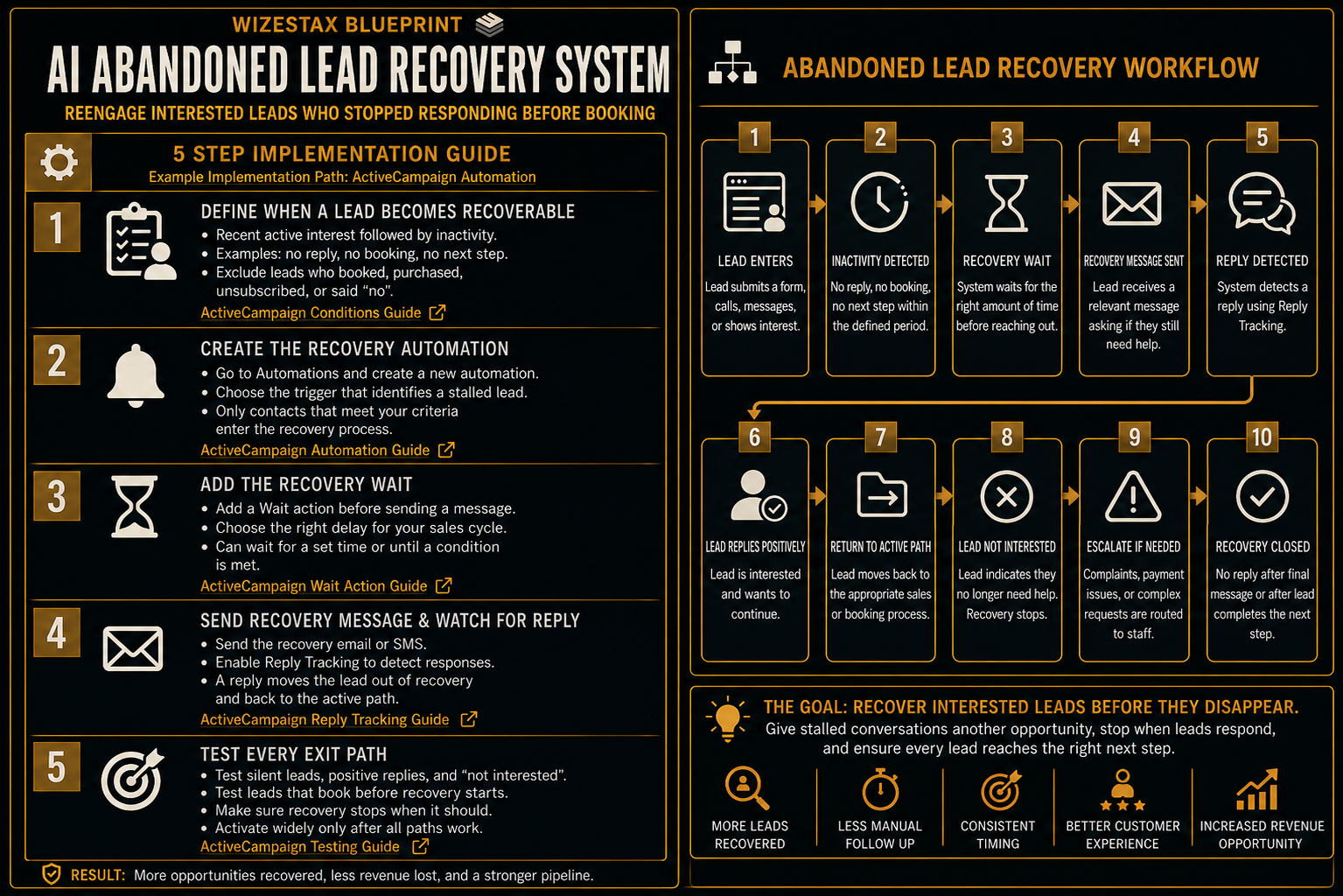
Step By Step Implementation Guide
The following setup demonstrates one implementation path using ActiveCampaign.
It is not a WIZESTAX recommendation or preferred Stax.
ActiveCampaign is used for this implementation example because its automation system supports timed waits, conditional waits and automation based on customer replies.
Step 1: Define When A Lead Becomes Recoverable
Establish the exact condition that means an active lead has stopped progressing.
Do not simply use the age of the contact record.
A recoverable lead should have recent evidence of active interest followed by an unexpected period of inactivity.
The business should also define conditions that prevent recovery.
These could include a completed booking, closed sale, explicit rejection, unsubscribe or another final status.
The goal is to distinguish an unfinished conversation from a lead that should no longer receive recovery communication.
Step 2: Create The Recovery Automation
Open Automations in ActiveCampaign and create the recovery automation.
Choose the appropriate trigger based on how the business identifies stalled leads.
The trigger should only allow contacts into recovery after they meet the business’s defined abandoned lead criteria.
Avoid sending every inactive contact through the same process.
Step 3: Add The Recovery Wait
Add a Wait action before the recovery message.
Choose a waiting period appropriate for the normal sales cycle.
ActiveCampaign allows contacts to wait for a defined period or until specified conditions are met.
The recovery delay should give the customer reasonable time to respond naturally before another message is sent.
ActiveCampaign Wait Action Guide
Step 4: Send The Recovery Message And Watch For Response
Send the recovery communication after the waiting period.
Then create the response logic that determines whether the contact should continue through recovery.
ActiveCampaign supports reply triggered automation for supported email communication when reply tracking is configured.
A response should move the customer out of recovery and into the appropriate active process.
The system should not continue sending abandoned lead messages after the conversation has resumed.
ActiveCampaign Reply Tracking Guide
Step 5: Test Every Exit Path
Create test contacts representing the important outcomes.
Test a lead that remains silent.
Test a lead that responds positively.
Test a lead that says they are no longer interested.
Test a lead that completes the intended next step before recovery begins.
Confirm that recovery communication stops whenever the lead no longer meets the recovery conditions.
Only activate the process broadly after every important path behaves correctly.
Operational Value Snapshot
The direct operational value comes from consistently revisiting stalled conversations without requiring employees to manually remember every lead.
| Monthly Stalled Leads | Manual Recovery Time Per Lead | Staff Time Represented |
|---|---|---|
| 25 | 5 Minutes | 2.1 Hours |
| 50 | 5 Minutes | 4.2 Hours |
| 100 | 5 Minutes | 8.3 Hours |
| 200 | 5 Minutes | 16.7 Hours |
Illustrative scenario using five minutes of manual recovery work per stalled lead. Actual time savings depend on the existing sales process.
Recovered revenue should be measured from the business’s actual results rather than assumed in advance.
WIZESTAX Diagnostic Scorecard
| Category | Assessment |
|---|---|
| Economic Problem | Previously acquired leads disappear after active conversations stall |
| Data Quality Required | High |
| Automation Potential | High |
| Human Judgment Required | Low for routine recovery and higher after complex responses |
| Implementation Complexity | Moderate |
| Scalability | High |
| Primary Value | Consistent recovery of unfinished active sales conversations |
| Primary Risk | Contacting leads who should no longer be in recovery |
Common Mistakes
| Mistake | Result |
|---|---|
| Recovering leads too quickly | Normal response delays are mistaken for abandonment |
| Sending too many recovery messages | Customers may become frustrated |
| Ignoring previous conversation context | Recovery communication feels disconnected |
| Continuing after a lead responds | Customer experience deteriorates |
| Using inaccurate lead status | Wrong customers enter recovery |
| Treating every old lead as abandoned | Recovery becomes long term nurturing |
| Leaving no exit condition | Leads remain inside recovery indefinitely |
Related WIZESTAX Categories
| Category | Related Business Problem |
|---|---|
| Lead Management | Lead Response Delay |
| Lead Management | Lead Routing Failure |
| Sales | Lead Qualification |
| Sales | Sales Pipeline Stagnation |
| Marketing | Long Term Lead Nurturing |
| Customer Retention | Customer Reactivation |
These remain separate problems. The AI Abandoned Lead Recovery System addresses active leads who showed recent interest and then unexpectedly stopped responding before completing the next step. Lead Response Delay addresses how quickly the business initially responds to a new inquiry. Lead Routing determines where a new lead belongs. Lead Qualification determines whether a lead meets defined business criteria. Long Term Lead Nurturing maintains communication with prospects across a longer buying cycle. Customer Reactivation addresses previous customers who stopped purchasing. This Blueprint owns the short term recovery of an active sales conversation that unexpectedly went silent.
Get New WIZESTAX Blueprints Every Monday
Subscribe to receive new WIZESTAX Blueprints covering Customer Retention, Marketing, Sales, Finance and Operations directly to your inbox.


