
Unanswered Customer Message Recovery System
Recover Customer Messages Before Silence Becomes Lost Trust Or Lost Revenue
Customer messages can disappear inside an otherwise functional business. An email arrives while the team is busy. A customer replies to an older conversation. Someone assumes another employee will answer. A message is assigned but sits untouched. By the time anyone notices, the customer may have waited hours or days without knowing whether the business received the request.
The Unanswered Customer Message Recovery System monitors inbound customer conversations for a missing business response. When a message remains unanswered beyond an appropriate response window, the system makes that conversation visible again through assignment, tagging, reminders, or escalation.
This Blueprint is not a general customer service backlog system. It addresses one specific operational failure: a customer has sent a message that requires a response, but the business has not responded within its expected window.
Front supports this model directly through delayed rules and reply time goals. Its rules can identify messages that remain unreplied after a specified period and then trigger actions such as tagging or notifying teammates. (Front Help Center)
Which Stax Fits Your Business
| Business Need | Stax | Software | Cost |
|---|---|---|---|
| Simple shared inbox with automatic routing and workflow based recovery | Starter Stax | Help Scout | Varies by plan and usage |
| Dedicated response monitoring with timed warnings and escalation | Growth Stax | Front | Starts at $25 per seat per month annually |
| Formal support operation requiring response SLA reminders and escalations | Pro Stax | Freshdesk | Varies by plan and users |
Pricing and capabilities change over time and should be confirmed directly with each software provider before purchase. Front currently lists Starter at $25 per seat per month when billed annually, with higher tiers adding more automation and omnichannel capabilities. (Front)
Software Linx
Starter
Growth
Pro
Blueprint Overview
| Metric | Value |
|---|---|
| Category | Customer Communication |
| Business Problem | Customer messages requiring a response remain unanswered |
| Primary Objective | Detect missing responses and return conversations to staff attention |
| Core Signals | Inbound message, reply status, waiting time, assignment and conversation status |
| Setup Time | Approximately 45 to 90 minutes |
| Difficulty | Intermediate |
| Maintenance | Periodic review |
| Best For | Businesses receiving customer email, support, sales or service messages |
| Primary Output | Recovery alert, assignment or escalation |
The Hidden Revenue Leak
| Without This Blueprint | With This Blueprint |
|---|---|
| Customer messages can disappear inside busy inboxes | Unanswered conversations are surfaced again |
| Staff rely on memory to notice missed replies | Waiting time becomes a measurable signal |
| Ownership can remain unclear | Conversations can be assigned to a responsible person |
| Older messages lose visibility as new messages arrive | Aging messages remain identifiable |
| Managers discover missed conversations through complaints | Escalation can happen before the customer gives up |
| Response failures are difficult to measure | Reply time and recovery activity can be reviewed |
The system should distinguish between a conversation that genuinely needs a response and one that does not. A thank you message, automated notification, spam message, or conversation intentionally closed without a reply should not automatically become a recovery case.
Business Impact Snapshot
| Area | Potential Impact |
|---|---|
| Customer Experience | Fewer customers are unintentionally left waiting |
| Sales | Buying questions and customer inquiries are less likely to disappear |
| Operations | Missed responses become detectable rather than dependent on memory |
| Accountability | Conversations can have clearer ownership |
| Management | Repeated response failures become easier to investigate |
| Service Quality | Response expectations can be enforced more consistently |
Real World Example
A residential remodeling company receives customer questions through a shared email address.
A homeowner replies to an existing conversation asking whether changing a material will affect the project schedule. The employee originally handling the conversation is away from work.
The message remains assigned but unanswered.
After the company’s defined response window passes, the system identifies that an inbound customer message has not received an outbound reply. The conversation is marked for attention and another available employee is notified.
The employee reviews the existing conversation, sees the customer’s question and responds with the appropriate information.
The recovery system did not answer the customer automatically. Its job was to recognize that the normal communication process had failed and return the conversation to human attention before the silence continued.
WIZESTAX Stax Options
Starter Stax
Help Scout
Best For
Small teams that want customer conversations centralized in a shared inbox with automatic assignment and workflow based escalation.
| Function | Software |
|---|---|
| Shared Inbox | Help Scout |
| Assignment | Routing |
| Recovery Logic | Automatic Workflows |
| Waiting Visibility | Waiting |
| Escalation | Workflow Actions |
Help Scout’s Routing can automatically distribute unassigned conversations to available teammates, including existing conversations already waiting in the unassigned queue. Its automatic workflows can also identify aging conversations and perform actions when response expectations are missed. (Help Scout Docs)
Advantages
| Benefit |
|---|
| Shared customer conversations |
| Automatic assignment is available |
| Workflows can act on aging conversations |
| Waiting conversations remain visible |
| Suitable for relatively straightforward support operations |
Limitations
| Limitation |
|---|
| More sophisticated recovery rules require thoughtful configuration |
| Routing capabilities depend on plan |
| Workflow rules can create noise if response expectations are poorly defined |
| Staff still need a process for conversations requiring human judgment |
Growth Stax
Front
Best For
Businesses that specifically want timed response monitoring across shared customer conversations and a clear escalation path when someone has not replied.
| Function | Software |
|---|---|
| Shared Inbox | Front |
| Ownership | Conversation Assignment |
| Response Monitoring | Reply Time Goals |
| Recovery Logic | Delayed Rules |
| Prioritization | Tags |
| Escalation | Rules And Notifications |
Front is particularly well matched to this Blueprint because its delayed rules include a Message unreplied after condition. Reply time goals can also surface conversations approaching or exceeding the company’s response target. (Front Help Center)
Advantages
| Benefit |
|---|
| Purpose built unreplied message detection |
| Configurable response time goals |
| Automatic assignment through rules |
| Tags can make recovery cases visible |
| Managers can be notified when response thresholds are exceeded |
| Reply time and goal breaches can be analyzed |
Front’s analytics can measure response time and reply time goal breaches, giving the business a way to determine whether unanswered messages represent isolated mistakes or a recurring operational problem. (Front Help Center)
Limitations
| Limitation |
|---|
| Per seat pricing may be unnecessary for very small businesses |
| More advanced automation depends on plan |
| Poorly chosen response windows can generate unnecessary alerts |
| Shared inbox discipline is still necessary |
Pro Stax
Freshdesk
Best For
Businesses with formal support responsibilities that need defined response expectations, agent reminders and management escalation.
| Function | Software |
|---|---|
| Customer Conversations | Freshdesk |
| Ownership | Ticket Assignment |
| Response Standards | SLA Policies |
| Early Warning | SLA Reminders |
| Escalation | SLA Violations |
| Management Visibility | Dashboards And Reports |
Freshdesk supports response SLA targets and can issue reminders as deadlines approach. It can also escalate first response, next response, and resolution violations to agents, managers, or other designated recipients. (Freshdesk)
Advantages
| Benefit |
|---|
| Formal response SLA management |
| Different response targets can reflect ticket priority |
| Agent reminders can occur before a response deadline |
| Management escalation can occur after violations |
| Response SLA information can appear in dashboards and reports |
Limitations
| Limitation |
|---|
| More support infrastructure than some small businesses need |
| Advanced SLA features depend on plan |
| Requires clear ticket ownership and status discipline |
| Poor SLA design can produce unnecessary escalation |
How The Three Stax Differ
| Stax | Primary Approach |
|---|---|
| Help Scout | Shared inbox routing and workflow based recovery |
| Front | Direct unreplied message detection and timed response recovery |
| Freshdesk | Formal SLA monitoring, reminders and escalation |
These are different implementation architectures rather than rankings.
Help Scout emphasizes straightforward shared inbox management. Front provides especially direct monitoring of conversations that remain unreplied. Freshdesk approaches the problem through structured support SLAs and escalation.
Copy And Paste Recovery Alert
Customer message requires attention. {{customer_name}} sent a message at {{message_time}} and no business response has been recorded within the expected response window. Review the conversation and determine whether a reply is required.
Copy And Paste Manager Escalation
Response threshold exceeded for {{customer_name}}. This conversation remains unanswered after {{elapsed_time}}. Current owner: {{assigned_user}}. Please review ownership and make sure the customer receives the appropriate response.
Copy And Paste AI Prompt
You are assisting a small business with unanswered customer message recovery.
Review the supplied conversation information and determine whether the latest inbound customer message appears to require a business response.
Consider the customer’s request, the most recent business response, conversation status, assignment, elapsed waiting time and any available context.
Do not assume every inbound message requires a response.
Distinguish customer questions, requests, complaints and unresolved issues from acknowledgements, automated messages, spam and conversations that have clearly concluded.
Do not invent missing conversation information.
Do not automatically respond to sensitive, disputed or unclear customer issues.
If the conversation appears to require human attention, explain why it was flagged.
If there is insufficient information, state that human review is required.
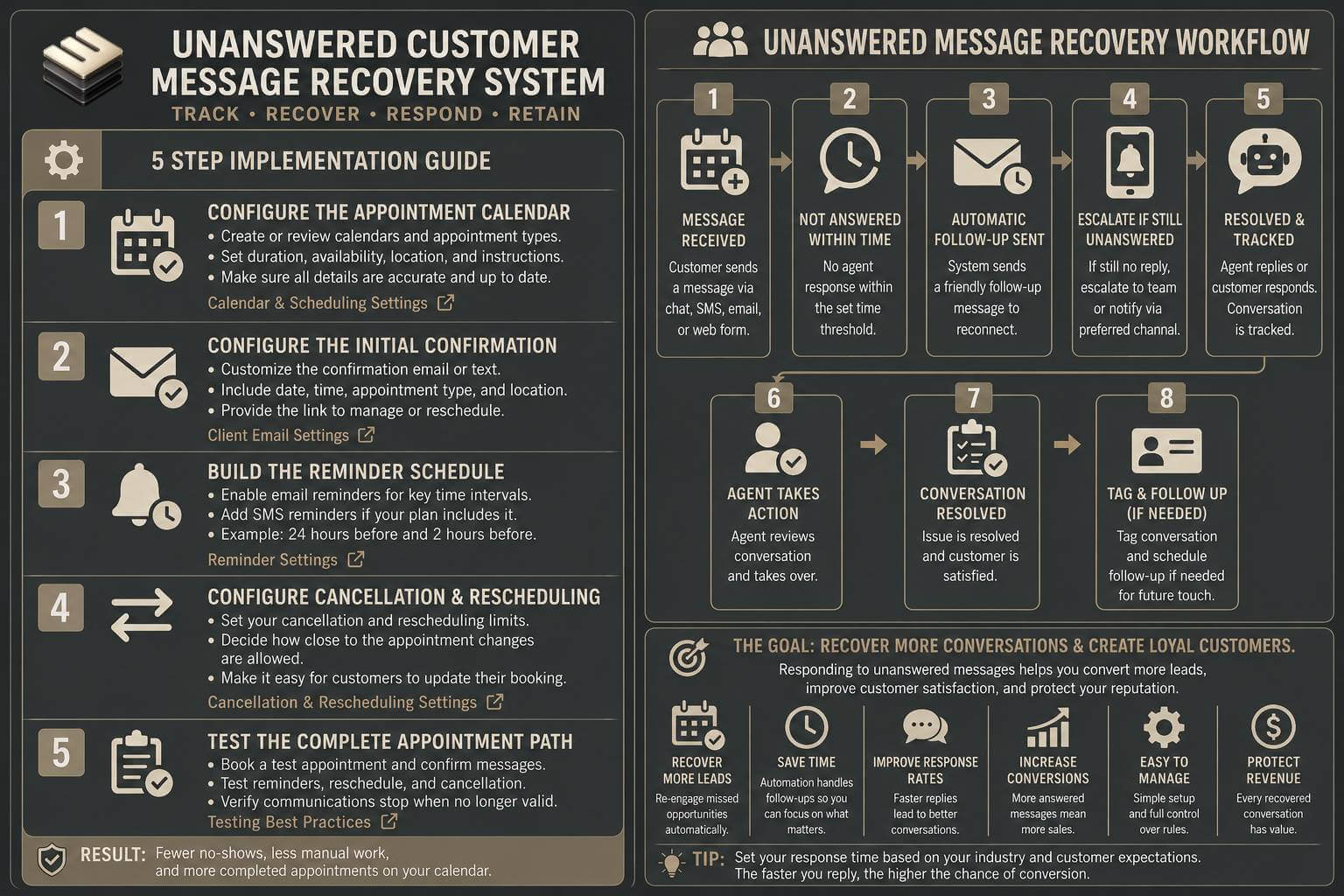
Step By Step Implementation Guide
The following setup demonstrates one implementation path using Front.
It is not a WIZESTAX recommendation or preferred Stax.
Front is used here because its delayed rules provide a direct implementation example for identifying customer messages that remain unreplied after a defined period. (Front Help Center)
Step 1: Define Which Conversations Require Monitoring
Determine which inboxes contain customer conversations where a business response is normally expected.
Exclude channels dominated by automated notifications, newsletters, spam, receipts or other messages that normally require no response.
The goal is not to force employees to answer every inbound message. It is to detect situations where a customer is genuinely waiting.
Step 2: Establish The Response Window
Define how long a customer can reasonably wait before the conversation deserves additional attention.
Different inboxes may require different expectations. A customer support inbox may need a shorter window than a general administrative inbox.
Front’s reply time goals are designed to track how long customers wait for an outbound response and surface conversations as they approach the defined limit. (Front Help Center)
Step 3: Create The Unanswered Message Rule
Open Front settings.
Open Rules and macros or Rules, depending on the workspace configuration.
Create a rule for the appropriate shared inbox.
Use the delayed condition that checks whether a message remains unreplied after the selected period.
Add any necessary conditions so the rule applies only to conversations the business actually intends to monitor.
Front documents Message unreplied after specifically for checking whether a reply occurred following a defined delay. (Front Help Center)
Step 4: Build The Recovery Action
Decide what should happen when the threshold is reached.
The conversation might receive an At Risk tag, notify the assigned employee, move into a recovery view, or alert another team member.
A second threshold can escalate conversations that remain unanswered longer. Front’s own rule library gives an example in which an unreplied conversation receives an At Risk tag after two hours and an Overdue tag plus manager notification after four hours. Those times are examples rather than universal response standards. (Front Help Center)
Step 5: Test The Failure Paths
Send test messages into the monitored inbox.
Test an ordinary customer question.
Test a conversation that receives a response before the threshold.
Test an unanswered conversation.
Test an unavailable assignee.
Test a message that does not require a response.
Confirm that valid conversations are recovered while irrelevant messages remain excluded.
Then periodically review response time and goal breaches to determine whether the recovery rules need adjustment. (Front Help Center)
Front Analytics Conversation Guide
Customer Silence At Risk Snapshot
The primary economic problem is not simply slow communication.
It is customer intent, revenue and trust exposed while a legitimate request sits unanswered.
| Unanswered Messages Monthly | Average Customer Value Represented | Customer Value Connected To Those Conversations |
|---|---|---|
| 5 | $500 | $2,500 |
| 10 | $500 | $5,000 |
| 25 | $500 | $12,500 |
Illustrative scenario using an average customer value of $500. Customer value represented is not revenue lost or revenue recovered. An unanswered message does not mean the customer will leave or stop purchasing.
WIZESTAX Diagnostic Scorecard
| Category | Assessment |
|---|---|
| Economic Problem | Customer intent and relationships can deteriorate while legitimate messages remain unanswered |
| Signal Quality Required | Moderate |
| Automation Potential | High |
| Human Judgment Required | Moderate |
| Data Dependency | Moderate |
| Scalability | High |
| Primary Value | Recover communication failures before prolonged customer silence |
| Primary Risk | Treating messages that require no response as recovery cases |
Common Mistakes
| Mistake | Result |
|---|---|
| Treating every inbound message as requiring a reply | Staff receive unnecessary alerts |
| Using one response threshold for every inbox | Low urgency conversations create noise while urgent ones may wait too long |
| Alerting without assigning responsibility | The message becomes visible but can still remain unanswered |
| Automatically answering complicated customer issues | Customers may receive inappropriate or incomplete information |
| Ignoring employee availability | Messages remain assigned to people who cannot respond |
| Closing conversations before the issue is actually complete | Customers can disappear from the recovery process |
| Never reviewing response failures | Repeated operational problems remain hidden |
Related WIZESTAX Categories
| Category | Related Business Problem |
|---|---|
| Customer Communication | Customer Response Delay Alert System |
| Customer Service | Customer Service Backlog Alert System |
| Customer Service | Support Response Time Monitoring System |
| Customer Service | Customer Request Ownership System |
| Operations | Customer Expectation Handoff System |
| Sales | Sales Follow Up Timing System |
These remain separate problems. Unanswered Customer Message Recovery detects an individual inbound message that should have received a response but did not. Customer Response Delay Alert focuses on deteriorating response speed. Customer Service Backlog Alert identifies accumulated service workload. Support Response Time Monitoring measures service performance across conversations. Customer Request Ownership establishes responsibility for handling requests.
Get New WIZESTAX Blueprints Every Monday
Subscribe to receive new WIZESTAX Blueprints covering Customer Retention, Marketing, Sales, Finance and Operations directly to your inbox.


