Abandoned Shopping Cart Recovery System
Recover High Intent Ecommerce Shoppers Before Abandoned Carts Become Lost Sales
A shopper can browse a store, choose a product and add it to their cart without completing the purchase. That unfinished cart represents stronger purchase intent than an ordinary website visit, but it does not automatically mean the customer changed their mind. The shopper may have been interrupted, wanted more time, encountered unexpected costs or simply planned to return later.
The Abandoned Shopping Cart Recovery System identifies known shoppers who leave products behind and creates a controlled follow up process designed to bring them back to the purchase they already started.
The purpose is not to pressure every shopper into buying. It is to preserve an opportunity that might otherwise disappear once the customer leaves the store.
Which Stax Fits Your Business
| Business Need | Stax | Software | Cost |
|---|---|---|---|
| Native recovery inside an existing Shopify store | Starter Stax | Shopify | Varies by Shopify plan |
| Ecommerce focused email and SMS recovery | Growth Stax | Omnisend | Free and paid plans available |
| Advanced behavioral segmentation and recovery flows | Pro Stax | Klaviyo | Free and paid plans available |
Pricing, eligibility and capabilities change over time and should be confirmed directly with each provider before implementation.
Software Linx
Starter: Shopify
Growth: Omnisend
Pro: Klaviyo
Blueprint Overview
| Metric | Value |
|---|---|
| Category | Marketing |
| Business Problem | Shoppers add products to their carts but leave before completing the purchase |
| Primary Objective | Reconnect identifiable abandoned carts with shoppers and provide a path back to purchase |
| Core Signals | Added to cart, checkout started, order placed, customer identity and recovery activity |
| Setup Time | Approximately 45 to 90 minutes |
| Difficulty | Intermediate |
| Maintenance | Monthly review with periodic testing |
| Best For | Ecommerce businesses with measurable cart abandonment |
| Primary Output | Automated cart recovery workflow |
The Hidden Revenue Leak
| Without This Blueprint | With This Blueprint |
|---|---|
| High intent shoppers can disappear after leaving the store | Eligible abandoned carts can enter a recovery process |
| Products selected by shoppers receive no follow up | Messages can reference the unfinished purchase |
| Staff cannot manually follow every abandoned cart | Recovery can operate automatically |
| Completed purchases and abandoned carts can be difficult to separate | Purchase events can remove customers from the workflow |
| Recovery timing varies or never occurs | Follow up follows defined timing rules |
| Cart recovery performance remains unclear | Recovered orders can be reviewed over time |
Abandoned cart and abandoned checkout are related but technically different events. Omnisend defines an abandoned cart as a known shopper adding products and leaving before starting checkout, while abandoned checkout occurs after the shopper begins checkout without placing the order. Omnisend Help Center
Business Impact Snapshot
| Area | Potential Impact |
|---|---|
| Ecommerce Revenue | Existing purchase intent receives another opportunity to convert |
| Marketing | Recovery focuses on shoppers who have already shown product interest |
| Customer Experience | Shoppers receive a direct route back to an unfinished purchase |
| Operations | Recovery does not depend on manual follow up |
| Measurement | Abandoned and recovered purchases can be monitored |
| Retention | Existing contacts can remain connected to the buying process |
Real World Example
An online retailer receives 500 shopping carts during a month.
Three hundred become completed orders. The remaining 200 are abandoned before purchase.
Those 200 carts are not automatically equivalent to 200 lost customers. Some shoppers were comparing products, some were not ready to purchase and some cannot be identified for follow up.
The recovery system isolates the eligible abandoned carts.
An identified shopper who leaves a product behind enters the workflow. After a defined delay, the shopper receives a reminder containing the relevant product and a route back to the store.
If the shopper purchases before the next message, the order event removes that person from the remaining recovery sequence.
The system does not assume every abandoned cart is recoverable. It creates a repeatable process for the portion where the business has enough information and permission to reconnect.
WIZESTAX Stax Options
Starter Stax
Shopify
Best For
Shopify merchants that want abandoned checkout recovery within their existing ecommerce environment without immediately adding a separate marketing platform.
| Function | Software |
|---|---|
| Ecommerce Platform | Shopify |
| Abandonment Trigger | Customer Abandons Checkout |
| Workflow | Shopify Flow |
| Recovery Communication | Shopify Messaging |
| Purchase Completion | Shopify Checkout |
| Monitoring | Abandoned Checkout Records |
Shopify currently provides an abandoned checkout reengagement automation for eligible Online Store and Buy Button checkouts. The workflow can be edited using Shopify Flow and activated to send recovery messages. Shopify Help Center
Advantages
| Benefit |
|---|
| Recovery remains inside the ecommerce platform |
| Checkout activity and completed orders share the same environment |
| Existing Shopify merchants require fewer additional systems |
| Workflow timing can be configured |
| Abandoned checkout records can support investigation |
Limitations
| Limitation |
|---|
| Native recovery focuses on qualifying abandoned checkouts rather than every anonymous cart |
| Channel and customer eligibility rules affect who can receive messages |
| Some checkout circumstances do not produce recovery emails |
| Native workflows provide less segmentation depth than specialized platforms |
| Recovery cannot reach shoppers the platform cannot identify or contact |
Shopify documents several situations where an abandoned checkout email will not be delivered, including certain customer eligibility, inventory and payment circumstances. Shopify Help Center
Growth Stax
Omnisend
Best For
Ecommerce businesses that want dedicated cart and checkout recovery workflows using email and, where supported, SMS.
| Function | Software |
|---|---|
| Ecommerce Automation | Omnisend |
| Cart Trigger | Added Product To Cart |
| Checkout Trigger | Started Checkout |
| Purchase Exit | Placed Order |
| Communication | Email And SMS |
| Workflow Logic | Filters, Delays And Exit Conditions |
Omnisend provides separate abandoned cart and abandoned checkout automations. Its abandoned cart workflow targets identified contacts who add products but do not start checkout, while the abandoned checkout workflow targets customers who begin checkout without completing the order. Omnisend Help Center
Advantages
| Benefit |
|---|
| Cart and checkout abandonment can be handled separately |
| Prebuilt workflows reduce initial setup |
| Email and SMS can participate in recovery where customer data permits |
| Purchase events can remove shoppers from recovery |
| Filters can narrow who enters the workflow |
Limitations
| Limitation |
|---|
| The shopper must be identifiable for abandoned cart recovery |
| Available customer data varies by ecommerce platform |
| SMS availability depends on the contact information available |
| Overlapping store and Omnisend recovery can create duplicate messages |
| Multiple abandonment workflows require careful exit conditions |
Omnisend specifically warns against running overlapping native store and Omnisend cart recovery workflows without coordinating them because customers can receive redundant messages. Omnisend Help Center
Pro Stax
Klaviyo
Best For
Ecommerce businesses that want more control over segmentation, message sequences and behavioral logic around cart recovery.
| Function | Software |
|---|---|
| Ecommerce Automation | Klaviyo |
| Behavioral Trigger | Added To Cart Or Started Checkout |
| Purchase Exclusion | Placed Order Filter |
| Segmentation | Profile And Flow Filters |
| Communication | Email And SMS |
| Optimization | Flow Analytics And Testing |
Klaviyo supports abandoned cart flows based on ecommerce activity and allows businesses to customize message timing, dynamic cart content, filters and multi message sequences. Its documentation distinguishes flows triggered by Added to Cart from those triggered by Started Checkout. Klaviyo Help Center
Advantages
| Benefit |
|---|
| Detailed flow logic can reflect customer behavior |
| Recovery messages can contain dynamic cart information |
| Multiple messages can be coordinated within one flow |
| Filters can prevent purchasers from continuing through recovery |
| Segmentation can support different recovery approaches |
Limitations
| Limitation |
|---|
| Requires reliable ecommerce integration and event synchronization |
| Greater flexibility creates more setup complexity |
| Very short delays can conflict with integration sync timing |
| Duplicate native store recovery should be disabled when appropriate |
| More automation does not guarantee more recovered purchases |
Klaviyo notes that ecommerce event synchronization can affect timing and recommends accounting for integration delays when configuring recovery messages. Klaviyo Help Center
How The Three Stax Differ
| Stax | Primary Approach |
|---|---|
| Shopify | Native abandoned checkout recovery within the commerce platform |
| Omnisend | Ecommerce focused cart and checkout recovery automation |
| Klaviyo | Advanced behavioral recovery flows and segmentation |
These are different implementation architectures rather than rankings.
The appropriate architecture depends on the ecommerce platform, whether the business needs cart level or checkout level recovery, how much customer information is available and how sophisticated the recovery workflow needs to become.
Copy And Paste Cart Recovery Message
You left something in your cart.
The items you selected are still available if you would like to continue your purchase.
{{cart_recovery_link}}
If you have already completed your order, no further action is needed.
Copy And Paste Recovery Review
Review abandoned shopping cart activity for {{period}}. Compare identified abandoned carts, recovery messages sent, completed purchases and recovered orders. Confirm that purchase events remove customers from active recovery sequences and investigate material changes in recovery performance before adjusting timing or messaging.
Copy And Paste AI Prompt
You are assisting an ecommerce business with abandoned shopping cart recovery.
Review the available cart, checkout, customer and order information.
Identify shoppers who demonstrated purchase intent by adding products to a cart or beginning checkout but did not complete an order.
Separate abandoned carts from abandoned checkouts where the available data supports that distinction.
Exclude customers who subsequently completed the purchase.
Review recovery timing, message delivery and recovered orders.
Do not assume every abandoned cart represents a lost sale.
Do not assume every shopper can legally or technically receive a recovery message.
Do not recommend discounts automatically.
Do not invent missing customer activity or attribution.
If the available information cannot determine whether a purchase was recovered by the workflow, state what additional information is required.
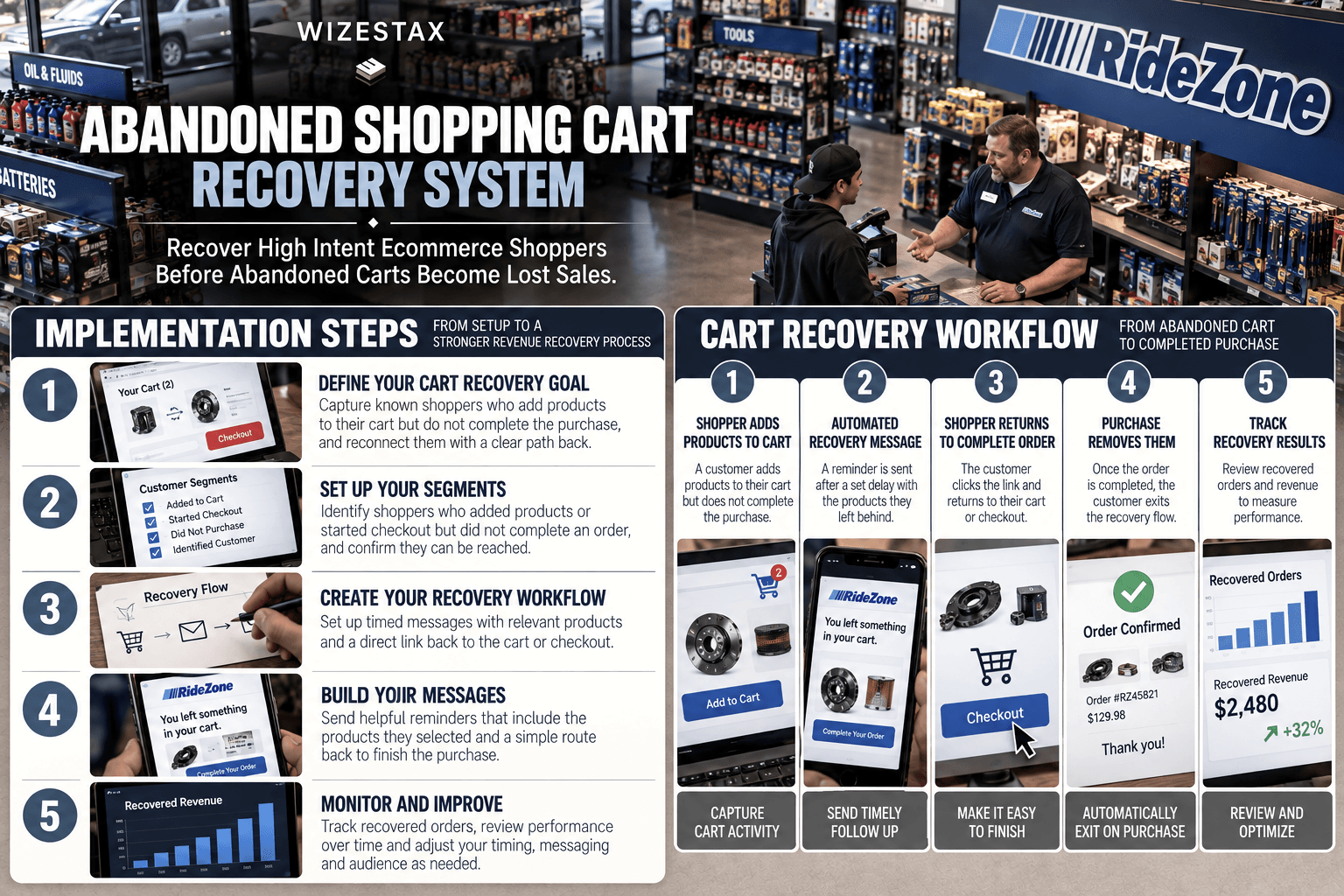
Step By Step Implementation Guide
The following setup demonstrates one implementation path using Omnisend.
It is not a WIZESTAX recommendation or preferred Stax.
Omnisend is used here because its current architecture separates abandoned cart and abandoned checkout activity while providing triggers, exit conditions and prebuilt recovery workflows. Omnisend Help Center
Step 1: Define The Abandonment Point
Decide what behavior the business intends to recover.
An abandoned cart occurs earlier in the buying process than an abandoned checkout.
Keeping those events separate prevents one broad definition from hiding where customers actually leave.
Step 2: Confirm Ecommerce Integration
Connect the ecommerce store and verify that customer, cart, checkout and purchase activity is reaching the automation platform correctly.
Do not activate recovery based only on the existence of an integration.
Test the events.
Step 3: Establish Customer Identification
Determine when the platform can identify a shopper.
Omnisend requires an identified contact before it can send abandoned cart recovery. Identification can occur through recognized email activity, signup forms and other supported methods. Anonymous visitors cannot simply be converted into reachable recovery contacts. Omnisend Help Center
Step 4: Create The Abandoned Cart Workflow
Open the automation library and select the abandoned cart workflow.
The basic logic is:
Product Added To Cart → Purchase Not Completed → Wait → Recovery Message
The exact trigger behavior depends on the connected ecommerce platform.
Step 5: Add The Purchase Exit
Configure the workflow so a completed purchase removes the shopper from recovery.
A customer who already purchased should not continue receiving messages suggesting the order is unfinished.
Omnisend uses purchase and checkout events as exit conditions within its abandonment workflows. Omnisend Help Center
Step 6: Set A Reasonable Delay
Choose a delay that gives the shopper time to return naturally before recovery begins.
Avoid treating one universal delay as correct for every business.
A low cost impulse purchase and a high consideration product can have very different buying patterns.
Step 7: Build The Recovery Message
Keep the message connected to the unfinished purchase.
Include the relevant products when supported and provide a clear route back to the cart or checkout.
Avoid automatically offering a discount in the first message unless the economics and business strategy justify it.
Step 8: Prevent Overlapping Recovery
Check whether the ecommerce platform already sends abandoned cart or checkout messages.
If another system is handling the same abandonment event, coordinate or disable the duplicate workflow before activation.
Omnisend warns that overlapping abandonment automations can cause the same contact to enter several workflows and receive excessive messaging. Omnisend Help Center
Step 9: Test The Entire Sequence
Use a controlled test customer.
Add a product to the cart.
Leave without purchasing.
Confirm the correct workflow begins.
Verify the recovery message.
Return and complete the purchase.
Confirm the customer exits the remaining sequence.
Step 10: Review Recovery Performance
Monitor the workflow over time.
Useful measures can include:
Identified Abandoned Carts
Recovery Messages Sent
Recovered Orders
Recovered Revenue
Recovery Rate
Interpret recovered revenue carefully. A customer may return and purchase for reasons beyond the recovery message itself.
Shopping Cart Revenue At Risk Snapshot
| Monthly Identified Abandoned Carts | Average Cart Value | Cart Value Entering Recovery |
|---|---|---|
| 50 | $75 | $3,750 |
| 150 | $75 | $11,250 |
| 300 | $75 | $22,500 |
Illustrative scenario only. Cart value entering recovery is not confirmed lost revenue and does not represent expected recovered revenue. Some shoppers would never have purchased, while others may return without receiving or responding to a recovery message.
WIZESTAX Diagnostic Scorecard
| Category | Assessment |
|---|---|
| Economic Problem | Existing purchase intent disappears before an ecommerce transaction is completed |
| Signal Quality Required | High |
| Automation Potential | High |
| Human Judgment Required | Moderate |
| Data Dependency | High |
| Scalability | High |
| Primary Value | Systematic follow up with identifiable shoppers who leave products behind |
| Primary Risk | Treating every abandoned cart as recoverable revenue |
Common Mistakes
| Mistake | Result |
|---|---|
| Treating cart and checkout abandonment as identical | The actual abandonment stage becomes unclear |
| Sending recovery after purchase | Customers receive irrelevant messages |
| Running overlapping recovery systems | Shoppers can receive duplicate communication |
| Assuming every cart belongs to an identifiable customer | Recovery opportunity is overstated |
| Offering discounts immediately | Margin can be sacrificed unnecessarily |
| Using aggressive message frequency | Recovery becomes customer friction |
| Ignoring event synchronization | Customers can enter or exit workflows incorrectly |
| Treating recovered revenue as perfect attribution | Automation impact can be overstated |
Get New WIZESTAX Blueprints Every Monday
Subscribe to receive new WIZESTAX Blueprints covering Customer Retention, Marketing, Sales, Finance and Operations directly to your inbox.