
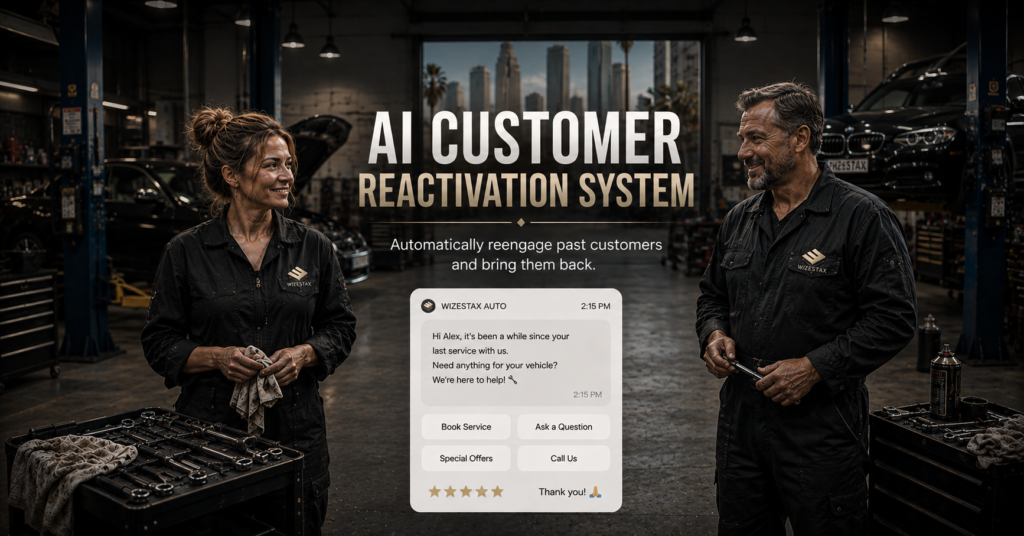
AI Customer Reactivation System
Bring Inactive Customers Back Into The Buying Cycle
Businesses often spend heavily acquiring new customers while existing customer relationships quietly become inactive.
A customer may have purchased six months ago, completed a seasonal service last year, or simply gone longer than expected without returning. Nothing necessarily went wrong. The business and customer simply stopped interacting. Without a structured process, these customers can remain inside a database indefinitely while the business continues paying to acquire entirely new prospects. The original Blueprint identified this same core opportunity: past customers who already know the business may eventually need its services again, but receive no systematic outreach. The AI Customer Reactivation System identifies customers who have become inactive according to defined business rules, places appropriate customers into a reactivation process, sends relevant outreach, handles routine responses, and creates a clear path back to the business. This Blueprint does not assume that every inactive customer can or should be recovered. Its purpose is to prevent established customer relationships from disappearing simply because the business has no process for reconnecting with them.
Which Stax Fits Your Business
| Business Need | Stax | Software | Cost |
|---|---|---|---|
| Flexible reactivation around an existing customer list | Starter Stax | Brevo + Make | Varies By Plan And Usage |
| CRM centered reactivation for service businesses | Growth Stax | GoHighLevel | Varies By Plan And Usage |
| Larger customer database with advanced segmentation and marketing automation | Pro Stax | HubSpot | Varies By Plan And Features |
Pricing and capabilities change over time and should be confirmed directly with each software provider before purchase.
Software Linx
Starter
Growth
Pro
Blueprint Overview
| Metric | Value |
|---|---|
| Category | Customer Retention |
| Business Problem | Previous customers become inactive without structured reengagement |
| Primary Objective | Reconnect with appropriate inactive customers before the relationship disappears |
| Core Signal | Customer has exceeded the expected return period |
| Setup Time | Approximately 60 To 120 Minutes |
| Difficulty | Beginner To Intermediate |
| Maintenance | Periodic segmentation and campaign review |
| Best For | Businesses with repeat, recurring, seasonal, or replacement demand |
| Primary Output | Inactive customer returns to conversation or booking process |
The Hidden Revenue Leak
| Without This Blueprint | With This Blueprint |
|---|---|
| Previous customers disappear into the database | Inactive customers can be identified |
| Outreach depends on someone remembering | Reactivation follows defined rules |
| Every past customer is treated the same | Customers can be segmented before outreach |
| Marketing focuses heavily on new acquisition | Existing relationships receive appropriate attention |
| Customers may forget the business | Relevant outreach can restore awareness |
| Return behavior is difficult to understand | Reactivation outcomes can be measured |
The economic problem is not simply that businesses forget to send marketing messages.
The larger leak is customer acquisition value being abandoned after the first purchase or service relationship.
The business may already have spent money on advertising, sales, onboarding, administrative work, and service delivery to establish the relationship.
When an appropriate customer becomes inactive without any attempt to reconnect, part of that investment is left unused.
Customer Reactivation therefore focuses on customers whose relationship has already become inactive.
It is not ordinary customer follow up and it is not a churn prediction system.
Business Impact Snapshot
| Area | Potential Impact |
|---|---|
| Customer Database | Existing records become an active business asset |
| Marketing Efficiency | Some demand can come from established relationships |
| Staff Work | Routine reactivation can require less manual outreach |
| Customer Experience | Relevant customers receive a simple path back |
| Segmentation | Different customer groups can receive different timing |
| Management | Return behavior and reactivation outcomes become measurable |
The system creates another opportunity for the customer to engage.
It does not create customer demand that does not exist.
Real World Example
A landscaping company completes a major seasonal cleanup for a homeowner in January.
The customer is satisfied, but no recurring service is scheduled.
Months pass.
The company knows that customers who purchase this type of service commonly need additional landscaping work later in the year.
In July, the customer reaches the company’s defined reactivation point.
The system confirms that the customer has not recently booked another service and remains eligible for communication.
A short message is sent reminding the customer that the company is available if additional landscaping work is needed.
The customer replies that several trees need trimming.
The conversation moves to the normal service request process and a new appointment is scheduled.
The automation did not manufacture demand.
It reconnected an established customer with the business when new demand already existed.
WIZESTAX Stax Options
Starter Stax
Brevo + Make
Best For
Businesses that already maintain usable customer records and want to add reactivation without replacing their primary business software.
| Function | Software |
|---|---|
| Customer Data | Existing Customer Database |
| Segmentation | Brevo |
| Email And SMS | Brevo |
| Automation Connections | Make |
| Reactivation Logic | Brevo + Make |
| Booking Destination | Existing Booking System |
Advantages
| Benefit |
|---|
| Can work around existing customer systems |
| Does not require a full CRM migration |
| Supports segmented campaigns |
| Individual components remain flexible |
| Suitable for relatively simple reactivation programs |
Limitations
| Limitation |
|---|
| Customer information may exist across several systems |
| Integration requires additional configuration |
| Accurate segmentation depends on reliable customer data |
| Complex customer history may be harder to manage |
Growth Stax
GoHighLevel
Best For
Service businesses that want customer records, segmentation, automated communication, conversations, and booking activity inside a more centralized CRM environment.
| Function | Software |
|---|---|
| Customer Records | GoHighLevel |
| Segmentation | GoHighLevel |
| Workflows | GoHighLevel |
| SMS And Email | GoHighLevel |
| Customer Conversations | GoHighLevel |
| Booking | GoHighLevel |
Advantages
| Benefit |
|---|
| Customer records and automation remain connected |
| Multiple communication channels can operate from one environment |
| Customer activity can control workflow eligibility |
| Responses remain connected to the contact |
| Booking can connect directly to the reactivation process |
Limitations
| Limitation |
|---|
| Requires accurate CRM data |
| Workflow configuration takes time |
| Messaging can create usage costs |
| May duplicate software already used by the business |
Pro Stax
HubSpot
Best For
Organizations with larger customer databases that need more extensive segmentation, customer lifecycle management, marketing automation, reporting, and team controls.
| Function | Software |
|---|---|
| CRM | HubSpot |
| Customer Segmentation | HubSpot |
| Marketing Automation | HubSpot |
| Customer History | HubSpot |
| Campaign Management | HubSpot |
| Reporting | HubSpot |
Advantages
| Benefit |
|---|
| Detailed customer history |
| Advanced segmentation capabilities |
| Reactivation can connect to broader lifecycle marketing |
| Suitable for larger customer databases |
| Extensive reporting infrastructure |
Limitations
| Limitation |
|---|
| Advanced capabilities can require higher plans |
| More infrastructure than simple reactivation requires |
| Implementation can become complex |
| Cost can increase with required features and database size |
How The Three Stax Differ
| Stax | Primary Approach |
|---|---|
| Brevo + Make | Reactivation layer around an existing customer database |
| GoHighLevel | Reactivation inside a centralized service business CRM |
| HubSpot | Reactivation within broader customer lifecycle and marketing infrastructure |
These are different implementation architectures rather than rankings.
Brevo and Make fit businesses that want to preserve their existing systems while adding targeted reactivation.
GoHighLevel fits businesses where customer communication, CRM records, automation, and booking should remain closely connected.
HubSpot fits organizations where reactivation is part of a larger customer lifecycle and marketing operation.
The appropriate architecture depends on where customer history currently lives, how customers normally return, database size, segmentation requirements, and the broader marketing infrastructure already in place.
Copy And Paste Reactivation SMS
“Hi {{first_name}}, it has been a while since we helped you with {{service}}. If you need anything again, we would be happy to help. Reply here and we can point you in the right direction.”
Copy And Paste Reactivation Email
Subject: Checking In From {{business_name}}
“Hi {{first_name}},
We helped you with {{service}} previously and wanted to check in.
If you need help with anything again, just reply to this email or use {{booking_link}} to get started.
If you do not need anything right now, no action is needed.
Thank you,
{{business_name}}”
Copy And Paste AI Prompt
You are assisting a service business with customer reactivation.
Your purpose is to reconnect with appropriate previous customers who have become inactive and help interested customers return to the normal buying or booking process.
Use only approved customer and business information supplied to you.
When a customer responds, determine whether they need another service, have a question, want to book, are not currently interested, or require staff assistance.
Keep communication short, helpful and conversational.
Do not pretend that the business remembers personal details that are not contained in the customer record.
Never invent services, prices, discounts, availability, guarantees, customer history or business policies.
Do not pressure customers who are not interested.
Immediately respect requests to stop receiving communication.
Route complaints, unresolved service problems, unusual requests and situations requiring judgment to a staff member.
Stop unnecessary reactivation communication when the customer returns, opts out, becomes otherwise ineligible, or enters another active customer process.
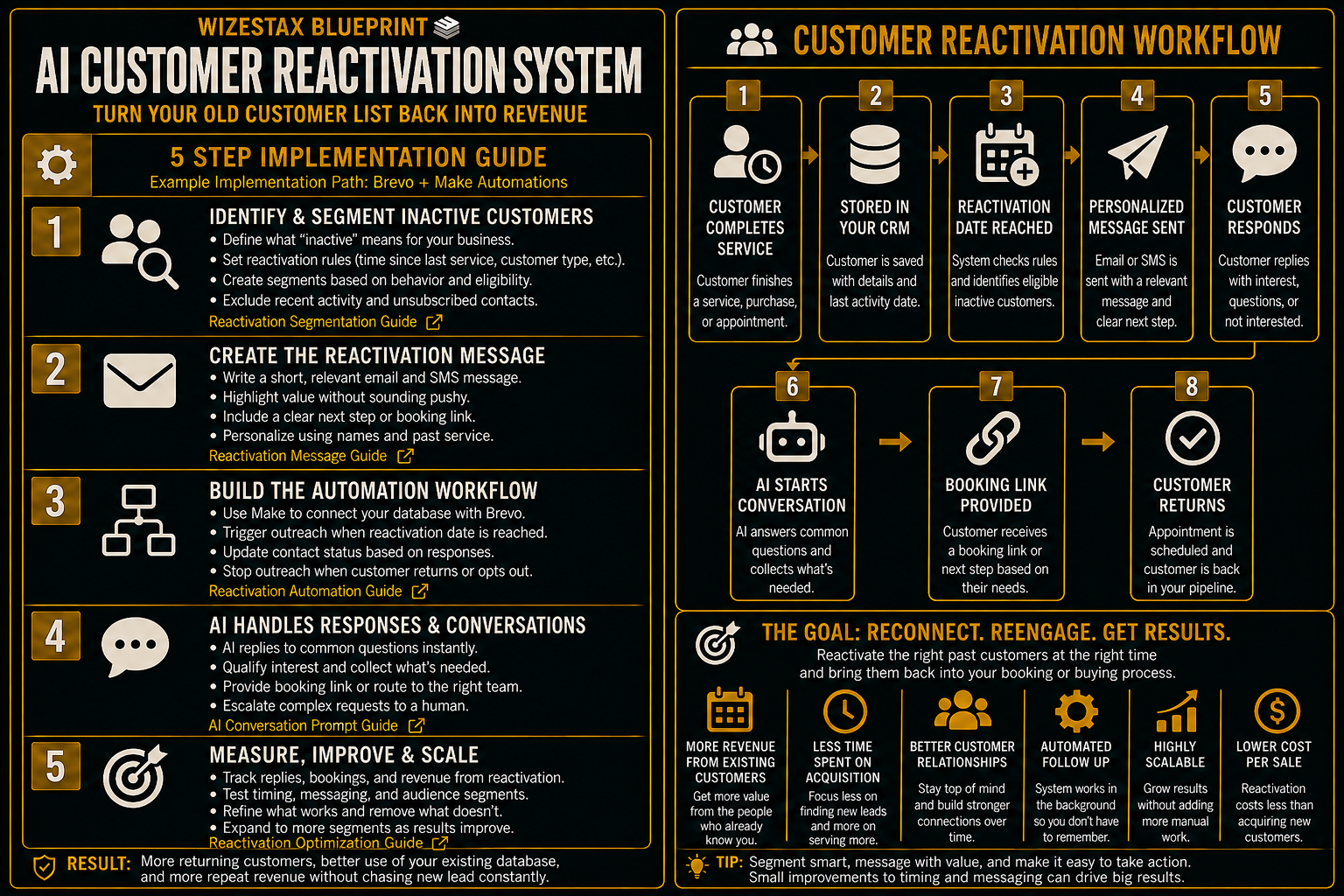
Step By Step Implementation Guide
The following setup demonstrates one implementation path using Brevo and Make.
It is not a WIZESTAX recommendation or preferred Stax.
This architecture is used because it demonstrates how a business can build customer reactivation around an existing customer database without requiring the entire business to move into a new CRM.
Step 1: Define What Inactive Means
Do not begin by messaging the entire customer database.
First determine when a previous customer genuinely becomes appropriate for reactivation.
The rule might depend on:
Time Since Last Purchase
How long has it been since the customer last purchased?
Expected Service Cycle
How frequently would a typical customer reasonably need the service again?
Customer Type
Different customer groups may have different return cycles.
Current Activity
Has the customer already booked, purchased, responded, or entered another active process?
Communication Eligibility
Is the customer still appropriate and permitted to receive the intended communication?
A six month gap could represent inactivity for one business and completely normal behavior for another.
Step 2: Build The Reactivation Segment
Create a customer segment containing only records that meet the reactivation criteria.
Useful information can include:
Customer Name
For appropriate personalization.
Last Service Or Purchase
To determine relevance.
Last Activity Date
To calculate inactivity.
Customer Category
To separate different service or product groups.
Communication Status
To exclude customers who should not receive outreach.
Current Customer Activity
To prevent recently returned customers from entering reactivation.
Step 3: Create The Reactivation Campaign
Build the reactivation message inside Brevo.
Keep the message relevant to the previous customer relationship.
Avoid pretending the customer has an urgent need.
The objective is simply to reopen an appropriate path back to the business.
Depending on the business and customer permissions, reactivation can use approved email or SMS communication.
Step 4: Connect Customer Activity
Use Make when customer activity needs to move between the existing business system and the reactivation process.
For example:
Customer reaches the defined inactivity period.
Customer enters the appropriate Brevo segment.
Reactivation communication is sent.
Customer responds or books.
The customer is removed from further reactivation activity.
The normal customer process resumes.
The important control is the stop condition.
A customer who has already returned should not continue receiving messages asking them to return.
Step 5: Test The Complete Reactivation Path
Create test customer records representing different situations.
Test a genuinely inactive customer.
Test a recently active customer.
Test a customer who should not receive marketing communication.
Test a customer who responds.
Test a customer who books again.
Confirm that only eligible customers enter the campaign.
Confirm that personalization uses accurate customer information.
Confirm that customers who return leave the reactivation process.
Confirm that opt out requests are respected.
The system is ready when inactivity can reliably trigger appropriate outreach and new customer activity reliably stops it.
Customer Reactivation Snapshot
The economic value of reactivation depends on how many eligible previous customers return and the value of the resulting completed business.
Consider an illustrative customer database where completed returning work averages $500.
| Eligible Customers Contacted | Illustrative Return Rate | Returning Customers | Completed Customer Value Represented |
|---|---|---|---|
| 50 | 5% | 2.5 | $1,250 |
| 100 | 5% | 5 | $2,500 |
| 200 | 5% | 10 | $5,000 |
Illustrative scenario only. A 5% return rate is an example assumption, not an expected result. Actual performance depends on customer history, demand, service type, timing, message quality, eligibility, and many other factors.
A response should also not automatically be counted as recovered revenue.
The most useful measurements are:
Eligible Inactive Customers
How many customers genuinely qualified for reactivation.
Customers Contacted
How many received the approved outreach.
Responses
How many returned to conversation.
Bookings Or Purchases
How many created a new transaction or appointment.
Completed Returning Business
How many reactivated opportunities became completed revenue.
Opt Outs
How many customers requested no further outreach.
WIZESTAX Diagnostic Scorecard
| Category | Assessment |
|---|---|
| Economic Problem | Established customer relationships become inactive without structured reengagement |
| Customer Data Accuracy Required | High |
| Automation Potential | High |
| Human Judgment Required | Low To Moderate |
| Customer Effort | Low |
| Segmentation Dependency | High |
| Scalability | High |
| Primary Value | Reopening appropriate existing customer relationships |
| Primary Risk | Sending irrelevant or unwanted outreach to poorly selected customers |
Common Mistakes
| Mistake | Result |
|---|---|
| Messaging the entire old customer database | Outreach becomes irrelevant |
| Using one inactivity period for every customer | Customers receive poorly timed communication |
| Ignoring recent activity | Active customers can receive reactivation messages |
| Sending generic messages repeatedly | Customers have little reason to engage |
| Failing to provide a return path | Interested customers face unnecessary friction |
| Ignoring opt outs | Customer trust and compliance can be damaged |
| Treating responses as revenue | Campaign performance becomes overstated |
| Using inaccurate customer history | Personalization becomes confusing or inappropriate |
Related WIZESTAX Categories
| Category | Related Business Problem |
|---|---|
| Customer Retention | Customer Churn Warning |
| Customer Retention | Recurring Schedule Gap Detection |
| Marketing | Referral Request |
| Sales | Estimate Follow Up |
| Operations | Job Completion Follow Up |
| Customer Service | FAQ And Customer Support |
These remain separate problems. The AI Customer Reactivation System begins after an established customer relationship has already become inactive and focuses on reopening that relationship. Customer Churn Warning operates earlier by identifying customers showing signs that they may leave before they actually become inactive. Recurring Schedule Gap Detection identifies expected recurring appointments or services that have not been scheduled. Referral Request asks satisfied customers to introduce the business to other people rather than asking the original customer to return. Estimate Follow Up manages an unresolved sales opportunity before the customer has purchased. Job Completion Follow Up closes the operational loop immediately after completed work. Each Blueprint therefore protects a different economic or operational leak.
Get New WIZESTAX Blueprints Every Monday
Subscribe to receive new WIZESTAX Blueprints covering Customer Retention, Marketing, Sales, Finance and Operations directly to your inbox.


