Customer Data Update System
Identify Customer Information Changes That Have Not Reached The Records Employees Actually Use
Customer information changes throughout the life of a business relationship. A customer moves to a new address, changes their primary phone number, replaces a billing contact or updates the instructions associated with a recurring service. The business may receive the new information without successfully updating every record that depends on it.
An employee might correct a customer’s phone number in the CRM while the scheduling platform continues using the previous number. A billing address may be updated in an email conversation but never reach the accounting system. Another employee may create a new customer record because the existing information no longer matches.
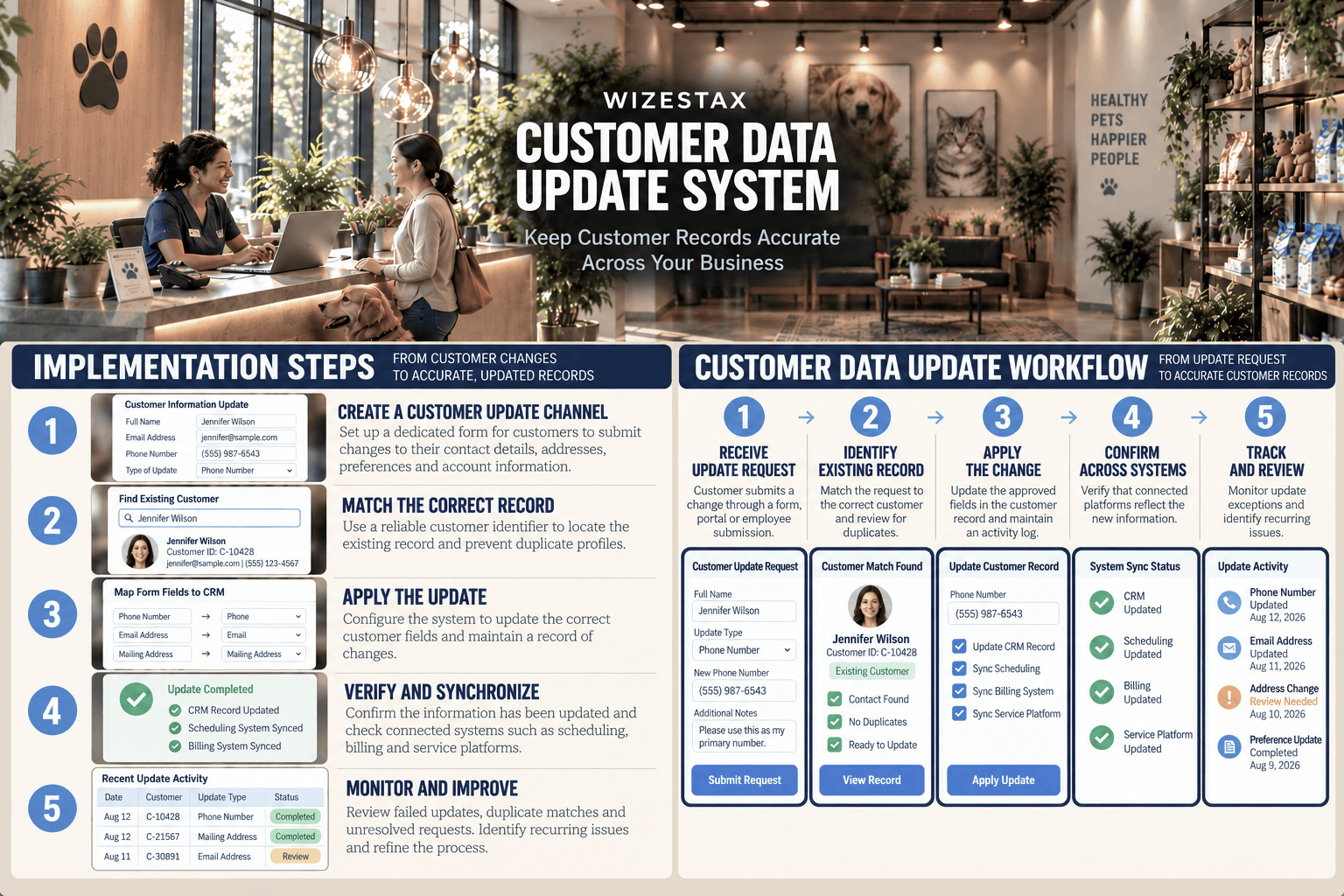
The Customer Data Update System establishes a controlled process for receiving customer changes, identifying the correct existing record, applying updates and verifying that the information reaches the systems where it is needed.
The objective is not to collect more customer information. It is to prevent valid changes from becoming lost, duplicated or inconsistently recorded.
Software Linx
Starter: Jotform
Growth: HubSpot CRM
Blueprint Overview
| Metric | Value |
|---|---|
| Category | Customer Data Management |
| Business Problem | Customer changes fail to reach existing records |
| Primary Objective | Keep customer information consistent |
| Core Signals | Update requests, record matches, field changes and sync failures |
| Setup Time | Approximately 3 to 6 hours |
| Difficulty | Intermediate |
| Maintenance | Daily exception review |
| Best For | Businesses maintaining recurring customer records |
| Primary Output | Verified updates and exception reports |
The Hidden Revenue Leak
| Without This Blueprint | With This Blueprint |
|---|---|
| Changes remain in messages | Updates enter a defined process |
| Employees edit separate records | A primary record is identified |
| Duplicate profiles accumulate | Existing records are matched |
| Old information remains active | Changes are verified |
| Failed updates go unnoticed | Exceptions receive review |
| Corrections require repeated work | Update history supports investigation |
Customer information errors often become visible only after another business process fails.
An appointment reminder goes to an inactive phone number. An invoice reaches an outdated billing contact. A technician follows old property access instructions despite the customer having supplied replacements.
These failures can generate administrative work, delayed payments, wasted travel and customer dissatisfaction.
The underlying issue is different from collecting incorrect information in the first place. The business may already possess the correct information, but the change has not been applied to the records supporting its operations.
This distinction is important because sending another customer update request will not solve a process that consistently fails to apply the information it receives.
A reliable system must establish what changed, which record requires modification, whether the change was applied and whether connected systems reflect the current information.
Business Impact Snapshot
| Area | Potential Impact |
|---|---|
| Administrative Labor | Fewer repeated corrections |
| Billing | Fewer address related delays |
| Scheduling | More reliable contact details |
| Data Quality | Reduced conflicting records |
| Customer Service | Less repeated information gathering |
| Management | Visibility into failed updates |
Real World Example
A regional property management company maintains records for 650 tenants across several residential properties.
Residents regularly submit changes to their phone numbers, emergency contacts, preferred communication methods and mailing addresses.
These updates arrive through email, telephone conversations and maintenance requests.
A resident changes their primary phone number during a maintenance appointment. The employee records the change in the service notes, but the resident database retains the original number.
Several weeks later, a maintenance coordinator attempts to schedule an inspection using the outdated contact information.
The coordinator makes repeated contact attempts before discovering that the resident had already supplied a replacement number.
A Customer Data Update System changes how this information is handled.
The employee submits the change through a defined update process. The system identifies the resident’s existing record, applies the approved modification and records whether the update was completed.
If the record cannot be matched or the change conflicts with existing information, the request is flagged for review.
Where connected systems support synchronization, the updated information can also be transferred to those platforms.
The company can now distinguish between receiving an update and successfully applying it.
This does not eliminate every communication failure. It reduces the likelihood that an acknowledged customer change remains unused.
WIZESTAX Stax Options
Starter Stax
Jotform
Best For
Small businesses that need a consistent customer update intake process before introducing more advanced CRM management.
| Function | Software |
|---|---|
| Update Collection | Jotform Forms |
| Required Information | Field Validation |
| Update Categories | Conditional Logic |
| Submission Records | Jotform Tables |
| Employee Notifications | Email Alerts |
| External Records | CRM Integrations |
Jotform allows businesses to create structured customer update forms that collect changes through a consistent process.
Rather than asking employees to interpret information from unrelated messages, a business can provide a dedicated form for contact details, service addresses, account instructions and other permitted changes.
Required fields help reduce incomplete submissions, while conditional logic can display different questions according to the requested update.
Submission notifications allow designated employees to review changes.
Jotform also supports integrations with external customer management systems. Depending on the integration, submitted information may be transferred into an existing contact record.
However, a form submission is not proof that every relevant business record has been updated.
For businesses without reliable record matching and integration, employee review remains necessary.
Advantages
| Benefit |
|---|
| Accessible digital update collection |
| Customizable information fields |
| Consistent submission records |
| Conditional form questions |
| Multiple integration options |
Limitations
| Limitation |
|---|
| Does not independently maintain every customer database |
| Record matching requires configuration |
| Sensitive updates need verification |
| Integrations differ in capabilities |
| Employees may need to confirm completion |
Growth Stax
HubSpot CRM
Best For
Growing businesses that need one central customer record accessible to employees across several departments.
| Function | Software |
|---|---|
| Customer Records | Contact Management |
| Customer Fields | Contact Properties |
| Update Collection | HubSpot Forms |
| Record Changes | Property Updates |
| Duplicate Review | Data Management Tools |
| Automation | HubSpot Workflows |
HubSpot CRM provides a centralized environment for maintaining customer information.
Contact records can contain standard and custom properties, allowing businesses to establish consistent fields for information used across customer relationships.
HubSpot Forms can collect new information and update contact properties when submissions are associated with existing records.
This reduces the need to maintain separate spreadsheets or disconnected employee contact lists.
Businesses can also use available data management tools to investigate duplicate records and inconsistent information.
Workflow automation can support more advanced update procedures on eligible subscription plans.
The central challenge is ensuring that the correct customer record receives the update.
Businesses should establish clear matching rules, permissions and review procedures before relying on form submissions to change important account information.
Advantages
| Benefit |
|---|
| Centralized customer records |
| Customizable contact properties |
| Connected information collection |
| Shared employee visibility |
| Expandable automation capabilities |
Limitations
| Limitation |
|---|
| Duplicate records still require review |
| External platforms may remain disconnected |
| Advanced features can require paid plans |
| Incorrect matching can create data errors |
| Employee procedures remain necessary |
Pro Stax
Zoho CRM + Zoho Forms
Best For
Businesses that need customer updates to modify existing CRM records through a configurable form and record lookup process.
| Function | Software |
|---|---|
| Customer Database | Zoho CRM |
| Update Collection | Zoho Forms |
| Existing Record Lookup | Zoho CRM Field |
| Existing Record Changes | Update Record |
| Information Mapping | Field Mapping |
| Process Automation | CRM Workflow Rules |
Zoho CRM and Zoho Forms provide a connected architecture for collecting changes and applying them to existing customer records.
Zoho Forms includes a CRM field that can retrieve information from an existing CRM module and prefill designated form fields.
The Update Record integration allows submitted changes to modify the associated CRM record.
Businesses can configure which fields are available for modification and map the submitted information to the appropriate CRM properties.
Zoho also supports distributing prefilled forms to selected contacts, allowing customers to review and submit changes to their existing information.
This architecture is particularly relevant when the business needs a repeatable customer information maintenance process.
Careful configuration is essential.
The CRM lookup must identify the intended record, field mappings must be accurate and the business must establish appropriate safeguards against unauthorized changes.
The system can reduce manual record editing, but it cannot independently determine whether every submitted change is legitimate.
Advantages
| Benefit |
|---|
| Existing record lookup |
| Prefilled customer forms |
| Direct CRM record updates |
| Configurable field mapping |
| Connected workflow options |
Limitations
| Limitation |
|---|
| Requires careful integration setup |
| Incorrect matching can affect records |
| Permissions require attention |
| External systems may need separate connections |
| Sensitive changes require verification |
How The Three Stax Differ
Each Stax addresses a different part of the customer information maintenance process.
Jotform
Creates a structured intake channel for customer changes. Its primary strength is replacing scattered information collection with consistent submissions that employees or connected systems can process.
HubSpot CRM
Establishes a centralized customer record. Its primary strength is reducing fragmentation by giving employees a common location for maintaining and reviewing customer information.
Zoho CRM + Zoho Forms
Connects customer information collection to existing CRM records through lookup, prefilled fields and update functions. Its primary strength is providing a configurable process for modifying existing information.
These are distinct implementation architectures rather than rankings.
The appropriate system depends on where customer updates currently fail and how much record maintenance the business needs to automate.
Copy And Paste Customer Update Alert
Customer information update received.
Customer: {{customer_name}}
Customer ID: {{customer_id}}
Requested change: {{update_type}}
Submitted: {{submission_date}}
Current status: {{update_status}}
Assigned employee: {{assigned_employee}}
Verify the customer’s identity and confirm that the requested change belongs to the correct existing record.
Review the updated information, apply the approved change and confirm whether connected systems require additional updates.
If the record cannot be matched or the information conflicts with existing data, flag the request for manual investigation.
Do not mark the update complete until the required changes have been verified.
Copy And Paste Customer Confirmation
Subject: Your Customer Information Update
Hello {{customer_name}},
We have received your request to update your customer information.
Requested change: {{update_type}}
Current status: {{update_status}}
We will review the information and confirm when the update has been completed.
If additional verification is required, our team will contact you through an established communication channel.
Thank you.
Copy And Paste AI Prompt
You are assisting a small business with customer information update management.
Review the customer update requests and existing customer records provided.
Identify updates that have been received but not completed.
Compare each requested change with the existing customer information.
Identify duplicate records, conflicting values, incomplete requests and changes that may have been applied to the wrong customer.
Distinguish between an update being submitted, approved, applied and verified.
Flag updates involving sensitive customer information for appropriate human review.
Identify connected systems that may still contain outdated information when synchronization records are available.
Do not assume that receiving a form submission means the customer database was successfully updated.
Do not invent customer details, verification results or completed changes.
Present findings in a table containing customer ID, requested change, existing value, submitted value, update status, verification status and required action.
If information is insufficient to confirm an update, explain what additional evidence is required.
Step By Step Implementation Guide
The following setup demonstrates one implementation path using Zoho CRM and Zoho Forms.
It is not a WIZESTAX recommendation or preferred Stax.
This architecture is used because its existing record lookup and update functions provide a clear example of applying customer changes to an established database.
Step 1: Identify Customer Data Fields
Review the information currently stored in the customer database.
Determine which fields customers regularly need to change.
Examples include:
-
Primary Phone Number
-
Email Address
-
Mailing Address
-
Service Address
-
Billing Contact
-
Communication Preferences
-
Account Instructions
Separate ordinary contact changes from sensitive account modifications requiring additional verification.
Step 2: Establish The Primary Customer Record
Identify which database should serve as the primary source of customer information.
For this implementation, use Zoho CRM.
Review existing contact records and identify duplicates before allowing automated updates.
A customer should not receive a second record simply because their contact information has changed.
Step 3: Create The Customer Update Form
Open Zoho Forms and create a form dedicated to customer information changes.
Include fields identifying the type of update and the information being modified.
Use conditional fields where appropriate to avoid presenting customers with unnecessary questions.
Keep the form limited to information needed for the update process.
Step 4: Configure Existing Record Lookup
Add the Zoho CRM field to the form.
Select the appropriate CRM module and configure the lookup settings.
Establish how the form identifies the correct existing customer record.
Avoid relying solely on information that customers frequently change, such as a phone number.
Test record matching before allowing updates to modify live information.
Step 5: Configure Field Mapping
Map the form fields to their corresponding CRM fields.
| Form Field | CRM Destination |
|---|---|
| Phone Number | Phone |
| Email Address | |
| Mailing Address | Mailing Address |
| Contact Preference | Custom Property |
| Service Instructions | Custom Property |
Use the actual field names configured in the business’s CRM.
Confirm that each field transfers information to the intended destination.
Step 6: Configure Update Record
Open the Zoho CRM integration settings in Zoho Forms.
Select the Update Record option and configure the required field mappings.
This function allows submitted changes to modify the matched CRM record.
Review the integration behavior carefully before enabling customer submissions.
Step 7: Establish Verification Controls
Define which changes can be processed through ordinary procedures and which require additional review.
Sensitive updates may include changes to billing contacts, account ownership, authorized representatives or information used for account recovery.
Use appropriate authentication or independent verification before accepting changes that could affect account security.
Do not expose private customer records through unrestricted lookup forms.
Step 8: Test Customer Updates
Create test customer records and submit several update scenarios.
| Test | Expected Result |
|---|---|
| Valid phone change | Correct record updated |
| Existing email change | Existing contact retained |
| Unknown customer | Manual review |
| Duplicate match | Update paused |
| Missing required field | Submission blocked |
| Unauthorized request | Change rejected |
Confirm that unrelated customer fields remain unchanged.
Step 9: Review Connected Systems
Identify other platforms that depend on customer information.
These may include scheduling, invoicing, customer support and service management systems.
Determine whether each platform receives updated information automatically or requires a separate process.
An updated CRM record does not guarantee that every connected system has received the same change.
Step 10: Monitor Update Exceptions
Review failed updates, duplicate matches and unresolved customer requests.
Record how long updates remain incomplete and whether employees must correct information more than once.
Investigate recurring failures rather than treating every correction as an isolated administrative task.
Customer Data Correction Cost Exposure Snapshot
| Monthly Updates | Correction Hours | Labor Cost |
|---|---|---|
| 100 | 5 | $125 |
| 200 | 10 | $250 |
| 300 | 15 | $375 |
Illustrative scenarios assuming 20% of customer updates require correction, each correction takes 15 minutes and administrative labor costs $25 per hour. Actual costs depend on error frequency, correction complexity and labor rates. These figures do not represent guaranteed savings.
WIZESTAX Diagnostic Scorecard
| Category | Assessment |
|---|---|
| Economic Problem | Repeated corrections and operational errors |
| Signal Quality Required | High |
| Automation Potential | High |
| Human Judgment Required | Moderate To High |
| Data Dependency | High |
| Scalability | High |
| Primary Value | Accurate existing customer records |
| Primary Risk | Incorrect or unauthorized record changes |
Common Mistakes
| Mistake | Result |
|---|---|
| Treating submissions as completed updates | Records remain outdated |
| Matching customers only by email | Changed addresses create conflicts |
| Creating new records for every change | Duplicate profiles accumulate |
| Updating only one connected platform | Systems contain conflicting data |
| Allowing unrestricted record changes | Account security risks increase |
| Overwriting fields without review | Existing information may be lost |
| Ignoring failed integrations | Changes never reach their destination |
| Skipping verification | Unauthorized changes may be accepted |
Get New WIZESTAX Blueprints Every Monday
Subscribe to receive new WIZESTAX Blueprints covering Customer Retention, Marketing, Sales, Finance and Operations directly to your inbox.