

Employee Certification Expiration System
Catch Expiring Employee Credentials Before They Create Staffing Or Compliance Problems
Employee certifications rarely become a problem on the day someone earns them. The operational risk appears months or years later when a license, qualification, permit, or training credential quietly approaches its expiration date.
A technician may still be scheduled for work that requires an active credential. A manager may discover an expired certification while preparing for an audit. An employee may need renewal training, but there is no longer enough time to complete it before the current credential lapses.
The Employee Certification Expiration System creates advance visibility around those dates. Instead of relying on spreadsheets, calendar reminders, or someone remembering to check employee files, the system records each credential, monitors its expiration date, notifies the appropriate people before renewal becomes urgent, and updates the record when a replacement credential is approved.
The objective is not simply document storage. It is preventing an expiration date from becoming an unexpected operational event. Certification and licensing requirements vary by occupation, jurisdiction, employer, and type of work. Businesses should verify which credentials are required and how renewal works for their own workforce.
Which Stax Fits Your Business
| Business Need | Stax | Software | Primary Approach |
|---|---|---|---|
| Small team that already needs employee document management | Starter Stax | Connecteam | Employee documents with automatic expiration reminders |
| Business managing many different licenses and renewal dates | Growth Stax | Expiration Reminder | Dedicated expiration tracking and renewal management |
| Workforce where recurring training creates or renews qualifications | Pro Stax | SC Training | Training, credentials, recurring certificates, and expiration monitoring |
These are different architectures rather than rankings.
Software Linx
Starter Stax
Growth Stax
Pro Stax
Connecteam supports employee documents, licenses, and certifications with automatic expiration alerts. Its document system can also show records that are expired or approaching expiration. (Connecteam Help Center)
Expiration Reminder is designed specifically around items that expire, including employee certifications, licenses, permits, insurance, and other credentials. It supports automated reminders and renewal records from a central system. (Expiration Reminder)
SC Training combines credential monitoring with training. Businesses can store licenses and credentials, give them expiration dates, automatically notify workers before expiration, and use recurring courses when the qualification itself requires repeated training. (SafetyCulture Training)
Blueprint Overview
| Metric | Value |
|---|---|
| Category | Workforce Operations |
| Business Problem | Required employee credentials can expire without enough advance visibility |
| Primary Objective | Surface upcoming expirations early enough to complete renewal |
| Core Signals | Employee, credential type, expiration date, renewal requirement, status |
| Difficulty | Intermediate |
| Maintenance | Ongoing record review |
| Best For | Businesses with licensed, certified, trained, or credentialed employees |
| Primary Output | Renewal warning and updated credential record |
The Hidden Operational Leak
The expensive event is not the expiration date itself.
The leak begins when the business lacks enough warning to respond intelligently.
A credential that expires tomorrow may require a training course next week.
A license that expires during an employee’s scheduled work may affect which assignments that employee can perform.
A missing renewal document can create an administrative problem even when the employee completed the renewal correctly.
Without a warning system, those situations remain invisible until the deadline is close or has already passed.
| Without This Blueprint | With This Blueprint |
|---|---|
| Certification dates live in separate files or spreadsheets | Credentials are tracked in one defined system |
| Managers manually check expiration dates | The system watches dates continuously |
| Employees learn about renewal too late | Renewal reminders begin in advance |
| Expired credentials can remain unnoticed | Expired and approaching records are visible |
| Replacement documents arrive through scattered channels | Renewed credentials return to a defined record |
| Staffing problems appear unexpectedly | Management gets time to plan around renewal |
Business Impact Snapshot
| Area | Potential Impact |
|---|---|
| Staffing | Fewer unexpected qualification related disruptions |
| Compliance | Better visibility into credential status |
| Administration | Less manual date checking |
| Scheduling | More time to account for upcoming renewals |
| Training | Renewal courses can begin earlier |
| Documentation | Current credentials remain easier to locate |
| Management | Exceptions become visible before they become urgent |
Real World Example
A commercial electrical contractor has several employees with credentials that renew on different schedules.
One electrician has a certification expiring in 45 days.
The document exists in the employee file, but nobody regularly checks that folder.
Without an expiration system, the credential might not attract attention until the employee or manager happens to notice it.
With the system in place, the expiration date triggers an advance reminder.
The employee receives notice that renewal is approaching. The manager can verify what renewal requires. If training, testing, paperwork, or processing time is involved, that work can begin before the deadline becomes urgent.
Once the renewed credential is received, the new expiration date replaces the old one and the monitoring cycle begins again.
The system did not renew the credential.
It made sure the renewal process started early enough to be manageable.
Starter Stax
Connecteam
Best For
Small and midsize businesses that want certification expiration tracking inside a broader employee management environment.
| Function | Connecteam |
|---|---|
| Employee Records | Employee profiles |
| Credential Storage | Documents |
| Expiration Dates | Document expiration settings |
| Employee Reminder | Automatic mobile notification |
| Admin Visibility | Expiring document status |
| Renewal | Employee document upload |
Connecteam allows businesses to store certifications and other employee documents and assign expiration dates. Employees automatically receive reminders 30 days, 7 days, and 1 day before expiration and again when the document expires. Admin notifications can also be configured for documents approaching expiration. (Connecteam Help Center)
Connecteam also now supports automation logic where a document approaching expiration can notify the employee and manager. (Connecteam Help Center)
Advantages
| Benefit |
|---|
| Credential records live with employee information |
| Automatic expiration reminders |
| Employees can upload replacement documents |
| Admins can filter expired and approaching records |
| Useful for businesses already using Connecteam for workforce operations |
Limitations
| Limitation |
|---|
| It is a broader workforce platform rather than a dedicated credential system |
| Complex credential programs may need more specialized reporting |
| Administrators still need accurate expiration dates |
| External renewal requirements remain outside the platform |
Connecteam currently offers a free Small Business Plan for up to 10 users. Its paid pricing varies by hub and plan, so businesses should verify which HR and Skills features are included before purchasing. (Connecteam)
Growth Stax
Expiration Reminder
Best For
Businesses where tracking expiration itself is the central problem and employees may hold many different certifications, licenses, permits, or other renewable credentials.
| Function | Expiration Reminder |
|---|---|
| Credential Types | Custom document types |
| Expiration Tracking | Dedicated expiration records |
| Reminder Schedule | Configurable reminder timing |
| Employee Notifications | Automated notifications |
| Document Storage | Credential evidence |
| Renewal History | Renew existing expiration record |
Expiration Reminder lets a business create credential types such as nurse certification, first aid certification, or paramedic certification. Each document type can carry its own reminder schedule. Its default reminder frequency is 30 days, 15 days, 5 days, and 1 day before expiration, although those settings can be changed. (Expiration Reminder Help Center)
When a credential is renewed, the existing expiration record can be updated with the new date, custom information, and renewal notes instead of rebuilding the record from scratch. (Expiration Reminder Help Center)
Advantages
| Benefit |
|---|
| Built specifically around expiration tracking |
| Supports many credential categories |
| Custom reminder timing |
| Central dashboard for renewable records |
| Employee self service available |
| Useful beyond employees for permits, insurance, equipment, and other expiring assets |
Limitations
| Limitation |
|---|
| Adds another system if HR records already live elsewhere |
| Initial credential data must be entered accurately |
| The system does not determine which licenses legally apply |
| Renewal itself can still require an outside agency or training provider |
Expiration Reminder currently lists its Starter plan at $49 per month when billed monthly, with 150 expiration items. Its Professional plan is currently $99 per month and adds capabilities including email escalation, onboarding, training hours, and a compliance status dashboard. Pricing and limits can change. (Expiration Reminder)
Pro Stax
SC Training
Best For
Businesses where certification renewal is closely connected to recurring training, competency verification, or repeated compliance education.
| Function | SC Training |
|---|---|
| Credential Storage | Licenses and credentials |
| Expiration Tracking | Qualification expiration dates |
| Training | Digital and in person learning |
| Renewal Logic | Recurring courses |
| Certificate Renewal | Recurring certificates |
| Monitoring | Training matrix and reporting |
SC Training can store licenses and credentials, monitor their expiration dates, and automatically notify workers before qualifications expire. (SafetyCulture Training)
For certifications created through training, administrators can add an expiration date to a certificate and make the related course recur automatically. Workers can then be asked to complete the training again before the qualification needs renewal. (SafetyCulture Training)
Advantages
| Benefit |
|---|
| Connects expiration monitoring directly with training |
| Supports recurring qualifications |
| Stores completion certificates |
| Supports digital and in person training records |
| Training matrix helps identify competency gaps |
| Useful for frontline workforces with repeated compliance requirements |
Limitations
| Limitation |
|---|
| More capability than needed for simple date reminders |
| External licenses may still require outside renewal |
| Course based renewal is not appropriate for every credential |
| Businesses still need to verify legal credential requirements independently |
SC Training currently offers a free plan for up to 10 learners. Premium is listed at $5 per learner per month when billed annually, with at least one administrator at $24 per seat per month. Enterprise pricing is customized. (SafetyCulture Training)
How The Three Stax Differ
| Stax | Core Architecture |
|---|---|
| Connecteam | Employee document management with expiration alerts |
| Expiration Reminder | Dedicated credential and expiration database |
| SC Training | Certification tracking connected to recurring training |
A landscaping company that simply needs to know when employee licenses expire may prefer a document centered system.
A contractor managing dozens of credential types across employees may benefit from dedicated expiration tracking.
A healthcare, manufacturing, logistics, or safety focused workforce that repeatedly renews qualifications through training may need the expiration date connected directly to the learning process.
The correct architecture depends on where the credential originates and what has to happen before it can be renewed.
Copy And Paste Employee Reminder
Certification renewal approaching
Your {{credential_name}} is scheduled to expire on {{expiration_date}}.
Please review the renewal requirements and begin any required training, testing, paperwork, or document submission early enough to avoid a lapse.
Once renewed, upload or submit the updated credential using the normal company process.
If you believe this expiration date is incorrect, contact {{manager_or_admin}}.
Copy And Paste Manager Alert
Employee credential requires review
Employee: {{employee_name}}
Credential: {{credential_name}}
Expiration date: {{expiration_date}}
Days remaining: {{days_remaining}}
Please confirm whether renewal has started and whether this credential affects upcoming assignments, scheduling, or work eligibility.
Copy And Paste AI Prompt
You are helping a business review employee credential expiration data.
Review the employee name, credential type, expiration date, renewal status, upcoming assignments, and any renewal lead time supplied.
Identify credentials that require management attention.
Prioritize records based on how soon they expire and the supplied amount of time required for renewal.
Do not determine whether a certification is legally required unless the requirement is explicitly supplied.
Do not assume an employee is legally prohibited from working solely because a listed credential has expired.
Separate records into:
-
Renewal can begin normally
-
Management attention required soon
-
Expiration is close enough to affect staffing or assignments
-
Already expired and requires immediate human review
For every flagged credential, explain the operational reason it requires attention and identify any missing information needed for a human decision.
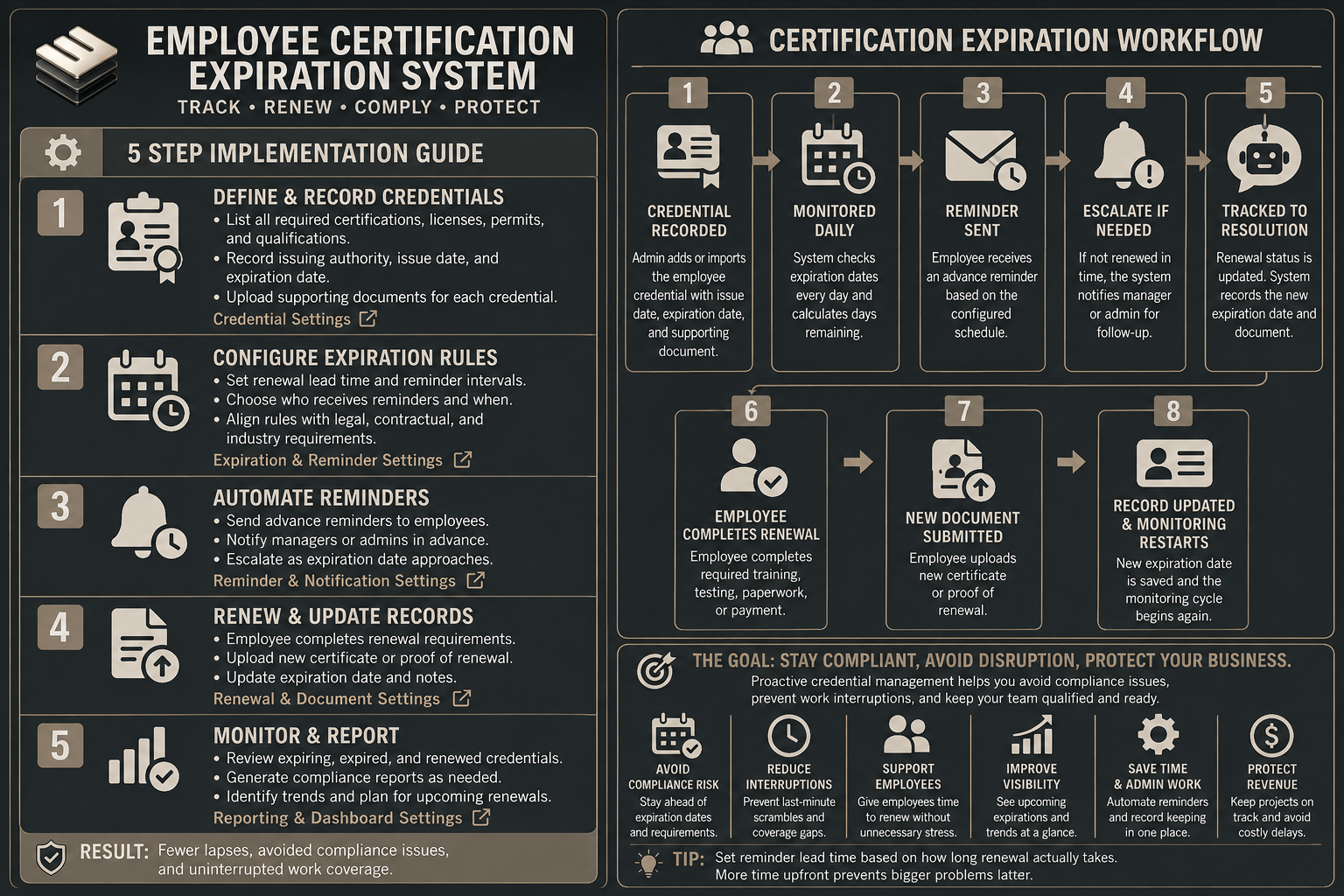
5 Step Implementation Guide
The following example uses Expiration Reminder because it demonstrates the core expiration tracking architecture clearly.
It is an implementation example, not a preferred Stax.
Step 1: Define Credential Types
Open the settings area and create a Document Type for each category that needs monitoring.
Examples could include:
OSHA training
Commercial driver license
First aid certification
Professional license
Equipment operator certification
Each type can carry its own reminder behavior and custom information. Expiration Reminder allows an account to create multiple Document Types and configure reminder frequency for them. (Expiration Reminder Help Center)
Step 2: Add Employees And Credential Records
Create or import the employee contacts who hold renewable credentials.
For each applicable employee, add the credential and its current expiration date.
Attach the certificate, license, or supporting document when appropriate so the date and evidence remain connected.
Step 3: Configure Advance Reminder Timing
Choose reminder intervals that reflect how long renewal actually takes.
A credential requiring a short online renewal may need less advance warning than a professional license involving training, testing, outside processing, or agency approval.
Expiration Reminder begins with default reminders at 30, 15, 5, and 1 day before expiration, but reminder frequency can be customized by Document Type. (Expiration Reminder Help Center)
Step 4: Define The Renewal Responsibility
Determine who receives each warning and who owns the next action.
The employee may be responsible for completing renewal.
A manager may need to verify completion.
An administrator may need to approve and store the replacement document.
The system should make that ownership explicit so the reminder does not simply become another notification that everybody assumes someone else handled.
Step 5: Test The Renewal Cycle
Create a test credential with an upcoming expiration.
Confirm that the correct person receives the reminder.
Complete a mock renewal.
Update the credential with a new expiration date and supporting document.
Then verify that the old expiration no longer appears as unresolved and that the renewed credential begins a new monitoring cycle.
Expiration Reminder supports renewing an existing record with a new expiration date and related information. (Expiration Reminder Help Center)
Credential Lapse Exposure
The economic problem is not simply the cost of renewing a certificate.
It is the operational exposure created when renewal happens too late.
Consider an employee whose qualification is necessary for a particular type of work.
If management learns about the expiration after the credential lapses, the business may need to change schedules, move assignments, postpone work, find another qualified employee, complete urgent administrative work, or temporarily operate with less capacity.
The cost depends heavily on the business.
For one company the consequence may be a few administrative hours.
For another it may affect an entire scheduled job.
That is why the most useful economic measurement is Credential Lapse Exposure.
| Input | Example |
|---|---|
| Qualified employee labor value per day | $400 |
| Days temporarily unavailable for affected work | 3 |
| Replacement or schedule adjustment cost | $300 |
| Administrative recovery time | $200 |
| Example exposure | $1,700 |
This is only an illustrative model.
A business should replace these numbers with its own labor value, staffing constraints, renewal lead time, and operational consequences.
The important question is how expensive a credential lapse becomes once it starts interfering with work.
WIZESTAX Diagnostic Scorecard
| Category | Assessment |
|---|---|
| Economic Problem | Credential expiration becomes visible too late |
| Primary Signal | Expiration date |
| Automation Potential | High |
| Human Judgment Required | Moderate to high |
| Data Accuracy Requirement | High |
| Maintenance Requirement | Moderate |
| Primary Value | Advance renewal visibility |
| Primary Risk | Incorrect credential requirements or stale expiration data |
Common Mistakes
| Mistake | Result |
|---|---|
| Recording the credential without an expiration date | The document becomes storage rather than a warning system |
| Using one reminder window for every credential | Complex renewals may still begin too late |
| Alerting only the employee | Management may remain unaware of unresolved renewals |
| Alerting only management | Employees may not receive enough time to act |
| Forgetting to replace the old expiration date after renewal | The system continues flagging a resolved problem |
| Tracking documents without verifying authenticity or approval | A file can appear complete while the credential is not |
| Assuming the software determines legal requirements | Compliance decisions can be based on incorrect assumptions |
| Ignoring staffing impact | Management may know a credential is expiring but fail to adjust upcoming work |
Related WIZESTAX Categories
| Category | Different Problem |
|---|---|
| Employee Training Reminder System | Ensures required learning is completed |
| Employee License Verification System | Confirms whether a supplied credential is valid |
| Employee Onboarding Completion System | Tracks requirements associated with a new hire |
| Employee Scheduling Conflict Detection System | Finds incompatible or problematic shifts |
| Employee Overtime Warning System | Detects approaching overtime cost |
| Employee Document Collection System | Collects missing workforce documentation |
The distinction matters. Employee Certification Expiration System owns the period between a valid credential existing and that credential reaching its renewal deadline. It does not primarily solve missing onboarding documents, employee training completion, scheduling conflicts, or overtime. Its job is to make sure an expiration date does not quietly become an operational problem.
Get New WIZESTAX Blueprints Every Monday
Subscribe to receive new WIZESTAX Blueprints covering Customer Retention, Marketing, Sales, Finance, Workforce, and Operations directly to your inbox.


