
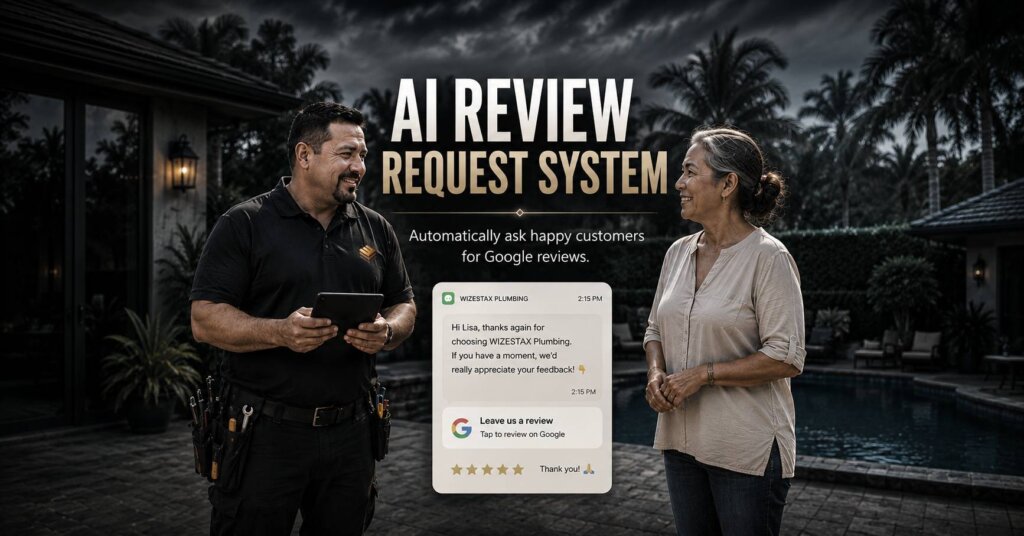
AI Review Request System
Turn Completed Customer Experiences Into A Consistent Review Process
A business can serve hundreds of customers successfully and still have relatively few online reviews. The problem is often not customer satisfaction. The problem is that asking for feedback depends on an employee remembering to do it after the work is finished. By that point, staff may already be collecting payment, preparing for another appointment, cleaning up, or moving to the next job. The AI Review Request System creates a structured process after a completed customer experience. It identifies customers who are eligible to receive a review request, sends the request at a defined time, provides a direct review link, records the outreach, and stops unnecessary communication once the process is complete. The purpose is not to manufacture positive reviews. It is to make legitimate review requests consistent while giving customers the freedom to describe their actual experience.
Google allows businesses to ask customers for genuine reviews and provides businesses with a review link and QR code for that purpose. Google prohibits incentives for reviews and prohibits businesses from discouraging negative reviews or selectively soliciting positive reviews. (Google Help)
Which Stax Fits Your Business
| Business Need | Stax | Software | Cost |
|---|---|---|---|
| Flexible review requests added to an existing customer process | Starter Stax | Google Sheets + Make + Twilio | Low Cost + Usage |
| Review automation connected to a service business platform | Growth Stax | Jobber | Varies By Plan And Features |
| Dedicated reputation and review management | Pro Stax | NiceJob | Varies By Plan And Features |
Pricing and capabilities change over time and should be confirmed directly with each software provider before purchase.
Software Linx
Starter
Growth
Pro
Review Destination
Blueprint Overview
| Metric | Value |
|---|---|
| Category | Marketing |
| Business Problem | Completed customer experiences do not consistently become opportunities for public feedback |
| Primary Objective | Create a reliable and policy conscious review request process |
| Core Signal | Appropriate customer interaction has been completed |
| Setup Time | Approximately 30 To 90 Minutes |
| Difficulty | Beginner To Intermediate |
| Maintenance | Low |
| Best For | Businesses that regularly complete customer services, appointments, purchases, or projects |
| Primary Output | Eligible customer receives a simple opportunity to leave an honest review |
The Hidden Reputation Problem
| Without This Blueprint | With This Blueprint |
|---|---|
| Employees must remember to ask | Review requests follow a defined process |
| Timing changes between customers | Timing can follow established rules |
| Customers must search for the review page | A direct review link can be provided |
| Review outreach is difficult to measure | Requests can be recorded |
| Some customers never receive an opportunity | Eligible customers can receive consistent outreach |
| Staff repeatedly perform the same task | Routine requests can be automated |
The economic problem is not simply that the business has fewer reviews.
The larger leak is completed customer experiences failing to become visible reputation signals for future buyers.
Reviews can help prospective customers understand previous customer experiences and can appear alongside a business in Google Search and Maps. (Google Help)
A business may already have spent money and labor acquiring and serving the customer. When there is no consistent review request process, the customer relationship ends without giving that customer an easy opportunity to share their experience publicly.
The system should create the opportunity.
The customer decides what to say.
Business Impact Snapshot
| Area | Potential Impact |
|---|---|
| Review Coverage | More eligible customers consistently receive an opportunity to review |
| Staff Work | Routine requests require less manual attention |
| Customer Effort | Direct links reduce unnecessary steps |
| Timing | Requests can occur while the experience remains recent |
| Reputation Visibility | More genuine customer experiences may become publicly visible |
| Management | Request activity can become measurable |
The system should not optimize for positive ratings by filtering customers.
Google specifically prohibits selectively soliciting positive reviews and discouraging negative reviews. (Google Help)
Real World Example
An electrician completes a residential repair.
The job is marked complete in the business system.
The customer is eligible for the standard review request process.
Later that day, the customer receives a short thank you message containing the company’s Google review link.
The customer opens the link and decides whether they want to leave feedback.
If they do, the review reflects their own experience and opinion.
The business records that the request was sent and does not repeatedly contact the customer unnecessarily.
The automation did not create the review or determine its rating.
It made sure the customer received a simple opportunity to provide honest feedback.
WIZESTAX Stax Options
Starter Stax
Google Sheets + Make + Twilio
Best For
Businesses that already have a customer or job completion process and want to add review requests without replacing their existing software.
| Function | Software |
|---|---|
| Customer Records | Google Sheets |
| Automation | Make |
| Messaging | Twilio |
| Review Destination | Google Business Profile |
| Request Tracking | Google Sheets |
| Workflow Logic | Make |
Advantages
| Benefit |
|---|
| Can work around existing business software |
| Does not require a CRM migration |
| Individual components remain flexible |
| Business controls timing and eligibility rules |
| Suitable for relatively simple request volume |
Limitations
| Limitation |
|---|
| Several applications must remain connected |
| Customer status must stay accurate |
| Review reporting is less centralized |
| More complex processes require additional configuration |
Growth Stax
Jobber
Best For
Service businesses that want review requests connected directly to customer records and completed field service activity.
| Function | Software |
|---|---|
| Customer Records | Jobber |
| Job Activity | Jobber |
| Review Requests | Jobber Reviews |
| Email And Text Requests | Jobber |
| Google Business Profile Connection | Jobber |
| Review Dashboard | Jobber |
Jobber currently supports automated Google review asks that can be triggered after events such as a completed visit, closed job, or paid invoice. Its review dashboard can also display request and review activity. Availability depends on Jobber’s current feature and plan configuration. (Jobber Help Center)
Advantages
| Benefit |
|---|
| Review activity remains connected to service operations |
| Customer records stay centralized |
| Requests can follow operational events |
| Less integration work than a multi application setup |
| Review activity can be viewed inside the platform |
Limitations
| Limitation |
|---|
| Primarily suited to service businesses |
| Feature availability depends on current plan and configuration |
| Less flexible than a fully custom architecture |
| Businesses already using another operational platform may duplicate functionality |
Pro Stax
NiceJob
Best For
Businesses that want review generation to operate inside a dedicated reputation management environment rather than as a secondary feature of another business platform.
| Function | Software |
|---|---|
| Review Invitations | NiceJob |
| Review Management | NiceJob |
| Customer Matching | NiceJob |
| Review Insights | NiceJob |
| Review Site Connections | NiceJob |
| Reputation Management | NiceJob |
NiceJob provides dedicated review tools including review invitations, customer matching, review insights, QR codes, and support for multiple review sites. (NiceJob Help Center)
Advantages
| Benefit |
|---|
| Dedicated review management environment |
| Review activity is the primary function rather than an additional CRM feature |
| Supports broader reputation workflows |
| Useful when reviews are important across multiple customer channels |
| Can provide deeper review specific management than a basic automation |
Limitations
| Limitation |
|---|
| Adds another platform to the business software stack |
| Customer operational data may remain elsewhere |
| Integration requirements depend on existing software |
| Dedicated reputation infrastructure may exceed the needs of very small businesses |
How The Three Stax Differ
| Stax | Primary Approach |
|---|---|
| Google Sheets + Make + Twilio | Custom review request layer around existing software |
| Jobber | Review requests connected directly to field service activity |
| NiceJob | Dedicated review and reputation management environment |
These are different implementation architectures rather than rankings.
Google Sheets, Make, and Twilio fit businesses that want to preserve their existing customer system and build a simple review process around it.
Jobber fits service businesses where job completion, customer information, communication, and review requests should remain connected.
NiceJob fits businesses that want reputation management to operate as its own dedicated function.
The appropriate architecture depends on existing software, customer volume, operational complexity, reporting needs, and how important reputation management is to the broader marketing strategy.
Copy And Paste Review Request
“Hi {{first_name}}, thanks for choosing {{business_name}}. If you would like to share your experience, you can leave us a Google review here: {{review_link}}. We appreciate your feedback.”
The message does not request a five star review or tell the customer what to write.
It simply provides an opportunity to leave honest feedback.
Copy And Paste AI Prompt
You are assisting a business with customer review requests after completed customer experiences.
Your purpose is to provide eligible customers with a simple opportunity to leave honest feedback.
Use only approved customer and business information supplied to you.
Keep review requests short, natural and professional.
Thank the customer for their business and provide the approved review link.
Do not ask for a specific star rating.
Do not tell the customer what to write.
Do not offer discounts, payments, gifts, services or other incentives in exchange for a review.
Do not selectively send public review links only to customers who indicate that they are satisfied.
Do not discourage negative reviews.
Do not pressure customers to leave a review.
If a customer responds with a service problem, complaint, refund request or situation requiring judgment, route the conversation to a staff member.
Respect requests to stop receiving communication.
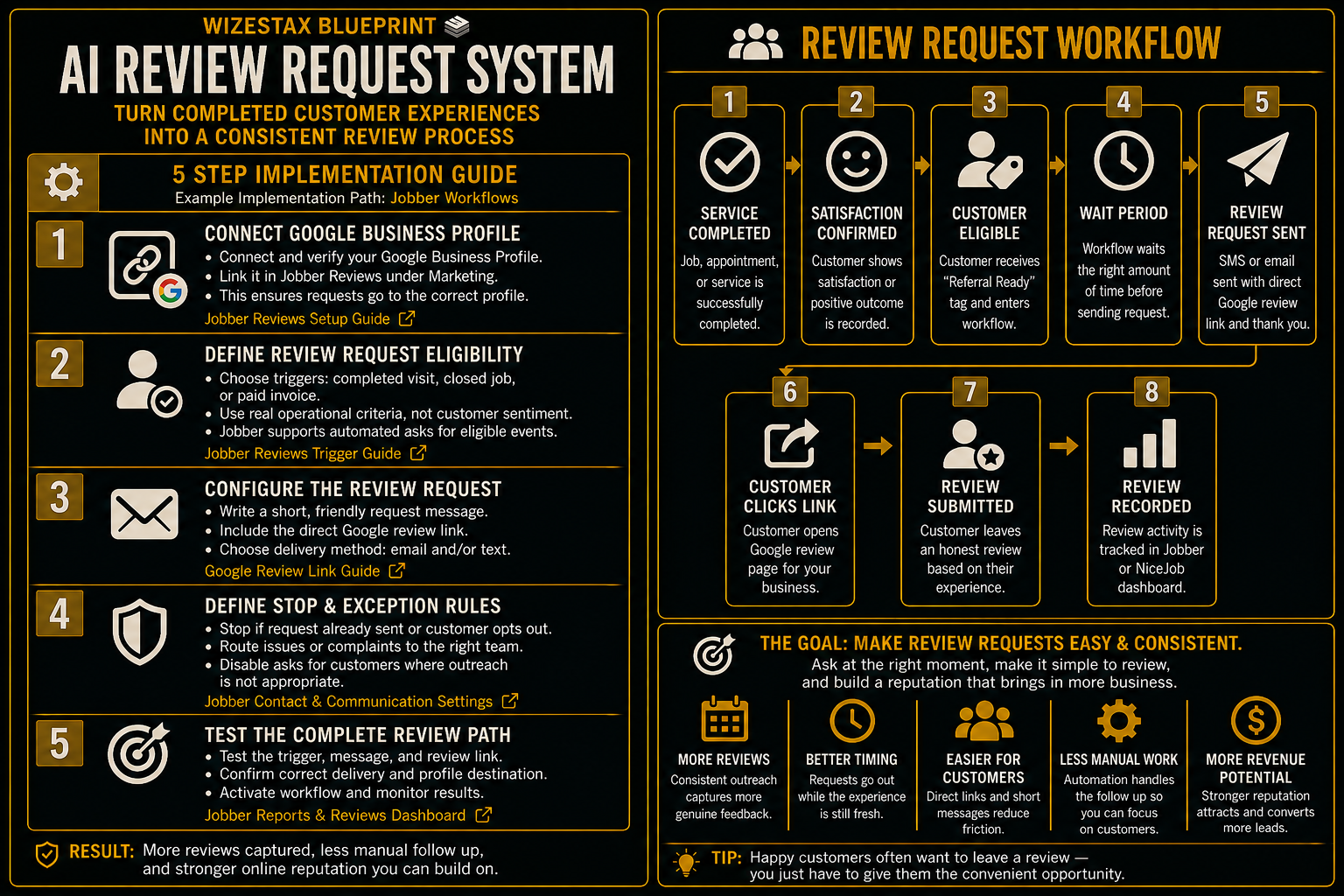
Step By Step Implementation Guide
The following setup demonstrates one implementation path using Jobber.
It is not a WIZESTAX recommendation or preferred Stax.
Jobber is used here because it can connect completed service activity, customer records, automated review asks, and Google Business Profile review activity inside one service business environment. (Jobber Help Center)
Step 1: Connect Google Business Profile
Begin by connecting the business’s verified Google Business Profile to Jobber’s review tools.
Jobber’s current setup process allows eligible businesses to connect their Google Business account from the Reviews area inside Marketing. (Jobber Help Center)
The connection allows the review request process to direct customers toward the correct business profile.
Step 2: Define Review Request Eligibility
Determine which completed customer interactions should enter the standard review request process.
Examples can include:
Completed Visit
The scheduled service has been performed.
Closed Job
The operational work is finished.
Paid Invoice
The transaction has reached the business’s chosen completion point.
Jobber currently supports automated Google review asks based on triggers including completed visits, closed jobs, and paid invoices. (Jobber Help Center)
Eligibility should be based on legitimate operational rules rather than predicted customer sentiment.
Do not create one path for happy customers that sends them to Google and another path that prevents dissatisfied customers from receiving the same opportunity.
Step 3: Configure The Review Request
Choose the appropriate request trigger and communication method.
Keep the message short.
Include the direct review path.
Make it clear that the customer is being invited to share their experience rather than being asked to provide a particular rating.
Google provides businesses with an official review link and QR code that can be shared with customers through appropriate channels. (Google Help)
Step 4: Define Stop And Exception Rules
Determine when review outreach should stop.
Examples include:
Request Already Sent
Avoid unnecessary duplicate requests.
Customer Opts Out
Respect the customer’s communication preference.
Customer Requires Service Assistance
Route the conversation to the appropriate employee.
Customer Relationship Is Not Appropriate For Outreach
Exclude the record according to legitimate communication or operational rules rather than expected review sentiment.
Jobber allows review asks to be disabled for individual customers through their communication settings. (Jobber Help Center)
Step 5: Test The Complete Review Path
Use test customer records before activating the process broadly.
Confirm that the correct operational event triggers the request.
Verify the customer’s name and business information.
Open the review link.
Confirm that it reaches the correct Google Business Profile.
Test email and text delivery where applicable.
Confirm that excluded customers do not receive the request.
Verify that staff understand how to respond if a customer replies with a service issue instead of leaving a review.
The system is ready when eligible customers can consistently receive an accurate review request without staff manually remembering each one.
Review Activity Snapshot
Review automation is better evaluated through activity and reputation growth than through a direct revenue claim.
Consider an illustrative business:
| Monthly Eligible Customers | Requests Sent | Illustrative Review Completion Rate | Illustrative New Reviews |
|---|---|---|---|
| 25 | 25 | 10% | 2.5 |
| 50 | 50 | 10% | 5 |
| 100 | 100 | 10% | 10 |
Illustrative scenario only. A 10% completion rate is an example assumption, not an expected result. Actual performance will vary.
The most useful measurements are:
Eligible Customers
How many customers qualified for the standard request process.
Requests Sent
How many review opportunities were actually delivered.
Review Link Engagement
How many customers interacted with the review path where measurable.
New Reviews
How many genuine reviews appeared during the period.
Request Coverage
How consistently eligible customers received the opportunity.
Opt Outs
How many customers requested no additional communication.
A review should never be treated as purchased revenue.
Its value comes from making genuine customer experiences more visible to future customers.
WIZESTAX Diagnostic Scorecard
| Category | Assessment |
|---|---|
| Economic Problem | Completed customer experiences are not consistently converted into opportunities for public feedback |
| Automation Potential | High |
| Human Judgment Required | Low |
| Customer Effort | Very Low |
| Data Accuracy Required | Moderate |
| Policy Sensitivity | High |
| Scalability | High |
| Primary Value | Consistent opportunities for genuine customer feedback |
| Primary Risk | Manipulating review selection or pressuring customers |
Common Mistakes
| Mistake | Result |
|---|---|
| Asking only customers expected to leave positive reviews | Creates review gating and policy risk |
| Offering discounts or rewards for reviews | Creates prohibited incentivized review activity |
| Asking for a specific star rating | Attempts to influence customer feedback |
| Sending too many reminders | Helpful outreach becomes unwanted communication |
| Using the wrong review link | Customers encounter unnecessary friction |
| Failing to stop duplicate requests | Customers receive repetitive outreach |
| Ignoring customer complaints | Service problems remain unresolved |
| Measuring only total review count | Process quality becomes difficult to understand |
Google explicitly prohibits incentives in exchange for reviews and selectively soliciting positive reviews. Violations can lead to removed reviews and restrictions on the Business Profile. (Google Help)
Related WIZESTAX Categories
| Category | Related Business Problem |
|---|---|
| Marketing | Referral Request |
| Operations | Job Completion Follow Up |
| Customer Retention | Customer Reactivation |
| Customer Service | FAQ And Customer Support |
| Lead Generation | New Lead Response |
These remain separate problems. The AI Review Request System creates a consistent opportunity for customers to share genuine public feedback after an appropriate completed interaction. Referral Request asks customers to introduce the business to another potential customer. Job Completion Follow Up closes the operational loop after completed work. Customer Reactivation reconnects with established customers after they have become inactive. FAQ And Customer Support handles routine customer questions and support needs. New Lead Response protects new inquiries before they become customers. Each Blueprint therefore protects a different economic or operational leak.
Get New WIZESTAX Blueprints Every Monday
Subscribe to receive new WIZESTAX Blueprints covering Customer Retention, Marketing, Sales, Finance and Operations directly to your inbox.


