

Business Document Expiration System
Track Critical Business Documents Before Expiration Creates An Operational Problem
Important business documents rarely expire at convenient times. A license reaches its renewal date. An insurance policy lapses. A permit needs to be renewed. A lease enters a notice period. A vehicle registration expires. A contract approaches a deadline that nobody has reviewed.
The document may still exist somewhere in the business. The problem is that its expiration date is buried inside a file, spreadsheet, inbox, calendar or employee’s memory.
The Business Document Expiration System creates a central record of documents with expiration or renewal dates and establishes advance reminders so the business has time to review, renew or replace them before they become operational problems.
This Blueprint is focused on business documents and organizational records. Employee certification expiration remains a separate problem because it tracks credentials attached specifically to individual workers.
Which Stax Fits Your Business
| Business Need | Stax | Software | Cost |
|---|---|---|---|
| Simple tracking for a small collection of licenses, permits, insurance and other documents | Starter Stax | DocuDue | Free and paid plans |
| Broader renewal tracking with customizable reminders and multiple notification channels | Growth Stax | Remindax | Free and paid plans |
| Structured expiration management across larger teams, document categories and compliance processes | Pro Stax | Expiration Reminder | Paid plans |
Pricing and capabilities change over time and should be confirmed directly with each software provider before purchase. Current research shows DocuDue offers a free tier and paid plans beginning at $5 per month, Remindax offers a free tier and paid plans beginning at $29 per month, and Expiration Reminder currently begins at $49 per month. (DocuDue)
Software Linx
Starter
Growth
Pro
Blueprint Overview
| Metric | Value |
|---|---|
| Category | Operations |
| Business Problem | Important documents can expire before the business notices |
| Primary Objective | Create advance visibility into upcoming expiration and renewal dates |
| Core Records | Licenses, permits, insurance, contracts, leases, registrations and other time sensitive documents |
| Setup Time | Approximately 60 to 120 minutes |
| Difficulty | Beginner To Intermediate |
| Maintenance | Periodic document review |
| Best For | Businesses managing multiple documents with expiration, renewal or notice dates |
| Primary Output | Upcoming expiration status and renewal alert |
The Hidden Operational Leak
| Without This Blueprint | With This Blueprint |
|---|---|
| Expiration dates remain scattered across files and inboxes | Relevant dates are recorded in one tracking system |
| Staff rely on memory or calendars | Automated reminders provide advance notice |
| Renewals can begin after a document has expired | Renewal work can begin before the deadline |
| Nobody clearly owns an upcoming renewal | Responsibility can be assigned before action is required |
| Current and expired documents can be difficult to distinguish | Document status becomes visible |
| Management discovers problems when the document is needed | Management can review upcoming expirations in advance |
Expiration tracking platforms are designed around exactly this control problem. Current products can centralize documents and dates, send advance alerts, and distinguish between current, approaching and expired records. (DocuDue)
Business Impact Snapshot
| Area | Potential Impact |
|---|---|
| Continuity | Critical documents are less likely to lapse unnoticed |
| Administration | Staff spend less time manually checking renewal dates |
| Visibility | Upcoming expirations become easier to review |
| Accountability | Renewal responsibility can be made clearer |
| Planning | Documents requiring longer renewal processes can be addressed earlier |
| Risk Control | The business has more time to respond before an expiration affects operations |
Real World Example
A small contracting company maintains several documents required for normal operations.
Its general liability insurance renews annually. Its contractor license has a separate expiration date. Several vehicles have registrations that renew throughout the year. Local permits also have their own schedules.
The information exists, but it is spread across email, physical paperwork and a spreadsheet maintained by one employee.
The employee who normally watches the spreadsheet takes an extended leave.
A contractor license is now approaching expiration, but nobody else knows that renewal work needs to begin.
The Business Document Expiration System has already recorded the license, its expiration date and the employee responsible for renewal. Advance reminders begin before the deadline.
Another staff member sees the upcoming expiration, reviews the record and begins the renewal process.
The value of the system is not simply storing another copy of the license. It is making the deadline operationally visible while the business still has time to act.
WIZESTAX Stax Options
Starter Stax
DocuDue
Best For
Small businesses that want straightforward expiration tracking without implementing a larger compliance platform.
| Function | Software |
|---|---|
| Document Tracking | DocuDue |
| Expiration Dates | DocuDue |
| Document Storage | DocuDue |
| Reminder Scheduling | DocuDue |
| Status Monitoring | DocuDue Dashboard |
Advantages
| Benefit |
|---|
| Designed specifically for small business expiration tracking |
| Documents can be tracked without uploading the actual file |
| Uploaded documents can have expiration dates extracted for confirmation |
| Custom reminder dates are supported |
| Dashboard shows current, due soon and expired documents |
| Free entry option is available |
Limitations
| Limitation |
|---|
| Primarily focused on straightforward expiration management |
| Businesses with complex approval processes may need additional workflow tools |
| Free plan has a limited document allowance |
| Larger compliance teams may require deeper reporting and permissions |
DocuDue currently supports licenses, insurance, permits, certifications, leases, registrations and contracts. Its system can track a record using only a name and expiration date, or an uploaded document can be used to suggest the date for confirmation. (DocuDue)
Growth Stax
Remindax
Best For
Businesses that need more document capacity, customizable reminder sequences and multiple ways to notify people about upcoming deadlines.
| Function | Software |
|---|---|
| Expiration Register | Remindax |
| Document Storage | Remindax |
| Email Alerts | Remindax |
| SMS Alerts | Remindax |
| WhatsApp Alerts | Remindax |
| Renewal Sequences | Remindax |
| Audit History | Remindax |
Advantages
| Benefit |
|---|
| Centralized expiration tracking |
| Custom reminder sequences |
| Email, SMS and WhatsApp notifications |
| Spreadsheet data can be imported |
| Recurring renewal reminders are supported |
| Multiple capacity levels are available as the document library grows |
Limitations
| Limitation |
|---|
| Paid plans become more expensive as capacity increases |
| SMS and WhatsApp usage depends on message allowances |
| More configuration is required than a basic reminder system |
| Small businesses with only a handful of documents may not need the broader feature set |
Remindax currently supports licenses, contracts, certifications, insurance, permits, warranties and other expiration based records. Its published plans also support recurring reminders and customizable reminder sequences. (Remindax)
Pro Stax
Expiration Reminder
Best For
Businesses that manage larger document libraries, multiple document categories, employees, vendors, locations or more formal compliance processes.
| Function | Software |
|---|---|
| Expiration Management | Expiration Reminder |
| Document Classification | Document Types |
| Document Storage | Expiration Reminder |
| Notifications | Email And SMS |
| Reporting | Expiration Reminder |
| Compliance Visibility | Status Dashboard |
| Escalation | Expiration Reminder |
Advantages
| Benefit |
|---|
| Purpose built expiration management |
| Documents can be organized by type |
| Reminder frequency can vary by document category |
| Documents and evidence can remain connected to expiration records |
| Reporting supports larger operational processes |
| Higher plans support additional compliance capabilities |
Limitations
| Limitation |
|---|
| Higher starting cost than simpler alternatives |
| More system than some very small businesses require |
| Configuration becomes more important as document categories increase |
| Advanced capabilities can require higher plans |
Expiration Reminder supports expiration items such as contracts, licenses, certifications and warranties. Its documentation recommends establishing document types before adding expiration items because those types can determine classification and email reminder frequency. (Expiration Reminder Help Center)
How The Three Stax Differ
| Stax | Primary Approach |
|---|---|
| DocuDue | Simple small business document expiration tracking |
| Remindax | Flexible multichannel renewal management |
| Expiration Reminder | Structured expiration and compliance management |
These are different implementation architectures rather than rankings.
The appropriate architecture depends on how many documents the business manages, how complicated its renewal processes are, how many employees need visibility and whether expiration tracking is primarily an administrative task or part of a broader compliance process.
Copy And Paste Document Expiration Alert
“Business document expiration alert for {{document_name}}. The current expiration date is {{expiration_date}}. Review the document, renewal requirements and responsible owner. Update the record when the renewal process has been completed.”
Copy And Paste Renewal Assignment
“{{document_name}} is approaching its expiration date on {{expiration_date}}. Please review the current document and determine what is required for renewal. Record the updated expiration date and replacement document when the process is complete.”
Copy And Paste AI Prompt
You are assisting a small business with document expiration management.
Review the document information provided and identify upcoming expiration, renewal and notice dates.
Separate documents that require immediate attention from documents that still have sufficient lead time.
Consider the amount of time normally required to complete each renewal.
Identify records that do not have a clear responsible owner.
Do not assume that every expiration requires renewal.
Do not invent expiration dates, regulatory requirements or renewal procedures.
Do not provide legal or regulatory conclusions when the available information does not support them.
If an expiration date or renewal requirement cannot be confirmed, flag the record for manual review.
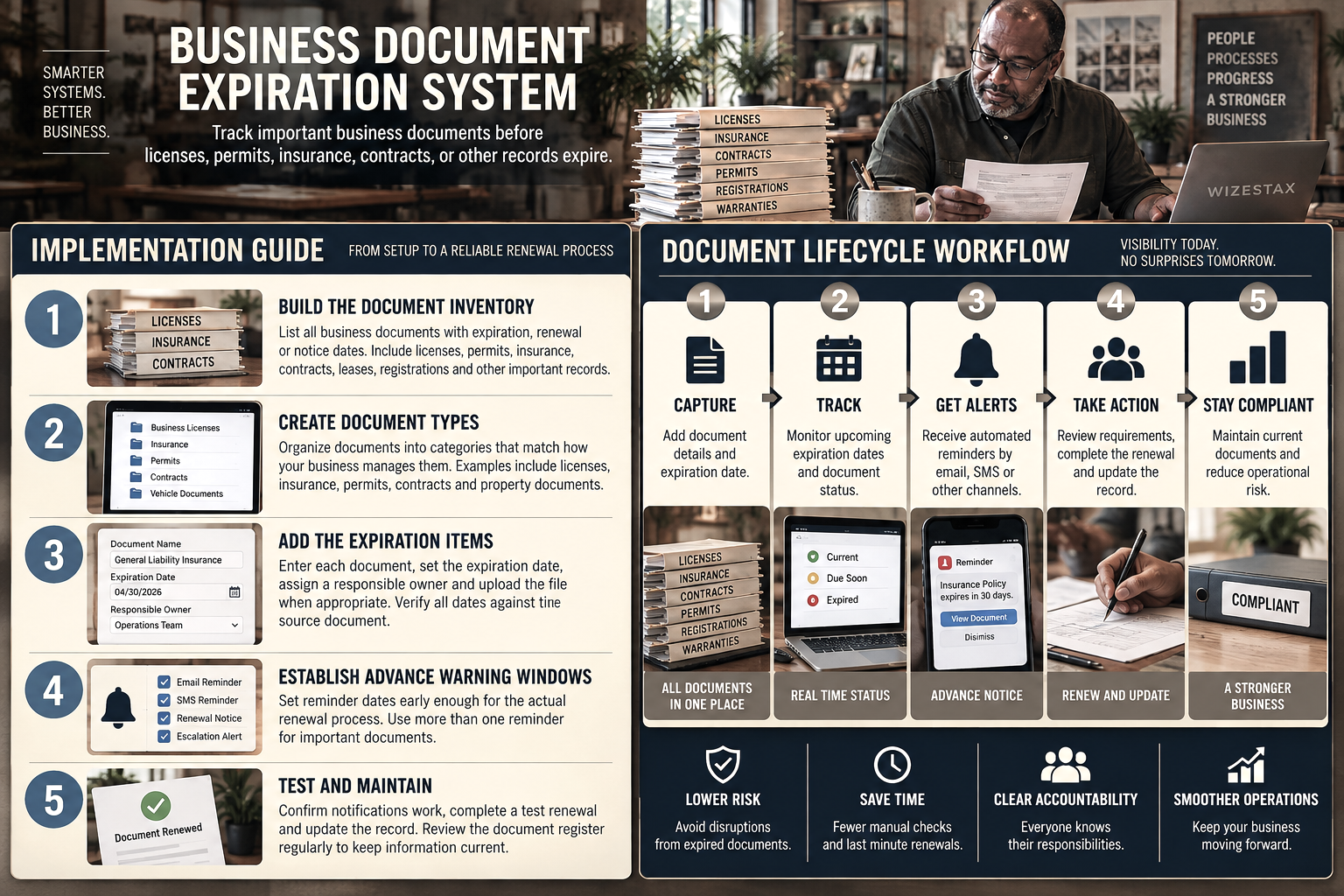
Step By Step Implementation Guide
The following setup demonstrates one implementation path using Expiration Reminder.
It is not a WIZESTAX recommendation or preferred Stax.
Expiration Reminder is used here because its document types, expiration items, contacts and reminder structure provide a clear example of how scattered expiration dates can become a repeatable business process. (Expiration Reminder Help Center)
Step 1: Build The Document Inventory
Identify the business documents that have expiration, renewal or important notice dates.
Include licenses, permits, insurance policies, registrations, contracts and other documents that could create a meaningful business problem if they quietly lapse.
Record the document name, current expiration date, responsible owner and location of the current file.
Do not assume the initial inventory is complete.
Review shared drives, physical records, email folders and existing spreadsheets for additional documents.
Step 2: Create Document Types
Group documents according to the way the business actually manages them.
Examples might include Business Licenses, Insurance, Permits, Contracts, Vehicle Documents and Property Documents.
Document types should make the expiration register easier to review without creating unnecessary categories.
Expiration Reminder specifically uses Document Types to classify expiration items and control reminder frequency. (Expiration Reminder Help Center)
Step 3: Add The Expiration Items
Open the expiration list.
Create a record for each tracked document.
Choose the appropriate document type.
Enter the expiration date and relevant record information.
Attach the current document when appropriate.
Add the contacts who need to receive notifications.
Verify every entered date against the source document before relying on the system.
Expiration Reminder Setup Guide
Step 4: Establish Advance Warning Windows
Not every document should use the same reminder schedule.
A simple registration may require little preparation.
A license, insurance policy or permit may require considerably more time.
Set reminders early enough for the actual renewal process rather than simply notifying staff immediately before expiration.
Where appropriate, use more than one reminder so unresolved renewals remain visible as the deadline approaches.
Step 5: Test The Renewal Process
Select several documents with different expiration dates.
Confirm that the correct people receive the expected notifications.
Check that the notification identifies the correct document and date.
Complete a test renewal or update process.
Confirm that the replacement document and new expiration date can be recorded correctly.
Periodically review the register for documents that have expired, records without owners and renewals that have not been updated.
Operational Exposure Snapshot
The primary economic value of this system depends on what the expiring document controls.
| Document | Possible Exposure If Missed |
|---|---|
| Business License | Ability to operate normally |
| Insurance Policy | Coverage continuity |
| Permit | Authorized business activity |
| Vehicle Registration | Vehicle availability |
| Contract Notice Date | Ability to review renewal terms |
| Lease Notice Date | Ability to make a timely occupancy decision |
| Warranty | Ability to act before coverage ends |
This table identifies areas of potential exposure rather than guaranteed financial losses. Actual consequences depend on the document, jurisdiction, contract terms and circumstances.
WIZESTAX Diagnostic Scorecard
| Category | Assessment |
|---|---|
| Economic Problem | Important business documents can lapse before management notices |
| Signal Quality Required | High |
| Automation Potential | High |
| Human Judgment Required | Moderate |
| Data Dependency | High |
| Scalability | High |
| Primary Value | Advance visibility and renewal control |
| Primary Risk | Incorrect or outdated expiration information |
Common Mistakes
| Mistake | Result |
|---|---|
| Tracking only the document name | Staff still cannot see when action is required |
| Entering dates without verifying the source document | Incorrect reminders create false confidence |
| Using one reminder window for every document | Some renewals begin too late |
| Leaving renewals without an owner | Alerts arrive without clear responsibility |
| Recording renewal completion without replacing the expiration date | The system continues using outdated information |
| Keeping separate uncoordinated spreadsheets | Management lacks a reliable expiration register |
| Assuming an alert means the renewal is complete | Notification occurs without confirming action |
| Never reviewing the document inventory | New or changed documents remain outside the system |
Related WIZESTAX Categories
| Category | Related Business Problem |
|---|---|
| Human Resources | Employee Certification Expiration |
| Human Resources | Employee License Renewal |
| Vendors | Vendor Contract Renewal |
| Vendors | Vendor Document Collection |
| Vendors | Vendor Insurance Expiration |
| Operations | Service Agreement Usage Tracking |
| Operations | Warranty Claim Tracking |
These remain separate problems. Business Document Expiration System manages the broader internal document library and the risk of important organizational records quietly lapsing. Employee Certification Expiration concerns credentials attached to individual workers. Vendor Insurance Expiration concerns insurance evidence belonging to outside vendors. Vendor Contract Renewal focuses on commercial renewal decisions and contractual timing rather than the general document register.
That gives #38 its own operational leak without absorbing the later specialized Blueprints in the roadmap.
Get New WIZESTAX Blueprints Every Monday
Subscribe to receive new WIZESTAX Blueprints covering Customer Retention, Marketing, Sales, Finance and Operations directly to your inbox.


