Inventory Shrinkage Detection System
Identify Missing Stock, Unexplained Inventory Losses, and Costly Discrepancies
Inventory can disappear from a business without anyone noticing a specific event. A hardware store receives fifty electrical components but records only forty eight. A repair shop removes replacement parts from storage without recording which job used them. A clothing retailer discovers that several items listed as available are no longer on the shelves.
Each discrepancy may appear minor. Over time, however, the difference between recorded inventory and actual physical stock can represent a substantial financial loss.
Inventory shrinkage occurs when a business has less physical inventory than its records indicate. Possible causes include theft, damaged or discarded products, receiving errors, unrecorded consumption, incorrect transfers and inaccurate transactions.
Not every discrepancy represents theft. An item may have been placed in the wrong location, counted incorrectly or assigned to an unfinished transaction.
The Inventory Shrinkage Detection System compares physical stock counts with recorded inventory balances, identifies unexplained differences and establishes a process for investigating their causes.
It connects inventory adjustments with supporting records so that businesses can distinguish verified losses from administrative errors.
The objective is not simply to correct inventory quantities.
It is to understand why discrepancies occur, measure their financial impact and identify recurring weaknesses before additional inventory disappears.
Software Linx
Starter: Sortly
Growth: inFlow Inventory
Pro: Zoho Inventory
Blueprint Overview
| Metric | Value |
|---|---|
| Category | Inventory Control And Loss Prevention |
| Business Problem | Physical stock does not match recorded inventory |
| Primary Objective | Detect, investigate and document unexplained stock losses |
| Core Signals | Physical counts, recorded quantities, adjustments, transaction history |
| Setup Time | Approximately 4 to 8 hours for an initial small inventory workflow |
| Difficulty | Intermediate |
| Maintenance | Regular cycle counts and discrepancy reviews |
| Best For | Retailers, warehouses, repair shops and inventory holding businesses |
| Primary Output | Inventory variance reports and unresolved loss investigations |
The Hidden Revenue Leak
| Without This Blueprint | With This Blueprint |
|---|---|
| Missing inventory goes unnoticed | Physical counts reveal discrepancies |
| Stock corrections lack explanations | Adjustments include documented reasons |
| Inventory losses accumulate | Repeated discrepancies become visible |
| Employees search for missing items manually | Investigation records establish next actions |
| Incorrect stock balances affect decisions | Verified counts improve inventory accuracy |
| Receiving errors remain unidentified | Transaction histories support investigation |
| Inventory losses are difficult to quantify | Variances are assigned financial values |
Inventory records are only as reliable as the transactions and physical counts supporting them.
A business may purchase one hundred units of a product, sell sixty and expect forty units to remain.
If the physical count reveals only thirty six units, four units are unaccounted for.
The difference may have several explanations.
A shipment could have arrived short. A sale may have been processed using the wrong product code. Merchandise may have been damaged and discarded without documentation. An employee may have moved the items to another storage location without recording the transfer.
The missing quantity is measurable, but its cause is not immediately established.
Businesses sometimes resolve these discrepancies by changing the recorded quantity to match the physical count.
Although the adjustment may restore inventory accuracy, it can also conceal the operational problem.
If the reason is never investigated, the same discrepancy may occur again.
The financial exposure becomes more significant when the business manages hundreds or thousands of products across several storage locations.
Small differences involving high value products can produce substantial losses.
Repeated discrepancies involving inexpensive products can also accumulate.
An effective shrinkage detection process preserves the original expected quantity, the verified physical count, the difference and the explanation for any approved adjustment.
This creates a record that can be reviewed for recurring patterns.
The system should not automatically interpret every negative variance as stolen inventory.
Its purpose is to identify unexplained differences and provide enough evidence for an appropriate investigation.
Business Impact Snapshot
| Area | Potential Impact |
|---|---|
| Inventory Value | Better visibility into unexplained stock losses |
| Financial Reporting | More accurate inventory balances |
| Receiving | Earlier identification of quantity errors |
| Operations | Less time investigating recurring discrepancies |
| Accountability | Documented reasons for inventory adjustments |
| Purchasing | More reliable stock information |
| Management | Visibility into recurring loss patterns |
Real World Example
A regional hardware supplier stores electrical fittings, plumbing components and specialty fasteners across a warehouse and retail counter.
One particular electrical connector has a recorded inventory balance of 240 units.
During a scheduled physical count, an employee finds only 216 units.
The discrepancy represents 24 missing connectors.
Each connector has an inventory cost of $18.
The unexplained difference therefore represents $432 in potential inventory loss.
Without a structured investigation process, the business might simply reduce the recorded quantity to 216.
The inventory system would become accurate again, but the reason for the missing connectors would remain unknown.
With an Inventory Shrinkage Detection System, the physical count creates a variance requiring review.
The manager examines recent sales, purchase receipts, inventory transfers and adjustment records.
The investigation discovers that a shipment of 20 connectors was recorded as received before the warehouse verified the delivered quantity.
The remaining four connectors cannot immediately be accounted for.
The business corrects the receiving discrepancy using supporting documentation and records the four remaining units as unresolved.
The investigation reveals two different problems rather than treating all 24 units as a single unexplained loss.
The company can address the receiving procedure while continuing to investigate the remaining discrepancy.
The system does not guarantee that every missing item will be recovered.
It prevents unexplained inventory differences from disappearing into routine stock adjustments without examination.
WIZESTAX Stax Options
Starter Stax
Sortly
Best For
Small businesses that need straightforward physical inventory tracking, mobile stock counts and visibility into quantity changes across storage locations.
| Function | Software |
|---|---|
| Inventory Records | Sortly Items |
| Storage Organization | Folders |
| Product Identification | Barcode And QR Scanning |
| Physical Verification | Stock Counts |
| Quantity Changes | Transactions |
| Inventory Movement | Move Summary |
| Employee Activity | User Activity Reports |
| Discrepancy Investigation | Reports And Documented Review |
Sortly provides a visual inventory management environment that allows businesses to organize products, materials and equipment into locations and categories.
Employees can create item records containing quantities, photographs, identifying information and custom fields.
Barcode and QR scanning can simplify the process of locating and updating inventory records.
For businesses with limited administrative resources, this provides an accessible foundation for physical inventory verification.
Sortly also supports stock counting workflows that allow employees to create, assign and track inventory counts.
Activity History reports show changes made to inventory records.
Transaction reports provide information about quantity changes, including the associated activity and user information.
Item Flow reports help businesses examine increases and decreases in recorded quantities over a selected period.
These records can support an investigation when physical stock does not match expected quantities.
However, a quantity change alone does not establish the reason for a loss.
A business must still review supporting evidence, investigate receiving and transfer activity, and determine whether the discrepancy represents a genuine shortage.
Sortly’s value in this Blueprint comes from making inventory movements and employee updates easier to document and review.
Advantages
| Benefit |
|---|
| Mobile inventory access |
| Barcode and QR scanning |
| Organized storage locations |
| Stock counting workflows |
| Inventory activity reporting |
Limitations
| Limitation |
|---|
| Investigation procedures require management oversight |
| Feature availability varies by subscription |
| Quantity changes do not automatically establish causes |
| Accounting reconciliation may require additional processes |
| More complex warehouse operations may need specialized controls |
Growth Stax
inFlow Inventory
Best For
Product based businesses that need structured stock counts, inventory adjustments and transaction records across purchasing and warehouse operations.
| Function | Software |
|---|---|
| Product Records | Products |
| Storage Tracking | Inventory Locations |
| Physical Verification | Stock Counts |
| Quantity Corrections | Stock Adjustments |
| Adjustment Documentation | Adjustment Reasons |
| Product Identification | Barcode Scanning |
| Purchasing Records | Purchase Orders |
| Inventory Investigation | Stock And Transaction Records |
inFlow Inventory connects product quantities with purchasing, sales and warehouse activity.
Businesses can maintain inventory records by product and location while recording the transactions that change stock balances.
Its stock counting workflow allows employees to prepare physical counts and compare the results with recorded quantities.
Counts can be organized into sheets for employees working on different sections of an inventory.
When discrepancies are confirmed, stock adjustments can correct the recorded quantity.
inFlow supports adjustment reasons, allowing businesses to distinguish corrections from damaged goods, write offs and other inventory events.
Employees can also add remarks to provide further context.
This is important because a negative adjustment should not automatically be treated as theft or unexplained shrinkage.
A damaged item that was properly documented represents a different operational problem from inventory that cannot be located.
The business can investigate differences using purchasing, sales and stock movement records before approving corrections.
The quality of the results depends on whether employees record inventory transactions accurately and whether physical counts are performed consistently.
inFlow provides the underlying inventory controls, but the company must establish its own investigation thresholds and review responsibilities.
Advantages
| Benefit |
|---|
| Structured physical stock counts |
| Inventory tracking by location |
| Documented adjustment reasons |
| Connected purchasing and sales records |
| Supports investigation of quantity discrepancies |
Limitations
| Limitation |
|---|
| Physical counts still require employee participation |
| Investigation thresholds require configuration or procedures |
| Inventory adjustments do not independently establish causes |
| Count accuracy depends on transaction timing |
| Workflow complexity increases with inventory volume |
Pro Stax
Zoho Inventory
Best For
Businesses managing larger product catalogs, multiple warehouses and inventory controls requiring documented stock adjustments and approval procedures.
| Function | Software |
|---|---|
| Product Records | Items |
| Warehouse Tracking | Warehouses |
| Physical Verification | Stock Counts |
| Quantity Corrections | Inventory Adjustments |
| Adjustment Classification | Adjustment Reasons |
| Inventory Traceability | Serial And Batch Tracking |
| Change Investigation | Activity Logs And Audit Trail |
| Management Review | Stock Count Approval Workflow |
Zoho Inventory provides inventory management capabilities that connect product records, warehouse quantities, purchasing and sales activity.
Businesses can conduct physical stock counts and compare counted quantities against recorded inventory balances.
The Stock Counts module supports scheduled and recurring counts.
Employees can submit counts through the mobile application, while authorized personnel review the results through the web application.
When a count reveals a mismatch, the approver can investigate the difference, reject the count for verification or approve an appropriate adjustment.
The platform also supports inventory adjustments with recorded reasons and associated accounting treatment.
This allows businesses to distinguish different types of quantity corrections rather than combining every discrepancy into a single category.
Zoho Inventory provides activity logs and audit trail reporting that can help managers examine changes to inventory records.
Serial and batch tracking can provide additional traceability for products that require individual or grouped identification.
These capabilities are useful when discrepancies involve expensive products, multiple locations or repeated inventory adjustments.
However, the Stock Counts feature is available in the Premium and Enterprise plans or through the applicable Advanced Warehouse Operations add on.
Serial and batch tracking also depend on subscription availability.
The business should verify the necessary features before selecting a plan.
Zoho Inventory’s role in this Blueprint is to connect physical verification, inventory adjustments and management review within a structured operational environment.
Advantages
| Benefit |
|---|
| Scheduled and recurring stock counts |
| Warehouse inventory tracking |
| Documented inventory adjustments |
| Approval workflow for count discrepancies |
| Activity logs and audit trail reporting |
Limitations
| Limitation |
|---|
| Stock Counts availability depends on plan or add on |
| Serial and batch tracking require eligible subscriptions |
| Configuration requires inventory process knowledge |
| Audit records do not independently prove misconduct |
| Complex discrepancies still require manual investigation |
How The Three Stax Differ
Each platform approaches inventory shrinkage detection through a different operational structure.
Sortly
Provides mobile inventory records, stock counts and activity reporting. This approach suits businesses that need to establish basic visibility into inventory quantities and changes without implementing a more extensive warehouse system.
inFlow Inventory
Connects stock counting and adjustments with product, purchasing and warehouse records. This approach suits businesses that need to investigate inventory differences within their existing inventory transaction process.
Zoho Inventory
Provides structured stock counts, adjustment reasons, approval workflows and audit records. This approach suits businesses that need stronger controls around physical verification and inventory corrections across multiple operational locations.
These are different implementation architectures rather than rankings.
The appropriate system depends on inventory volume, transaction complexity, existing software and the level of financial oversight required.
Copy And Paste Inventory Discrepancy Alert
Inventory discrepancy requires review.
Product: {{product_name}}
SKU: {{sku}}
Location: {{warehouse_location}}
Expected quantity: {{expected_quantity}}
Physical count: {{counted_quantity}}
Quantity variance: {{quantity_variance}}
Unit cost: {{unit_cost}}
Estimated variance value: {{variance_value}}
Count date: {{count_date}}
Assigned reviewer: {{assigned_employee}}
Current investigation status: {{investigation_status}}
Review recent receipts, sales, transfers and inventory adjustments.
Verify the physical count before recording a permanent correction.
Document any receiving errors, unrecorded movements or damaged inventory.
If the difference remains unexplained, assign an investigation owner and establish the next review date.
Do not classify the discrepancy as theft without supporting evidence.
Copy And Paste Inventory Investigation Record
Inventory discrepancy investigation
Reference: {{investigation_number}}
Product: {{product_name}}
SKU: {{sku}}
Storage location: {{location}}
Date identified: {{date_identified}}
Recorded quantity: {{recorded_quantity}}
Verified quantity: {{verified_quantity}}
Quantity difference: {{difference}}
Estimated cost exposure: {{cost_exposure}}
Recent receiving activity: {{receiving_activity}}
Recent sales activity: {{sales_activity}}
Recent transfers: {{transfer_activity}}
Previous adjustments: {{adjustment_history}}
Recount completed: {{recount_status}}
Identified cause: {{identified_cause}}
Supporting evidence: {{supporting_evidence}}
Corrective action: {{corrective_action}}
Assigned reviewer: {{assigned_reviewer}}
Approval status: {{approval_status}}
Final resolution: {{resolution}}
Preserve the original variance and investigation history.
Record whether the discrepancy was explained, partially explained or unresolved.
Copy And Paste AI Prompt
You are assisting a small business with inventory shrinkage detection and stock discrepancy investigation.
Review the provided inventory records, physical stock counts, receiving documents, sales transactions, inventory transfers and adjustment history.
Identify products where verified physical quantities differ from recorded stock balances.
Calculate the quantity variance for each affected product.
Estimate the financial exposure using documented inventory unit costs.
Identify repeated negative adjustments involving the same products or locations.
Compare stock discrepancies with receiving and transfer records.
Flag products with unusually frequent quantity corrections.
Distinguish documented damage, authorized disposal and known administrative errors from unexplained inventory differences.
Identify missing transaction records that could explain a variance.
Do not assume that a negative inventory variance represents theft.
Do not accuse employees or assign responsibility for misconduct based solely on inventory records.
Do not invent missing quantities, costs or transaction histories.
Separate confirmed inventory losses from discrepancies that remain under investigation.
Present the findings in a table containing the product, SKU, location, expected quantity, counted quantity, variance, estimated cost exposure, supporting evidence, investigation status and recommended next action.
Where the available records are insufficient, identify the additional information required.
Prioritize discrepancies based on documented financial exposure and repeated unresolved patterns.
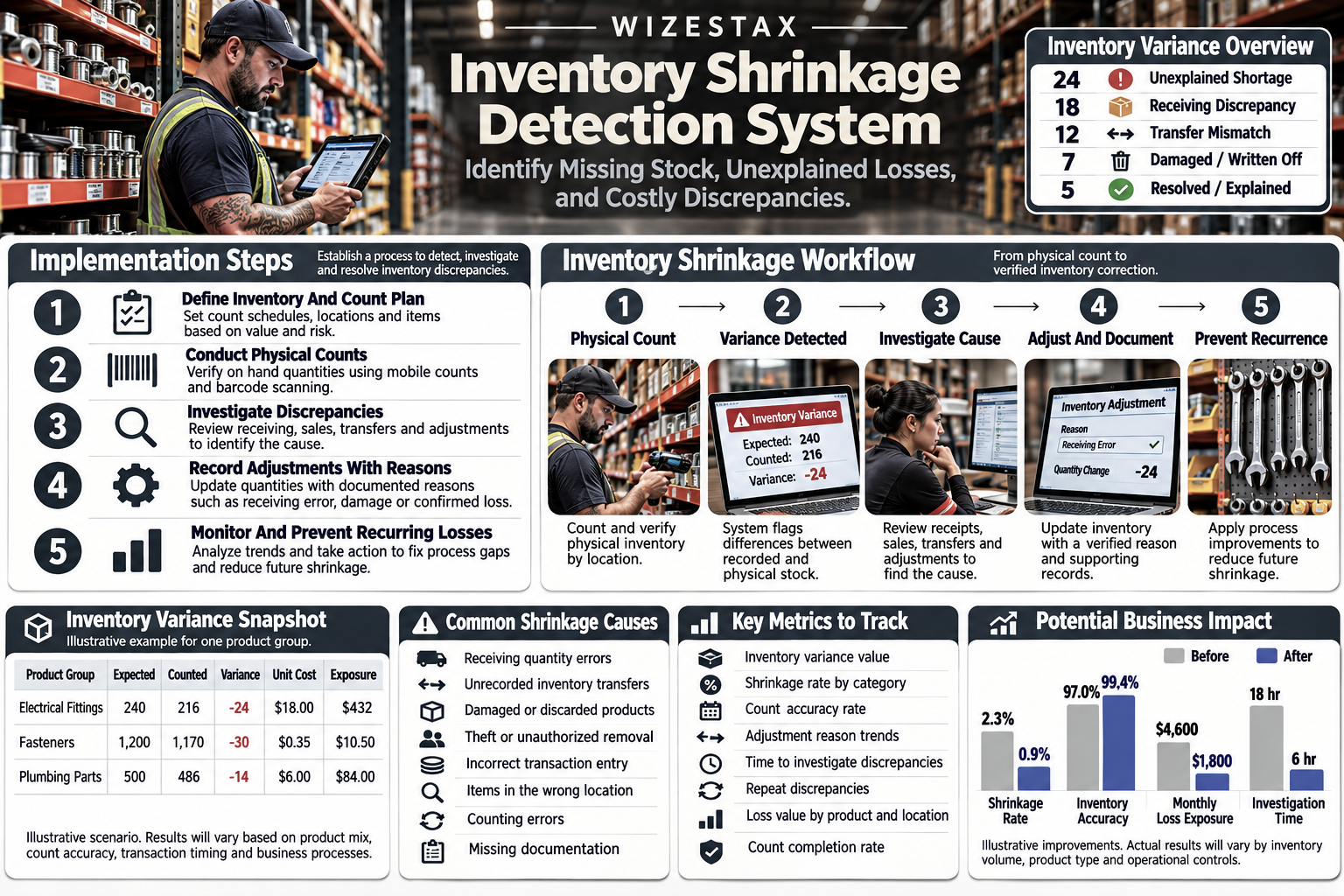
Step By Step Implementation Guide
The following implementation demonstrates one inventory shrinkage detection workflow using Zoho Inventory.
This example is not a WIZESTAX endorsement or preferred Stax.
Zoho Inventory is used because its stock counting, adjustment and approval capabilities provide a clear example of how businesses can connect physical inventory verification with documented discrepancy review.
Step 1: Define Inventory Shrinkage
Establish which inventory differences require investigation.
Inventory shrinkage should represent a confirmed reduction in physical stock that cannot be fully explained by authorized and properly recorded inventory activity.
An initial count difference should be treated as a discrepancy until the business verifies its cause.
Separate inventory events into appropriate categories.
Examples include:
Receiving Error
Unrecorded Sale
Incorrect Transfer
Damaged Inventory
Authorized Disposal
Counting Error
Unexplained Shortage
Confirmed Loss
This distinction prevents routine inventory corrections from being classified incorrectly.
Step 2: Verify Inventory Records
Review the products and locations included in the inventory system.
Confirm that each product has a unique identifier.
Check that quantities are assigned to the correct warehouse.
Review whether product costs are recorded consistently.
Identify duplicate product records and outdated inventory locations.
Physical counts cannot produce reliable comparisons when the underlying records are inaccurate.
Step 3: Select Inventory For Counting
Identify products that require regular physical verification.
Consider inventory value, transaction frequency, historical discrepancies and operational importance.
High value products may require more frequent counts than inexpensive items with stable transaction histories.
Businesses should also include lower value products that have experienced repeated unexplained shortages.
The counting schedule should reflect actual exposure rather than treating every product identically.
Step 4: Configure Stock Counts
In Zoho Inventory, enable the Stock Counts module where supported by the subscription.
Confirm that the required warehouse settings are enabled.
Create a stock count and select the relevant products.
Assign employees responsible for performing the physical verification.
Establish a count date and review deadline.
For recurring verification, configure a repeating count schedule where appropriate.
Step 5: Establish Counting Procedures
Define how employees should count inventory.
Specify whether products will be counted by individual unit, package, case or another consistent measurement.
Ensure that employees understand the unit of measure associated with each product.
Where possible, pause inventory movements during the count or establish a documented method for accounting for transactions occurring during the counting period.
Unrecorded movements can create apparent discrepancies even when no stock has been lost.
Step 6: Record Physical Quantities
Use the supported mobile stock counting workflow to enter verified quantities.
Where appropriate, use barcode scanning to identify products.
Record the actual physical quantity rather than copying the expected inventory balance.
If an item cannot be located, verify its storage location before recording a shortage.
Submit the completed count for review.
Step 7: Identify Inventory Variances
Compare recorded stock balances against submitted physical counts.
Calculate the difference for each product.
| Measurement | Calculation |
|---|---|
| Quantity Variance | Counted Quantity Minus Recorded Quantity |
| Shortage Quantity | Recorded Quantity Minus Counted Quantity, When Positive |
| Shortage Value | Shortage Quantity Multiplied By Unit Cost |
| Count Accuracy | Matching Product Records Divided By Counted Product Records |
A negative quantity variance indicates fewer physical units than recorded.
A positive variance indicates more physical units than recorded.
Neither result independently establishes the cause.
Step 8: Establish Investigation Thresholds
Define which discrepancies require additional review.
Thresholds may depend on monetary value, percentage variance, product sensitivity or repeated discrepancies.
A missing $300 component may deserve immediate investigation.
A one unit difference involving an inexpensive consumable may require a recount and routine documentation.
Repeated small discrepancies should not be ignored merely because each individual amount is low.
Use consistent criteria and document exceptions.
Step 9: Investigate Transaction History
Review the inventory activity associated with each significant variance.
Check recent purchase receipts.
Compare sales and fulfillment records.
Review transfers between warehouses.
Examine previous inventory adjustments.
Verify whether damaged or discarded goods were recorded correctly.
Where serial or batch tracking is available, use the associated records to narrow the investigation.
Do not conclude that an employee caused a loss simply because the employee processed the most recent transaction.
Step 10: Recount Unresolved Items
When a discrepancy cannot be explained, perform a second physical count.
Where appropriate, assign a different employee to verify the quantity.
Inspect nearby storage locations.
Check whether the product was stored under another identifier.
Review open receiving and fulfillment activity that may affect the expected balance.
Document the second count separately from the original result.
A recount may resolve a counting error without requiring an inventory adjustment.
Step 11: Classify Confirmed Differences
Assign an appropriate reason to each verified inventory difference.
| Reason | Required Review |
|---|---|
| Receiving Error | Compare purchase and delivery records |
| Counting Error | Verify recount results |
| Damaged Inventory | Confirm disposal documentation |
| Incorrect Transfer | Review location movements |
| Unrecorded Consumption | Identify authorized usage |
| Unexplained Shortage | Continue investigation |
| Confirmed Loss | Document supporting evidence |
Do not use a generic shrinkage reason when the actual cause is known.
Preserving accurate classifications helps management identify which operating procedures require improvement.
Step 12: Review And Approve Adjustments
In Zoho Inventory, review submitted stock counts through the approval workflow.
Examine unmatched quantities and available transaction information.
Reject a count when additional verification is required.
When an adjustment is justified, select the appropriate reason and approve the correction.
Ensure that the adjustment reflects the verified physical quantity.
Record the financial treatment using the company’s established accounting procedures.
Approval should not erase the original discrepancy or investigation history.
Step 13: Monitor Adjustment Activity
Review inventory adjustment records periodically.
Look for products with repeated negative corrections.
Examine whether discrepancies are concentrated in specific locations or product categories.
Review adjustment reasons and supporting documentation.
Use activity logs and audit trail reporting to investigate relevant record changes.
Do not interpret unusual activity as proof of misconduct without further evidence.
The objective is to identify weak processes and unexplained losses.
Step 14: Measure Shrinkage Exposure
Calculate confirmed inventory losses for the reporting period.
Separate unresolved discrepancies from losses with established causes.
Review the value of shortages using consistent inventory costing methods.
A business may also calculate shrinkage as a percentage of inventory available during the period, provided the numerator and denominator use compatible cost values and a consistent reporting period.
Do not compare inventory cost losses directly against retail sales revenue without clearly identifying the different measurement bases.
Step 15: Correct Recurring Problems
Use investigation results to improve inventory controls.
Receiving discrepancies may require more consistent delivery verification.
Transfer errors may require barcode scanning and confirmation at both locations.
Unrecorded consumption may require a clearer process for assigning materials to jobs.
Repeated unexplained losses may justify additional access controls or more frequent independent counts.
The purpose is to address the underlying cause rather than repeatedly adjusting inventory balances.
Inventory Shrinkage Cost Exposure Snapshot
| Monthly Inventory Cost Value | Assumed Shrinkage Rate | Potential Monthly Loss |
|---|---|---|
| $20,000 | 1% | $200 |
| $50,000 | 1% | $500 |
| $100,000 | 1% | $1,000 |
These illustrative scenarios apply an assumed 1% shrinkage rate to the cost value of inventory handled during a month.
The figures represent potential inventory loss exposure rather than guaranteed savings or an industry benchmark.
Actual shrinkage depends on product types, inventory controls, transaction accuracy and the business’s operating environment.
The calculation should use a consistent inventory cost basis and should not be interpreted as a percentage of sales unless sales and losses have been measured using compatible values.
WIZESTAX Diagnostic Scorecard
| Category | Assessment |
|---|---|
| Economic Problem | Unexplained reductions in physical inventory value |
| Signal Quality Required | High |
| Automation Potential | Moderate To High |
| Human Judgment Required | High |
| Data Dependency | High |
| Scalability | High |
| Primary Value | Visibility into inventory discrepancies and their causes |
| Primary Risk | Treating every negative variance as theft |
Common Mistakes
| Mistake | Result |
|---|---|
| Adjusting inventory without investigating | Recurring causes remain unidentified |
| Assuming every shortage is theft | Administrative errors are misclassified |
| Using inaccurate product records | Physical comparisons become unreliable |
| Counting during unrecorded stock movements | False discrepancies appear |
| Ignoring small repeated shortages | Cumulative losses remain hidden |
| Failing to document damaged goods | Authorized disposal appears unexplained |
| Recording all adjustments under one reason | Loss patterns become difficult to analyze |
| Skipping independent recounts | Counting errors become permanent adjustments |
| Failing to review receiving records | Delivery discrepancies remain unresolved |
| Ignoring warehouse transfers | Stock may appear missing from the wrong location |
| Assigning blame without evidence | Employees may face unsupported accusations |
| Failing to preserve investigation history | Repeated discrepancies cannot be traced |
| Measuring losses using inconsistent costs | Financial exposure becomes misleading |
| Reviewing reports without corrective action | The same inventory problems continue |
Get New WIZESTAX Blueprints Every Monday
Subscribe to receive new WIZESTAX Blueprints covering Customer Retention, Marketing, Sales, Finance and Operations directly to your inbox.