
Field Worker Check In System
Identify Missed Employee Check Ins Before Communication Gaps Become Operational Or Safety Incidents
Field employees regularly perform assignments away from direct supervision. Maintenance technicians work inside vacant buildings, property inspectors visit remote locations and cleaning crews complete evening assignments after office personnel have left for the day. These employees may have reliable schedules and clearly assigned responsibilities, but a scheduled assignment does not confirm that a worker remains safe, reachable or able to continue working.
When an employee stops responding, managers may not immediately recognize the problem. The worker could be experiencing poor cellular reception, an unexpected equipment issue, a medical emergency or another situation requiring assistance.
The Field Worker Check In System establishes scheduled communication checkpoints and identifies when an expected employee response has not been received. The system records check in confirmations, monitors expected response times and provides a defined escalation process when a worker cannot be reached.
Its purpose is not to continuously monitor employees or treat every missed response as an emergency. It provides a structured way to distinguish normal field activity from communication gaps requiring investigation. A missed check in should initiate an appropriate response rather than automatically establish that an employee is in danger.
Software Linx
Starter: Jotform
Growth: Connecteam
Pro: Make
Blueprint Overview
| Metric | Value |
|---|---|
| Category | Field Operations And Worker Safety |
| Business Problem | Employees working remotely may become unreachable without timely detection |
| Primary Objective | Identify missed worker check ins and initiate appropriate follow up |
| Core Signals | Worker identity, assignment, expected check in, response time and escalation status |
| Setup Time | Approximately 3 to 6 hours |
| Difficulty | Intermediate |
| Maintenance | Daily exception monitoring and periodic escalation testing |
| Best For | Businesses with mobile, remote or independently working employees |
| Primary Output | Check in records, missed response alerts and escalation documentation |
The Hidden Revenue Leak
| Without This Blueprint | With This Blueprint |
|---|---|
| Worker availability remains uncertain | Scheduled check ins establish communication |
| Missed responses go unnoticed | Missing confirmations trigger review |
| Supervisors rely on informal calls | Communication follows a defined procedure |
| Employee problems surface late | Unusual silence receives earlier attention |
| Escalation responsibilities are unclear | Assigned contacts manage exceptions |
| Incident timelines are incomplete | Check in and response activity is recorded |
A business may know where an employee is scheduled to work without knowing whether the employee can still be contacted.
This creates an operational visibility problem that ordinary scheduling software does not necessarily resolve.
Consider a maintenance employee assigned to inspect equipment at an unoccupied commercial property. The employee is expected to complete the assignment independently and return to the office afterward.
If the worker experiences a problem and stops communicating, the business may not recognize the interruption until the scheduled return time has passed.
The consequences depend on the circumstances.
A simple communication failure might delay the next assignment while the office attempts to locate the employee. A more serious situation could require assistance from a supervisor, property manager or emergency responder.
Businesses may experience additional administrative work, delayed service commitments and increased exposure when incidents are not identified promptly.
The system cannot prevent workplace accidents or guarantee that a worker can request assistance during an emergency.
Its value comes from establishing an expected communication schedule and ensuring that missed responses are investigated according to a documented procedure.
Business Impact Snapshot
| Area | Potential Impact |
|---|---|
| Worker Safety | Earlier investigation of unexplained silence |
| Operations | Better visibility into employee availability |
| Administrative Labor | Less uncertainty about communication responsibilities |
| Incident Response | Clearer escalation procedures |
| Accountability | Recorded check in expectations |
| Management | Measurable communication reliability |
Real World Example
A commercial property management company employs technicians who inspect vacant buildings and maintain mechanical equipment.
One technician is assigned to inspect an electrical equipment room inside a commercial property that is temporarily unoccupied.
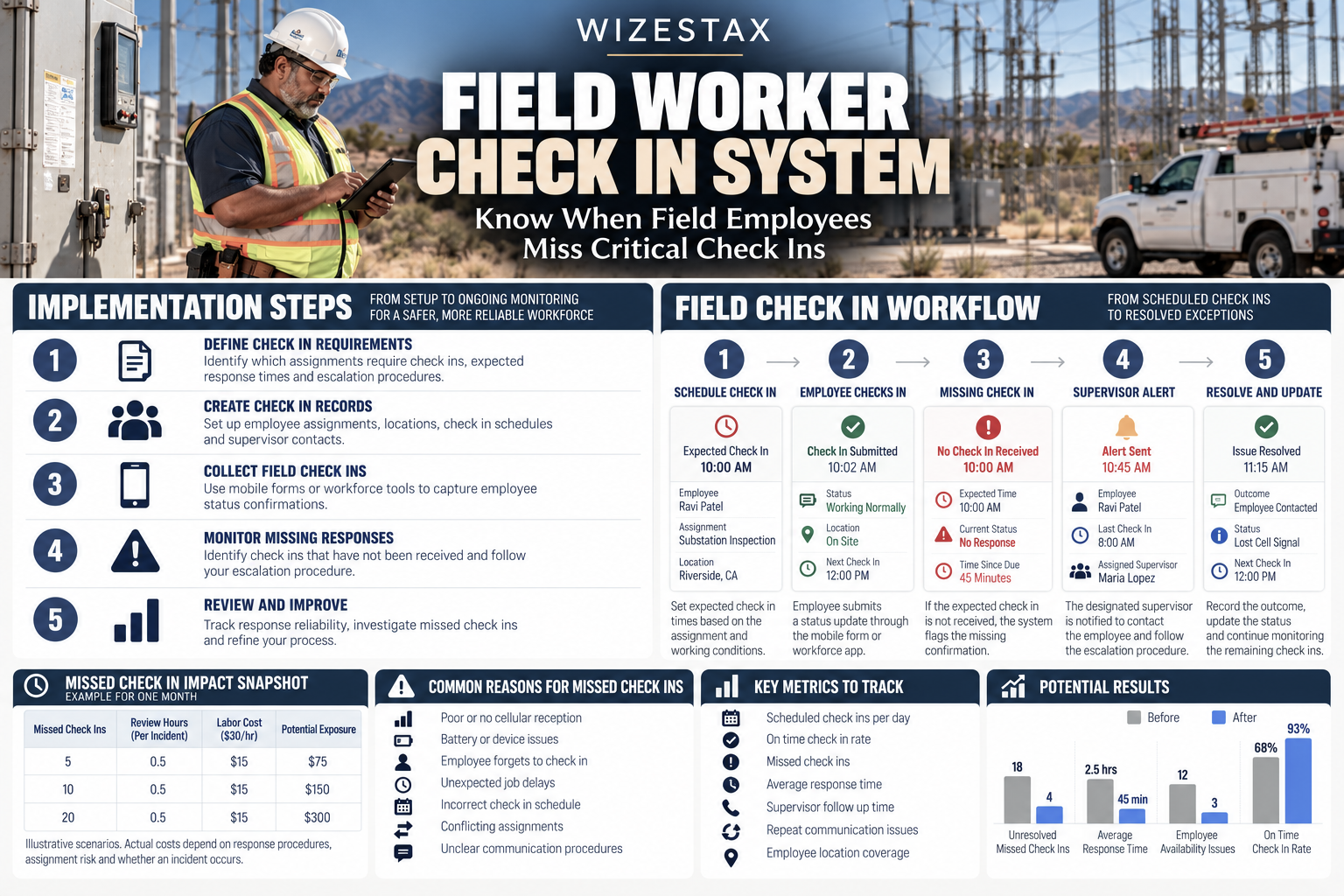
The technician begins the assignment at 9:00 AM and is expected to complete a status check at 10:00 AM.
Under the company’s existing procedure, employees contact the office only when they encounter a problem.
At 10:00 AM, the office receives no update.
Without a structured check in system, the absence of communication may go unnoticed because the technician is not expected to return until later in the afternoon.
With a Field Worker Check In System, the assignment includes a required confirmation time.
When the expected response is not received, the system flags the missing check in.
The designated supervisor attempts to contact the employee through the approved communication channel.
If the employee remains unreachable, the supervisor follows the company’s escalation procedure, considering the work location, known hazards and available emergency contacts.
The employee may simply have lost cellular reception inside the equipment room.
Alternatively, the situation may require assistance.
The system does not determine which explanation is correct. It ensures that the unexplained communication gap receives attention rather than remaining unnoticed.
WIZESTAX Stax Options
Starter Stax
Jotform
Best For
Small businesses that need a customizable mobile check in form without implementing a complete workforce management platform.
| Function | Software |
|---|---|
| Employee Check Ins | Mobile Forms |
| Worker Identification | Form Fields |
| Assignment Details | Custom Fields |
| Response Time | Submission Records |
| Optional Location | Geo Stamp Widget |
| Supervisor Updates | Email Notifications |
| Conditional Routing | Form Conditions |
Jotform allows businesses to create mobile forms that employees can complete during field assignments.
A basic check in form can record the employee’s identity, assignment location, current status and whether assistance is required.
The business can establish scheduled response times and provide workers with a mobile form link.
When an employee submits the form, Jotform records the response and can notify designated supervisors through configured email notifications.
Conditional logic can direct different responses to appropriate contacts.
For example, an employee selecting Assistance Required can trigger a separate notification from a routine status confirmation.
Location information can also be collected through supported widgets when appropriate permissions are available.
However, location data should not be treated as continuous employee tracking or proof that the worker is safe.
Jotform primarily records submitted information. Detecting the absence of an expected submission requires a separate monitoring procedure or connected automation.
A business using Jotform alone must ensure that a supervisor actively reviews expected check ins and follows up when responses are missing.
Advantages
| Benefit |
|---|
| Customizable mobile check in forms |
| Simple employee status collection |
| Conditional notification routing |
| Optional location information |
| Centralized submission records |
| Limited technical setup |
Limitations
| Limitation |
|---|
| Missed submissions require separate monitoring |
| Employees must complete forms |
| Location accuracy depends on device permissions |
| Offline submissions may not arrive immediately |
| Emergency escalation requires additional procedures |
| Not a dedicated lone worker protection platform |
Growth Stax
Connecteam
Best For
Businesses managing multiple mobile employees that want field check ins integrated with workforce communication, scheduling and employee management.
| Function | Software |
|---|---|
| Employee Records | Employee Management |
| Work Scheduling | Job Scheduler |
| Check In Forms | Forms And Checklists |
| Employee Communication | Team Chat |
| Location Records | Location Stamps |
| Supervisor Alerts | Form Notifications |
| Activity Review | Submission History |
Connecteam provides workforce management tools designed for employees who perform work away from traditional office environments.
Its forms and checklists allow businesses to establish standardized field reporting procedures.
Employees can submit status confirmations through the mobile application, including information about their current assignment, work conditions and whether additional assistance is needed.
Managers can review submitted records and receive configured notifications.
The platform also supports employee scheduling and communication, allowing supervisors to connect check in activity with the employee’s assigned work.
Location stamps can provide additional context when supported and enabled.
Connecteam also offers location tracking capabilities associated with its time clock, but those features should not be confused with a dedicated emergency monitoring service.
A worker’s recorded location does not establish that the employee is safe or able to respond.
For a Field Worker Check In System, the business must define expected response times and ensure that missing confirmations are identified.
Forms, reminders and notifications can support that process, but a reliable missed response escalation workflow may require additional configuration or active supervisor review.
Advantages
| Benefit |
|---|
| Centralized mobile workforce records |
| Employee forms and checklists |
| Integrated team communication |
| Scheduling visibility |
| Location information where enabled |
| Organized supervisor notifications |
Limitations
| Limitation |
|---|
| Not a substitute for emergency monitoring |
| Missed check in escalation needs configuration |
| Workers require appropriate device access |
| Location features depend on permissions and plans |
| Communication may fail in remote areas |
| Employee privacy requires clear policies |
Pro Stax
Make
Best For
Businesses operating across multiple systems that need automated detection of missing check ins, configurable escalation procedures and centralized exception reporting.
| Function | Software |
|---|---|
| Workflow Automation | Make |
| Check In Collection | Connected Form Or Application |
| Employee Records | Connected Database |
| Schedule Monitoring | Scheduled Scenarios |
| Missing Response Detection | Filters And Data Comparison |
| Escalation Routing | Routers |
| Supervisor Notifications | Connected Messaging Service |
| Exception Records | Connected Database Or CRM |
Make provides a visual automation environment that connects applications and processes information between them.
Unlike Jotform and Connecteam, Make is not a dedicated employee management or worker safety application.
Its role is to coordinate information from an existing check in system and identify when expected confirmations have not arrived.
A business can maintain a database containing employee assignments, expected check in times and designated escalation contacts.
Employees submit confirmations through a connected form or mobile application.
Make receives or retrieves those records and compares them with the expected schedule.
When a required response is missing beyond the configured tolerance period, the workflow can create an exception record and send a notification to the responsible supervisor.
Additional conditions can distinguish between routine communication delays, employees who have completed their assignments and situations requiring further investigation.
For example, the system may send an initial reminder before escalating an unresolved missing response.
A separate workflow can record when a supervisor acknowledges the alert and documents the outcome.
This architecture supports more complex operations, but it introduces dependencies on the availability of connected applications, accurate scheduling data and reliable notification delivery.
Make cannot determine whether an employee is experiencing an emergency.
The business must establish an appropriate response procedure and ensure that responsible personnel are available to act when an alert occurs.
Advantages
| Benefit |
|---|
| Automated missing response detection |
| Custom escalation conditions |
| Integration across existing applications |
| Flexible supervisor notification routing |
| Centralized exception records |
| Adaptable to different field operations |
Limitations
| Limitation |
|---|
| Requires connected data sources |
| More technical configuration |
| External messaging costs may apply |
| Workflow failures require monitoring |
| Emergency response remains a human responsibility |
| Not a certified lone worker safety service |
How The Three Stax Differ
Each platform supports field worker check ins through a different operating model.
Jotform
Provides customizable mobile forms for recording employee status, assignment information and requests for assistance. This approach is suited to smaller businesses that need a simple communication record and can manage missing responses through a defined supervisor process.
Connecteam
Connects employee check in records with workforce scheduling, communication and field management. This approach is suited to businesses that want a consistent reporting process across several mobile employees.
Make
Coordinates expected check in schedules, received confirmations and escalation notifications across connected applications. This approach is suited to organizations that require customized missing response detection without replacing their existing systems.
These are different implementation architectures rather than rankings.
Businesses with hazardous lone worker assignments should separately evaluate dedicated safety monitoring services, emergency communication capabilities and applicable workplace safety requirements.
The appropriate system depends on worker exposure, communication reliability, operational complexity and the level of monitoring required.
Copy And Paste Worker Check In Form
Field Worker Status Confirmation
Employee Name: {{employee_name}}
Assignment: {{assignment_name}}
Work Location: {{work_location}}
Check In Time: {{check_in_time}}
Current Status: {{worker_status}}
Communication Available: {{communication_status}}
Assistance Required: {{assistance_required}}
Additional Information: {{worker_notes}}
Next Expected Check In: {{next_check_in}}
Submit this form at the required communication checkpoint.
If immediate assistance is needed, follow the company’s emergency procedure rather than relying solely on this form.
Copy And Paste Missed Check In Alert
Field worker check in requires review.
Employee: {{employee_name}}
Assignment: {{assignment_name}}
Last Confirmed Check In: {{last_check_in}}
Expected Check In: {{expected_check_in}}
Current Status: No Confirmation Recorded
Assigned Supervisor: {{supervisor_name}}
Contact the employee using the approved communication procedure.
If the employee remains unreachable, follow the established escalation process and document the outcome.
Do not assume that a missing response confirms an emergency.
Copy And Paste Supervisor Follow Up
Hello {{employee_name}},
We have not received your scheduled check in for {{assignment_name}}.
Please confirm your current status and whether you require assistance.
If you are unable to complete the normal check in process, contact {{supervisor_contact}} through an available communication channel.
If you are experiencing an emergency, follow the established emergency response procedure.
Copy And Paste AI Prompt
You are assisting a business with field worker check in monitoring.
Review the provided employee assignments, expected check in schedules and recorded status confirmations.
Identify employees whose required check in times have passed without a corresponding response.
Compare each missing confirmation with the employee’s assigned work period, last confirmed status and approved communication tolerance.
Exclude assignments that were cancelled or completed before the expected check in time.
Identify missing supervisor assignments, incomplete contact information and unresolved escalation records.
Separate late administrative submissions from situations that may require immediate human investigation.
Do not assume that a missing check in means an employee has been injured.
Do not assume that a location record proves the employee is safe.
Do not invent employee locations, emergency conditions or communication attempts.
Present the findings in a table containing employee, assignment, expected check in, last confirmation, current status, assigned supervisor and required action.
Flag records where the available information is insufficient to determine whether escalation has already occurred.
Emergency decisions must remain with authorized personnel following the organization’s established procedures.
Step By Step Implementation Guide
The following setup demonstrates one implementation path using Jotform.
It is not a WIZESTAX recommendation or preferred Stax.
Jotform is used here because its customizable mobile forms, submission records and notification settings provide a clear example of collecting employee check in confirmations.
The initial implementation relies on a designated supervisor to identify missing responses. Automated absence detection can be added through a connected workflow.
Step 1: Identify Workers Requiring Check Ins
Review assignments where employees perform work without immediate supervision.
Examples may include:
Remote Equipment Inspections
Vacant Property Maintenance
Evening Cleaning Assignments
Utility Service Visits
Security Patrols
Remote Installation Work
Determine whether each assignment requires routine communication monitoring or a more specialized safety procedure.
The check in frequency should reflect the actual working conditions and associated risks.
Step 2: Define The Check In Schedule
Establish when each employee is expected to confirm their status.
A business might require confirmation when an assignment begins, at specified intervals during the work period and before leaving the location.
Check in schedules should account for assignment duration, expected communication coverage and known workplace hazards.
Employees working in higher risk conditions may require more frequent monitoring or dedicated safety equipment.
A routine form submission process should not replace appropriate emergency monitoring.
Step 3: Create The Mobile Check In Form
Open Jotform and create a new form.
Choose a blank form or adapt an appropriate employee reporting template.
Name the form Field Worker Check In.
Keep the submission process short enough for employees to complete during normal field operations.
Avoid requesting information that does not support worker communication or incident response.
Step 4: Establish Required Fields
Configure the form to capture the information necessary for monitoring.
| Field | Purpose |
|---|---|
| Employee Name | Identifies the worker |
| Assignment | Identifies current work |
| Work Location | Records expected location |
| Check In Time | Establishes response timing |
| Worker Status | Records current condition |
| Assistance Required | Identifies reported problems |
| Notes | Provides additional context |
| Next Check In | Establishes next checkpoint |
Where possible, use predefined answers to reduce unnecessary typing.
Step 5: Configure Status Options
Create a worker status field with clear response categories.
Examples include:
Working Normally
Assignment Completed
Experiencing A Delay
Assistance Required
Unable To Continue
These categories should describe the employee’s reported condition without attempting to diagnose an emergency automatically.
Step 6: Configure Supervisor Notifications
Open the form’s email notification settings.
Assign the appropriate supervisor or monitoring contact as the notification recipient.
Configure routine submission notifications where needed.
Use conditional logic to route Assistance Required responses to designated personnel.
Test the notifications to confirm that they contain enough information for the supervisor to identify the employee and assignment.
A submitted form should not be treated as an acknowledged alert unless the responsible person has actually received and reviewed it.
Step 7: Establish The Expected Check In Register
Create a separate register containing the expected check in schedule.
| Field | Purpose |
|---|---|
| Employee | Identifies assigned worker |
| Assignment | Identifies current task |
| Expected Time | Defines response deadline |
| Confirmation | Records received check in |
| Supervisor | Establishes responsibility |
| Escalation Status | Tracks unresolved exceptions |
This register is necessary because received submissions alone do not reveal which expected confirmations are missing.
The register may be maintained manually or connected to an automated monitoring workflow.
Step 8: Define A Missed Response Tolerance
Determine how long the business should wait after a scheduled check in before initiating follow up.
The tolerance should reflect the risks associated with the assignment.
For routine low risk work, a brief administrative delay may be appropriate.
For hazardous or isolated work, the organization may require a much shorter response interval or a dedicated safety monitoring system.
Do not use the same escalation threshold for every work environment without evaluating the consequences of delayed assistance.
Step 9: Establish The Escalation Procedure
Document what happens when an expected check in is missing.
A typical process may include:
-
Identify the missing confirmation.
-
Contact the employee through the primary communication channel.
-
Attempt the approved alternative contact method.
-
Notify the designated supervisor if the employee remains unreachable.
-
Follow the organization’s incident or emergency procedure when the circumstances warrant it.
The sequence and timing must reflect the actual workplace hazards.
Employees and supervisors should know who is responsible for each action.
Step 10: Test Missing Response Detection
Create a test assignment with a scheduled check in.
Complete one test submission successfully.
Then create another expected check in without submitting a response.
Confirm that the supervisor can identify the missing confirmation through the register.
If automated monitoring has been configured, verify that the expected alert is generated and delivered.
Test the procedure without creating confusion about a real emergency.
Step 11: Test Communication Failures
Review situations where employees may have limited cellular reception or unreliable internet access.
Jotform Mobile Forms can support offline data collection, but an offline submission may remain on the device until connectivity returns.
A saved offline form does not establish that the office has received a check in.
For assignments with unreliable connectivity, establish alternative communication arrangements appropriate to the risks.
Step 12: Train Employees And Supervisors
Explain when employees must check in and what to do if the normal reporting method is unavailable.
Employees should understand that the procedure is intended to support communication and response rather than simply record attendance.
Supervisors should know how to identify missed confirmations and when to escalate unresolved contact attempts.
Training should include how employees request assistance and how emergencies are handled outside the normal form workflow.
Step 13: Review Unresolved Exceptions
At the end of each monitoring period, review missing check ins and incomplete escalation records.
Determine whether each exception resulted from a communication failure, an inaccurate schedule, a missed employee submission or another operational issue.
Document the resolution.
Do not close a missing check in merely because the employee’s scheduled shift has ended.
Step 14: Monitor Communication Reliability
Track the number of expected check ins and the number received within the required response period.
Review how often supervisors needed to investigate missing confirmations.
Identify recurring problems involving connectivity, confusing procedures or inaccurate schedules.
Use these findings to improve communication reliability while keeping the process appropriate to actual worker risks.
Field Worker Communication Cost Exposure Snapshot
| Monthly Check Ins | Review Hours | Labor Cost |
|---|---|---|
| 200 | 2 | $50 |
| 400 | 4 | $100 |
| 600 | 6 | $150 |
| 800 | 8 | $200 |
Illustrative scenarios assuming 10% of expected check ins require five minutes of administrative investigation and supervisor labor costs $30 per hour. Figures are rounded to the nearest whole hour and represent potential administrative exposure before improvements. Actual results depend on employee response rates, escalation procedures and assignment risks.
These figures do not represent guaranteed savings or the financial value of preventing a workplace incident.
The primary purpose of the system is reliable communication and appropriate response, not reducing necessary safety monitoring.
WIZESTAX Diagnostic Scorecard
| Category | Assessment |
|---|---|
| Economic Problem | Unresolved communication gaps create operational disruption and delayed response |
| Signal Quality Required | High |
| Automation Potential | High |
| Human Judgment Required | High |
| Data Dependency | Moderate To High |
| Scalability | High |
| Primary Value | Earlier identification of missed worker confirmations |
| Primary Risk | Treating automated alerts as a substitute for emergency response |
Common Mistakes
| Mistake | Result |
|---|---|
| Recording only completed check ins | Missing confirmations remain invisible |
| Failing to define expected response times | Supervisors cannot identify late responses |
| Treating location data as proof of safety | Employee condition remains unknown |
| Using identical intervals for every assignment | Monitoring may not match workplace risks |
| Ignoring offline submission delays | Communication records become misleading |
| Sending alerts without assigned ownership | Missing responses remain unresolved |
| Failing to test escalation procedures | Critical communication failures go unnoticed |
| Monitoring employees outside authorized periods | Privacy and trust concerns increase |
| Closing exceptions without investigation | Communication problems remain unexplained |
| Relying entirely on general workforce software | Specialized safety needs may remain unmet |
Get New WIZESTAX Blueprints Every Monday
Subscribe to receive new WIZESTAX Blueprints covering Customer Retention, Marketing, Sales, Finance and Operations directly to your inbox.


