
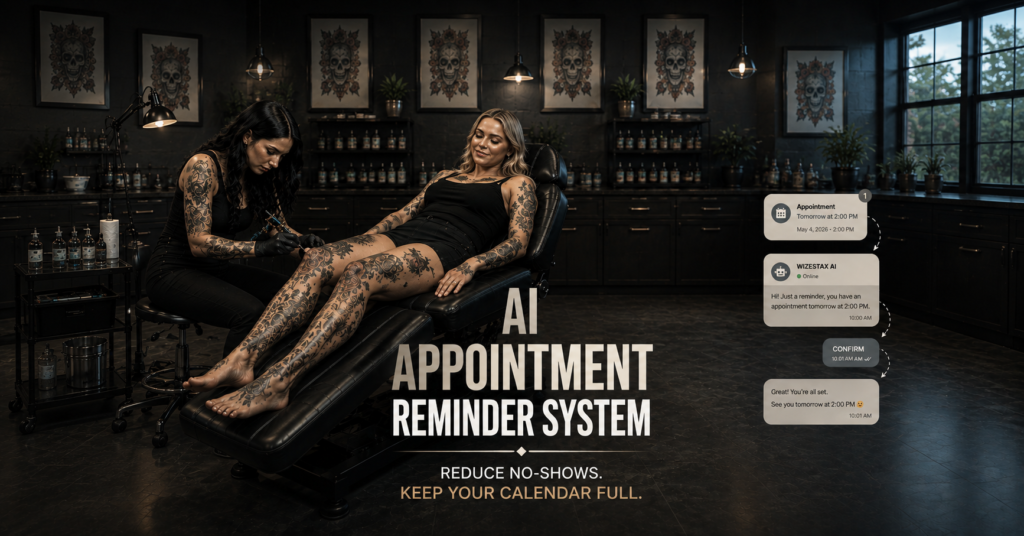
AI Appointment Reminder System
Keep Scheduled Appointments From Becoming Preventable Empty Calendar Time
Every appointment on the calendar represents time the business has reserved for a customer. When a customer forgets, loses the confirmation, becomes unsure about the time, or realizes too late that they need to reschedule, that reserved capacity can become an empty appointment. Appointment based businesses can lose revenue and productive time when customers unintentionally miss scheduled appointments and staff depend on manual reminders. The AI Appointment Reminder System creates a structured communication process between booking and appointment time. It confirms the appointment, sends reminders at defined intervals, provides essential appointment details, gives customers a clear way to respond, and helps surface cancellations, rescheduling requests, questions, or scheduling problems before the appointment arrives. The purpose is not to guarantee attendance. It is to reduce preventable appointment confusion while there is still time to do something about it.
Which Stax Fits Your Business
| Business Need | Stax | Software | Cost |
|---|---|---|---|
| Custom reminders added around an existing calendar | Starter Stax | Google Calendar + Make + Twilio | Low Cost + Usage |
| Scheduling and reminder communication inside one appointment platform | Growth Stax | Acuity Scheduling | Varies By Plan |
| Appointment management connected to broader customer operations | Pro Stax | Jobber | Varies By Plan And Features |
Pricing and capabilities change over time and should be confirmed directly with each software provider before purchase.
Software Linx
Starter Stax
Growth Stax
Pro Stax
Blueprint Overview
| Metric | Value |
|---|---|
| Category | Operations |
| Business Problem | Scheduled customers forget, misunderstand, or fail to manage upcoming appointments |
| Primary Objective | Reduce preventable appointment uncertainty before the scheduled time |
| Core Signal | Valid future appointment exists |
| Setup Time | Approximately 30 To 90 Minutes |
| Difficulty | Beginner To Intermediate |
| Maintenance | Periodic timing and message review |
| Best For | Businesses that reserve specific time for customers |
| Primary Output | Customer receives useful communication before the appointment |
The Hidden Revenue Leak
| Without This Blueprint | With This Blueprint |
|---|---|
| Customers rely on memory | Upcoming appointments receive defined reminders |
| Staff make manual reminder calls | Routine reminders can be automated |
| Appointment details become difficult to find | Important details remain accessible |
| Customers mention conflicts too late | Communication creates an earlier opportunity to respond |
| Rescheduling requires extra effort | A clear scheduling path can be provided |
| Attendance problems appear at appointment time | Some problems surface before the reserved time arrives |
The economic leak is not simply forgetting to send reminder messages.
It is business capacity being reserved for an appointment while preventable uncertainty remains unresolved until the appointment begins.
That capacity can include employee time, treatment rooms, vehicles, equipment, preparation, inventory, travel, or other resources.
Once an appointment time passes unused, much of that capacity cannot simply be stored and sold tomorrow.
The Appointment Reminder System protects the period after an appointment has been booked but before the appointment takes place.
Business Impact Snapshot
| Area | Potential Impact |
|---|---|
| Appointment Awareness | Customers receive timely reminders |
| Staff Work | Routine reminder activity requires less manual attention |
| Scheduling Clarity | Date, time and relevant instructions remain visible |
| Customer Response | Questions and conflicts can surface earlier |
| Calendar Management | Changes may become visible before appointment time |
| Scalability | Reminder volume can grow without equal growth in manual calling |
The system should not assume every no show can be prevented.
Emergencies, transportation problems, changing circumstances and many other situations can still cause an appointment to be missed.
The purpose is narrower.
Reduce preventable communication failures before reserved business capacity is lost.
Real World Example
A massage therapist has a client scheduled for Thursday afternoon.
The client booked the appointment several weeks earlier.
When the appointment was created, the customer received a confirmation containing the date, time and basic instructions.
The day before the appointment, another reminder is sent.
The client realizes they have a work meeting at the same time and uses the scheduling link to move the appointment.
The business learns about the conflict while there is still time to manage the calendar.
The original opening can now enter whatever cancellation management process the business uses.
The reminder did not guarantee revenue.
It revealed an appointment conflict before the reserved time arrived.
WIZESTAX Stax Options
Starter Stax
Google Calendar + Make + Twilio
Best For
Businesses that already schedule appointments in Google Calendar and want to build reminder automation around the calendar they already use.
| Function | Software |
|---|---|
| Appointment Calendar | Google Calendar |
| Automation | Make |
| SMS Messaging | Twilio |
| Workflow Logic | Make |
| Appointment Data | Google Calendar |
| Customer Response | Existing Business Process |
Advantages
| Benefit |
|---|
| Existing calendar can remain in place |
| Individual components are flexible |
| Timing logic can be customized |
| No larger scheduling migration is required |
| Suitable for relatively simple appointment operations |
Limitations
| Limitation |
|---|
| Several systems must remain connected |
| Calendar data must remain accurate |
| Customer response handling requires additional logic |
| Complex scheduling creates more configuration work |
| Messaging setup and compliance require attention |
Growth Stax
Acuity Scheduling
Best For
Appointment based businesses that want scheduling, confirmations, reminders and customer initiated appointment changes inside a dedicated scheduling platform.
| Function | Software |
|---|---|
| Online Scheduling | Acuity |
| Appointment Calendar | Acuity |
| Confirmation Communication | Acuity |
| Email Reminders | Acuity |
| Text Reminders | Acuity |
| Rescheduling | Acuity |
Acuity supports automated confirmation, reminder and follow up communication tied directly to scheduled appointments.
Advantages
| Benefit |
|---|
| Scheduling and reminders remain closely connected |
| Less integration work than a custom architecture |
| Built specifically around appointments |
| Customers can manage bookings through a scheduling environment |
| Reminder timing follows actual appointment information |
Limitations
| Limitation |
|---|
| Broader CRM functions are more limited than a full business platform |
| Features vary by subscription |
| Complex field operations may require additional software |
| Existing scheduling software may duplicate functionality |
Pro Stax
Jobber
Best For
Service businesses where scheduled visits are part of a larger operational process involving customers, jobs, employees and field service activity.
| Function | Software |
|---|---|
| Customer Records | Jobber |
| Scheduling | Jobber |
| Visits | Jobber |
| Appointment Communication | Jobber |
| Field Operations | Jobber |
| Job Management | Jobber |
Advantages
| Benefit |
|---|
| Scheduling remains connected to customer and job records |
| Useful for businesses sending employees into the field |
| Appointment activity fits into broader service operations |
| Staff can manage scheduling alongside job information |
| Reduces the need to separate scheduling from field operations |
Limitations
| Limitation |
|---|
| Primarily designed for service businesses |
| May exceed the needs of simple appointment operations |
| Features vary by plan |
| Businesses already using another field service platform may duplicate functionality |
How The Three Stax Differ
| Stax | Primary Approach |
|---|---|
| Google Calendar + Make + Twilio | Custom reminder layer around an existing calendar |
| Acuity Scheduling | Dedicated appointment scheduling and reminder environment |
| Jobber | Scheduling connected to broader field service operations |
These are different implementation architectures rather than rankings.
Google Calendar, Make and Twilio fit businesses that want to preserve an existing calendar while building custom reminder logic around it.
Acuity fits businesses where appointments themselves are the central operational unit and confirmations, reminders and customer scheduling actions should remain connected.
Jobber fits service businesses where appointments or visits are one part of a larger job management process.
The appropriate architecture depends on appointment volume, existing software, scheduling complexity, communication channels and whether the business needs scheduling alone or broader operational management.
Copy And Paste Appointment Confirmation
“Hi {{first_name}}, your appointment with {{business_name}} is confirmed for {{appointment_date}} at {{appointment_time}}. If you need to make a change, you can manage your appointment here: {{scheduling_link}}.”
Copy And Paste Reminder
“Hi {{first_name}}, this is a reminder about your appointment with {{business_name}} tomorrow at {{appointment_time}}. We look forward to seeing you. If anything has changed, you can manage your appointment here: {{scheduling_link}}.”
Copy And Paste Final Reminder
“Hi {{first_name}}, just a quick reminder that your appointment with {{business_name}} is today at {{appointment_time}}. Please check your appointment details if you need any information before you arrive.”
The timing should reflect the actual business.
An appointment booked months in advance may need a different reminder structure than one booked for the following afternoon.
Copy And Paste AI Prompt
You are assisting a business with customers who already have scheduled appointments.
Your purpose is to help customers understand and manage their upcoming appointment.
Use only approved appointment information and business information supplied to you.
Keep responses short, helpful, professional and conversational.
You may confirm approved appointment details.
You may provide approved business hours, location information, arrival instructions and other routine information supplied by the business.
If the customer wants to cancel or reschedule, follow only the approved scheduling process.
Never invent appointment availability.
Never invent pricing, policies, cancellation fees, services, preparation instructions, guarantees or scheduling options.
Do not change an appointment unless the connected scheduling system provides accurate availability and explicitly permits the action.
Route unusual scheduling problems, complaints, pricing questions and situations requiring judgment to a staff member.
Stop unnecessary reminder communication when the appointment is cancelled, moved, completed or otherwise no longer valid.
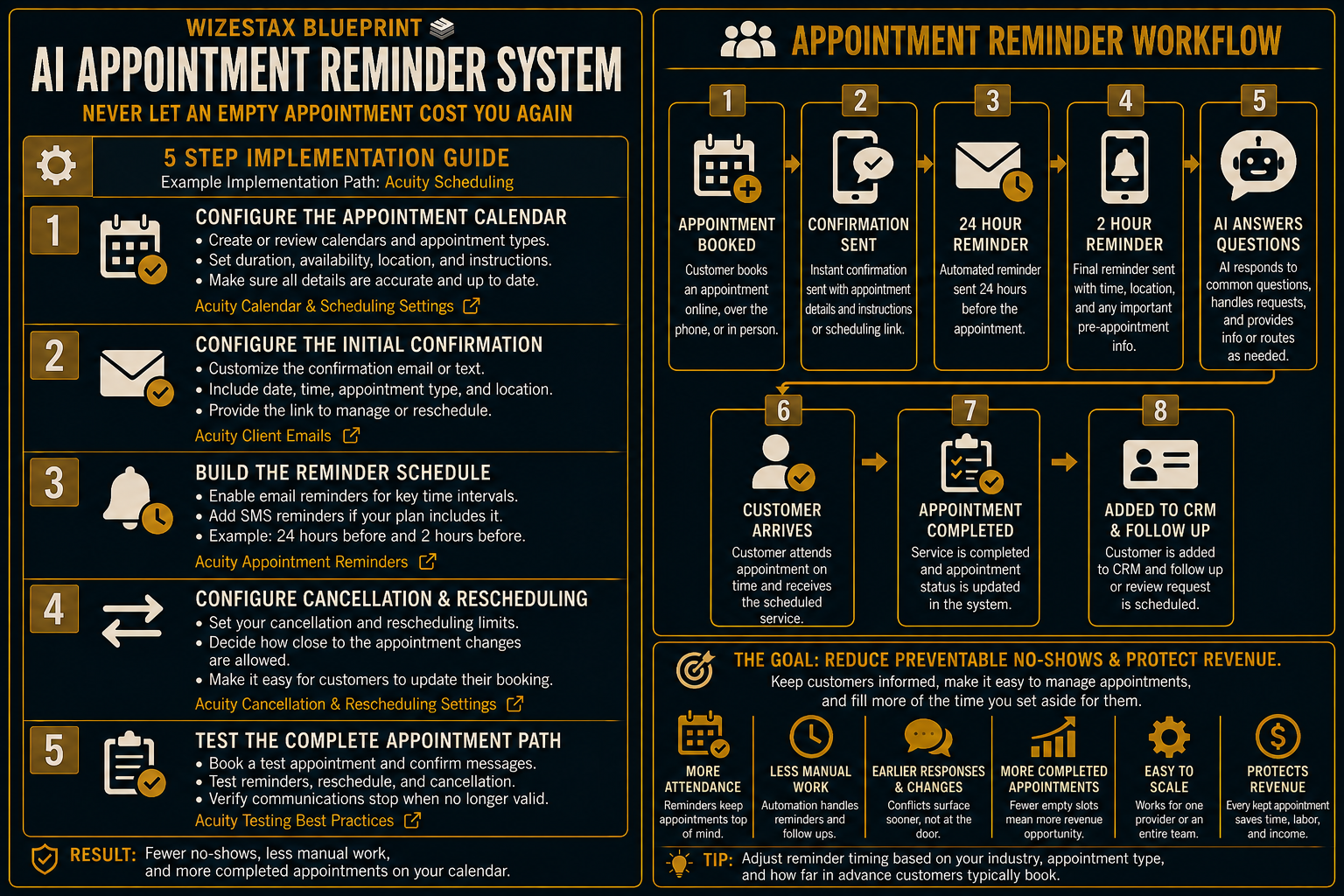
Step By Step Implementation Guide
The following setup demonstrates one implementation path using Acuity Scheduling.
It is not a WIZESTAX recommendation or preferred Stax.
Acuity is used here because scheduling, appointment information, automated confirmations, reminders and customer appointment management can operate inside a dedicated scheduling environment.
Step 1: Configure The Appointment Calendar
Create or review the calendars and appointment types customers will use.
Make sure each appointment type contains accurate information including:
Appointment Name
Clearly identify what the customer booked.
Duration
Set the correct amount of reserved time.
Availability
Define when that appointment can actually be scheduled.
Location
Include accurate location or meeting information where appropriate.
Instructions
Provide only information customers genuinely need before arriving.
The reminder process is only as reliable as the underlying appointment data.
Acuity Calendar And Scheduling Settings
Step 2: Configure The Initial Confirmation
Create the communication customers receive after scheduling.
The confirmation should clearly identify:
Business Name
Make the sender recognizable.
Appointment Date
Show the correct scheduled day.
Appointment Time
Show the correct scheduled time.
Appointment Type
Remind the customer what they booked.
Scheduling Access
Provide the approved method for cancelling or rescheduling when appropriate.
The confirmation creates the customer’s first reliable reference point for the upcoming appointment.
Step 3: Build The Reminder Schedule
Configure the reminder communication that should occur before the appointment.
Acuity allows businesses to configure automated reminder emails, and eligible plans can also use text message reminders.
Possible timing might include:
Advance Reminder
Sent far enough ahead for the customer to notice a conflict.
Closer Reminder
Sent nearer to the appointment when another reminder is operationally useful.
The timing should match the business’s normal scheduling cycle.
Do not automatically copy another company’s reminder schedule.
A consultation scheduled tomorrow and a specialized appointment booked three months ahead have different communication needs.
Step 4: Configure Cancellation And Rescheduling
Decide what customers should be allowed to do when their plans change.
Acuity allows businesses to control whether clients can cancel or reschedule appointments and how close to the appointment those changes are permitted.
Set these rules according to the business’s actual scheduling policy.
Then make the approved scheduling path easy to find in customer communication.
This creates a way for appointment conflicts to become visible before the reserved time arrives.
Acuity Cancellation And Rescheduling Settings
Step 5: Test The Complete Appointment Path
Create test appointments before relying on the system for customers.
Test a normal booking.
Confirm that the initial confirmation arrives.
Verify the appointment date and time.
Check the reminder schedule.
Open the cancellation and rescheduling path.
Move a test appointment.
Confirm that future communication reflects the updated appointment.
Cancel another test appointment.
Confirm that invalid appointment communication does not continue.
Test the process on both desktop and mobile.
The system is ready when the current appointment information determines what the customer receives.
Scheduled Appointment Value Snapshot
This system can be evaluated by measuring the business capacity represented by upcoming appointments.
Consider an illustrative business where the average scheduled appointment is worth $150.
| Monthly Appointments | Average Scheduled Value | Scheduled Appointment Value |
|---|---|---|
| 50 | $150 | $7,500 |
| 100 | $150 | $15,000 |
| 200 | $150 | $30,000 |
These figures represent scheduled appointment value. They do not represent additional revenue created or protected by reminder automation.
Not every appointment without a reminder would become a no show.
Not every missed appointment can be prevented.
Not every rescheduled appointment ultimately becomes completed revenue.
The more useful measurements are:
Appointments Scheduled
How much future customer capacity entered the calendar.
Confirmations Delivered
How consistently customers received accurate booking information.
Reminders Delivered
How consistently eligible appointments received communication.
Reschedule Activity
How many customers moved appointments before the scheduled time.
Cancellations
How many customers communicated that the appointment would not occur.
Completed Appointments
How many appointments ultimately took place.
No Shows
How many appointment times passed without attendance.
WIZESTAX Diagnostic Scorecard
| Category | Assessment |
|---|---|
| Economic Problem | Reserved business capacity becomes vulnerable to preventable appointment confusion |
| Appointment Data Accuracy Required | High |
| Automation Potential | High |
| Human Judgment Required | Low To Moderate |
| Customer Effort | Very Low |
| Timing Dependency | High |
| Scalability | High |
| Primary Value | Keeping customers informed before scheduled appointments |
| Primary Risk | Incorrect or excessive reminder communication |
Common Mistakes
| Mistake | Result |
|---|---|
| Sending reminders with outdated appointment information | Customers receive incorrect instructions |
| Failing to update communication after rescheduling | Customers continue seeing the old appointment |
| Sending too many reminders | Useful communication becomes intrusive |
| Making rescheduling unnecessarily difficult | Customers may wait too long to address conflicts |
| Using identical timing for every appointment type | Communication ignores the actual scheduling cycle |
| Allowing AI to invent availability | Customers receive unreliable scheduling information |
| Continuing after cancellation | Invalid appointments continue generating messages |
| Mixing reminders with no show recovery | Different appointment problems become one confusing workflow |
| Measuring messages rather than appointment outcomes | Automation activity is mistaken for operational improvement |
Related WIZESTAX Categories
| Category | Related Business Problem |
|---|---|
| Customer Retention | No Show Recovery |
| Operations | Cancellation Fill |
| Operations | Customer Intake |
| Operations | Job Completion Follow Up |
| Sales | Lead Follow Up |
| Marketing | Review Request |
These remain separate problems. The AI Appointment Reminder System operates before a valid scheduled appointment and reduces preventable uncertainty about whether the customer will attend. No Show Recovery begins only after the customer has already missed the appointment. Cancellation Fill begins after an appointment has been cancelled and focuses on recovering newly available calendar capacity. Customer Intake collects information needed to prepare for the scheduled service. Job Completion Follow Up begins after the work or appointment has been completed. Lead Follow Up manages unresolved prospects who have not yet reached the scheduled customer stage. Review Request provides completed customers with an opportunity to leave genuine public feedback. Each Blueprint therefore protects a different economic or operational leak.
Get New WIZESTAX Blueprints Every Monday
Subscribe to receive new WIZESTAX Blueprints covering Customer Retention, Marketing, Sales, Finance and Operations directly to your inbox.


