
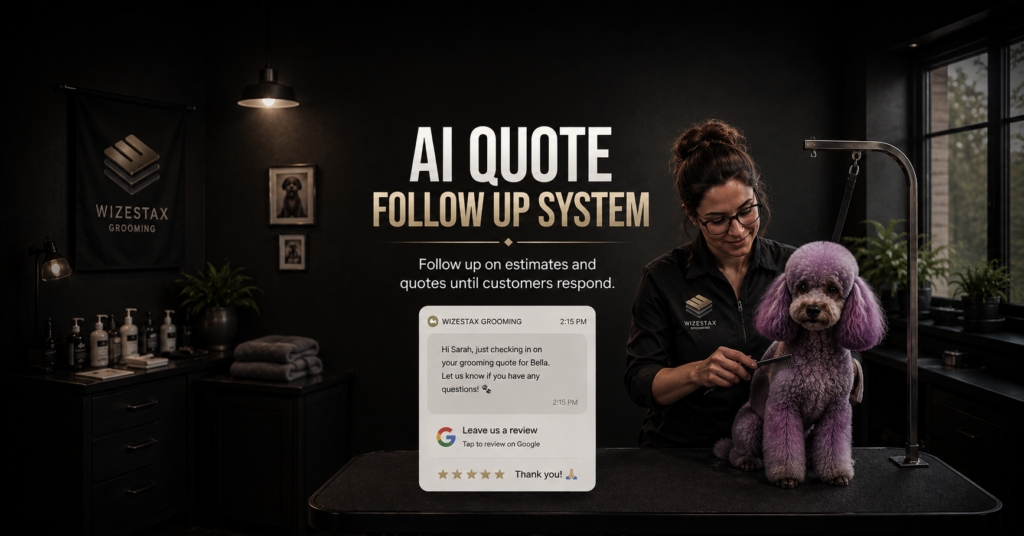
AI Quote Follow Up System
Keep Unanswered Quotes From Quietly Becoming Lost Opportunities
A customer asks for an estimate. The business inspects the job, prepares the quote, sends it, and waits. Then nothing happens. The customer may still be interested. They may be comparing providers, reviewing the cost, waiting for another decision maker, planning around their budget, or simply forgetting to respond. Meanwhile, the business moves on to new work and the unanswered quote gradually disappears from attention.
The AI Quote Follow Up System creates a structured process around those unanswered quotes. It identifies quotes that remain unresolved, sends appropriate follow up communication, handles routine responses using approved information, and brings employees back into the conversation when human judgment is needed.
This Blueprint does not assume that more follow up will make every customer accept a quote. Its purpose is to prevent legitimate sales opportunities from disappearing simply because nobody consistently managed the period between quote delivery and customer decision.
Which Stax Fits Your Business
| Business Need | Stax | Software | Cost |
|---|---|---|---|
| Flexible follow up added to an existing quoting process | Starter Stax | Google Sheets + Make + Twilio | Low Cost + Usage |
| Quote follow up connected to a service business CRM | Growth Stax | Jobber | Varies By Plan |
| Larger field service operation with substantial quote volume | Pro Stax | ServiceTitan | Custom Pricing |
Pricing and capabilities change over time and should be confirmed directly with each software provider before purchase.
Software Linx
Starter
Growth
Pro
Blueprint Overview
| Metric | Value |
|---|---|
| Category | Sales |
| Business Problem | Sent quotes remain unresolved without consistent follow up |
| Primary Objective | Keep unanswered quotes visible until the customer reaches a meaningful outcome |
| Core Signal | Quote has been sent but remains unresolved |
| Setup Time | Approximately 45 To 90 Minutes |
| Difficulty | Beginner To Intermediate |
| Maintenance | Periodic timing and message review |
| Best For | Businesses that regularly send quotes or estimates |
| Primary Output | Unanswered quote receives appropriate follow up or human attention |
The Hidden Revenue Leak
| Without This Blueprint | With This Blueprint |
|---|---|
| Quotes depend on someone remembering them | Open quotes follow a defined process |
| Follow up timing varies | Timing follows established rules |
| Customer silence is easily mistaken for rejection | Unresolved opportunities remain visible |
| Staff repeatedly check quote status | Current status can control follow up |
| Interested customers can quietly disappear | Responses can return opportunities to staff |
| Sales outcomes remain unclear | Accepted, declined and unresolved quotes can be separated |
The economic problem is not simply forgotten reminder messages.
The larger leak is legitimate sales opportunities becoming stale while the business still does not know whether the customer intends to proceed.
Preparing the quote may already have required advertising expense, employee time, travel, inspection, measurement, pricing, administrative work, or consultation.
When the quote disappears without a meaningful outcome, the business loses visibility into an opportunity it already spent resources creating.
The purpose of this system is therefore not aggressive selling.
It is structured sales follow up.
Business Impact Snapshot
| Area | Potential Impact |
|---|---|
| Quote Visibility | Unresolved opportunities remain easier to identify |
| Staff Work | Routine follow up can require less manual effort |
| Consistency | Similar quotes can follow defined timing rules |
| Customer Experience | Customers receive an easy opportunity to ask questions |
| Sales Management | Quote outcomes become easier to understand |
| Scalability | Follow up coverage can grow without equal growth in manual reminders |
The objective is not to contact customers as often as possible.
The objective is to keep appropriate quotes from disappearing before the business understands the outcome.
Real World Example
A roofing company visits a homeowner and prepares a $6,500 quote.
The quote is sent on Monday.
Several days pass without a response.
The customer has not declined the work and the quote remains open.
The system waits according to the company’s defined follow up timing and sends a short message asking whether the customer has any questions.
The customer replies that they are interested but want clarification about one part of the project scope.
The question requires specific project knowledge, so the automated conversation stops and the salesperson is notified.
The salesperson answers the question.
The customer later approves the quote.
The system did not convince the homeowner to purchase.
It prevented an unresolved opportunity from disappearing before the business understood what the customer needed.
WIZESTAX Stax Options
Starter Stax
Google Sheets + Make + Twilio
Best For
Solo operators and smaller businesses that already have a quoting process and want to add structured follow up without replacing their existing business software.
| Function | Software |
|---|---|
| Quote Tracking | Google Sheets |
| Automation | Make |
| SMS | Twilio |
| Follow Up Logic | Make |
| Status Tracking | Google Sheets |
| Existing Quote Process | Current Business Software |
Advantages
| Benefit |
|---|
| Can work around an existing quoting system |
| Individual components remain flexible |
| Does not require a CRM migration |
| Suitable for relatively simple quote volume |
| Business controls the follow up logic |
Limitations
| Limitation |
|---|
| Several applications must remain connected |
| Quote status depends on accurate updates |
| Customer history is less centralized |
| Complex sales processes require more configuration |
Growth Stax
Jobber
Best For
Service businesses that want customer records, quotes, follow up, job conversion, and operational activity connected inside the same field service environment.
| Function | Software |
|---|---|
| Customer Records | Jobber |
| Quotes | Jobber |
| Quote Status | Jobber |
| Customer Communication | Jobber |
| Quote Follow Up | Jobber |
| Job Conversion | Jobber |
Advantages
| Benefit |
|---|
| Quotes remain connected to customer records |
| Designed around service business workflows |
| Quote activity remains close to resulting jobs |
| Less infrastructure than a multi application architecture |
| Operational and sales information remain connected |
Limitations
| Limitation |
|---|
| Capabilities depend on the selected plan |
| Less flexible than a custom automation architecture |
| Primarily designed for service businesses |
| Complex sales organizations may require additional systems |
Pro Stax
ServiceTitan
Best For
Established field service organizations managing substantial quote volume across technicians, salespeople, customers, crews, and locations.
| Function | Software |
|---|---|
| Customer Management | ServiceTitan |
| Estimate Management | ServiceTitan |
| Sales Tracking | ServiceTitan |
| Field Operations | ServiceTitan |
| Customer Communication | ServiceTitan |
| Reporting | ServiceTitan |
Advantages
| Benefit |
|---|
| Quote activity connects to broader field operations |
| Suitable for larger service organizations |
| Detailed sales and operational reporting |
| Customer and service history remain connected |
| Supports more extensive sales infrastructure |
Limitations
| Limitation |
|---|
| More infrastructure than many small businesses require |
| Greater implementation complexity |
| Pricing requires direct consultation |
| Advanced processes may require additional configuration |
How The Three Stax Differ
| Stax | Primary Approach |
|---|---|
| Google Sheets + Make + Twilio | Follow up layer around an existing quoting process |
| Jobber | Quote follow up inside a service business platform |
| ServiceTitan | Quote management inside a larger field service operation |
These are different implementation architectures rather than rankings.
Google Sheets, Make, and Twilio fit businesses that want to preserve their current quoting process while adding automation around it.
Jobber fits businesses where quoting, customer communication, and resulting jobs should remain closely connected.
ServiceTitan fits larger field service organizations where quote activity forms part of a broader sales and operational infrastructure.
The appropriate architecture depends on where quotes are created, how quote status is recorded, sales volume, employee structure, and what must happen after the customer makes a decision.
Copy And Paste Follow Up Sequence
Follow Up 1
“Hi {{first_name}}, just checking that you received the quote we sent for {{service}}. If you have any questions, just reply here and we will be happy to help.”
Follow Up 2
“Hi {{first_name}}, following up on your quote for {{service}}. If you are still considering the project and there is anything we can clarify, just let us know.”
Follow Up 3
“Hi {{first_name}}, I wanted to check in once more regarding your quote for {{service}}. If you would like to move forward or have any questions before deciding, reply here and we can help with the next step.”
Copy And Paste AI Prompt
You are assisting a service business with customers who have received a quote but have not yet provided a final decision.
Your purpose is to help customers with routine questions and identify situations where a staff member should continue the sales conversation.
Use only approved quote information and business information supplied to you.
Keep communication short, professional and conversational.
Do not pressure the customer.
Do not assume silence means rejection.
When a customer responds, determine whether they have a routine question, want to proceed, need more time, are no longer interested, or require staff assistance.
Never invent pricing, discounts, project details, availability, guarantees, financing terms, policies or changes to the quote.
Do not negotiate or modify the quote.
Route pricing negotiations, scope changes, project specific questions, objections, complaints and unusual requests to a staff member.
Stop unnecessary follow up when the quote has been accepted, declined, replaced, expired, or otherwise resolved.
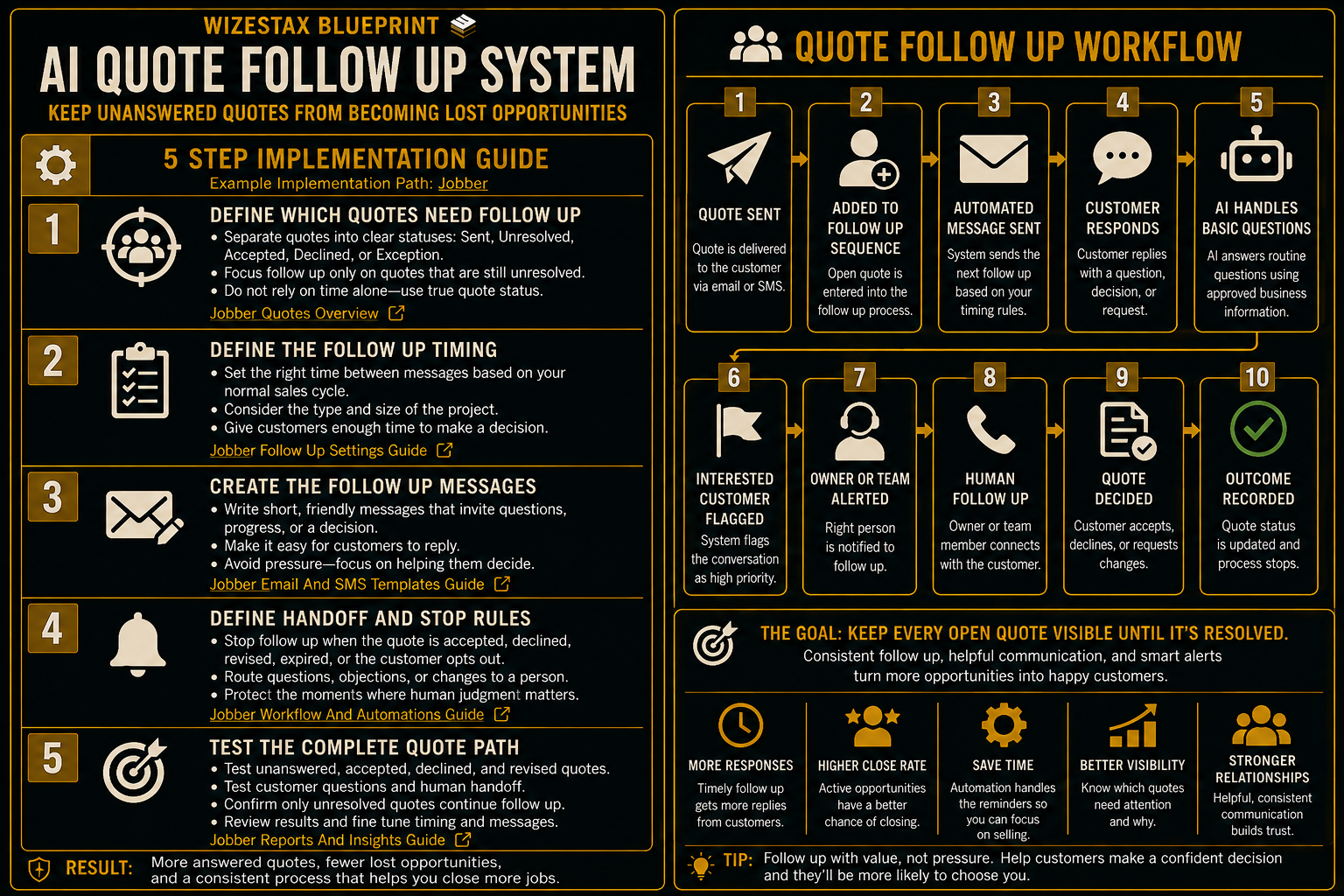
Step By Step Implementation Guide
The following setup demonstrates one implementation path using Jobber.
It is not a WIZESTAX recommendation or preferred Stax.
Jobber is used here because customer records, quotes, quote status, communication, and resulting jobs can remain connected inside one service business environment.
Step 1: Define Which Quotes Need Follow Up
Begin by determining exactly which quotes should enter the process.
Separate quotes into clear statuses.
Sent
The customer has received the quote.
Unresolved
The customer has not accepted or declined it.
Accepted
The customer has agreed to proceed.
Declined
The customer has provided a negative decision.
Exception
The quote requires manual handling or should not receive automated communication.
Do not use elapsed time alone.
The quote should still be genuinely unresolved before another message is sent.
Step 2: Define The Follow Up Timing
Determine how long customers should reasonably have to review the quote before receiving another message.
The appropriate timing depends on the type of work.
A customer considering a small repair may make a decision quickly.
A homeowner considering a major renovation may need substantially more time.
Create timing based on the normal buying cycle rather than sending every quote through an identical aggressive sequence.
Step 3: Create The Follow Up Messages
Write short messages that acknowledge the open quote without assuming why the customer has not responded.
The message should make it easy to:
Ask A Question
The customer may need clarification.
Continue Considering
The customer may simply need additional time.
Move Forward
The customer may be ready to proceed.
Decline
A clear negative answer is still useful because it resolves the opportunity.
The system should help the customer communicate a decision rather than pressure them toward one.
Step 4: Define Human Handoff And Stop Rules
Determine exactly when automation should stop.
Examples include:
Quote Accepted
The sales objective has been reached.
Quote Declined
The opportunity has received a clear outcome.
Quote Replaced
A new version is now active.
Customer Requests A Person
Staff should take over.
Project Question Requires Judgment
The automated system should not guess.
Customer Requests No Further Contact
Outreach stops.
The system should automate routine follow up while protecting situations where a salesperson creates more value.
Step 5: Test The Complete Quote Path
Create several test scenarios.
Test a quote that remains unanswered.
Test an accepted quote.
Test a declined quote.
Test a revised quote.
Test a customer asking a routine question.
Test a customer asking something requiring human judgment.
Confirm that only unresolved quotes continue through follow up.
Confirm that accepted and declined quotes stop receiving unnecessary messages.
Verify that staff can identify and respond to conversations requiring personal attention.
The system is ready when quote status reliably determines the next appropriate action.
Open Quote Value Snapshot
The economic value of this system begins with legitimate sales opportunities represented by unanswered quotes.
Consider an illustrative business with an average quote value of $1,000.
| Monthly Unresolved Quotes | Average Quote Value | Open Quote Value Represented |
|---|---|---|
| 10 | $1,000 | $10,000 |
| 20 | $1,000 | $20,000 |
| 40 | $1,000 | $40,000 |
These figures represent unresolved quote value, not additional revenue created by follow up.
Not every quote would have been accepted.
Automation cannot guarantee additional sales.
The useful measurements are:
Quotes Sent
How many legitimate quotes entered the sales process.
Unresolved Quotes
How many remain without a customer decision.
Customers Contacted
How many appropriate follow up messages were delivered.
Customer Responses
How many customers returned to the conversation.
Accepted Quotes
How many opportunities became approved work.
Declined Quotes
How many reached a clear negative outcome.
Still Unresolved
How many remain open after the defined follow up process.
WIZESTAX Diagnostic Scorecard
| Category | Assessment |
|---|---|
| Economic Problem | Legitimate sales opportunities become stale before the customer provides a decision |
| Quote Status Accuracy Required | High |
| Automation Potential | High |
| Human Judgment Required | Moderate |
| Customer Effort | Low |
| Data Dependency | Moderate |
| Scalability | High |
| Primary Value | Keeping unresolved quotes visible until they reach an appropriate outcome |
| Primary Risk | Excessive follow up damaging the customer relationship |
Common Mistakes
| Mistake | Result |
|---|---|
| Following up too quickly | Customers feel pressured |
| Sending too many messages | Helpful communication becomes unwanted outreach |
| Treating silence as rejection | Legitimate opportunities can be abandoned |
| Continuing after acceptance | Customers receive irrelevant messages |
| Continuing after rejection | Customer decisions are ignored |
| Allowing AI to change pricing | Quote accuracy is compromised |
| Automating project specific judgment | Customers can receive unreliable information |
| Measuring messages instead of outcomes | Activity is mistaken for sales performance |
Related WIZESTAX Categories
| Category | Related Business Problem |
|---|---|
| Lead Generation | New Lead Response |
| Lead Generation | Website Lead Qualification |
| Sales | High Value Lead Prioritization |
| Sales | Sales Opportunity Aging |
| Operations | Customer Intake |
| Finance | Invoice Follow Up |
These remain separate problems. The AI Quote Follow Up System owns the period after a quote has been delivered but before the customer has provided a meaningful decision. New Lead Response protects the initial inquiry before a quote exists. Website Lead Qualification determines basic fit before significant sales attention is required. High Value Lead Prioritization determines which legitimate opportunities may deserve greater sales attention. Sales Opportunity Aging identifies opportunities that have remained unresolved beyond the expected sales cycle. Customer Intake collects operational information needed once the customer advances toward service. Invoice Follow Up manages money owed after an invoice has been issued. Each Blueprint therefore protects a different economic or operational leak.
Get New WIZESTAX Blueprints Every Monday
Subscribe to receive new WIZESTAX Blueprints covering Customer Retention, Marketing, Sales, Finance and Operations directly to your inbox.


