
AI Booking Confirmation System
Automatically Confirm New Bookings, Deliver Important Appointment Details And Catch Scheduling Problems Early
A completed booking should remove uncertainty for the customer. Instead, many businesses create a new communication problem the moment an appointment enters the calendar. The customer may not know whether the booking was successfully recorded. They may be unsure about the location, arrival time, service details or preparation requirements. If something in the booking is wrong, the problem may remain unnoticed until shortly before the appointment. Staff then spend time answering questions, repeating appointment information and correcting problems that could have surfaced much earlier.
The AI Booking Confirmation System closes that communication gap. Once an appointment is created, the system delivers the relevant booking information, provides instructions the customer needs and creates a clear path for questions or scheduling problems. The purpose is not simply sending another automated message. It is making sure the customer and the business are working from the same appointment information.
Which Stax Fits Your Business
| Business Need | Stax | Software | Cost |
|---|---|---|---|
| Straightforward scheduling with automated meeting communication | Starter Stax | Calendly | Varies by plan and users |
| Appointment management, confirmations and customer communication in one service platform | Growth Stax | Square Appointments | Varies by plan and location |
| CRM connected scheduling and broader customer workflows | Pro Stax | HubSpot | Varies by plan and users |
Pricing and capabilities change over time and should be confirmed directly with each software provider before purchase.
Software Linx
Starter
Growth
Pro
Blueprint Overview
| Metric | Value |
|---|---|
| Category | Customer Service |
| Business Problem | Customers receive incomplete or inconsistent communication after booking |
| Primary Objective | Confirm appointment information immediately and surface booking problems earlier |
| Core Signals | New appointment, appointment details, customer response and appointment changes |
| Setup Time | Approximately 30 to 90 minutes |
| Difficulty | Beginner To Intermediate |
| Maintenance | Low |
| Best For | Appointment based businesses |
| Primary Output | Confirmed booking information and clear customer response path |
The Hidden Revenue Leak
| Without This Blueprint | With This Blueprint |
|---|---|
| Customers wonder whether the booking worked | Confirmation is delivered consistently |
| Staff repeatedly provide appointment details | Core information is delivered automatically |
| Preparation requirements are forgotten | Relevant instructions can accompany the booking |
| Location questions create unnecessary calls | Location information can be included automatically |
| Incorrect details remain unnoticed | Customers have an opportunity to identify a problem |
| Customer replies are disconnected from scheduling | Responses can be routed into the appointment process |
| Staff manually monitor new bookings | Routine confirmation communication becomes systematic |
The leak is not the booking itself.
The booking has already happened.
The problem is the operational gap between appointment creation and customer certainty.
Business Impact Snapshot
| Area | Potential Impact |
|---|---|
| Customer Clarity | Important booking information reaches customers consistently |
| Staff Time | Fewer repetitive appointment questions require manual responses |
| Scheduling Accuracy | Incorrect details can surface earlier |
| Preparation | Customers receive relevant instructions before arrival |
| Customer Service | Customers have a defined path when something is wrong |
| Scalability | Confirmation communication does not depend on staff remembering every booking |
Real World Example
A customer books a haircut for Saturday morning.
The appointment enters the salon calendar.
Within minutes, the customer receives confirmation showing the appointment time, salon location and selected service.
The message also includes a short instruction asking the customer to reply if any information appears incorrect.
The customer notices that the appointment was booked for a haircut only, but they intended to schedule both a haircut and color service.
Instead of discovering the problem when the customer arrives, the customer replies immediately.
Staff review the booking and correct the appointment while there is still enough time to adjust the schedule.
The automation did not make the scheduling decision.
It made the information visible early enough for the customer and staff to catch the problem.
WIZESTAX Stax Options
Starter Stax
Calendly
Best For
Solo operators, consultants and small teams that primarily need scheduling plus automated communication surrounding appointments or meetings.
| Function | Software |
|---|---|
| Scheduling | Calendly |
| Calendar Connection | Calendly |
| Customer Communication | Calendly Automations |
| Appointment Reminders | Calendly Automations |
| Customer Responses | Email And Scheduling Links |
Advantages
| Benefit |
|---|
| Focused scheduling platform |
| Automated communication can surround scheduled meetings |
| Custom automation options are available on qualifying plans |
| Suitable for relatively simple appointment workflows |
| Does not require a large CRM implementation |
Limitations
| Limitation |
|---|
| Less suited to complex service operations |
| Advanced automation depends on plan |
| Broader customer management may require additional software |
| Businesses with payments, staff resources and service operations may need a more specialized platform |
Growth Stax
Square Appointments
Best For
Appointment based service businesses that want scheduling, customer communication and appointment management connected inside the same operational platform.
| Function | Software |
|---|---|
| Scheduling | Square Appointments |
| Appointment Records | Square Appointments |
| Customer Notifications | Square Appointments |
| Confirmations | Square Appointments |
| Customer Responses | Square Assistant |
| Payments | Square |
Advantages
| Benefit |
|---|
| Appointment management and communication remain connected |
| Confirmation requests can be delivered by text or email |
| Automated appointment notifications can be customized |
| Confirmation status is visible from appointment records |
| Square Assistant can help customers confirm, cancel or reschedule |
| Useful for service businesses already operating through Square |
Limitations
| Limitation |
|---|
| Some communication capabilities depend on plan and configuration |
| Businesses not using Square may prefer another scheduling ecosystem |
| Complex CRM requirements may exceed the purpose of an appointment platform |
| Payment processing costs remain separate from subscription pricing |
Square Appointment Communication Guide
Pro Stax
HubSpot
Best For
Businesses that need appointment scheduling connected with a larger CRM, customer history, sales activity and broader automation.
| Function | Software |
|---|---|
| CRM | HubSpot |
| Customer Records | HubSpot Smart CRM |
| Scheduling | HubSpot Meetings |
| Automation | HubSpot Workflows |
| Customer Communication | HubSpot |
| Customer History | HubSpot CRM |
Advantages
| Benefit |
|---|
| Appointment information can exist within broader customer records |
| Useful when booking is one stage of a longer customer journey |
| CRM context can support more sophisticated communication |
| Suitable for teams managing larger customer databases |
| Broader automation can extend beyond appointment confirmation |
Limitations
| Limitation |
|---|
| More software than many small appointment businesses require |
| Advanced functionality may require higher plans |
| Configuration can be more involved |
| Cost can increase as CRM requirements expand |
How The Three Stax Differ
| Stax | Primary Approach |
|---|---|
| Calendly | Scheduling focused appointment communication |
| Square Appointments | Service scheduling and confirmation inside one operational platform |
| HubSpot | CRM connected appointment communication |
These are different implementation architectures rather than rankings.
A solo consultant may only need scheduling and communication.
A salon or service business may need appointments, confirmations, customer responses and payments working together.
A larger organization may need booking activity connected to a broader CRM and customer lifecycle.
The appropriate architecture depends on what happens before and after the appointment, not simply the size of the business.
Copy And Paste Booking Confirmation Message
“Hi {{first_name}}, your appointment is confirmed for {{appointment_time}}. Your appointment details are available here: {{appointment_details}}. Please review the information and reply if anything appears incorrect or if you need assistance before your appointment.”
Copy And Paste Preparation Message
“Hi {{first_name}}, before your {{service_name}} appointment, please review these instructions: {{preparation_instructions}}. If you have any questions before your appointment, reply here and our team can help.”
Copy And Paste Location Message
“Hi {{first_name}}, your appointment is scheduled at {{location_name}}. The address is {{location_address}}. Please arrive {{arrival_time}} before your scheduled appointment. If you need help finding us, reply to this message.”
Copy And Paste AI Prompt
You are assisting an appointment based business with booking confirmation communication.
When a confirmed appointment is available, use only the appointment information contained in the scheduling system or customer record.
Clearly provide the confirmed date, time, service, location and preparation information that is available.
Keep the message concise, helpful and professional.
Do not invent missing appointment information.
If the customer reports that a date, time, service, provider, location or other appointment detail appears incorrect, do not guess what the correct information should be.
Route unclear scheduling problems to a staff member for review.
Do not tell a customer that an appointment has been changed or cancelled unless the scheduling system confirms that change.
Escalate complaints, payment problems, accessibility requests, safety concerns and unusual scheduling requests to a staff member.
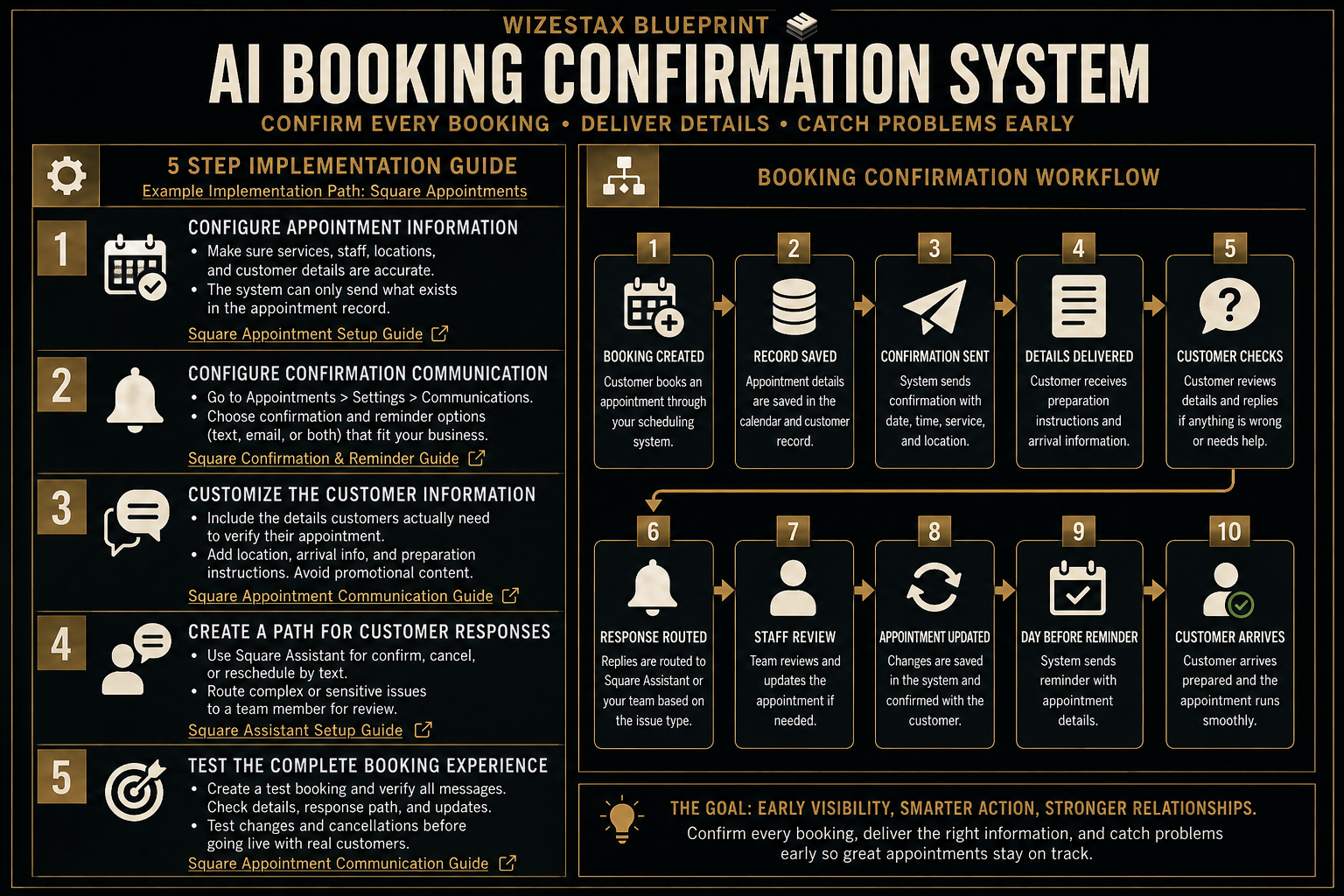
Step By Step Implementation Guide
The following setup demonstrates one implementation path using Square Appointments.
It is not a WIZESTAX recommendation or preferred Stax.
Square Appointments is used for this implementation example because its documentation provides a direct path for configuring appointment confirmations, customer notifications and appointment responses inside the scheduling system.
Step 1: Configure Appointment Information
Before automating customer communication, make sure the scheduling system contains accurate services, staff availability, customer information and appointment details.
The confirmation system can only communicate information that exists in the appointment record.
Square Appointments allows businesses to create appointments with customer information, appointment locations and other relevant details.
Square Appointment Setup Guide
Step 2: Configure Confirmation Communication
Open Square Dashboard.
Go to Appointments.
Open Settings.
Select Communications.
Configure the confirmation and reminder options appropriate for the business.
Square allows appointment communication through text, email or both depending on the business settings and customer preferences.
Square Confirmation And Reminder Guide
Step 3: Customize The Customer Information
Review the automated notifications customers receive when appointments are booked.
Add the information customers actually need to verify their appointment.
Depending on the business, this may include the service, business name, location, arrival expectations or preparation instructions.
Avoid adding promotional language to transactional appointment notifications.
Square Appointment Communication Guide
Step 4: Create A Path For Customer Responses
Decide what should happen when a customer needs to confirm, cancel, reschedule or report a problem.
Square Assistant can help customers confirm, cancel or reschedule appointments through text communication and update the appointment calendar accordingly.
Requests that require human judgment should still be reviewed by staff.
Step 5: Test The Complete Booking Experience
Create a test appointment using the same process customers will use.
Confirm that the appointment appears correctly in the calendar.
Check the customer notification.
Verify the date, time, service and location information.
Test the customer response path.
Change or cancel the test appointment and verify that the correct communication is generated.
Only use the system with real customers after the full appointment communication path behaves as expected.
Square Appointment Communication Guide
Operational Value Snapshot
The economic value of booking confirmation comes from reducing repetitive communication while also catching appointment problems earlier.
| Monthly Bookings | Manual Confirmation Time Per Booking | Staff Time Represented |
|---|---|---|
| 50 | 5 Minutes | 4.2 Hours |
| 100 | 5 Minutes | 8.3 Hours |
| 200 | 5 Minutes | 16.7 Hours |
Illustrative scenario using five minutes of manual confirmation time per booking. Actual time savings depend on the business and existing scheduling process.
This calculation does not include potential value from preventing appointment errors, improving preparation or reducing unnecessary customer questions.
WIZESTAX Diagnostic Scorecard
| Category | Assessment |
|---|---|
| Economic Problem | Staff time and appointment reliability are lost through inconsistent booking communication |
| Data Quality Required | Moderate |
| Automation Potential | High |
| Human Judgment Required | Low To Moderate |
| Implementation Complexity | Low To Moderate |
| Scalability | High |
| Primary Value | Consistent customer certainty after booking |
| Primary Risk | Automatically distributing incorrect appointment information |
Common Mistakes
| Mistake | Result |
|---|---|
| Sending incomplete appointment details | Customers still need to contact staff |
| Using identical instructions for every service | Customers receive irrelevant information |
| Using incorrect appointment fields | Customers receive confusing booking details |
| Allowing automation to guess scheduling changes | Appointment errors can become worse |
| Providing no response path | Customer problems remain unresolved |
| Failing to test every booking path | Some appointments may receive incorrect communication |
| Mixing promotional messages into confirmations | Transactional communication becomes less clear |
Related WIZESTAX Categories
| Category | Related Business Problem |
|---|---|
| Operations | Appointment Reminder Failure |
| Operations | Appointment Rescheduling Friction |
| Customer Service | Appointment Preparation Failure |
| Customer Service | Scheduling Error Detection |
| Revenue | No Show Recovery |
| Operations | Cancellation Fill Management |
These remain separate problems. The AI Booking Confirmation System solves the communication gap immediately after a booking is created. Appointment reminders address customers forgetting an upcoming appointment. No Show Recovery begins after the customer fails to arrive. Cancellation Fill Management addresses newly available capacity after a cancellation. Rescheduling Friction addresses the process of changing an existing appointment. Each Blueprint therefore owns a different economic or operational leak.
Get New WIZESTAX Blueprints Every Monday
Subscribe to receive new WIZESTAX Blueprints covering Customer Retention, Marketing, Sales, Finance and Operations directly to your inbox.


