

Scope Creep Detection System
Detect Work Expanding Beyond The Original Agreement Before Unbilled Labor And Materials Consume The Job Margin
Scope creep happens when a job gradually grows beyond what was originally quoted, approved, or scheduled. An extra room gets added. A customer requests another revision. A technician performs work that was not included. Small additions accumulate until the business has delivered substantially more than it priced.
The Scope Creep Detection System compares the approved scope against what is actually being requested, recorded, and performed during the job. When meaningful differences appear, the system flags them for review before additional work quietly becomes free work.
The purpose is not to reject reasonable customer requests. It is to make changes visible so the business can decide whether the request is already included, requires a change order, needs revised pricing, or should be handled another way.
Which Stax Fits Your Business?
| Business Environment | Stax | Primary Strength |
|---|---|---|
| Small service business | Jobber | Job level labor, cost, and profitability visibility |
| Project based business | QuickBooks Online | Project income and cost tracking |
| Complex field operation | ServiceTitan | Detailed project financial and budget monitoring |
Software Linx
Starter Stax: Jobber
Growth Stax: QuickBooks Online
Pro Stax: ServiceTitan
Blueprint Overview
| Category | Details |
|---|---|
| Category | Operations |
| Business Problem | Work expands beyond the approved scope without being recognized or priced |
| Primary Objective | Detect meaningful differences between approved work and actual work |
| Core Signal | Labor, materials, tasks, requests, or costs exceed the approved scope |
| Setup Time | Approximately 90 To 180 Minutes |
| Difficulty | Intermediate |
| Maintenance | Requires accurate scope and job activity records |
| Best For | Contractors, agencies, home services, repair businesses, consultants and project based businesses |
| Primary Output | Internal scope review alert |
The Hidden Revenue Leak
Scope creep rarely arrives as one obvious expensive request.
It often appears as a sequence of seemingly harmless additions.
A technician stays another hour. A customer asks for one additional task. Materials are used that were not included in the estimate. A project receives another revision. Staff solve the problem because completing the work feels easier than stopping to document the change.
Individually, each addition can look insignificant.
Collectively, they can change the economics of the job.
The real leak is not simply that customers request additional work. It is that the business has no reliable mechanism for recognizing when the work being delivered has moved beyond the work that was originally approved.
Business Impact Snapshot
Scope creep can affect:
| Area | Potential Impact |
|---|---|
| Labor | Additional hours are performed without additional revenue |
| Materials | Unquoted materials reduce job margin |
| Scheduling | Jobs occupy more capacity than originally planned |
| Profitability | Revenue stays fixed while costs increase |
| Billing | Legitimate additional work may never reach an invoice |
| Customer Communication | Disagreements can occur when additional charges appear unexpectedly |
| Estimating | Future quotes may remain inaccurate if expanded work is never documented |
The system creates a checkpoint between additional work appearing and additional work quietly being absorbed.
Real World Example
A residential painting company quotes a customer $6,000 to paint several interior rooms.
During the project, the customer asks the crew to repair additional drywall damage, repaint another closet, and add trim work that was not included in the original estimate.
The crew wants to be helpful and performs the first few additions.
The job eventually records:
Quoted labor: 80 hours
Actual labor: 96 hours
Additional materials: $340
Additional requested tasks: 3
Without a detection process, those additions can disappear inside the completed job.
With scope monitoring, the increasing labor and additional tasks trigger an internal review.
The manager compares the work against the approved estimate and determines which additions require customer approval and revised pricing.
The system identifies the difference.
A person decides what should happen next.
WIZESTAX Stax Options
Starter Stax
Jobber
Best For: Service businesses that already manage quotes, jobs, employee time, expenses, and job profitability in one operational system.
Jobber currently calculates job profitability using line items, employee timesheets, and job expenses. Its job costing tools can also flag qualifying one off jobs when profit margin drops below an account wide threshold. (Jobber Help Center)
| Function | Jobber Role |
|---|---|
| Approved Work | Quote and job line items |
| Labor | Timesheets |
| Materials | Line item costs and expenses |
| Cost Visibility | Job costing |
| Margin Signal | Job profit alert |
| Investigation | Compare actual job activity against original scope |
Advantages
Operational information already lives close to the job.
Labor, expenses, line items, revenue, and profitability can be reviewed together.
Jobber’s current job costing system automatically checks qualifying one off jobs against a configured profit alert. (Jobber Help Center)
Limitations
A falling margin does not prove scope creep.
Material prices, inefficient labor, estimating mistakes, rework, and other problems can produce similar financial signals.
The business still needs to compare the actual work against the approved scope.
Jobber also warns that duplicate cost recording can distort profitability, such as recording the same material through both a line item and an expense. (Jobber Help Center)
Growth Stax
QuickBooks Online
Best For: Businesses that want the financial side of scope expansion connected closely to project accounting.
| Function | QuickBooks Role |
|---|---|
| Customer | Customer record |
| Project | Project tracking |
| Revenue | Project income |
| Costs | Project expenses |
| Comparison | Project profitability |
| Review | Financial investigation |
Advantages
Useful when the strongest evidence of expanding scope appears financially.
Businesses can compare project revenue and attributable costs and investigate projects whose economics are changing unexpectedly.
It can also provide a useful financial record after operational work has been completed.
Limitations
Accounting data may identify the financial consequence later than an operational system detects the underlying request.
A cost increase alone cannot determine whether work was outside the agreed scope.
Businesses still need a reliable record of what was originally promised.
Pro Stax
ServiceTitan
Best For: Larger field service and project operations requiring detailed financial visibility.
ServiceTitan’s Budget vs Actual tools compare project budgets with actual expenses, including cost categories such as labor, materials, subcontractors, and equipment. Its current project financial tools can also expose committed costs and support forecasting before a project closes. (ServiceTitan)
| Function | ServiceTitan Role |
|---|---|
| Planned Economics | Project budget |
| Actual Economics | Actual costs |
| Labor | Cost tracking |
| Materials | Cost tracking |
| Future Exposure | Committed costs and forecasting |
| Investigation | Budget variance review |
Advantages
Detailed financial visibility can expose changes while a larger project is still underway.
Managers can drill into actual costs to investigate the labor, material, and subcontractor activity responsible for a variance. (ServiceTitan)
Limitations
Configuration is more involved.
ServiceTitan notes that some project financial capabilities require account configuration. (ServiceTitan)
Detailed financial systems also cannot replace a clearly defined original scope.
How The Three Stax Differ
| Stax | Detection Perspective | Best Environment |
|---|---|---|
| Jobber | Job activity and profitability | Small service operations |
| QuickBooks Online | Project financial performance | Accounting centered project businesses |
| ServiceTitan | Budget, actual cost and project financial variance | Complex field operations |
These are different ways of observing the same underlying problem.
The appropriate architecture depends largely on where the business already records the approved scope and the actual work.
Copy And Paste Scope Review Message
Internal Alert
Scope review required for [JOB OR PROJECT].
Original approved scope: [ORIGINAL SCOPE]
Potential additional work detected: [ADDITIONAL WORK]
Current labor or cost variance: [VARIANCE]
Please compare the recorded work against the approved quote or agreement before additional work continues.
If the work is outside the approved scope, follow the business’s established approval and pricing process before proceeding.
Copy And Paste AI Prompt
Prompt:
Review the following project information for possible scope expansion.
Use only the approved scope, quote, job records, labor entries, materials, expenses, customer requests, change orders, and other verified information provided.
Compare the work originally approved with the work currently requested or recorded.
Identify any tasks, labor, materials, revisions, or customer requests that appear outside the approved scope.
Do not assume that a cost increase automatically means scope creep.
Do not invent missing scope information.
Do not determine pricing for additional work.
Do not approve or reject customer requests.
Do not automatically classify reasonable operational variation as scope creep.
Separate confirmed differences from possible differences.
If the original scope is unclear or incomplete, state that human review is required.
For every potential scope difference, report:
Original approved work
Current work or request
Verified difference
Available labor or cost impact
Information still missing
Recommended review category
The goal is to identify possible scope expansion early enough for a person to determine whether the work is included, requires approval, requires revised pricing, or should be handled another way.
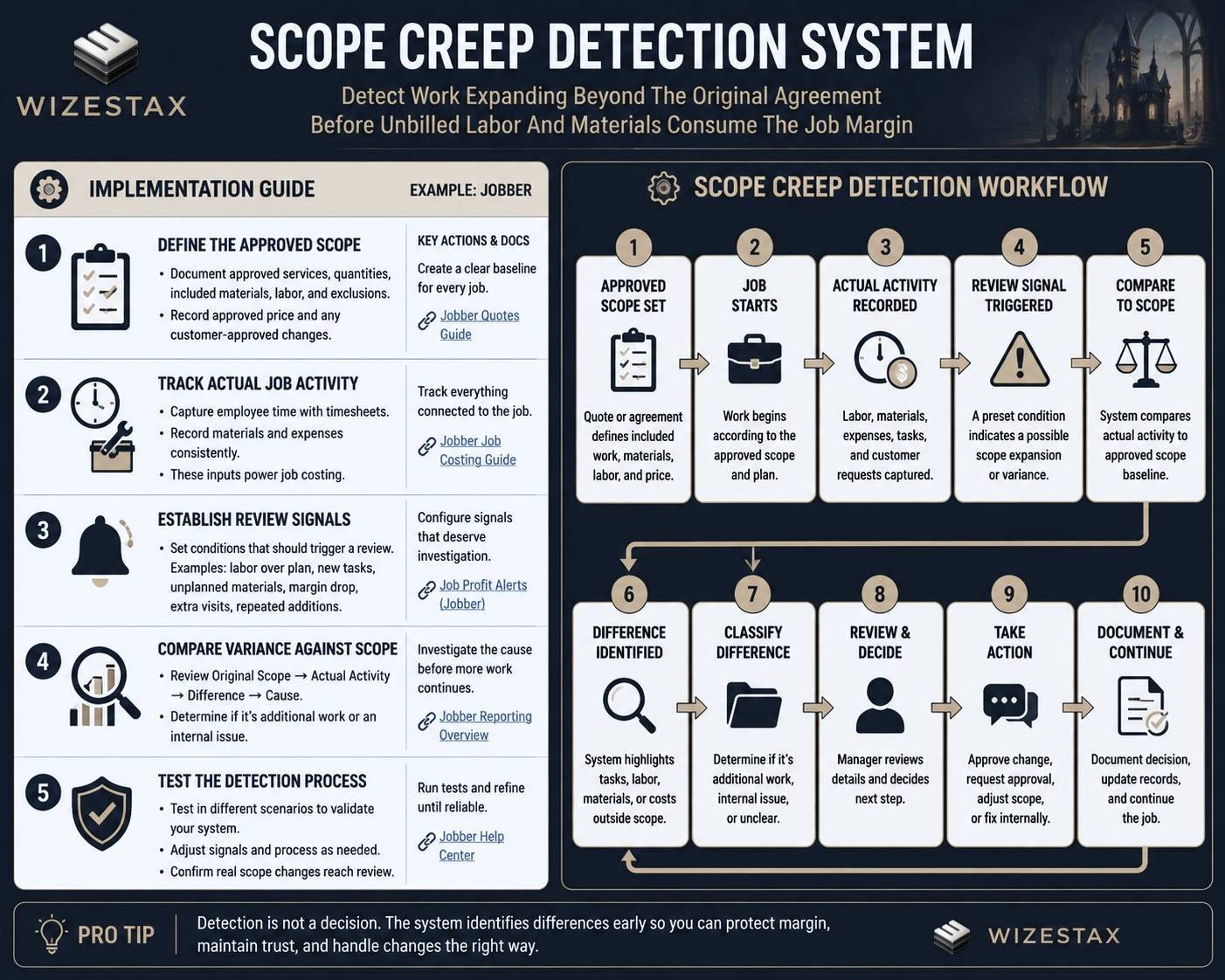
Step By Step Implementation Guide
Example Implementation: Jobber
This implementation uses Jobber because its combination of quotes, jobs, timesheets, expenses, and current job costing features provides a straightforward example of the detection logic. It is an implementation example, not a WIZESTAX recommendation.
Step 1: Define The Approved Scope
The detection system needs a baseline.
For each job, clearly record:
Approved services
Approved quantities
Expected labor
Included materials
Important exclusions
Approved price
Customer approved changes
A vague original scope makes reliable scope detection nearly impossible.
Step 2: Track Actual Job Activity
Configure the job so actual activity can be compared against the original expectation.
Record employee time through timesheets.
Record appropriate line item costs.
Record job expenses consistently.
Jobber currently uses these inputs to calculate job profitability. (Jobber Help Center)
Step 3: Establish Review Signals
Choose conditions that deserve investigation.
Examples include:
Actual labor materially exceeding expected labor
New task added after quote approval
Unexpected material expense
Repeated customer additions
Job margin falling below an internal threshold
Additional visit not included in the original plan
These are review signals, not automatic proof of scope creep.
Step 4: Compare The Variance Against Scope
When a signal appears, review:
Original Scope → Actual Activity → Difference → Cause
If the difference represents additional requested work, route it through the business’s normal approval process.
If it represents inefficient labor, rework, inaccurate estimating, or another internal problem, route it to the appropriate operational process instead.
Jobber’s current profit alerts can provide one financial signal by flagging qualifying one off jobs that fall below the configured margin threshold. (Jobber Help Center)
Step 5: Test The Detection Process
Test several situations:
A job staying exactly within scope
A legitimate additional customer request
Unexpected material cost without scope expansion
Employee inefficiency
Rework caused by the business
A properly approved change
A job with incomplete original scope information
The system is ready when genuine scope differences reliably reach human review without treating every cost variance as customer driven scope creep.
Revenue At Risk
Consider an illustrative service job:
Original Price: $8,000
Expected Direct Cost: $5,000
Expected Contribution: $3,000
During the job:
Additional Labor: $700
Additional Materials: $350
Additional Unpriced Work: $600
If those additions are absorbed without review, the economics of the job change substantially even though the original selling price does not.
The relevant economic question is not simply how much the business sold.
It is how much unapproved or unpriced work the business delivered without recognizing the change.
These numbers are illustrative only. Actual economics depend on labor rates, overhead, materials, contracts, pricing structure, and how the business defines direct cost.
WIZESTAX Diagnostic Scorecard
| Diagnostic Area | Assessment |
|---|---|
| Economic Problem | Unrecognized additional work consumes job margin |
| Data Accuracy Required | High |
| Automation Potential | Moderate To High |
| Human Judgment Required | Very High |
| Customer Effort | Low |
| Timing Dependency | Very High |
| Financial Sensitivity | High |
| Scalability | High |
| Primary Value | Earlier visibility into expanding work |
| Primary Risk | Mistaking ordinary cost variance for scope expansion |
Common Mistakes
Treating every over budget job as scope creep
Poor estimating, productivity problems, rework, material inflation, and operational mistakes can all increase costs without the customer changing the scope.
Starting with an unclear scope
The system cannot reliably identify differences when nobody clearly documented the original agreement.
Waiting until the invoice
By then the business may have already delivered the additional labor and materials.
Automatically charging customers
Detection should trigger review. It should not automatically create a charge without verifying the agreement and obtaining any required approval.
Ignoring small additions
A single small request may be harmless. Repeated small additions are exactly how substantial scope expansion can develop.
Using AI as the decision maker
AI can compare records and identify differences. Contract interpretation, customer communication, pricing, exceptions, and approval decisions should remain controlled by the business.
Subscribe to WIZESTAX for practical business system Blueprints built around specific operational and economic leaks.


