
AI Job Completion Follow Up System
Automatically Close The Communication Loop After A Job Is Finished
Completing the physical work does not automatically complete the customer experience.A technician may finish the job, update its status and leave the property while the customer still has unanswered questions.Is the work officially complete? What was done? Are there care instructions? Is there anything the customer should avoid? Who should they contact if something does not look right?When that information is delivered inconsistently, staff spend time answering avoidable questions and customers are left uncertain about what happens after the work is finished.
The AI Job Completion Follow Up System closes that operational communication gap. When a job is marked complete, the system sends the appropriate completion message, provides relevant service or care information and gives the customer a clear path to report a problem. This Blueprint stops there. Reviews, referrals, future service reminders and repeat business campaigns are valuable, but they solve different business problems and belong in their own systems.
Which Stax Fits Your Business
| Business Need | Stax | Software | Cost |
|---|---|---|---|
| Flexible completion communication connected to existing business tools | Starter Stax | Make And Twilio | Varies by usage and connected software |
| Field service management with native job follow up communication | Growth Stax | Jobber | Varies by plan and users |
| Field service operations with job status notifications and customer communication | Pro Stax | Housecall Pro | Varies by plan and features |
Pricing and capabilities change over time and should be confirmed directly with each software provider before purchase.
Software Linx
Starter
Growth
Pro
Blueprint Overview
| Metric | Value |
|---|---|
| Category | Customer Service |
| Business Problem | The operational communication loop remains open after completed work |
| Primary Objective | Clearly communicate completion and relevant next steps |
| Core Signals | Job completion status, service performed, customer record and service instructions |
| Setup Time | Approximately 30 to 90 minutes |
| Difficulty | Beginner To Intermediate |
| Maintenance | Low |
| Best For | Field service and appointment based businesses |
| Primary Output | Consistent job completion communication |
The Hidden Revenue Leak
| Without This Blueprint | With This Blueprint |
|---|---|
| Work ends without a clear customer handoff | Completion triggers a defined communication process |
| Customers are unsure whether work is officially finished | Completion status is communicated clearly |
| Care instructions depend on staff memory | Relevant instructions can be delivered consistently |
| Customers call with avoidable questions | Important information is provided proactively |
| Problems may remain unclear after technicians leave | Customers receive a defined response path |
| Completion communication varies between employees | The business establishes a repeatable standard |
| Staff manually send routine completion messages | Routine communication can happen automatically |
The leak is not customer acquisition or repeat business.
The customer already purchased and the work has already been performed.
The problem is unfinished operational communication after the service itself is complete.
Business Impact Snapshot
| Area | Potential Impact |
|---|---|
| Customer Clarity | Customers know the job has officially been completed |
| Staff Time | Fewer routine completion questions require manual responses |
| Service Quality | Relevant care and service information is delivered consistently |
| Problem Detection | Customers have a clear path for reporting concerns |
| Operations | Job completion creates a repeatable closing process |
| Scalability | Customer handoff does not depend entirely on individual employees |
Real World Example
A carpet cleaning company finishes a residential job at 2:00 PM.
The technician marks the job complete from the field.
The customer automatically receives a message confirming that the service is finished.
The message explains how long the carpet should remain undisturbed and provides the company’s contact information if the customer notices a problem.
Later that afternoon, the customer notices that one room is drying differently from the others.
Instead of wondering whether this is normal or searching for the technician’s phone number, the customer replies through the established communication path.
Staff review the concern and determine whether additional action is necessary.
The system did not attempt to generate another sale.
It simply completed the customer handoff that began when the physical work ended.
WIZESTAX Stax Options
Starter Stax
Make And Twilio
Best For
Businesses that already have a reliable system recording completed jobs but need a flexible way to turn that completion event into customer communication.
| Function | Software |
|---|---|
| Job Completion Source | Existing Business Software |
| Automation | Make |
| Customer Data | Existing System |
| Text Communication | Twilio |
| Email Communication | Existing Email Platform |
| Human Escalation | Existing Team Process |
Advantages
| Benefit |
|---|
| Can work around existing business software |
| Flexible automation architecture |
| Communication logic can be customized |
| Does not require replacing the primary job system |
| Useful when the existing platform lacks completion communication |
Limitations
| Limitation |
|---|
| Multiple systems must remain connected |
| Configuration requires more technical work |
| Message accuracy depends on the source data |
| Additional integrations create more points of failure |
Growth Stax
Jobber
Best For
Service businesses that want job management and post job customer communication connected inside the same field service platform.
| Function | Software |
|---|---|
| Job Management | Jobber |
| Customer Records | Jobber |
| Completion Status | Jobber |
| Job Follow Up | Jobber |
| Customer Replies | Jobber Communication Process |
| Communication Reporting | Jobber |
Advantages
| Benefit |
|---|
| Job completion and customer communication remain connected |
| Job follow ups can send automatically after completion |
| Messages can be customized |
| Customer responses can reach the designated team member |
| Communication can be reviewed through reporting |
Limitations
| Limitation |
|---|
| Job follow ups are available on select plans |
| Job follow up communication is primarily email based |
| Businesses using another field service platform may not need to switch |
| Specialized communication may require additional tools |
Pro Stax
Housecall Pro
Best For
Field service businesses that want completion communication connected directly to job status and broader service operations.
| Function | Software |
|---|---|
| Job Management | Housecall Pro |
| Customer Records | Housecall Pro |
| Completion Trigger | Finished Job Status |
| Customer Notification | Housecall Pro |
| Additional Follow Up | Email Automation |
| Internal Tasks | Housecall Pro |
Advantages
| Benefit |
|---|
| Finished job status can trigger customer communication |
| Completion messaging remains connected to service operations |
| Customer notifications can be managed centrally |
| Automated email campaigns can begin after job completion |
| Internal tasks can support situations requiring staff attention |
Limitations
| Limitation |
|---|
| Some capabilities depend on plan and enabled applications |
| Businesses outside field service may not need the broader platform |
| Additional campaigns require configuration |
| Complex communication may require additional automation |
Housecall Pro Customer Notifications Guide
Housecall Pro Automated Email Campaigns Guide
How The Three Stax Differ
| Stax | Primary Approach |
|---|---|
| Make And Twilio | Connect an existing completion event to custom communication |
| Jobber | Native field service job follow up |
| Housecall Pro | Job status communication inside a broader field service platform |
These are different implementation architectures rather than rankings.
A business with established job software may only need an automation layer.
Another business may benefit from keeping job management and customer follow up inside the same platform.
The appropriate architecture depends on where the completed job is recorded and how much of the service operation the business wants managed inside one system.
Copy And Paste Job Completion Message
“Hi {{first_name}}, your {{service_name}} is now complete. Thank you for choosing us. Please review the information below for anything you need to know following today’s service. If you have any questions or notice a problem, reply here and our team can help.”
Copy And Paste Care Instructions
“Your {{service_name}} was completed today. Please follow these care instructions: {{care_instructions}}. If anything appears unusual or you have questions about the completed work, contact us at {{contact_information}}.”
Copy And Paste Problem Response
“Thank you for letting us know. We want to make sure the completed work is reviewed properly. We have recorded your concern and a member of our team will review the job information and contact you if additional action is needed.”
Copy And Paste AI Prompt
You are assisting a service business with customer communication immediately after completed work.
Use only confirmed information from the job record.
Clearly tell the customer that the job has been completed.
Provide the relevant care, maintenance or service instructions available for that specific job.
Do not invent instructions that are missing from the job record.
Do not automatically request a review, referral, new purchase or future booking.
If the customer reports incomplete work, damage, a safety concern, billing disagreement, refund request or another service problem, route the issue to a staff member for review.
Do not promise refunds, corrective work or compensation unless an authorized staff member has approved it.
Keep routine completion communication clear, concise and helpful.
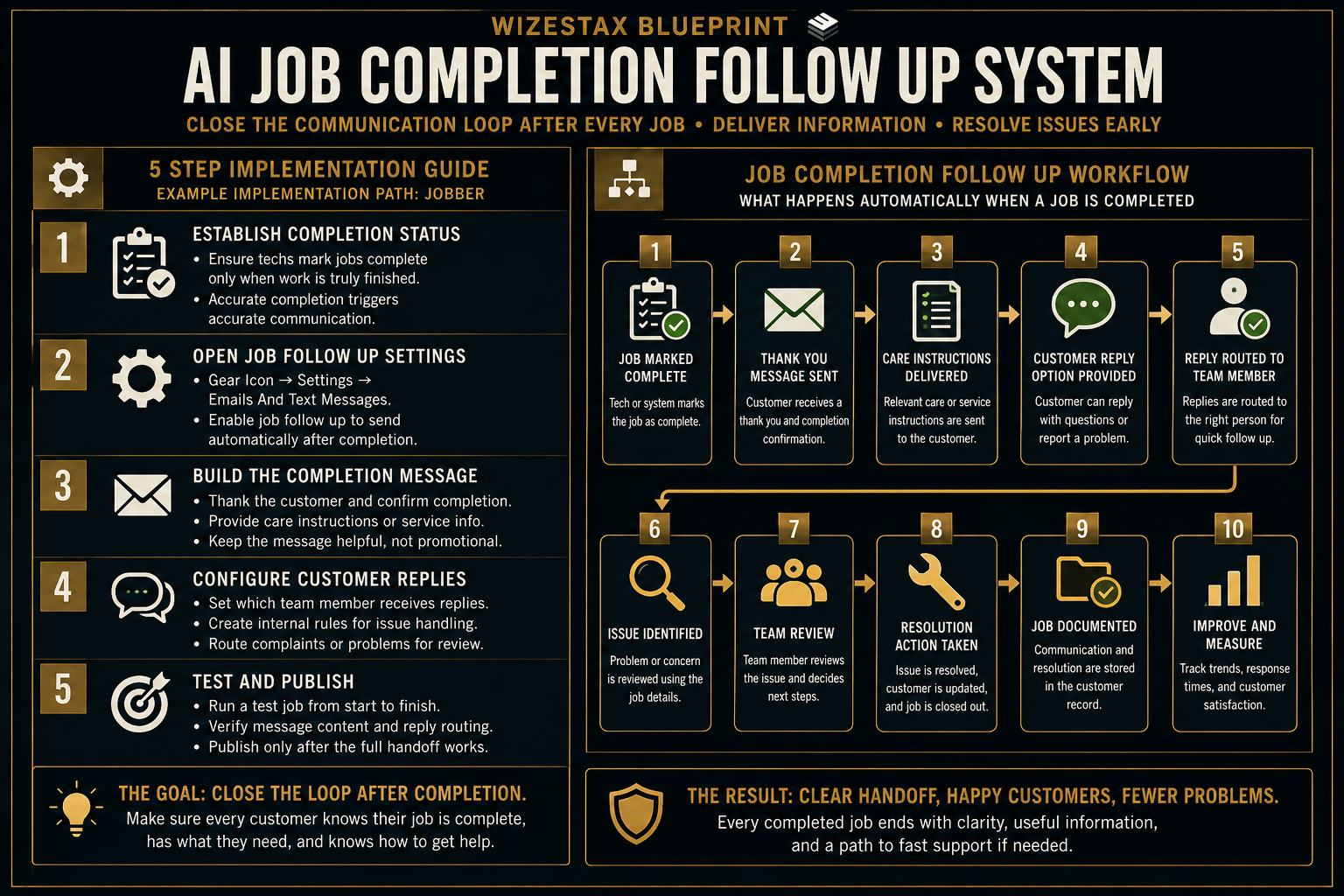
Step By Step Implementation Guide
The following setup demonstrates one implementation path using Jobber.
It is not a WIZESTAX recommendation or preferred Stax.
Jobber is used for this implementation example because its documentation provides a direct native path from job completion to automatic customer follow up.
Step 1: Establish A Reliable Completion Status
Make sure employees consistently mark jobs complete when the actual work has finished.
The automation depends on a trustworthy completion event.
A job should not be marked complete while important work remains unfinished simply to trigger customer communication.
The completion status should represent the real operational end of the job.
Step 2: Open The Job Follow Up Settings
In Jobber, open the Gear Icon.
Select Settings.
Open Emails And Text Messages.
Locate the job follow up settings.
Jobber allows job follow up communication to be sent automatically after job completion on qualifying plans.
Step 3: Build The Completion Message
Customize the job follow up message around the information customers need after the work is finished.
The message should clearly acknowledge completion and explain the appropriate next step.
Where relevant, include care instructions or a link to service specific information.
Avoid turning the completion message into a sales promotion.
Its primary purpose is closing the operational communication loop.
Jobber Email And Text Settings Guide
Step 4: Configure Customer Replies
Confirm which employee should receive responses to job follow up communication.
Customer replies can contain questions, complaints or information that requires human judgment.
Create an internal rule for what staff should do when a customer reports a problem.
Routine questions can be answered normally.
Complaints, damage, safety issues, refunds and unresolved work should move into the appropriate service resolution process.
Step 5: Test The Complete Handoff
Create a test customer and test job.
Complete the job using the same process employees will use in normal operations.
Confirm that the completion event occurs correctly.
Check the customer message.
Verify the customer name and job information.
Test the reply path.
Confirm that the correct employee receives the response.
Only enable the process broadly after the complete customer handoff works as intended.
Operational Value Snapshot
The direct operational value comes from reducing repetitive completion communication while making the customer handoff more consistent.
| Monthly Completed Jobs | Manual Completion Communication Per Job | Staff Time Represented |
|---|---|---|
| 25 | 5 Minutes | 2.1 Hours |
| 50 | 5 Minutes | 4.2 Hours |
| 100 | 5 Minutes | 8.3 Hours |
| 200 | 5 Minutes | 16.7 Hours |
Illustrative scenario using five minutes of manual completion communication per job. Actual time savings depend on the existing business process.
This calculation does not assign speculative revenue to reviews, referrals or repeat purchases because those outcomes belong to separate systems.
WIZESTAX Diagnostic Scorecard
| Category | Assessment |
|---|---|
| Economic Problem | Staff time and customer clarity are lost when completed work lacks a consistent handoff |
| Data Quality Required | Moderate |
| Automation Potential | High |
| Human Judgment Required | Low for routine communication and higher when problems are reported |
| Implementation Complexity | Low To Moderate |
| Scalability | High |
| Primary Value | Consistent closure of the customer communication loop |
| Primary Risk | Triggering completion communication before the work is actually finished |
Common Mistakes
| Mistake | Result |
|---|---|
| Marking jobs complete too early | Customers receive inaccurate completion communication |
| Using generic care instructions | Customers may receive information that does not apply |
| Providing no reply path | Problems remain difficult to report |
| Allowing AI to invent service instructions | Incorrect information can reach customers |
| Automatically promising corrective action | Staff lose control over service resolution |
| Turning every completion message into a promotion | Important operational information becomes less clear |
| Combining reviews, referrals and rebooking into one workflow | Separate customer problems become difficult to manage and measure |
Related WIZESTAX Categories
| Category | Related Business Problem |
|---|---|
| Reputation | Review Request Failure |
| Growth | Referral Request Failure |
| Customer Retention | Repeat Service Reminder Failure |
| Customer Service | Customer Complaint Resolution |
| Operations | Job Documentation Failure |
| Finance | Invoice Follow Up Failure |
These remain separate problems.
The AI Job Completion Follow Up System closes the operational communication loop immediately after completed work.
Review Request Failure addresses whether satisfied customers provide public feedback.
Referral Request Failure addresses whether existing customers introduce new customers.
Repeat Service Reminder Failure addresses whether customers return when another service becomes due.
Complaint Resolution addresses what happens when a customer reports a service problem.
Invoice Follow Up addresses unpaid money after work has been completed.
Each Blueprint therefore owns a different economic or operational leak.
Get New WIZESTAX Blueprints Every Monday
Subscribe to receive new WIZESTAX Blueprints covering Customer Retention, Marketing, Sales, Finance and Operations directly to your inbox.


