

Customer Response Delay Alert System
Detect Customer Messages That Have Waited Too Long For A Human Response Before Silence Becomes A Service Problem
A customer can receive an excellent answer and still have a poor experience if that answer arrives too late. Messages enter through email, contact forms, support tickets, chat, and other channels throughout the day. During busy periods, some conversations are answered immediately while others quietly remain untouched. The Customer Response Delay Alert System watches the time between a customer’s message and the next meaningful human response.
When that waiting time approaches or exceeds the business’s approved response target, the system creates an internal alert so the conversation can be reviewed before the delay grows. The system does not automatically answer every customer. It makes unanswered customers visible.
Which Stax Fits Your Business?
| Business Environment | Stax | Primary Strength |
|---|---|---|
| Small support team | Freshdesk | Straightforward ticket response targets |
| Growing customer service operation | HubSpot Service Hub | SLA monitoring combined with CRM and workflows |
| Complex support organization | Zendesk | Detailed response metrics and SLA policies |
Software Linx
Starter Stax: Freshdesk
Growth Stax: HubSpot Service Hub
Pro Stax: Zendesk
Blueprint Overview
| Category | Details |
|---|---|
| Category | Customer Service And Operations |
| Business Problem | Customer messages remain unanswered longer than the business intends |
| Primary Objective | Detect response delays before conversations are forgotten |
| Core Signal | Customer waiting time approaches or exceeds an approved response threshold |
| Setup Time | Approximately 60 To 120 Minutes |
| Difficulty | Intermediate |
| Maintenance | Response targets, schedules, routing and ticket ownership |
| Best For | Service businesses, support teams, agencies, professional services and customer facing operations |
| Primary Output | Internal response delay alert |
The Hidden Revenue Leak
The dangerous message is not always the angry one.
Sometimes it is simply the message nobody noticed.
A customer asks for an update at 9:15 AM.
The employee responsible for the account is working elsewhere.
Another employee assumes someone already answered.
By 1:00 PM the customer is still waiting.
By the end of the day, the message has disappeared beneath newer conversations.
Nothing technically broke.
The business simply failed to recognize that the customer was still waiting.
A response delay system turns that invisible waiting period into something measurable.
Business Impact Snapshot
| Area | Potential Impact |
|---|---|
| Customer Experience | Customers wait without knowing whether anyone saw their message |
| Retention | Repeated delays can weaken confidence in the business |
| Sales | Existing customer questions can stall additional work |
| Operations | Messages become buried as new conversations arrive |
| Management | Response problems remain invisible until complaints appear |
| Staff Accountability | Ownership becomes unclear |
| Escalation | Important conversations receive attention too late |
Real World Example
A property management company receives a tenant message at 10:05 AM.
Its internal response target for normal requests is four business hours.
The ticket is assigned correctly, but the employee responsible becomes occupied with an urgent property issue.
At three hours, the system marks the conversation as approaching its response target.
An internal alert is sent.
Another team member sees the alert, reviews the conversation, and determines whether they can respond or whether the original employee needs to handle it.
The automation did not write the answer.
It prevented the waiting customer from becoming invisible.
WIZESTAX Stax Options
Starter Stax
Freshdesk
Best For: Smaller teams that want structured response targets without building a large customer service architecture.
Freshdesk SLA policies can define first response, every response, and resolution targets. Targets can also vary by ticket priority and other policy conditions. (Freshdesk)
| Function | Freshdesk Role |
|---|---|
| Customer Request | Ticket |
| Response Target | SLA Policy |
| Initial Delay | First Response Time |
| Later Delay | Every Response Time |
| Priority | Ticket Priority |
| Escalation | SLA Workflow |
Advantages
Freshdesk provides the core timing structure directly inside the ticketing system.
That makes it possible to distinguish between the first response to a new request and later responses after a customer replies again. (Freshdesk)
Limitations
Response targets still need to reflect how the business actually operates.
A target that is unrealistically short can create constant alerts.
A target that is too generous may detect problems after the customer experience has already deteriorated.
Growth Stax
HubSpot Service Hub
Best For: Businesses that want response monitoring connected with customer records, workflows, ownership, and broader CRM activity.
HubSpot currently supports SLA goals for time to first reply, time to next reply, and time to close. Businesses can also define when a ticket becomes due soon. (HubSpot Knowledge Base)
| Function | HubSpot Role |
|---|---|
| Customer Message | Help Desk Ticket |
| Ownership | Ticket Owner |
| Response Target | SLA Goal |
| Warning State | Due Soon |
| Breach State | Overdue |
| Internal Alert | Workflow Notification |
| Analysis | SLA Reporting |
Advantages
HubSpot can use SLA status properties inside workflows.
For example, a workflow can detect when a ticket becomes due soon or overdue and send an internal email, in app notification, or Slack notification to the appropriate employee or team. (HubSpot Knowledge Base)
SLA rules can also differ based on ticket properties, allowing different response expectations for different types of conversations. (HubSpot Knowledge Base)
Limitations
HubSpot’s Help Desk SLA functionality is tied to eligible Service Hub subscriptions and configuration. (HubSpot Knowledge Base)
Teams also need to define carefully when SLA timers should pause, such as when the business is legitimately waiting for information from the customer. (HubSpot Knowledge Base)
Pro Stax
Zendesk
Best For: Support organizations requiring more detailed response measurement across larger ticket volumes and teams.
Zendesk records first reply time as the period between ticket creation and the first public agent response. It can calculate this using calendar hours or business hours. (Zendesk Support)
Zendesk SLA policies can also measure first reply time, next reply time, periodic update time, requester wait time, agent work time, and resolution related metrics. (Zendesk Support)
| Function | Zendesk Role |
|---|---|
| Customer Request | Ticket |
| First Response | First Reply Time |
| Later Response | Next Reply Time |
| Response Target | SLA |
| Priority | Ticket Priority |
| Team Accountability | Group SLA |
| Analysis | Zendesk Reporting |
Advantages
Zendesk provides considerable control over exactly what kind of waiting period the business wants to measure.
This becomes useful when the business needs different expectations for urgent requests, normal support, ongoing conversations, or different internal teams.
Limitations
More sophisticated SLA configurations create more opportunities for incorrect rules.
Teams need to understand which events start, pause, and fulfill each timer.
Zendesk also distinguishes between its native first reply time metric and SLA first reply time behavior, so those measurements should not automatically be treated as identical. (Zendesk Support)
How The Three Stax Differ
| Stax | Detection Perspective | Best Environment |
|---|---|---|
| Freshdesk | Straightforward ticket response targets | Smaller support teams |
| HubSpot | SLA monitoring connected with CRM workflows | Growing customer operations |
| Zendesk | Detailed response and SLA management | Complex support organizations |
All three architectures are solving the same fundamental problem:
A customer is waiting and the business needs to know before that wait becomes unacceptable.
Copy And Paste Internal Alert
CUSTOMER RESPONSE DELAY ALERT
Customer: [CUSTOMER]
Conversation: [TICKET OR MESSAGE]
Assigned To: [OWNER]
Customer Message Received: [TIME]
Current Waiting Time: [TIME]
Response Target: [TARGET]
Status: [APPROACHING TARGET / OVERDUE]
Please review the conversation and determine whether a response, reassignment, or escalation is required.
This alert identifies response delay only. It does not determine the appropriate customer response.
Copy And Paste AI Prompt
Prompt:
Review the following customer conversation for response delay.
Use only the timestamps, customer messages, employee responses, ticket status, priority, assigned owner, business hours, response targets and other verified information provided.
Determine whether the customer is currently waiting for a meaningful human response.
Do not count an automated acknowledgement as a meaningful human response unless the business explicitly defines it that way.
Calculate the available waiting time using the business’s approved operating schedule.
Compare the waiting time against the applicable response target.
Classify the conversation as:
Within Target
Approaching Target
Response Target Exceeded
Waiting On Customer
Resolved
Unable To Determine
Do not invent missing timestamps.
Do not assume silence means the customer is dissatisfied.
Do not automatically generate or send a customer response.
If the target is approaching or exceeded, identify the assigned owner and the appropriate internal escalation path using only the supplied rules.
The goal is to identify customers who are waiting too long so a human can review the conversation before the delay grows.
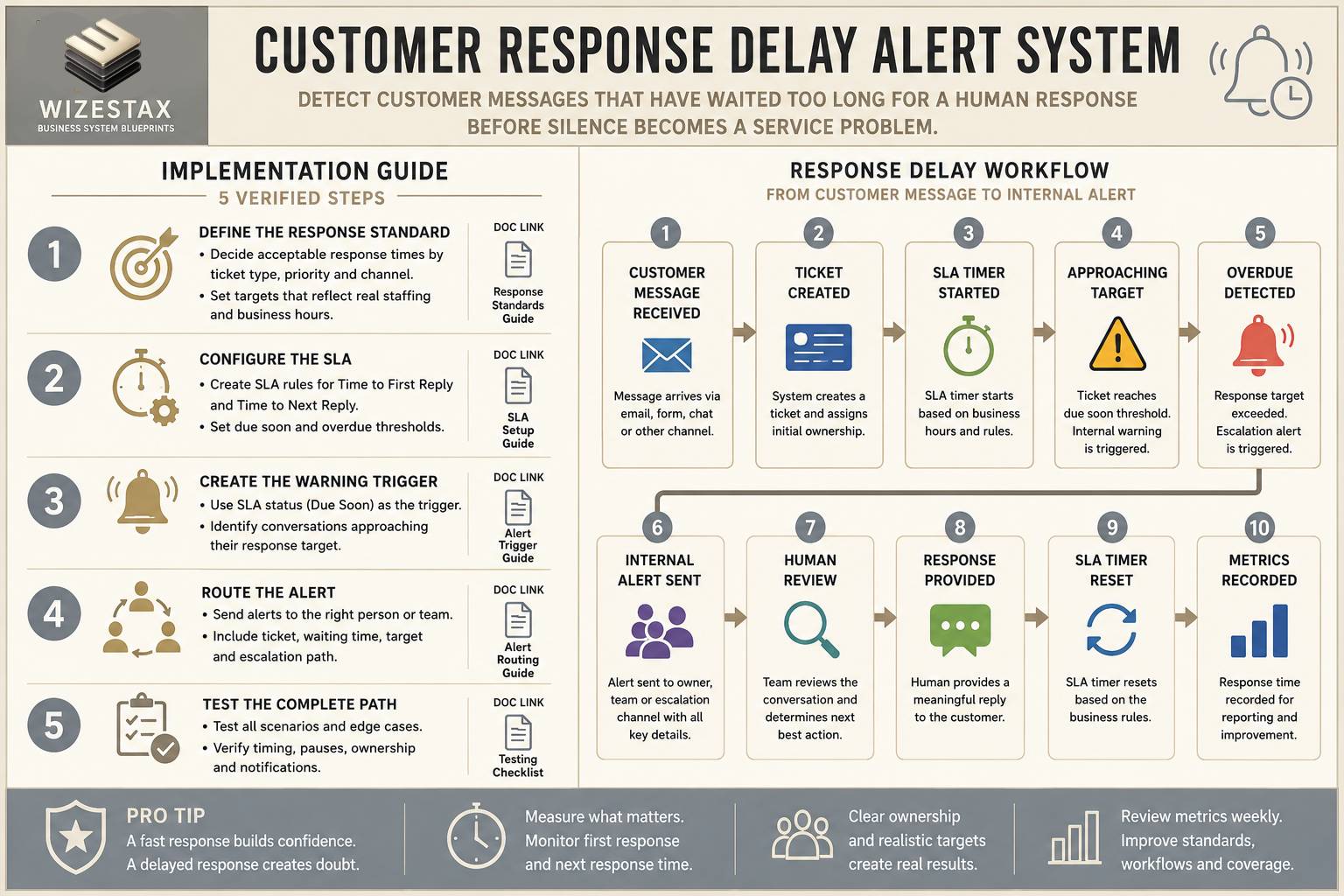
Step By Step Implementation Guide
Example Implementation: HubSpot Service Hub
This implementation uses HubSpot because its SLA status properties can connect response timing directly with internal workflows and notifications.
It is an implementation example, not a WIZESTAX recommendation.
Step 1: Define The Response Standard
Decide what the business actually considers an acceptable response time.
Different conversations may require different targets.
For example:
Normal customer question
Urgent customer issue
Existing project update
High priority account
Different communication channel
The target should reflect the business’s real staffing and operating hours.
Step 2: Configure The SLA
Inside HubSpot Help Desk, create the appropriate SLA rule.
HubSpot supports goals including:
Time To First Reply
Time To Next Reply
Time To Close
The business can also configure when the SLA becomes due soon. (HubSpot Knowledge Base)
Step 3: Create The Warning Trigger
Use the SLA status to identify conversations approaching the response limit.
A simple path is:
Customer Message → SLA Timer → Due Soon → Internal Alert
HubSpot exposes SLA status properties that can be used as workflow enrollment triggers. (HubSpot Knowledge Base)
Step 4: Route The Alert
Send the warning to the person who can actually act on it.
That might be:
Ticket owner
Support team
Manager
Backup employee
Escalation channel
The purpose is not simply to create another notification.
It is to put the waiting conversation in front of someone capable of responding.
Step 5: Test The Complete Response Path
Test several realistic scenarios.
New customer message answered normally
No alert.
Message approaching response target
Warning appears.
Response target exceeded
Escalation appears.
Customer replies again
Next response timer behaves correctly.
Team is waiting on customer
Timer follows the approved pause rules.
Message arrives outside business hours
Timing follows the business’s configured schedule.
Response Delay Snapshot
Consider a business receiving 400 customer conversations per month.
Suppose:
Response Target: 4 business hours
Conversations exceeding target: 8%
That means:
400 × 8% = 32 delayed conversations
If better monitoring reduces that rate to 3%:
400 × 3% = 12 delayed conversations
That represents:
20 fewer conversations per month exceeding the business’s own response standard.
This does not automatically translate into a specific revenue number.
Its value is operational visibility.
These figures are illustrative only.
WIZESTAX Diagnostic Scorecard
| Diagnostic Area | Assessment |
|---|---|
| Operational Problem | Customer messages remain unanswered beyond the intended response window |
| Data Accuracy Required | High |
| Automation Potential | Very High |
| Human Judgment Required | Moderate |
| Customer Effort | None |
| Timing Dependency | Very High |
| Financial Sensitivity | Moderate |
| Scalability | Very High |
| Primary Value | Making excessive customer waiting visible |
| Primary Risk | Creating excessive alerts from poorly designed response targets |
Common Mistakes
Measuring Only The First Response
A customer can receive a fast first reply and then wait excessively after sending another message.
Counting Automated Acknowledgements As Real Service
An immediate confirmation may reassure the customer that the message arrived, but it does not necessarily mean the customer’s question was addressed.
Ignoring Business Hours
A message received after closing should not automatically be treated the same as one received during staffed hours unless that is the business’s actual policy.
Creating Too Many Alerts
If every conversation becomes urgent, employees begin ignoring the warnings.
Failing To Define Ownership
Detecting a delay is useless if nobody knows who should respond.
Using The Same Target For Everything
A routine scheduling question and a serious service failure may deserve different response expectations.
Confusing Response Time With Resolution Time
A fast response does not mean the customer’s problem has been solved.
Make Customer Waiting Visible
Customer response delays are easy to overlook because silence creates very little operational noise. There is no failed payment. No cancelled appointment. No obvious system error. There is simply a customer waiting on the other side of a conversation. The Customer Response Delay Alert System gives that silence a timer, a threshold, and an escalation path so the business can recognize the delay while there is still time to respond.
Subscribe to WIZESTAX for practical business system Blueprints built around specific operational and economic leaks.


