

AI Lead Follow Up System
Keep Interested Leads From Disappearing After The First Conversation
A potential customer fills out a form, requests information, sends a message, or asks about a service. The business responds. Then the conversation stops. That does not necessarily mean the opportunity is lost. The prospect may be busy, comparing options, waiting for someone else, reviewing the information they received, or simply forgetting to reply. The original system identified exactly this problem: leads showing genuine interest but disappearing because follow up ends after the first response.
The AI Lead Follow Up System creates a structured process for leads that have already received an initial response but have not yet reached a meaningful outcome. It keeps those conversations visible, sends appropriate follow up communication, recognizes responses, routes conversations requiring judgment to a person, and stops outreach when the lead books, declines, becomes disqualified, opts out, or otherwise reaches a clear outcome. This Blueprint is not about responding faster to a brand new inquiry. It protects the period after the initial response but before the lead reaches a meaningful sales outcome.
Which Stax Fits Your Business
| Business Need | Stax | Software | Cost |
|---|---|---|---|
| Flexible follow up added around an existing sales process | Starter Stax | Make + HubSpot CRM + Twilio | Low Cost + Usage |
| Lead follow up inside a communication focused CRM | Growth Stax | GoHighLevel | Varies By Plan And Usage |
| Structured follow up for a dedicated sales organization | Pro Stax | Pipedrive | Varies By Plan |
Pricing and capabilities change over time and should be confirmed directly with each software provider before purchase.
Software Linx
Starter
Growth
Pro
Blueprint Overview
| Metric | Value |
|---|---|
| Category | Sales |
| Business Problem | Interested leads disappear after the initial response |
| Primary Objective | Keep unresolved lead conversations active until a meaningful outcome |
| Core Signal | Lead received an initial response but has not advanced or declined |
| Setup Time | Approximately 60 To 120 Minutes |
| Difficulty | Beginner To Intermediate |
| Maintenance | Periodic timing, message and routing review |
| Best For | Businesses that regularly receive leads requiring continued sales conversation |
| Primary Output | Unresolved leads receive appropriate follow up or human attention |
The Hidden Revenue Leak
| Without This Blueprint | With This Blueprint |
|---|---|
| Follow up depends on staff memory | Leads follow a defined process |
| One response can become the entire sales effort | Appropriate conversations can continue |
| Silence is easily interpreted as rejection | Unresolved leads remain visible |
| Timing varies between employees | Timing follows established rules |
| Replies can become buried | Responses can trigger the next action |
| Leads quietly disappear | Outcomes can be recorded |
The economic problem is not simply that employees forget to send another message.
The larger leak is legitimate sales interest disappearing before the business learns whether the prospect intends to continue.
Money may already have been spent generating that lead through advertising, referrals, search visibility, social media, partnerships, or employee time.
Once the lead exists, failing to manage the conversation wastes part of the investment that created the opportunity.
The objective is not endless pursuit.
It is reaching a meaningful outcome.
Business Impact Snapshot
| Area | Potential Impact |
|---|---|
| Lead Visibility | Unresolved conversations remain easier to identify |
| Staff Work | Routine follow up requires less manual effort |
| Consistency | Similar leads can follow defined timing rules |
| Customer Experience | Prospects receive an easy opportunity to continue |
| Sales Management | Lead outcomes become easier to understand |
| Scalability | Follow up coverage can grow without equal growth in manual reminders |
The system should not contact every lead indefinitely.
A good process knows when to continue, when to involve a person, and when to stop.
Real World Example
A homeowner contacts a landscaping company about replacing their backyard irrigation system.
An employee responds and asks a few basic questions.
The homeowner answers and receives information about the next step.
Then the conversation stops.
The homeowner has not said no.
The lead remains unresolved.
After the company’s defined waiting period, the system sends a short message asking whether the homeowner still needs help with the project.
The homeowner replies that they are interested but need to know whether the company can complete the project before an upcoming event.
That question requires current scheduling information.
Automation stops and the conversation is assigned to an employee.
The employee checks availability and continues the discussion.
The system did not manufacture interest.
It prevented existing interest from disappearing because nobody returned to the conversation.
WIZESTAX Stax Options
Starter Stax
Make + HubSpot CRM + Twilio
Best For
Businesses that already have a basic lead process and want to add structured follow up without moving their entire sales operation into another platform.
| Function | Software |
|---|---|
| Lead Records | HubSpot CRM |
| Automation | Make |
| Messaging | Twilio |
| Workflow Logic | Make |
| Lead Status | HubSpot CRM |
| Human Follow Up | Existing Sales Process |
Advantages
| Benefit |
|---|
| Can work around an existing sales process |
| Individual components remain flexible |
| CRM and automation remain separate |
| Business controls follow up logic |
| Suitable for relatively simple lead volume |
Limitations
| Limitation |
|---|
| Several applications must remain connected |
| Lead status must stay accurate |
| More integration points require maintenance |
| Complex sales processes require additional configuration |
Growth Stax
GoHighLevel
Best For
Businesses that want lead records, messaging, workflows, responses, booking, and sales activity connected inside one environment.
| Function | Software |
|---|---|
| CRM | GoHighLevel |
| Workflows | GoHighLevel |
| SMS And Email | GoHighLevel |
| Response Detection | GoHighLevel |
| Lead Routing | GoHighLevel |
| Booking | GoHighLevel |
HighLevel workflows include controls that can stop an automation when a contact responds, helping prevent automated messages from continuing after a prospect has reentered the conversation. (HighLevel Support Portal)
Advantages
| Benefit |
|---|
| Lead communication remains connected to CRM records |
| Multiple follow up functions can operate in one environment |
| Responses can influence workflow behavior |
| Human and automated communication can remain visible together |
| Suitable for businesses handling substantial inbound lead activity |
Limitations
| Limitation |
|---|
| More functionality than some businesses require |
| Configuration requires careful testing |
| Messaging and other usage costs can vary |
| Poor workflow design can automate unwanted outreach |
Pro Stax
Pipedrive
Best For
Sales organizations that want lead follow up connected closely to pipeline activity, sales ownership, activities, and deal progression.
| Function | Software |
|---|---|
| Lead Management | Pipedrive |
| Pipeline | Pipedrive |
| Activities | Pipedrive |
| Automation | Pipedrive |
| Sales Ownership | Pipedrive |
| Deal Progression | Pipedrive |
Pipedrive provides automation templates for activities such as nurturing new leads, contacting new leads, following up when lead information remains unchanged, and reengaging inactive leads. (Pipedrive Support)
Advantages
| Benefit |
|---|
| Follow up remains closely connected to pipeline management |
| Useful for dedicated sales teams |
| Lead activity and deal progression remain visible |
| Supports structured sales ownership |
| Suitable for more formal sales processes |
Limitations
| Limitation |
|---|
| Requires disciplined pipeline management |
| Feature availability varies by plan |
| May exceed the needs of very small operators |
| Communication architecture may require additional configuration |
How The Three Stax Differ
| Stax | Primary Approach |
|---|---|
| Make + HubSpot CRM + Twilio | Custom follow up layer around an existing sales process |
| GoHighLevel | Communication and follow up inside an integrated CRM |
| Pipedrive | Follow up organized around a structured sales pipeline |
These are different implementation architectures rather than rankings.
Make, HubSpot CRM and Twilio fit businesses that want to assemble their own follow up process while preserving existing tools.
GoHighLevel fits businesses where CRM records, messaging, workflow logic, responses, and booking should remain closely connected.
Pipedrive fits organizations where sales ownership, activities, pipeline movement, and continued follow up form part of a more structured sales process.
The appropriate architecture depends on lead volume, existing software, communication channels, sales cycle length, employee structure, and how leads currently move toward a decision.
Copy And Paste Follow Up Sequence
Follow Up 1
“Hi {{first_name}}, just checking back on your request about {{service}}. If you still need help or have any questions, just reply here and we can help.”
Follow Up 2
“Hi {{first_name}}, I wanted to follow up in case {{service}} is still something you are considering. If there is anything you need before deciding on the next step, let us know.”
Follow Up 3
“Hi {{first_name}}, checking in once more about your request for {{service}}. If you would still like help, reply here and we can continue whenever you are ready.”
The sequence should match the normal buying cycle.
A high intent emergency service lead and someone considering a large project should not automatically receive identical timing.
Copy And Paste AI Prompt
You are assisting a business with leads who have already received an initial response but have not yet reached a final sales outcome.
Your purpose is to help legitimate prospects continue the conversation while identifying situations requiring a staff member.
Use only approved business information and lead information supplied to you.
Keep communication short, helpful, professional and conversational.
Do not pressure the lead.
Do not assume silence means rejection.
When a lead responds, determine whether they have a routine question, want to continue, need more time, are no longer interested, want to book, or require staff assistance.
Never invent pricing, availability, services, guarantees, policies, discounts, financing terms or appointment times.
Do not negotiate unless the business has explicitly approved a specific automated process.
Route project specific questions, pricing negotiations, complaints, unusual requests and situations requiring judgment to a staff member.
Stop unnecessary follow up when the lead books, purchases, declines, becomes disqualified, opts out, requests a person, or otherwise reaches a clear outcome.
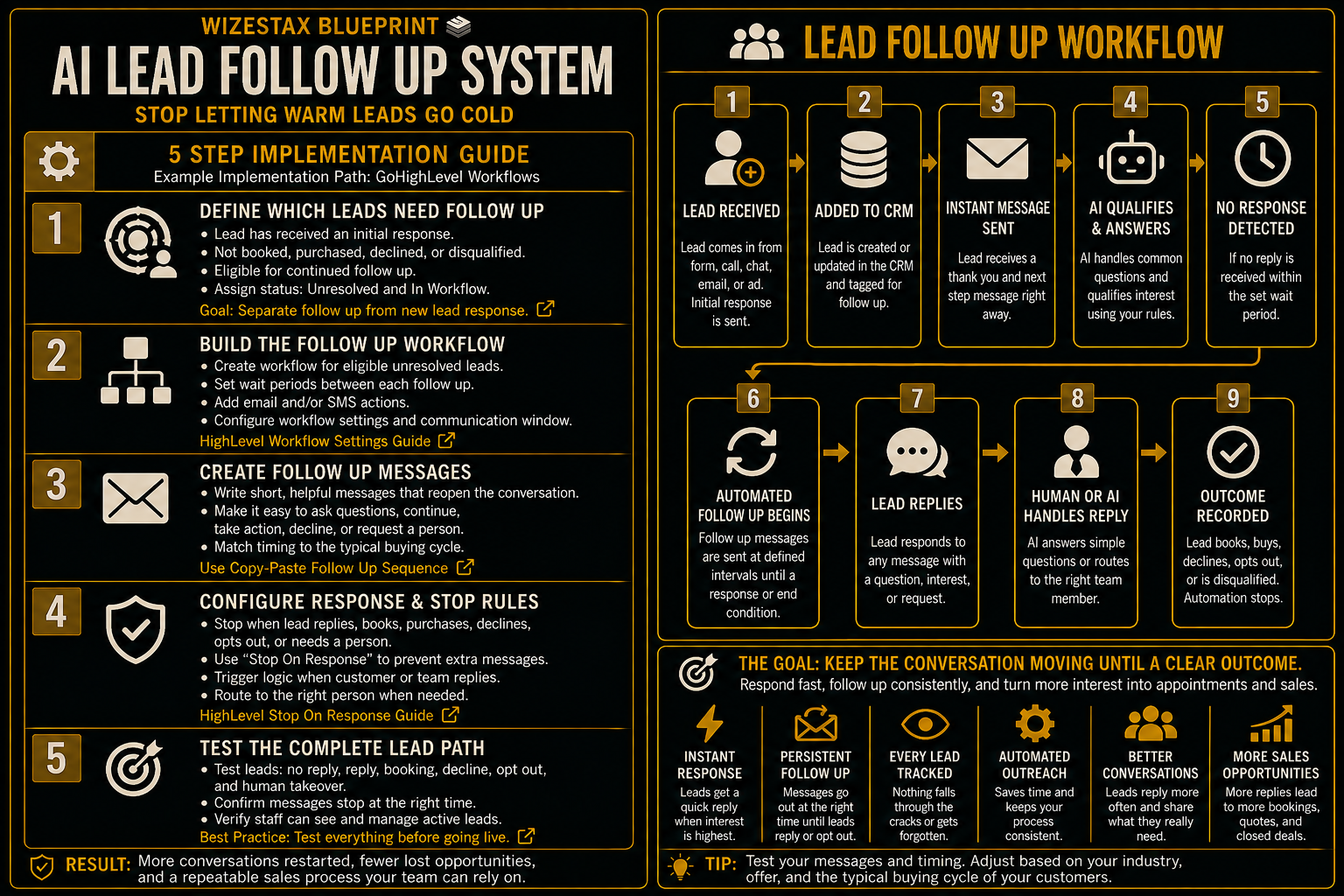
Step By Step Implementation Guide
The following setup demonstrates one implementation path using GoHighLevel.
It is not a WIZESTAX recommendation or preferred Stax.
GoHighLevel is used here because lead records, messaging, workflow logic, response detection and human sales activity can operate inside the same environment.
Step 1: Define Which Leads Need Continued Follow Up
Do not place every contact into the same sequence.
Begin by defining the state this Blueprint protects.
Initial Response Completed
The business has already responded to the new inquiry.
Still Unresolved
The lead has not booked, purchased, declined or otherwise reached an outcome.
Eligible For Follow Up
The lead remains appropriate for continued communication.
Human Handling
An employee has taken responsibility for the conversation.
Closed
The lead has reached an outcome and no longer requires this workflow.
This separation prevents Lead Follow Up from duplicating the New Lead Response System.
Step 2: Build The Follow Up Workflow
Create the workflow that manages eligible unresolved leads.
Define the entry condition.
Add appropriate waiting periods between messages.
Create the communication actions.
Set the workflow’s communication window and other relevant settings.
HighLevel provides workflow level controls for contact handling, communication timing and sender information. (HighLevel Support Portal)
HighLevel Workflow Settings Guide
Step 3: Create The Follow Up Messages
Build short messages around the actual state of the conversation.
The prospect already contacted the business.
The business already responded.
The follow up therefore does not need to introduce the company again or pretend the conversation is new.
Make it easy for the prospect to:
Ask A Question
They may need clarification.
Continue The Conversation
They may still be interested.
Take The Next Step
They may be ready to book or speak with someone.
Decline
A clear negative outcome is still useful.
Request A Person
Some conversations should immediately leave automation.
Step 4: Configure Response And Stop Rules
This is one of the most important parts of the system.
HighLevel’s Stop On Response setting can remove a contact from a workflow after the contact responds to communication sent by that workflow. (HighLevel Support Portal)
Customer reply activity can also trigger separate workflow logic for routing or other actions. (HighLevel Support Portal)
Define stop conditions for:
Lead Replies
Do not keep sending an unanswered lead sequence after the person has reengaged.
Appointment Booked
Move the lead into the appropriate booking process.
Purchase Completed
Sales follow up is no longer necessary.
Lead Declines
Record the outcome and stop.
Lead Opts Out
Communication stops.
Employee Takes Over
Prevent automated and personal communication from colliding.
HighLevel also supports workflow logic that can react when a team member personally replies. (HighLevel Support Portal)
HighLevel Stop On Response Guide
Step 5: Test The Complete Lead Path
Create several test contacts.
Test a lead that never responds.
Test a lead that responds after the first follow up.
Test a booking.
Test a decline.
Test an opt out.
Test a lead requiring human assistance.
Test an employee manually taking over the conversation.
Confirm that automated messages stop at the correct time.
Verify that staff can identify leads requiring attention.
The system is ready when the lead’s actual status determines what happens next rather than the workflow blindly continuing.
Unresolved Lead Value Snapshot
The economic value of this system begins with legitimate opportunities that already entered the sales process.
Consider an illustrative business with an average potential customer value of $500.
| Monthly Unresolved Leads | Average Potential Customer Value | Opportunity Value Represented |
|---|---|---|
| 20 | $500 | $10,000 |
| 40 | $500 | $20,000 |
| 80 | $500 | $40,000 |
These figures represent potential opportunity value associated with unresolved leads. They do not represent revenue created or recovered by automation.
Some leads would never have purchased.
Some may choose another provider.
Some may no longer need the service.
Automation cannot guarantee additional sales.
The useful measurements are:
Eligible Leads
How many legitimate leads entered continued follow up.
Follow Ups Delivered
How consistently appropriate outreach occurred.
Lead Responses
How many prospects returned to the conversation.
Human Handovers
How many conversations required employee attention.
Appointments Or Sales Progression
How many leads moved to a meaningful next step.
Declined Or Disqualified Leads
How many received a clear outcome.
Still Unresolved
How many remain open after the defined process.
WIZESTAX Diagnostic Scorecard
| Category | Assessment |
|---|---|
| Economic Problem | Legitimate sales interest disappears before a meaningful outcome |
| Lead Status Accuracy Required | High |
| Automation Potential | High |
| Human Judgment Required | Moderate |
| Customer Effort | Low |
| Data Dependency | Moderate |
| Scalability | High |
| Primary Value | Keeping unresolved lead conversations visible |
| Primary Risk | Excessive or poorly timed outreach damaging the customer experience |
Common Mistakes
| Mistake | Result |
|---|---|
| Starting before the initial response is complete | Duplicates the New Lead Response process |
| Sending too many messages | Leads experience unwanted outreach |
| Using identical timing for every lead | Follow up ignores the actual buying cycle |
| Treating silence as rejection | Legitimate opportunities can be abandoned |
| Continuing after a reply | Automated messages collide with active conversations |
| Continuing after an opt out | Customer preference is ignored |
| No human handoff | Complex conversations remain trapped in automation |
| Allowing AI to invent answers | Prospects receive unreliable information |
| Measuring messages instead of outcomes | Activity is mistaken for sales performance |
Related WIZESTAX Categories
| Category | Related Business Problem |
|---|---|
| Lead Generation | New Lead Response |
| Lead Generation | Website Lead Qualification |
| Sales | High Value Lead Prioritization |
| Sales | Quote Follow Up |
| Sales | Sales Opportunity Aging |
| Operations | Customer Intake |
These remain separate problems. The AI Lead Follow Up System owns the period after the initial response but before the lead reaches a meaningful sales outcome. New Lead Response protects the first response immediately after a new inquiry arrives. Website Lead Qualification determines whether a website inquiry meets the business’s basic fit criteria. High Value Lead Prioritization determines which legitimate opportunities may deserve greater sales attention. Quote Follow Up begins after a formal quote has been delivered. Sales Opportunity Aging identifies opportunities that have remained unresolved beyond their expected sales cycle. Customer Intake collects operational information once the customer advances toward service. Each Blueprint therefore protects a different economic or operational leak.
Get New WIZESTAX Blueprints Every Monday
Subscribe to receive new WIZESTAX Blueprints covering Customer Retention, Marketing, Sales, Finance and Operations directly to your inbox.


