
Missed Time Entry Recovery System
Detect Missing Clock Entries, Recover Actual Hours Worked, And Resolve Incomplete Time Records Before Payroll Processing
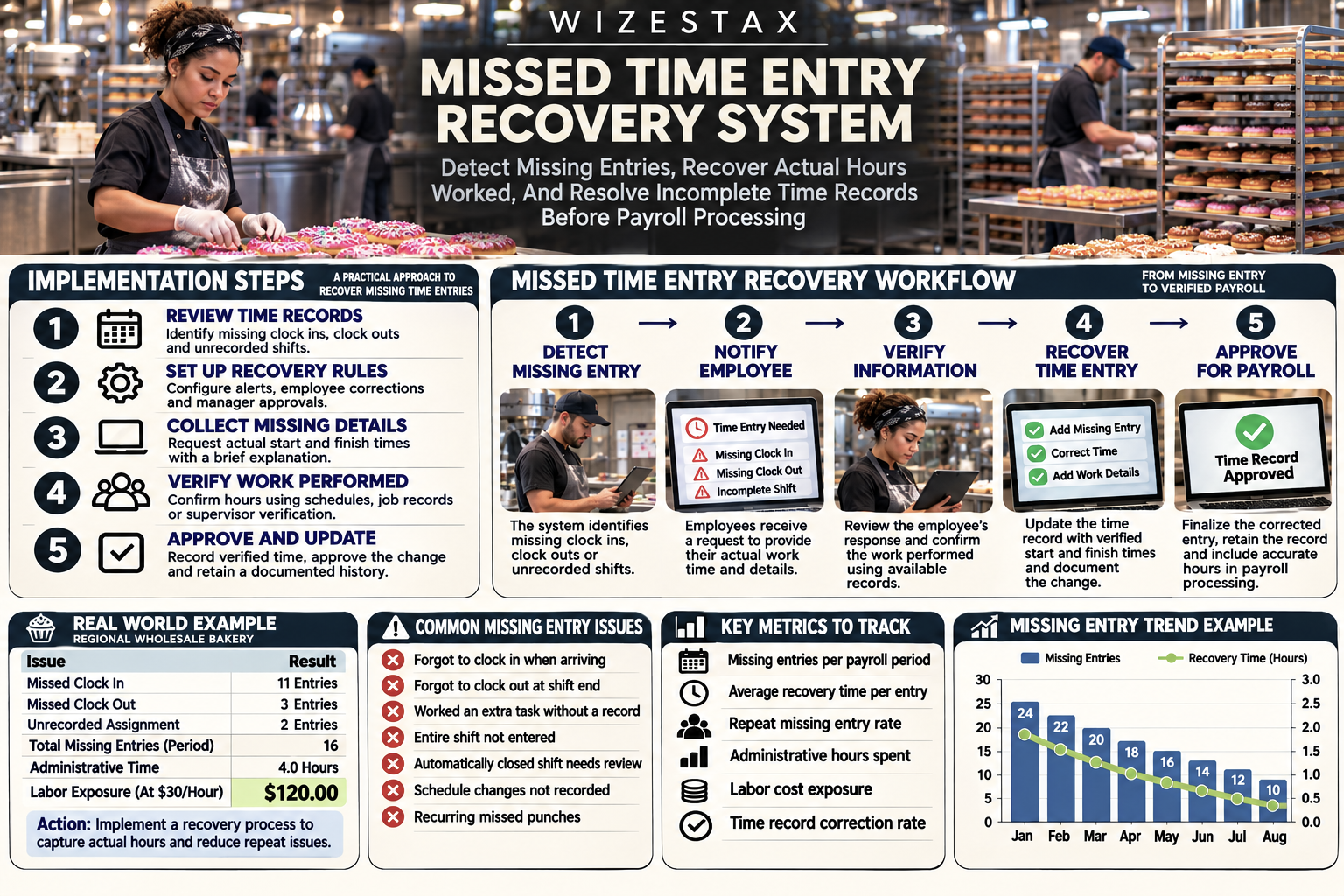
A missing time entry can begin with something as ordinary as an employee arriving during a busy shift and forgetting to clock in. The employee completes the assigned work, the supervisor sees the work being performed, and the business continues operating. The problem may not become visible until several days later, when payroll preparation reveals that the employee has no recorded start time.
Missing clock outs create a different problem. An employee may finish an assignment and leave without ending the recorded shift, allowing the timekeeping system to display an incomplete or unusually long entry. In some systems, an automatic clock out may close the record, but that timestamp does not necessarily represent when the employee actually stopped working.
These situations are especially common in businesses with variable shifts, multiple locations or employees who move directly into demanding tasks when they arrive. A restaurant employee may begin preparing the kitchen before opening. A maintenance technician may respond immediately to an equipment failure. A warehouse worker may start unloading a delivery before remembering to use the time clock.
The resulting gap creates administrative work and can compromise the accuracy of payroll records. Supervisors must reconstruct what happened, employees must confirm their hours, and payroll administrators need verified information before finalizing compensation.
A Missed Time Entry Recovery System creates a repeatable process for identifying incomplete records, notifying the appropriate people, collecting the missing information and documenting authorized corrections.
Unlike a general timesheet exception detection process, this Blueprint concentrates on recovering work time that was not recorded completely or was never entered in the first place. Its purpose is to make sure actual hours worked are captured accurately, even when the original clocking procedure fails.
Software Linx
Starter: Buddy Punch
Growth: Connecteam
Pro: Deputy
Blueprint Overview
| Metric | Value |
|---|---|
| Category | Workforce And Timekeeping Operations |
| Business Problem | Missing clock entries leave actual work hours undocumented |
| Primary Objective | Recover incomplete or absent time records |
| Core Signals | Missed clock ins, missed clock outs, open shifts and missing scheduled work records |
| Primary Automation | Detection, reminders and correction routing |
| Setup Time | Approximately 3 to 6 hours for an initial recovery process |
| Difficulty | Intermediate |
| Maintenance | Daily monitoring and payroll period review |
| Best For | Businesses with hourly employees and recurring shifts |
| Primary Output | Verified and approved time entries |
Setup time is illustrative and excludes a complete software migration, complex payroll integrations or custom timekeeping policy development.
The Hidden Revenue Leak
| Without This Blueprint | With This Blueprint |
|---|---|
| Missing punches remain unnoticed | Incomplete records are identified earlier |
| Employees remember missing time days later | Employees receive timely correction requests |
| Supervisors reconstruct shifts from memory | Supporting records can be reviewed promptly |
| Open shifts remain unresolved | Missing clock outs are investigated |
| Payroll teams chase employees at the deadline | Corrections move through a defined process |
| Manual adjustments lack explanations | Correction requests include supporting details |
| Missing entries are replaced with scheduled hours | Actual hours worked are verified |
| Repeated recording failures continue | Missed entry patterns become measurable |
The cost of a missed time entry is not limited to the minutes required to correct it. Each incomplete record can interrupt the payroll preparation process, requiring communication between the employee, supervisor and administrator responsible for approving hours.
A single missing clock in may require a supervisor to examine a work schedule, review the employee’s explanation and confirm when the employee actually began working. If the employee performed an unscheduled assignment, the business may need to consult job records or other available evidence.
When the discrepancy is discovered immediately, those details are usually easier to establish. Waiting until the end of the payroll period can make the investigation more difficult because employees and supervisors have handled numerous assignments since the original shift.
Missing records can also create compensation risks. An employee may have worked a complete shift despite the absence of a clock entry. The business remains responsible for accurately recording and paying compensable work time under applicable requirements. A missing punch should never be treated as evidence that no work occurred.
Automatic clock outs introduce another consideration. Although they can prevent shifts from remaining open indefinitely, the resulting time may be based on a system rule rather than the employee’s actual departure. The record still needs verification when the system indicates that the shift was closed automatically.
The operational leak is therefore the absence of a reliable recovery process. Employees may know that they forgot to record their time, but without a consistent method for reporting the issue, the correction can remain incomplete until payroll processing begins.
Business Impact Snapshot
| Area | Potential Impact |
|---|---|
| Payroll Accuracy | More complete records of actual hours worked |
| Administrative Labor | Less repeated follow up |
| Employee Experience | Clearer process for correcting missing entries |
| Management | Faster verification of incomplete shifts |
| Compliance | Better documentation of work time corrections |
| Payroll Preparation | Fewer unresolved missing punches |
| Operations | Visibility into recurring recording failures |
Real World Example
A regional wholesale bakery supplies fresh bread, pastries and specialty baked goods to grocery stores, hotels and independent restaurants. Its production begins late at night, with dough preparation, baking, packaging and loading continuing through the early morning.
The company employs 48 hourly workers across production, packaging and distribution. Employees work different schedules depending on production demand, and some shifts cross midnight. Supervisors are responsible for verifying hours before the bakery’s biweekly payroll is processed.
During a busy production week, an employee arrives for a scheduled 11:00 PM shift and immediately assists with an equipment problem. The employee begins working but forgets to clock in until 11:35 PM.
Another worker completes a packaging shift at 7:10 AM but leaves without clocking out. The timekeeping system eventually closes the shift according to its configured rule, creating a timestamp that requires confirmation.
A third employee works an additional loading assignment after being asked to cover for an absent coworker. The employee completes the assignment but never creates a separate time entry.
Each situation involves work that must be documented accurately. The bakery cannot simply use the original schedule as proof of the hours worked, because actual production conditions may have changed.
Assume the company experiences 14 missing or incomplete time entries during a typical two week payroll period. Each incident requires an average of 15 minutes of administrative investigation, including employee communication, verification and correction.
That represents 3.5 administrative hours per payroll period.
At an illustrative loaded administrative labor cost of $30 per hour, the investigation represents $105 per payroll period.
Across 26 biweekly payroll periods, the same pattern would represent approximately $2,730 in annual administrative labor exposure.
These figures do not include any unpaid wages, payroll adjustments, penalties or other potential consequences. They measure only the illustrative time spent recovering incomplete records.
The bakery introduces a recovery process that identifies missed punches earlier and routes them to the appropriate supervisor. Employees can submit missing information while the shift is still recent, and managers can review supporting production or delivery records.
A forgotten clock in can be corrected using the verified actual start time. An automatically closed shift can be checked against the employee’s actual finish time. An entirely missing assignment can be added after confirming that the work occurred.
The business still performs the necessary verification, but the investigation no longer depends on discovering every missing entry at the payroll deadline.
WIZESTAX Stax Options
Starter Stax
Buddy Punch
Software: Buddy Punch
Best For
Small businesses that want missed punch notifications, employee correction requests and manager approval controls.
| Function | Software |
|---|---|
| Time Recording | Buddy Punch |
| Missed Clock In Detection | Missed In Alerts |
| Missed Clock Out Detection | Missed Out Alerts |
| Employee Corrections | Add Or Edit Punch |
| Correction Review | Pending Approval |
| Manager Authorization | Punch Approval |
| Change Documentation | Activity Log |
| Payroll Preparation | Approved Time Cards |
Buddy Punch provides employee time tracking with configurable alerts for missed clock ins and missed clock outs. When employees are assigned scheduled shifts, the system can notify designated users if an expected punch does not occur within the configured conditions.
These alerts help businesses identify missing entries closer to the time they occur. A manager may receive a notification that an employee has not clocked in for a scheduled shift, allowing the manager to determine whether the employee is absent, working without a recorded punch or following an adjusted schedule.
Buddy Punch also supports employee time corrections. When permitted by the administrator, employees can add or edit punch information and submit the changes for approval.
A correction request can include the proposed time and an explanatory note. If approval is required, the change remains pending until an authorized manager reviews it.
The platform also provides an Activity Log that records changes to time entries, including the original and revised information. This supports later review of how a missing entry was recovered.
The recovery process depends on accurate schedules and appropriate alert settings. A missed punch alert does not establish that an employee worked, and a correction request does not establish that the submitted time is accurate without verification.
Advantages
| Benefit |
|---|
| Dedicated missed clock in alerts |
| Dedicated missed clock out alerts |
| Employee initiated corrections |
| Manager approval controls |
| Documented changes to time records |
Limitations
| Limitation |
|---|
| Scheduled shift information is needed for certain alerts |
| Notification timing requires configuration |
| Employee correction permissions must be managed |
| Managers still need to verify actual work time |
| Some features depend on subscription and account settings |
Growth Stax
Connecteam
Software: Connecteam
Best For
Businesses that need employee reminders, centralized timesheet issues and a structured process for resolving incomplete records.
| Function | Software |
|---|---|
| Employee Time Recording | Connecteam Time Clock |
| Clock Reminders | Time Clock Reminders |
| Incomplete Records | Timesheet Issues |
| Missing Workday Visibility | Empty Working Day Issues |
| Automatic Closure Review | Auto Clock Out Issues |
| Employee Corrections | Shift Requests |
| Manager Review | Timesheet Request Approval |
| Final Authorization | Timesheet Approval |
Connecteam combines time tracking with employee reminders and a centralized timesheet review process. Administrators can configure reminders that prompt employees to clock in or out at designated times.
The platform’s Timesheet Issues feature helps managers identify records requiring attention. Depending on the enabled settings, issues can include automatically closed shifts, pending correction requests and expected working days with no recorded time.
Employees can submit shift requests or request changes to recorded hours when they forget to clock in or out. Administrators can review the request and approve or reject the proposed correction.
Connecteam also supports daily issue reminders through its Time & Attendance Chat when the required settings and communication features are enabled. Employees can receive a reminder about unresolved issues from the previous workday and open the affected timesheet.
For example, a regional property maintenance company may have technicians moving between apartment complexes throughout the day. An employee who forgets to end a shift can receive a reminder and submit the missing information before the discrepancy reaches payroll.
Automatic clock out settings can help control open shifts, but the resulting entries still require verification when the recorded end time may not reflect actual work.
Advantages
| Benefit |
|---|
| Configurable clock reminders |
| Centralized timesheet issue visibility |
| Employee correction requests |
| Daily unresolved issue reminders where enabled |
| Manager approval and record review |
Limitations
| Limitation |
|---|
| Certain reminders require additional configuration |
| Daily issue reminders depend on enabled chat and notification settings |
| Empty workday detection depends on expected workday information |
| Automatic clock outs may not reflect actual finish times |
| Feature availability varies by subscription |
Pro Stax
Deputy
Software: Deputy
Best For
Businesses with variable schedules that need incomplete shift recovery, employee time amendments and controlled manager review.
| Function | Software |
|---|---|
| Time Recording | Deputy Timesheets |
| Scheduled Shift Reference | Deputy Scheduling |
| Forgotten Clock In | Timesheet Amendment |
| Forgotten Clock Out | Timesheet Amendment |
| Unrecorded Past Shift | Add Past Timesheet |
| Automatic Closure Review | Timesheet Warning |
| Manager Authorization | Timesheet Approval |
| Change History | Timesheet History |
Deputy provides scheduling and timekeeping capabilities that allow employees and managers to address forgotten clock entries.
When employees forget to clock in or out, they may be able to amend the affected timesheet, depending on their permissions. Managers with appropriate access can also review and correct the record.
Deputy supports the creation of past timesheets for work that was performed but never recorded, subject to the relevant permissions. This is useful when an employee completes an unscheduled assignment or forgets to record an entire shift.
The platform also has an automatic closure process for certain shifts when an employee forgets to clock out. An automatically closed timesheet receives a warning that allows the approving manager to review the recorded information.
A bakery or production facility operating overnight shifts may benefit from this approach because employees can forget to clock out after working through a shift that crosses midnight.
Managers must verify the actual finish time rather than assuming that an automatically assigned end time is correct. The original schedule can provide useful context, but it does not replace the employee’s actual work record.
Deputy also provides timesheet history and approval controls, allowing organizations to maintain a documented review process.
Advantages
| Benefit |
|---|
| Recovery of forgotten clock entries |
| Support for adding past timesheets |
| Automatic closure warnings |
| Manager review and approval |
| Integration with scheduling information |
Limitations
| Limitation |
|---|
| Employee amendments depend on permissions |
| Automatic closure times require verification |
| Scheduled shifts may not reflect actual work |
| Complex scheduling rules require configuration |
| Managers remain responsible for reviewing corrections |
How The Three Stax Differ
Buddy Punch
Emphasizes direct alerts for missed punches and a defined employee correction and approval process. Its approach helps managers identify expected clock events that did not occur.
Connecteam
Emphasizes reminders, unresolved issue visibility and employee participation in correcting incomplete records. Its approach connects prevention with recovery.
Deputy
Emphasizes recovery within a scheduling and timesheet management environment. Its approach supports forgotten punches, missing past shifts and manager review of automatically closed records.
These approaches address the same operational problem through different workflows. Their suitability depends on scheduling practices, employee permissions, existing payroll systems and the type of missing entries a business encounters.
Vendor Selection Boundary
Starter, Growth and Pro describe illustrative implementation approaches rather than product rankings or endorsements.
Businesses should verify current subscription features, pricing, integrations, support requirements and applicable timekeeping capabilities directly with each vendor.
Copy And Paste Missing Time Entry Alert
Missing time entry identified.
Employee reference: {{employee_reference}}
Department or location: {{department_location}}
Work date: {{work_date}}
Scheduled shift: {{scheduled_shift}}
Missing entry type: {{missing_entry_type}}
Existing time record: {{existing_record}}
Assigned reviewer: {{assigned_reviewer}}
Correction status: {{correction_status}}
Review deadline: {{review_deadline}}
An expected clock entry is missing or incomplete.
Contact the employee to confirm whether work was performed and determine the actual start or finish time.
Review available supporting information and record the employee’s explanation.
Do not assume that scheduled hours equal actual hours worked.
Submit any verified correction through the authorized approval process and retain an appropriate record of the change.
Escalate unresolved records promptly while observing applicable payroll and wage payment requirements.
Copy And Paste Employee Time Recovery Request
Hello {{employee_name}},
We noticed that your time record for {{work_date}} is missing the following information:
{{missing_entry_description}}
Please confirm the actual time you started or finished working and provide any relevant details about the shift.
If you worked an additional assignment that was not recorded, please include the work performed and the actual hours.
Your response will help us complete your time record accurately before payroll processing.
Please respond by {{response_deadline}}.
Thank you.
Copy And Paste AI Prompt
You are assisting an authorized payroll or workforce administrator with missing time entry recovery.
Review the supplied employee schedules, recorded punches, approved absences and available work records.
Identify missing clock ins, missing clock outs, open shifts, automatically closed records requiring verification and scheduled workdays with no recorded time.
Distinguish between an employee who did not work and an employee whose work was not recorded.
Do not assume that an absent punch means no work occurred.
Do not invent start times, finish times, breaks or total hours.
Use schedules only as supporting information. Actual compensable work time must be verified using the employee’s explanation and available records.
For each incomplete entry, produce a table containing employee reference, work date, missing information, existing evidence, required clarification, assigned reviewer, correction status and next action.
Flag records that require human verification and identify information that is insufficient to establish actual hours worked.
Do not automatically modify time records or recommend withholding compensation for work actually performed.
Protect employee information and use only authorized records.
Step By Step Implementation Guide
The following implementation illustrates one approach using Buddy Punch. It does not represent a WIZESTAX endorsement.
Step 1: Review Existing Missing Time Entries
Examine recent payroll periods and identify how often employees forgot to clock in, forgot to clock out or worked without creating a time entry.
Separate incomplete shifts from entirely missing shifts. Determine which situations created the greatest administrative effort and whether the business already has a consistent correction procedure.
Step 2: Confirm Employee Schedules
Review the scheduled shifts associated with employees in Buddy Punch.
Accurate schedules are important because missed punch alerts depend on the expected timing of employee activity.
Verify that employees with changing assignments are not incorrectly treated as absent simply because their schedules were not updated.
Step 3: Configure Missed In Alerts
Open the applicable notification and alert settings.
Enable Missed In Alerts for the appropriate employees, managers or administrators.
Choose notification timing that allows staff to investigate a missing clock in without creating unnecessary alerts for legitimate schedule changes.
Step 4: Configure Missed Out Alerts
Enable Missed Out Alerts for employees who are expected to record a clock out at the end of a scheduled shift.
Set the alert conditions according to the business’s normal operating patterns.
For overnight operations, ensure that the settings account for shifts that cross midnight.
Step 5: Review Employee Correction Permissions
Determine whether employees should be permitted to add or edit their own punch information.
If employee corrections are allowed, configure the appropriate permissions and consider requiring manager approval before changes are accepted.
Explain how employees should report an entirely missing shift.
Step 6: Establish A Missing Entry Recovery Form
Use a consistent set of fields when requesting missing information.
| Field | Purpose |
|---|---|
| Employee Reference | Identifies the worker |
| Work Date | Identifies the affected day |
| Missing Entry | Defines the incomplete information |
| Actual Start Time | Records the employee’s reported start |
| Actual Finish Time | Records the employee’s reported finish |
| Work Performed | Provides operational context |
| Employee Explanation | Documents the circumstances |
| Supporting Records | Supports verification |
| Assigned Reviewer | Establishes responsibility |
| Approval Status | Tracks the correction |
Step 7: Establish A Daily Review Routine
Assign a supervisor to review missing punch alerts and unresolved time records each workday.
Prioritize recent entries while employees and supervisors can still verify the details.
A daily review reduces the need to reconstruct an entire payroll period at once.
Step 8: Contact Employees About Missing Information
When an alert indicates a missing entry, determine whether the employee actually worked.
If work occurred, request the missing time information and an explanation of the circumstances.
Avoid treating an unanswered alert as proof of absence.
Step 9: Review Supporting Evidence
Compare the employee’s reported time with available records.
Depending on the business, supporting information may include production logs, service records, delivery documentation, supervisor observations or authorized access records.
These sources can help verify the workday, but they should not be treated as automatically definitive.
Step 10: Approve Verified Corrections
Open the affected time card and review the proposed correction.
Confirm that the updated information accurately represents the employee’s actual work.
Approve the correction using the appropriate manager permissions. Preserve relevant notes and the available history of changes.
Step 11: Reconcile Records Before Payroll
Before final payroll processing, review the remaining missing punch alerts and pending correction requests.
Confirm that verified work time has been recorded and that incomplete records have been escalated appropriately.
Do not disregard compensable work because an administrative correction remains pending.
Step 12: Monitor Recurring Missing Entries
Track the frequency of missing punches by location, shift and employee group.
Investigate whether repeated problems are caused by difficult clock access, inconsistent scheduling, insufficient training or unclear procedures.
Use the findings to reduce future recording failures rather than relying indefinitely on manual recovery.
Missing Time Entry Cost Exposure Snapshot
| Missing Entries Per Payroll Period | Average Recovery Time | Administrative Hours | Illustrative Labor Exposure |
|---|---|---|---|
| 5 | 15 Minutes | 1.25 Hours | $37.50 |
| 10 | 15 Minutes | 2.5 Hours | $75 |
| 14 | 15 Minutes | 3.5 Hours | $105 |
| 20 | 15 Minutes | 5 Hours | $150 |
| 30 | 15 Minutes | 7.5 Hours | $225 |
These scenarios assume 15 minutes of administrative work per missing entry and a loaded administrative labor cost of $30 per hour.
The calculations represent potential administrative labor exposure, not guaranteed savings. They do not include wages owed for work performed, payroll correction costs or legal consequences.
WIZESTAX Diagnostic Scorecard
| Category | Assessment |
|---|---|
| Economic Problem | Missing time records increase administrative work and payroll uncertainty |
| Detection Potential | High When Expected Shifts Are Available |
| Recovery Automation | Moderate |
| Human Verification Required | High |
| Data Dependency | High |
| Scalability | High |
| Primary Value | Earlier recovery of actual work time |
| Primary Risk | Replacing missing entries with unverified assumptions |
Common Mistakes
| Mistake | Result |
|---|---|
| Treating missing punches as absences | Actual work may go unrecorded |
| Automatically using scheduled hours | Recorded time may be inaccurate |
| Ignoring automatic clock out warnings | Incorrect end times may remain |
| Waiting until payroll day to investigate | Employees may struggle to recall details |
| Allowing unrestricted time edits | Unauthorized changes become harder to control |
| Failing to preserve correction history | Record verification becomes difficult |
| Ignoring entirely missing shifts | Compensable work may be omitted |
| Assuming an alert proves an employee error | Legitimate schedule changes may be overlooked |
| Sending repeated reminders without review | Unresolved records remain unresolved |
| Failing to check overnight shifts | Time entries may be assigned incorrectly |
| Using estimates without supporting information | Payroll accuracy is weakened |
| Ignoring recurring missing punches | Underlying process problems continue |
WIZESTAX Perspective
Missing time entries are fundamentally a recovery problem. The employee may have completed the work correctly while the timekeeping record remains incomplete. A business needs a process that separates the performance of the work from the administrative act of recording it.
Automated alerts can identify when an expected clock event is missing, but they cannot establish every detail of the employee’s workday. The recovery process must allow employees to explain what occurred and give authorized supervisors a reliable way to verify and document the correction.
The most useful outcome is not simply fewer missing punch notifications. It is a more complete record of actual work, supported by timely investigation and consistent approval procedures.
Businesses that repeatedly recover the same types of missing entries should also examine the timekeeping process itself. A difficult clock location, confusing mobile procedure or poorly maintained schedule can create recurring problems that reminders alone will not resolve.
Monday Action
Review the previous two payroll periods and count the number of missing clock ins, missing clock outs and entirely unrecorded shifts.
Determine how long each correction required, whether the employee was contacted promptly and whether the verified information was documented.
Select one recurring missing entry problem and establish a daily recovery procedure before the next payroll period.
Get New WIZESTAX Blueprints Every Monday
Subscribe to receive new WIZESTAX Blueprints covering Customer Retention, Marketing, Sales, Finance and Operations directly to your inbox.