Overbooking Prevention System
Prevent Double Bookings, Scheduling Conflicts And Resource Shortages Before They Disrupt Customer Appointments
A confirmed appointment is a commitment that a business has the time, personnel and resources needed to deliver a service. When scheduling information is incomplete or spread across different systems, that commitment can become difficult to manage.
A customer might reserve an appointment online while another employee accepts a telephone booking for the same time. Both reservations may appear valid, even though the business has only one available employee or service room.
Overbooking can also occur when appointments require shared equipment, preparation time or specialized personnel that are not included in the scheduling rules.
The Overbooking Prevention System establishes availability controls that check existing reservations and required resources before accepting additional bookings. It helps businesses prevent conflicting commitments while maintaining enough flexibility to accommodate legitimate simultaneous appointments.
Software Linx
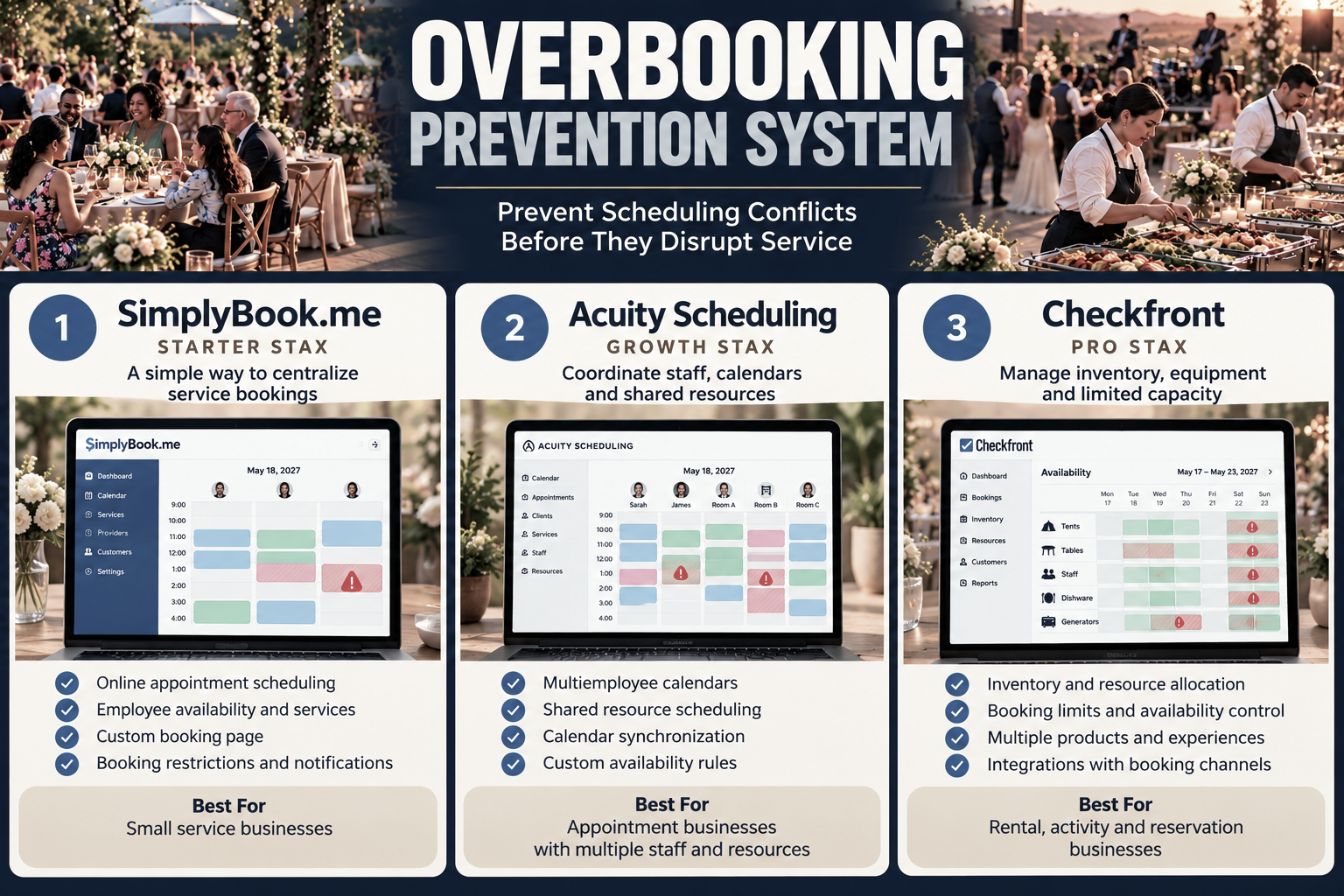
Starter: SimplyBook.me
Growth: Acuity Scheduling
Pro: Checkfront
Blueprint Overview
Category | Details |
|---|---|
Business Problem | Conflicting bookings exceed available capacity |
Primary Objective | Prevent reservations that cannot be fulfilled |
Core Signals | Appointment times, staff availability, shared resources and booking limits |
Setup Time | Approximately 2 to 6 hours for an initial configuration |
Difficulty | Moderate |
Maintenance | Daily exception checks and periodic scheduling reviews |
Best For | Appointment, service, rental and reservation businesses |
Primary Output | Validated availability and fewer booking conflicts |
The Hidden Revenue Leak
Overbooking creates operational costs that may not appear directly in scheduling reports.
When two customers receive confirmation for the same limited resource, employees must determine which commitment can be fulfilled. Resolving the conflict may involve additional labor, refunds, rescheduling or finding alternative resources.
The business may also lose future revenue if an affected customer chooses not to return.
These problems often originate from a mismatch between what the booking system considers available and what the business can actually deliver.
A calendar might show that an employee is free without recognizing that the required equipment is already reserved. Similarly, two employees might each have open appointments while only one service room remains available.
A reliable prevention system must account for the complete set of resources required to fulfill each booking.
Business Impact Snapshot
The following example illustrates the potential cost of recurring scheduling conflicts at a small appointment based business.
Monthly Exposure | Example |
|---|---|
8 conflicting bookings | 8 incidents |
Average recovery time | 25 minutes each |
Administrative labor | $25 per hour |
Monthly recovery labor | $83.33 |
3 lost appointments | $120 each |
Lost appointment revenue | $360 |
Total Illustrative Exposure | $443.33 |
This example combines administrative labor and lost appointment revenue. It does not represent guaranteed losses or recoverable profit. Actual financial impact depends on service margins, staffing arrangements and whether affected appointments can be rescheduled.
Real World Example
Consider a massage studio operating with four therapists and three treatment rooms.
All four therapists have availability at 2:00 PM, but the business can only perform three room dependent treatments simultaneously.
Without resource restrictions, a scheduling system may allow four appointments because each therapist has an open calendar.
The fourth booking creates a conflict even though no individual therapist was double booked.
By defining three treatment rooms as shared resources, the studio can prevent an additional room dependent appointment once all three rooms are reserved.
The same principle applies to vehicle service bays, photography studios, rental equipment, consultation rooms and other businesses with limited shared capacity.
Starter Stax: SimplyBook.me
Best For: Small service businesses establishing a centralized appointment booking process
SimplyBook.me provides online appointment scheduling with service definitions, employee availability and customer booking pages.
For businesses currently managing reservations through telephone calls, messages and manually maintained calendars, the platform can establish a more consistent booking process.
How It Works
The business creates services, assigns providers and defines when appointments can be accepted.
Customers select from available booking times, and confirmed appointments are recorded in the scheduling system.
Additional booking restrictions and resource configurations may be available through specific features and subscription options.
Implementation
Create the business account and enter operating hours.
Add each service with its required appointment duration.
Assign the employees who can perform each service.
Configure employee availability and unavailable periods.
Review relevant resource and booking restriction features.
Connect the booking page to the business website.
Test overlapping booking requests before accepting live reservations.
Operational Strength
SimplyBook.me is suited to establishing a structured booking process without requiring a complex operational management system.
Its value in this Blueprint comes from reducing inconsistent availability information and giving customers a defined reservation process.
Considerations
Businesses with multiple shared resources should verify that their chosen plan and enabled features support the exact capacity restrictions they require.
A basic appointment calendar alone may not prevent conflicts involving rooms, equipment or other shared assets.
Software: Explore SimplyBook.me
Growth Stax: Acuity Scheduling
Best For: Appointment businesses coordinating multiple employees, calendars and shared resources
Acuity Scheduling supports appointment availability rules, calendar synchronization and resource limits.
Its scheduling controls can help businesses manage situations where employees are available but physical resources are limited.
How It Works
Acuity evaluates appointment availability against configured calendars and scheduling limits.
Businesses can define shared resources such as rooms or equipment and specify which appointment types require them.
When the available quantity of a required resource is exhausted, additional appointments requiring that resource are restricted.
Implementation
Create the required employee or service calendars.
Define appointment durations and availability.
Configure booking limits for each calendar.
Connect supported external calendars where needed.
Create shared resources representing rooms or equipment.
Assign the relevant resources to appointment types.
Test simultaneous reservations across multiple calendars.
Confirm that unavailable time slots are blocked correctly.
Operational Strength
Acuity addresses a scheduling problem that individual employee calendars cannot always detect.
A business may have several employees available while sharing fewer rooms or pieces of equipment. Resource limits help coordinate those dependencies.
Considerations
Calendar synchronization and resource rules require careful configuration.
Businesses should verify plan limits, resource quantities and appointment settings before relying on the system to prevent all booking conflicts.
Software: Explore Acuity Scheduling
Pro Stax: Checkfront
Best For: Rental, activity and reservation businesses managing limited inventory across multiple experiences
Checkfront focuses on booking management for businesses that reserve inventory, equipment, spaces or experiences.
Its resource allocation capabilities support businesses where the same physical asset may be used by different services.
How It Works
A business defines its available inventory and establishes which products or experiences require particular resources.
When a booking is accepted, the system adjusts availability according to the relevant inventory and capacity rules.
This helps prevent the same limited asset from being committed to incompatible reservations.
Implementation
Create the business inventory and booking products.
Define the number of available units for each resource.
Establish reservation durations and operating periods.
Associate shared resources with the experiences that use them.
Configure booking limits and availability restrictions.
Connect supported booking channels where appropriate.
Test overlapping reservations involving the same resource.
Review booking exceptions and inventory availability regularly.
Operational Strength
Checkfront is designed for more complex inventory based booking situations.
A rental company, for example, may offer several activities that use the same equipment. Resource allocation allows the business to account for that shared inventory instead of treating every activity as independently available.
Considerations
Businesses should verify the supported integrations, inventory rules and subscription requirements for their operating model.
Checkfront is more specialized toward inventory and experience bookings than conventional employee appointment scheduling.
Software: Explore Checkfront
How The Three Stax Differ
Stax | Primary Focus | Operating Environment |
|---|---|---|
SimplyBook.me | Centralized service bookings | Small appointment businesses |
Acuity Scheduling | Staff calendars and shared resources | Multiemployee service operations |
Checkfront | Inventory and resource allocation | Rentals, activities and experiences |
These platforms address different scheduling environments rather than representing a universal progression in software quality.
The appropriate configuration depends on whether the business primarily reserves employee time, shared facilities or physical inventory.
Implementation Guide
Step 1: Identify Every Booking Channel
Document where reservations originate, including the website, telephone, email, social media and external booking platforms.
Determine whether each channel updates the same availability information.
Step 2: Define Actual Service Capacity
Identify the employees, rooms, equipment and other resources required for every appointment type.
A service should not appear available unless its required resources can also be reserved.
Step 3: Establish Booking Rules
Define appointment durations, capacity limits, preparation time, cleanup periods and restrictions on overlapping reservations.
Include exceptions for services that can legitimately operate simultaneously.
Step 4: Configure The Scheduling System
Enter the capacity and availability rules into the selected platform.
Ensure employees understand how to record telephone reservations, manual changes and cancellations.
Step 5: Test Conflict Scenarios
Attempt to reserve the same limited resource through different booking paths.
Confirm that the system blocks invalid reservations without preventing legitimate appointments.
Step 6: Monitor Booking Exceptions
Review manually created appointments, schedule overrides, synchronization failures and customer complaints involving unavailable time slots.
Investigate recurring exceptions to identify rules that need correction.
Copy And Paste Assets
Booking Conflict Review Checklist
OVERBOOKING PREVENTION REVIEW

Date:
Reviewer:
Booking Channel:
Appointment Type:
Requested Time:
Assigned Employee:
Required Room Or Equipment:

Existing Reservation Conflict:
Resource Capacity Available:
Preparation Or Cleanup Buffer:
Calendar Synchronization Status:

Booking Validated: Yes / No
Corrective Action:
Follow Up Owner:
Internal Scheduling Alert
Subject: Booking Conflict Requires Review

A potential scheduling conflict has been identified.

Appointment:
Requested Date And Time:
Assigned Employee:
Required Resource:
Conflicting Reservation:

Please verify availability before confirming the appointment.

If the requested time cannot be supported, identify an alternative appointment or resource.

Review Owner:
Resolution Deadline:
Customer Rescheduling Message
Subject: Appointment Scheduling Update

Hello [Customer Name],

We are contacting you regarding your appointment scheduled for [Date And Time].

We identified an availability issue that requires us to adjust the reservation.

We can offer the following alternatives:

Option 1:
Option 2:

We apologize for the inconvenience and appreciate your understanding.

Please let us know which option works best for you.

[Business Name]
AI Scheduling Review Prompt
Review the following appointment and resource scheduling data.

Identify reservations that overlap beyond available capacity.

For each potential conflict, report:

1. Appointment dates and times
2. Employees or resources involved
3. Capacity limits being exceeded
4. Possible scheduling adjustments
5. Missing information requiring human review

Do not assume that simultaneous appointments are conflicts unless they exceed a defined capacity or resource restriction.

Do not cancel or modify customer reservations.

Provide a concise exception report for operational review.
Diagnostic Scorecard
Use the following questions to evaluate whether existing scheduling controls adequately protect business capacity.
Diagnostic Question | Yes / No |
|---|---|
Do all booking channels update a reliable availability record? | |
Are employee schedules accurately maintained? | |
Are shared rooms and equipment included in booking rules? | |
Are appointment durations and buffer periods defined? | |
Are overlapping reservations restricted where necessary? | |
Are manual scheduling changes reviewed? | |
Are booking conflicts monitored and documented? |
A higher number of unanswered or negative responses indicates that the business may need stronger availability controls or clearer booking procedures.
Common Implementation Mistakes
Treating employee availability as total business capacity
An employee may be available while the equipment or facility required for the appointment is already reserved.
Ignoring manual reservations
Telephone bookings and employee schedule changes can create conflicts if they are not recorded in the primary scheduling system.
Applying overly restrictive rules
Not every simultaneous appointment represents overbooking. Excessive restrictions may reduce legitimate booking opportunities.
Failing to account for preparation time
Appointments that do not overlap directly may still conflict when cleaning, setup or travel time is required.
Assuming calendar synchronization eliminates every conflict
Calendar connections can help identify unavailable time, but they do not automatically establish every resource dependency or business capacity rule.
Final Blueprint Assessment
Overbooking prevention begins with an accurate definition of what the business can fulfill.
A reliable scheduling process must account for more than open calendar slots. It must also recognize the employees, facilities, equipment and preparation time required to deliver each confirmed service.
SimplyBook.me provides a structured approach to service appointment booking. Acuity Scheduling adds scheduling controls for multiple calendars and shared resources. Checkfront addresses inventory and resource allocation for reservation based operations.
Each represents a different operating approach to the same underlying problem: accepting bookings without exceeding available capacity.
The objective is not to eliminate simultaneous reservations. It is to ensure that every confirmed reservation can be fulfilled with the resources available.
Explore more operational systems and software comparisons at WIZESTAX.com.