Payroll Error Detection System
Identify Unusual Payroll Changes, Review Pay Discrepancies, And Correct Errors Before Employees Are Paid
Payroll errors can occur even when a business has an established payroll provider and employees consistently submit their hours. A pay rate may be entered incorrectly after a promotion, an approved bonus may appear twice, or a recurring deduction may change unexpectedly. Each individual mistake can seem minor until the payroll is finalized and employees receive amounts that do not match their actual earnings.
Businesses with variable schedules, multiple pay rates and frequent employee changes face additional administrative complexity. Payroll information may originate in timekeeping systems, human resources records, commission calculations and manual adjustments. Even when these systems are connected, incorrect information can move through the process without being identified.
The problem becomes especially difficult when payroll administrators focus primarily on whether all employees have been included and whether the payroll total appears reasonable. A company’s overall payroll expense may remain close to its usual amount while individual employees are overpaid or underpaid. A missing bonus for one employee and an unintended payment to another can offset each other in the total, concealing both discrepancies.
The Payroll Error Detection System establishes a structured review of calculated payroll before payment authorization. It compares current payroll information with previous pay periods, approved compensation records and documented changes. Unusual amounts are flagged for investigation so authorized employees can determine whether the difference is legitimate or requires correction.
The objective is not to eliminate human payroll judgment. It is to make potentially incorrect payments visible while there is still an opportunity to investigate them before payroll is submitted.
Software Linx
Starter: Gusto
Growth: Rippling
Pro: Paylocity
Blueprint Overview
| Metric | Value |
|---|---|
| Category | Payroll And Financial Controls |
| Business Problem | Incorrect payroll amounts pass through processing without sufficient review |
| Primary Objective | Identify potential payroll errors before payment authorization |
| Core Signals | Unusual gross pay, duplicate earnings, pay rate changes, unexpected deductions, unexplained payroll variances |
| Setup Time | Approximately 3 to 6 hours for an initial review procedure |
| Difficulty | Intermediate |
| Maintenance | Every payroll cycle |
| Best For | Businesses processing recurring employee payroll |
| Primary Output | Payroll exception reports, verified corrections and documented approvals |
Setup time is illustrative and excludes payroll migration, new software implementation, complex integrations and professional compliance review.
The Hidden Revenue Leak
| Without This Blueprint | With This Blueprint |
|---|---|
| Unusual pay amounts remain unnoticed | Significant changes are flagged for review |
| Duplicate bonuses may be processed | Repeated earnings receive additional scrutiny |
| Incorrect pay rates continue across payroll cycles | Compensation changes can be compared with approved records |
| Unexpected deductions go unexplained | Deduction variances are investigated |
| Payroll totals are reviewed without employee detail | Individual employee differences remain visible |
| Errors are discovered after payday | Potential discrepancies can be identified before submission |
| Corrections require additional administrative work | Earlier review can reduce avoidable corrections |
| Approval decisions are difficult to reconstruct | Investigations and authorizations are documented |
Payroll is a recurring financial obligation that directly affects employees and the company’s cash position. Unlike many operating expenses, payroll transactions involve individual compensation agreements, wage requirements, deductions and payment deadlines. An incorrect amount can affect an employee’s ability to meet personal obligations while creating additional work for the employer.
Some errors originate from incorrect employee information. A compensation increase may be entered with the wrong effective date, or a recurring allowance may remain active after it should have ended. Other errors arise when a manual adjustment is added without recognizing that the same amount has already been included through another payroll process.
Payroll errors can also result from incorrect classifications or calculations. Overtime, commissions, bonuses and certain deductions may require different treatment depending on the employee, compensation arrangement and applicable law. A payroll system can calculate an amount consistently while still producing an incorrect result if its underlying inputs or configuration are wrong.
A recurring problem is the absence of meaningful comparison between pay periods. Payroll administrators may review the total amount due without examining whether individual employee earnings have changed unexpectedly. A payroll total that appears normal does not establish that each employee’s payment is accurate.
The Payroll Error Detection System creates a defined review stage before final authorization. It identifies unusual differences and directs them to employees with the authority and information necessary to investigate the underlying cause.
An unusual amount is not automatically an error. A legitimate bonus, promotion, commission payment or change in hours can produce a substantial variance. The system should distinguish between identifying a discrepancy and confirming that a correction is required.
Business Impact Snapshot
| Area | Potential Impact |
|---|---|
| Payroll Administration | Earlier identification of questionable entries |
| Financial Controls | Greater visibility into unexpected compensation changes |
| Employee Relations | Fewer avoidable payment discrepancies |
| Cash Management | Reduced exposure to unintended payroll disbursements |
| Compliance | More consistent review of pay calculations |
| Documentation | Clearer records of investigated exceptions |
| Management | Better understanding of recurring payroll issues |
Real World Example
A regional commercial printing company operates three production facilities serving retailers, event organizers and corporate customers. Its employees include printing press operators, finishing technicians, warehouse personnel, administrative staff and production supervisors. Some employees receive hourly wages, while others have salaries or additional compensation arrangements.
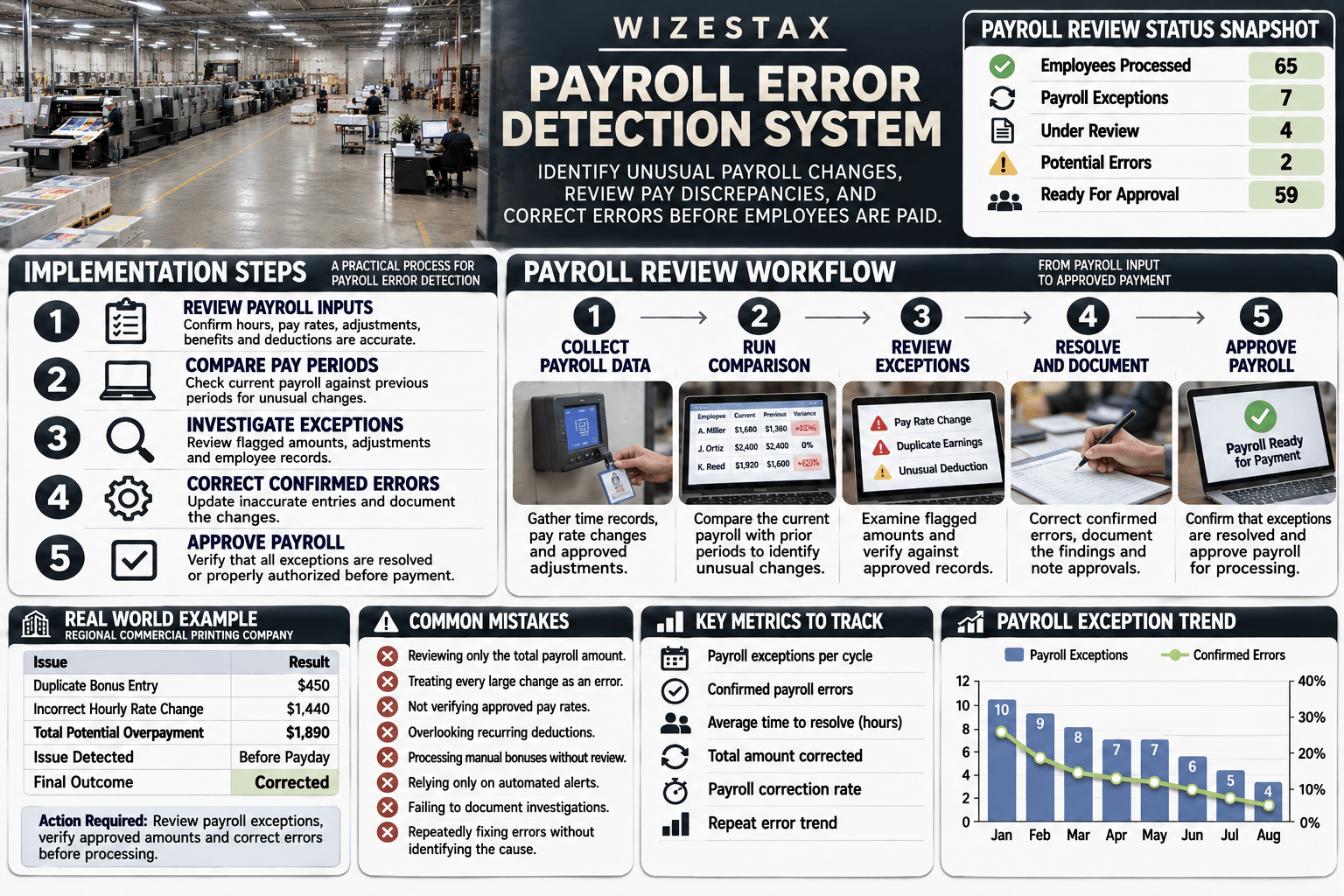
The company processes payroll every two weeks for 65 employees. Payroll information comes from approved time records, employee compensation profiles and adjustments submitted by authorized managers. Most payroll cycles follow predictable patterns, but overtime, production demands and occasional bonuses cause legitimate changes.
During one payroll period, a production supervisor receives an approved $450 performance bonus. The amount is entered manually after it has already been included through an approved payroll adjustment, creating a duplicate payment. Another employee’s hourly rate is incorrectly changed from $24 to $42 during an administrative update.
The payroll administrator reviews the total payroll expense and notices that it is slightly higher than the previous cycle. However, the company recently completed a large customer order, so the increase initially appears reasonable.
A structured payroll comparison identifies both entries as exceptions. The supervisor’s bonus appears twice, while the employee’s hourly rate differs substantially from the approved compensation record.
Assume the second employee has 80 regular hours in the pay period. The difference between $24 and $42 per hour represents $1,440 in potential excess gross wages before considering any other compensation components.
Combined with the duplicate $450 bonus, the two discrepancies represent $1,890 in potential incorrect gross payments.
The payroll administrator investigates the entries, confirms the approved compensation amounts and corrects the discrepancies before payroll authorization. The review prevents those specific errors from reaching the payment stage.
The company also identifies several other unusual payroll amounts during the same review. Some reflect legitimate overtime and approved adjustments. Those entries are documented and allowed to proceed without modification.
This distinction is essential. The purpose of payroll error detection is not to force every employee’s compensation to resemble the previous pay period. It is to identify amounts that require verification and establish whether the underlying information supports them.
WIZESTAX Stax Options
Starter Stax
Gusto
Software: Gusto
Best For
Small businesses seeking payroll processing with built in alerts that highlight unusual changes during regular payroll review.
| Function | Software |
|---|---|
| Payroll Processing | Gusto Payroll |
| Unusual Pay Changes | Payroll Review Alerts |
| Historical Comparison | Previous Payroll Data |
| Employee Earnings | Payroll Reports |
| Compensation Records | Employee Pay History |
| Payroll Adjustments | Payroll Review |
| Change Documentation | Payroll Activity Log |
| Reporting | Custom Payroll Reports |
Gusto provides payroll processing capabilities for businesses that need to calculate employee compensation and review payroll before submission. During regular payroll runs, its review process can identify unusual changes based on historical payroll information.
These alerts help administrators recognize differences that may deserve additional investigation. A significant change in earnings, for example, may reflect an approved adjustment or an incorrect entry. The administrator must examine the relevant information before deciding whether the payroll requires correction.
Gusto also provides payroll reports that allow businesses to examine employee earnings, taxes, deductions and other compensation information. Payroll history and activity records can help administrators investigate changes and determine how an entry was introduced.
For example, a small architectural firm may have salaried employees who occasionally receive bonuses or reimbursement payments. If a regular payroll contains an unexpected compensation change, the administrator can review the amount against the firm’s approved records before submitting payroll.
Gusto’s unusual change alerts apply to regular payroll runs and should not be assumed to cover every type of payroll transaction. Off cycle and additional payroll runs may require separate review procedures.
The system identifies signals rather than confirmed errors. Businesses remain responsible for checking compensation records, verifying deductions and authorizing accurate payments.
Advantages
| Benefit |
|---|
| Payroll review within the processing workflow |
| Alerts for unusual changes |
| Historical payroll reporting |
| Employee compensation records |
| Accessible review process for smaller teams |
Limitations
| Limitation |
|---|
| Unusual change alerts do not cover every payroll type |
| Alerts are not proof of incorrect payment |
| Historical comparisons may miss recurring errors |
| Requires accurate compensation information |
| Complex payroll arrangements may require additional controls |
Growth Stax
Rippling
Software: Rippling
Best For
Growing businesses seeking connected employee records and payroll processing with detailed comparisons between current and previous pay runs.
| Function | Software |
|---|---|
| Payroll Processing | Rippling Payroll |
| Pay Run Comparison | Payroll Comparison Tools |
| Gross Pay Review | Payroll Detail Review |
| Deduction Review | Payroll Comparison |
| Employee Records | Connected HR Information |
| Compensation Changes | Employee Pay Data |
| Payroll Adjustments | Payroll Editing Tools |
| Reporting | Payroll Reports |
Rippling connects payroll processing with employee information maintained within its broader workforce management environment. Businesses can compare a current payroll run with previous runs to investigate differences in gross pay, taxes and deductions before final approval.
This approach provides additional context when payroll amounts change. Rather than reviewing only the total payroll expense, administrators can examine individual employee differences and identify which components contributed to a variance.
For example, a regional engineering firm may employ salaried professionals, hourly technical staff and employees receiving project related bonuses. During payroll review, an administrator may notice that one employee’s gross pay increased substantially even though no compensation adjustment was expected.
The comparison tools can help isolate the changed amount, while connected employee records provide additional information for investigating the discrepancy. The administrator can determine whether the difference reflects an authorized payment or incorrect payroll data.
Rippling’s connected approach can also reduce some manual transfers between employee records and payroll processing. However, integration does not guarantee that every source record is correct. An incorrect compensation entry can still affect payroll if it is not reviewed.
Businesses should confirm which payroll review capabilities, workforce modules and integrations are included in their selected arrangement.
Advantages
| Benefit |
|---|
| Detailed comparison between pay runs |
| Connected employee information |
| Visibility into earnings and deduction changes |
| Centralized payroll review |
| Support for growing workforce complexity |
Limitations
| Limitation |
|---|
| Requires accurate employee records |
| Significant variances may be legitimate |
| Connected systems can propagate incorrect source data |
| Module availability depends on configuration |
| Complex implementations may require additional setup |
Pro Stax
Paylocity
Software: Paylocity
Best For
Organizations with more complex payroll requirements that need configurable audits, variance tracking and structured payroll readiness reviews.
| Function | Software |
|---|---|
| Payroll Processing | Paylocity Payroll |
| Payroll Audits | Configurable Pre Submit Audits |
| Readiness Monitoring | Payroll Readiness Dashboard |
| Pay Variance Review | Payroll Comparison Tools |
| Unexpected Earnings | Payroll Exception Checks |
| Deduction Review | Payroll Audit Controls |
| Employee Data | Connected HR Records |
| Reporting | Payroll Reports And Summaries |
| Issue Investigation | Detailed Payroll Review |
Paylocity provides payroll processing with built in review tools designed to identify potential issues before payroll is finalized. Its Payroll Readiness Dashboard highlights outstanding tasks, while configurable audits can flag unusual payroll information for further investigation.
The platform describes more than 40 payroll audits that can help identify potential problems, including unexpected pay changes and missing deductions. Administrators can use payroll summaries, variance information and detailed records to investigate the issues before authorizing payment.
For example, a regional equipment manufacturing company may have multiple production shifts, employees receiving different pay rates and periodic compensation adjustments. Payroll administrators need to review changes across a larger workforce while distinguishing legitimate operational variation from incorrect calculations.
Configurable audits can help direct attention to entries that meet defined exception conditions. The payroll team can then investigate the underlying information, obtain necessary approvals and correct confirmed errors before processing.
Paylocity also supports connections between payroll and other workforce information. These connections can reduce repeated data entry, although the accuracy of the payroll still depends on appropriate configuration and reliable source records.
The availability of specialized features and AI assisted analysis may depend on the organization’s selected products, configuration and rollout status. Businesses should verify the capabilities included in their proposed agreement rather than assuming every advertised feature is available automatically.
Advantages
| Benefit |
|---|
| Configurable payroll audits |
| Payroll readiness monitoring |
| Detailed variance analysis |
| Structured review of potential errors |
| Connected workforce information |
Limitations
| Limitation |
|---|
| Requires appropriate audit configuration |
| Complex workflows may need specialist implementation |
| Alerts still require human investigation |
| Product availability varies by arrangement |
| Smaller organizations may not need the full platform |
How The Three Stax Differ
The three platforms provide different approaches to reviewing payroll accuracy. The appropriate system depends on the complexity of the workforce, the types of compensation processed and the controls already established by the business.
Gusto
Provides payroll processing with alerts for unusual changes during regular payroll review. This approach can support smaller businesses that need visibility into unexpected differences without designing an extensive payroll audit environment.
Rippling
Provides payroll comparisons supported by connected employee information. This approach can help growing organizations investigate changes across payroll runs and identify the compensation components responsible for unexpected differences.
Paylocity
Provides configurable payroll audits and readiness monitoring. This approach can support organizations with more complex payroll administration and a need for structured exception review before processing.
These are different implementation architectures rather than product rankings.
Vendor Selection Boundary
Starter, Growth and Pro describe illustrative implementation approaches rather than endorsements.
Businesses should verify current pricing, payroll capabilities, review features, supported integrations and implementation requirements directly with each vendor.
Copy And Paste Payroll Error Alert
Payroll review exception identified.
Employee reference: {{employee_reference}}
Pay period: {{pay_period}}
Payroll date: {{pay_date}}
Exception category: {{exception_category}}
Current payroll amount: {{current_amount}}
Comparison amount: {{comparison_amount}}
Variance: {{variance_amount}}
Variance percentage: {{variance_percentage}}
Affected earnings or deduction category: {{payroll_category}}
Approved compensation reference: {{approved_record}}
Assigned reviewer: {{assigned_reviewer}}
Current review status: {{review_status}}
Required resolution date: {{resolution_date}}
Review the payroll entry against the applicable compensation records, approved adjustments and supporting documentation.
Determine whether the variance reflects an authorized change or a potential error. Do not alter the payment solely because the amount differs from a previous payroll period.
If an error is confirmed, follow the company’s authorized correction process before payroll submission. Record the investigation, supporting information and final approval.
Escalate unresolved discrepancies according to the company’s payroll procedures and applicable payment deadlines.
Copy And Paste Payroll Review Request
Hello {{reviewer_name}},
A payroll entry requires additional review before the upcoming payroll is finalized.
Employee reference: {{employee_reference}}
Pay period: {{pay_period}}
Exception: {{exception_description}}
Current amount: {{current_amount}}
Expected or comparison amount: {{comparison_amount}}
Please review the supporting compensation records and confirm whether the entry is accurate.
If the difference is authorized, document the reason and approve the entry according to the established payroll procedure. If a correction is required, notify the payroll administrator so the appropriate adjustment can be completed.
Please respond by {{review_deadline}} to support timely payroll processing.
Thank you.
Copy And Paste AI Prompt
You are assisting an authorized payroll administrator with payroll error detection.
Review the current payroll register, prior payroll information, approved compensation records and adjustment documentation provided.
Identify unusual changes in gross pay, recurring earnings, bonuses, deductions and other payroll amounts. Examine significant differences between current and historical payroll records, and identify entries that may require further investigation.
Compare employee pay rates with approved compensation records. Identify possible duplicate earnings, unexplained adjustments and payroll entries that appear inconsistent with the supplied documentation.
Do not assume that a large variance is an error. Legitimate overtime, bonuses, commissions, compensation changes and other authorized payments may create substantial differences between payroll periods.
Do not invent employee compensation agreements, overtime eligibility, tax calculations, deduction authority or applicable legal requirements.
Do not automatically modify payroll records, approve payments or determine that wages may be withheld. Flag potential discrepancies for review by authorized personnel.
Present the findings in a table containing employee reference, pay period, exception category, current amount, comparison amount, variance, supporting information, review status and recommended next action.
Identify missing information that prevents a reliable conclusion and distinguish confirmed discrepancies from entries that simply require verification.
Handle all payroll information as confidential employee data and use only authorized systems and access controls.
Step By Step Implementation Guide
The following implementation demonstrates one approach using Gusto. It is not a WIZESTAX recommendation or preferred Stax.
Gusto is used because its regular payroll review alerts and payroll reporting capabilities provide a practical example of how a business can investigate unusual compensation changes before payroll submission.
Step 1: Document The Payroll Process
Review how payroll information enters the business’s existing payroll system. Identify the sources of employee pay rates, hours, bonuses, commissions, reimbursements and deductions.
Determine who can modify compensation information, who reviews payroll and who has authority to submit payments.
Document the existing approval procedure before introducing additional checks.
Step 2: Identify Common Payroll Error Categories
Review previous payroll corrections and employee payment inquiries to identify recurring problems.
Potential categories include incorrect pay rates, duplicate bonuses, unexpected deductions, unauthorized adjustments and unusual gross pay changes.
Separate payroll calculation errors from missing time records and unresolved timekeeping exceptions. Those problems may require their own operational processes before payroll calculations can be reviewed.
Step 3: Verify Employee Compensation Records
Review the employee compensation information maintained in Gusto.
Confirm that pay rates, compensation types and effective dates agree with approved employment records. Investigate discrepancies before the next payroll is prepared.
Changes to compensation should follow established authorization procedures.
Step 4: Establish Payroll Review Responsibilities
Identify the employees authorized to prepare payroll, investigate discrepancies and approve final payment.
Where possible, establish a separate review of significant adjustments or unusual entries before payroll submission.
Ensure that employees have only the access permissions required for their responsibilities.
Step 5: Establish A Payroll Comparison Baseline
Use historical payroll records to understand typical compensation patterns.
Compare employees with their own prior payroll information rather than assuming everyone in the same department should receive similar pay.
Consider legitimate changes in working hours, compensation arrangements and approved adjustments when evaluating unusual amounts.
Step 6: Review Regular Payroll Alerts
During the regular payroll review process, examine the unusual change alerts provided by Gusto.
Identify the employees and payroll components associated with each alert.
Do not assume that the absence of an alert proves the payroll is accurate. Continue reviewing important payroll details and transactions outside the alert coverage.
Step 7: Examine Supporting Payroll Reports
Use the payroll reporting tools to examine earnings, taxes, deductions and other relevant information.
Compare unusual amounts with prior payroll records and approved compensation changes.
Where necessary, review the payroll activity history to understand whether an entry was modified and who performed the change.
Step 8: Create An Exception Review Register
Maintain a restricted record of payroll issues requiring investigation.
| Field | Purpose |
|---|---|
| Exception Number | Identifies the issue |
| Employee Reference | Identifies the affected employee |
| Pay Period | Identifies the payroll cycle |
| Exception Type | Classifies the discrepancy |
| Current Amount | Records the calculated amount |
| Comparison Amount | Provides a reference |
| Variance | Measures the difference |
| Supporting Record | Identifies relevant documentation |
| Assigned Reviewer | Establishes responsibility |
| Investigation Status | Tracks progress |
| Resolution | Documents the outcome |
| Approval Date | Records final authorization |
Protect this register according to the company’s payroll privacy and access requirements.
Step 9: Investigate Unusual Entries
Review each exception against the appropriate supporting records.
A bonus should be compared with the approved bonus authorization. A pay rate change should be compared with the employee’s compensation record. An unexpected deduction should be investigated using the relevant authorization and payroll information.
Where information is incomplete, request clarification from the responsible employee or department.
Step 10: Correct Confirmed Errors
When an investigation confirms that a payroll entry is incorrect, follow the authorized correction procedure within the payroll system.
Document the original discrepancy, the supporting evidence and the corrected amount.
Do not delay legally required wage payments while investigating unrelated discrepancies. Obtain appropriate payroll or legal guidance when a correction affects statutory payment requirements.
Step 11: Complete Final Payroll Authorization
Before submitting payroll, confirm that significant exceptions have been resolved or appropriately escalated.
Review the payroll totals, employee level changes and outstanding issues.
Ensure that the person authorizing payroll understands any remaining unresolved concerns and the applicable payment deadlines.
Step 12: Monitor Payroll Error Patterns
After each payroll cycle, record the number of exceptions identified, the number confirmed as errors and the amount of administrative work required to resolve them.
Identify recurring causes such as incorrect compensation updates, duplicate adjustments or poorly documented changes.
Use those findings to improve the payroll preparation process rather than relying indefinitely on detecting the same mistakes.
Payroll Error Cost Exposure Snapshot
| Confirmed Errors Per Month | Average Administrative Correction Time | Monthly Administrative Hours | Illustrative Labor Exposure |
|---|---|---|---|
| 2 | 45 Minutes | 1.5 Hours | $52.50 |
| 5 | 45 Minutes | 3.75 Hours | $131.25 |
| 10 | 45 Minutes | 7.5 Hours | $262.50 |
| 20 | 45 Minutes | 15 Hours | $525 |
These illustrative scenarios assume 45 minutes of administrative correction work per confirmed payroll error and a loaded labor cost of $35 per hour.
Actual correction time depends on the nature of the error, the payroll provider, employee communication requirements and applicable payment rules.
The figures represent administrative labor exposure rather than guaranteed savings. They exclude the amounts of incorrect payments, tax adjustments, penalties and other consequences that cannot be estimated without actual payroll records.
WIZESTAX Diagnostic Scorecard
| Category | Assessment |
|---|---|
| Economic Problem | Incorrect payroll amounts are processed without sufficient review |
| Signal Quality Required | High |
| Automation Potential | High For Detection |
| Human Judgment Required | High |
| Data Dependency | High |
| Scalability | High |
| Primary Value | Earlier identification of potential payroll errors |
| Primary Risk | Treating unusual compensation as proof of an error |
Common Mistakes
| Mistake | Result |
|---|---|
| Reviewing only total payroll expense | Individual errors may remain hidden |
| Treating every large variance as incorrect | Legitimate compensation may be challenged |
| Failing to verify approved pay rates | Incorrect rates can continue across pay periods |
| Ignoring recurring deductions | Unexpected changes may go unnoticed |
| Processing manual bonuses without comparison | Duplicate earnings may occur |
| Relying entirely on automated alerts | Errors outside detection rules may be missed |
| Using inaccurate historical payroll as the baseline | Existing errors can appear normal |
| Failing to document investigations | Correction decisions become difficult to verify |
| Allowing unauthorized compensation changes | Payroll controls are weakened |
| Ignoring payroll deadlines | Employees may receive late payments |
| Sharing payroll data through unsecured tools | Confidential employee information is exposed |
| Repeatedly correcting errors without investigating causes | The same problems continue |
WIZESTAX Perspective
Payroll error detection is a financial control process built around the difference between an unusual payment and an incorrect payment. Businesses need visibility into changes that deserve investigation, but they also need enough context to recognize legitimate compensation differences. A large payroll variance may reflect a serious mistake or a properly authorized payment that happens to be uncommon.
Automation can compare payroll records, highlight unexpected changes and organize exceptions for review. It cannot independently establish whether every payment complies with an employee’s compensation agreement or applicable wage requirements. Those determinations depend on accurate records and authorized human judgment.
The objective is to identify questionable payroll amounts before they become completed transactions. A consistent review process helps businesses reduce avoidable corrections while protecting the accuracy and reliability of employee payments.
Monday Action
Review the most recent completed payroll and identify five employee payments that changed noticeably from the previous comparable period.
Compare those amounts with approved compensation records, documented adjustments and the relevant payroll information. Determine whether each change was authorized and identify any discrepancies that require follow up.
Use the findings to establish a repeatable payroll review procedure before the next payment cycle.
Get New WIZESTAX Blueprints Every Monday
Subscribe to receive new WIZESTAX Blueprints covering Customer Retention, Marketing, Sales, Finance and Operations directly to your inbox.