

Website Form Failure Detection System
Detect Broken Website Forms Before Customer Inquiries Disappear
Website forms often sit quietly between customer intent and the business. A visitor can complete a contact form, quote request, registration form or inquiry form expecting that information to reach someone on the other side.
When the form breaks, that handoff can disappear without an obvious warning. Code errors, validation problems, mobile incompatibility and other technical issues can interfere with form submissions. Dedicated form monitoring tools can detect broken forms and notify the business when failures occur.
The Website Form Failure Detection System creates a monitoring layer around important website forms so businesses can detect failures, verify that submissions are reaching their intended destination and investigate problems before they remain unnoticed.
Which Stax Fits Your Business
| Business Need | Stax | Software | Cost |
|---|---|---|---|
| Dedicated monitoring for existing website forms | Starter Stax | FormStory | Free plan available |
| Hosted form processing with submission delivery workflows | Growth Stax | Formspree | Varies by plan |
| Behavioral evidence surrounding form interactions | Pro Stax | Microsoft Clarity | Free |
Pricing and capabilities can change. Confirm current information with each provider before implementation.
Software Linx
Starter: FormStory
Growth: Formspree
Pro: Microsoft Clarity
Blueprint Overview
| Metric | Value |
|---|---|
| Category | Marketing |
| Business Problem | Website forms can fail without the business immediately knowing |
| Primary Objective | Detect form failures and verify that customer information reaches its intended destination |
| Core Signals | Form submissions, errors, submission activity, notifications and user interactions |
| Setup Time | Approximately 45 to 90 minutes |
| Difficulty | Intermediate |
| Maintenance | Weekly testing with continuous monitoring where available |
| Best For | Businesses that rely on website forms for inquiries, leads, registrations or quote requests |
| Primary Output | Form failure alert and investigation trigger |
The Hidden Revenue Leak
| Without This Blueprint | With This Blueprint |
|---|---|
| A broken form can remain unnoticed | Form activity receives dedicated monitoring |
| Visitors may believe an inquiry was delivered | Submission delivery can be independently checked |
| Missing leads can resemble weak demand | Technical failure becomes a separate diagnostic possibility |
| Problems may be discovered through customer complaints | Monitoring can surface problems earlier |
| Website updates can introduce silent failures | Forms can be retested after changes |
| Staff may assume low submission volume is normal | Unexpected changes can trigger investigation |
FormStory currently monitors forms for broken states and can send alerts when a form is broken. Its service can also capture submissions when errors occur, depending on the configuration and plan. formstory.io
Business Impact Snapshot
| Area | Potential Impact |
|---|---|
| Lead Generation | Fewer customer inquiries disappear unnoticed |
| Customer Experience | Form problems can be investigated sooner |
| Sales | Missing form activity can be separated from weak demand |
| Marketing | Campaign performance is less likely to be distorted by an unnoticed form failure |
| Operations | Form testing becomes a repeatable process |
| Website Management | Updates can include post change submission validation |
Real World Example
A local service business normally receives approximately 40 quote requests through its website each week.
After a website update, the form still appears normal. Visitors can enter their information and press the submit button, but a technical problem prevents the expected submission process from completing correctly.
During the next several days, the business receives almost no website inquiries.
Without form monitoring, the team might initially attribute the decline to advertising performance, seasonality or reduced customer demand.
A Website Form Failure Detection System provides another signal.
The unexpected change in form activity triggers an investigation. The team performs a controlled test submission, checks whether the submission is recorded and confirms whether the expected notification reaches the correct destination.
The purpose of the system is not to assume every decline means the form is broken. It provides evidence that helps separate technical failure from changes in customer behavior.
WIZESTAX Stax Options
Starter Stax
FormStory
Best For
Businesses that already have website forms and want an additional monitoring layer designed specifically around form activity and failures.
| Function | Software |
|---|---|
| Form Monitoring | FormStory |
| Broken Form Detection | Broken Form Alerts |
| Submission Monitoring | Form Tracking |
| Partial Activity | Partial Entry Tracking |
| Notifications | Form Activity Notifications |
| Reporting | Activity Recaps |
FormStory says its monitoring can notify users when forms are submitted, abandoned or broken. Its current free plan includes one website, one form, page monitoring, broken form alerts and recurring activity recaps. formstory.io
Advantages
| Benefit |
|---|
| Designed specifically around website form monitoring |
| Can work alongside existing forms |
| Broken form alerts provide a direct failure signal |
| Partial entries provide additional diagnostic information |
| Free entry level monitoring is currently available |
Limitations
| Limitation |
|---|
| Monitoring requires installation of its tracking script |
| Current free plan has usage limits |
| Multi step forms are not currently supported according to FormStory |
| Captured form information creates additional privacy and data handling considerations |
| Monitoring does not eliminate the need for controlled form testing |
Growth Stax
Formspree
Best For
Businesses that want the form submission infrastructure itself to handle submissions, notifications and downstream workflows rather than only monitoring an existing form.
| Function | Software |
|---|---|
| Form Processing | Formspree |
| Submission Storage | Form Inbox |
| Email Delivery | Notification Workflows |
| Routing | Form Rules |
| Integrations | Workflow Plugins |
| Spam Control | Filtering And Domain Restrictions |
Formspree can send submission notifications and route form data into tools including Slack, CRMs and spreadsheets through its workflow integrations. Its Business plan also supports rules that control submission delivery based on defined conditions. Formspree
Advantages
| Benefit |
|---|
| Submission handling is separated from the website’s own email configuration |
| Form submissions can be routed to multiple destinations |
| Stored submission records provide evidence that a form reached the service |
| Workflow integrations can create additional delivery paths |
| Domain restrictions and spam controls are available |
Limitations
| Limitation |
|---|
| Requires changing how the website form processes submissions |
| Some routing capabilities require paid plans |
| Successful receipt by Formspree does not guarantee every downstream system performed correctly |
| Spam filtering requires appropriate configuration |
| Existing forms may require development work to migrate |
Pro Stax
Microsoft Clarity
Best For
Businesses that need behavioral evidence to investigate what visitors are doing around a form when submission activity changes.
| Function | Software |
|---|---|
| Behavioral Analytics | Microsoft Clarity |
| Form Interaction | Smart Events |
| Submission Signal | Submit Form Event |
| Investigation | Session Recordings |
| Interaction Analysis | Heatmaps |
| Event Filtering | Smart Event Filters |
Microsoft Clarity automatically recognizes several types of website interactions, including Submit Form, Contact Us, Request Quote and Sign Up events. Smart Events can then be viewed alongside recordings and other behavioral information. Microsoft Learn
Advantages
| Benefit |
|---|
| Provides behavioral context around form interactions |
| Submit Form activity can be tracked as a Smart Event |
| Recordings can help investigate visitor behavior |
| Custom Smart Events can be created without code in supported situations |
| Can complement dedicated form monitoring |
Limitations
| Limitation |
|---|
| Behavioral tracking is not the same as confirming successful lead delivery |
| Does not replace controlled form testing |
| Event configuration requires validation |
| Recordings require human interpretation |
| A recorded submit interaction does not prove the business received the inquiry |
How The Three Stax Differ
| Stax | Primary Approach |
|---|---|
| FormStory | Monitor existing forms for activity and failures |
| Formspree | Process and route form submissions through dedicated infrastructure |
| Microsoft Clarity | Investigate visitor behavior surrounding form interactions |
These are different architectures rather than rankings.
The appropriate approach depends on whether the business wants to monitor an existing form, replace or strengthen its submission infrastructure, or investigate visitor behavior surrounding form activity.
Copy And Paste Form Failure Alert
Website form review required for {{form_name}} on {{page_url}}. Expected submission activity has changed or a form failure signal has been detected. Perform a controlled test submission and verify the form interface, successful processing, stored submission record and expected notification destination before determining the cause.
Copy And Paste Weekly Form Test
Test {{form_name}} using a controlled submission. Confirm that required fields work correctly, the submit action completes, the expected confirmation appears, the submission is recorded and the intended recipient receives the notification. Record the test date, result and any corrective action required.
Copy And Paste AI Prompt
You are assisting a small business with website form failure detection.
Review the available form activity, submission records, monitoring alerts and controlled test results.
Identify evidence of a possible website form failure.
Separate technical form problems from normal changes in submission volume.
Check whether the form loads correctly, accepts valid information, completes its submit action, records the submission and delivers the expected notification.
Do not assume that reduced form activity proves the form is broken.
Do not assume that a visible success message proves the business received the submission.
Do not invent missing information.
If the evidence is insufficient to determine where the submission process failed, identify the next validation step required.
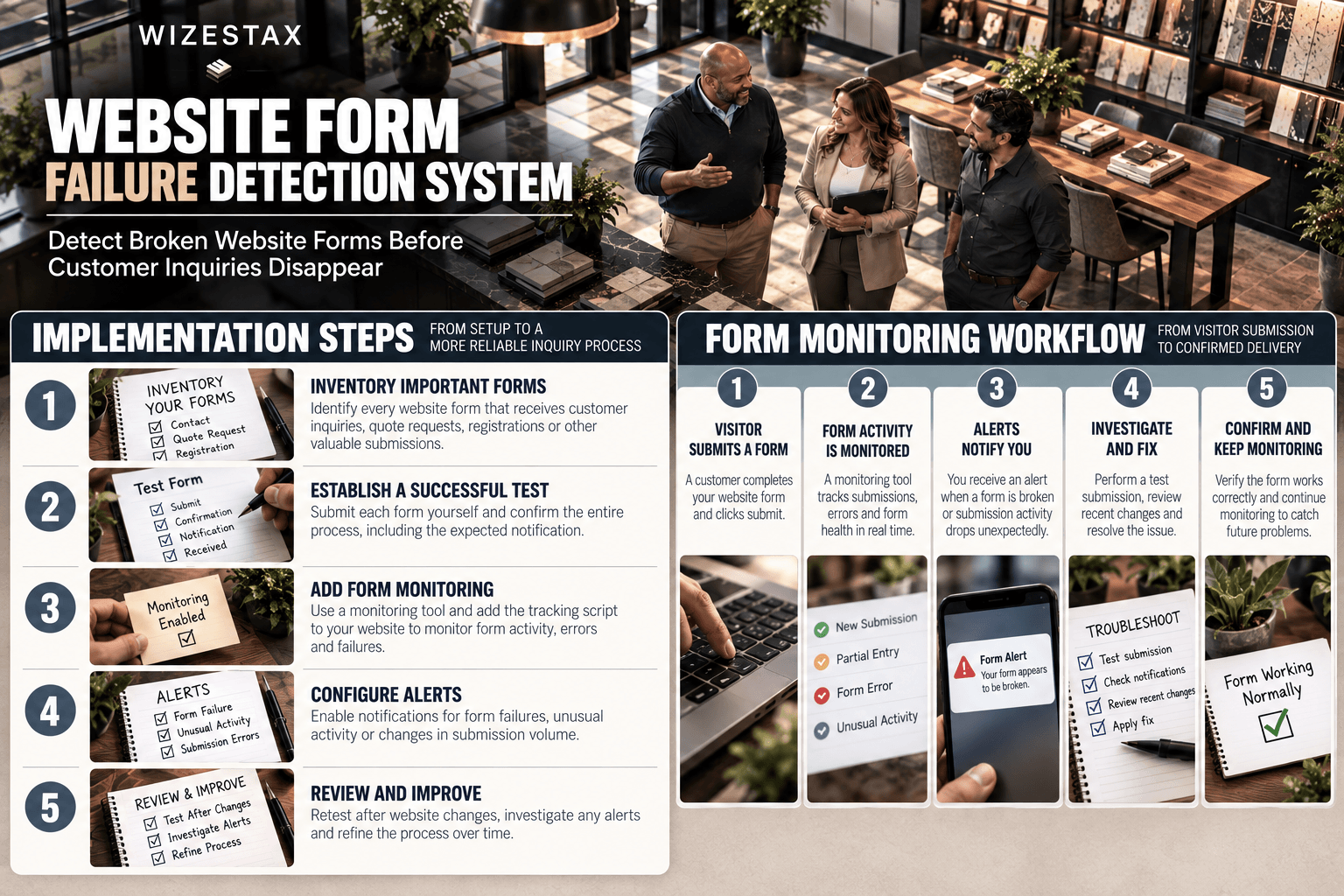
Step By Step Implementation Guide
The following setup demonstrates one implementation path using FormStory.
It is not a WIZESTAX recommendation or preferred Stax.
FormStory is used here because its current product specifically supports form monitoring, broken form alerts and submission activity tracking. formstory.io
Step 1: Inventory Important Forms
Identify every website form connected to a meaningful business process.
Examples can include contact forms, quote requests, consultation requests, registration forms and customer inquiries.
Record the page containing each form and the intended destination for its submissions.
Step 2: Establish A Successful Test
Submit each form yourself using clearly identifiable test information.
Confirm the entire chain:
Visitor enters information.
Form accepts the information.
Submit action completes.
Confirmation appears.
Submission is recorded.
Expected recipient receives the notification.
This creates a known working state before monitoring begins.
Step 3: Add Form Monitoring
Enter the page containing the form into FormStory and select the form to monitor.
FormStory’s documented setup then provides a script that is added to the website’s head section to begin monitoring. formstory.io
Step 4: Confirm Monitoring
Perform another controlled test after installation.
Verify that the monitoring system recognizes the form activity correctly.
Do not assume installation alone means monitoring is working.
Step 5: Configure Alerts
Enable the appropriate form failure notifications available under the selected plan.
The objective is to surface unexpected technical problems without requiring someone to manually inspect every form throughout the day.
Step 6: Establish Normal Activity
Observe normal submission patterns over time.
A business receiving dozens of inquiries each day has a different normal range from a business receiving several inquiries each month.
Avoid using submission volume alone as proof of failure.
Step 7: Investigate An Alert
When monitoring indicates a potential problem, perform a controlled test.
Check the page.
Complete the form.
Submit it.
Confirm the success state.
Check the monitoring record.
Verify the final notification destination.
This helps locate the point where the process stopped working.
Step 8: Review Recent Website Changes
If the form fails, identify recent changes that could have affected it.
Review plugin updates, form edits, validation rules, integrations, website redesigns, email routing changes and other relevant technical modifications.
Do not reverse changes without evidence connecting them to the failure.
Step 9: Add Behavioral Evidence When Needed
If the form technically works but customers appear unable to complete it consistently, behavioral analytics can provide another layer of evidence.
Microsoft Clarity can track Submit Form and related Smart Events and connect those interactions with session recordings. Microsoft Learn
Step 10: Retest After Repair
After correcting a problem, repeat the entire controlled submission process.
A repair is not complete until the business verifies that the form successfully travels from visitor input through the intended destination.
Form Failure At Risk Snapshot
| Expected Weekly Form Inquiries | Undetected Failure Duration | Potentially Interrupted Inquiries |
|---|---|---|
| 10 | 3 days | Approximately 4 |
| 35 | 3 days | Approximately 15 |
| 70 | 3 days | Approximately 30 |
Illustrative scenario assuming inquiries are distributed evenly throughout the week. Interrupted inquiries do not represent confirmed lost customers or revenue. Actual impact depends on visitor behavior, alternative contact methods and whether submitted information can be recovered.
WIZESTAX Diagnostic Scorecard
| Category | Assessment |
|---|---|
| Economic Problem | Customer intent can disappear between website submission and business receipt |
| Signal Quality Required | High |
| Automation Potential | High |
| Human Judgment Required | Moderate |
| Data Dependency | Moderate |
| Scalability | High |
| Primary Value | Earlier detection of silent website form failures |
| Primary Risk | Assuming low submission volume proves technical failure |
Common Mistakes
| Mistake | Result |
|---|---|
| Testing only whether the form appears | A visible form can still fail during submission |
| Checking only the success message | The business may still fail to receive the inquiry |
| Relying only on email notifications | Delivery problems can be mistaken for form problems |
| Treating low volume as proof of failure | Normal demand changes can trigger false conclusions |
| Failing to retest after website changes | New technical problems can remain unnoticed |
| Monitoring without controlled testing | Alerts lack a verified reference point |
| Collecting unnecessary form data | Monitoring can create avoidable privacy and security exposure |
Get New WIZESTAX Blueprints Every Monday
Subscribe to receive new WIZESTAX Blueprints covering Customer Retention, Marketing, Sales, Finance and Operations directly to your inbox.


