

AI No Show Recovery System
Turn Missed Appointments Back Into Booking Opportunities
A missed appointment creates an immediate hole in a business’s schedule, but the financial loss does not necessarily end when the appointment time passes. Some customers forget. Others run late, encounter a scheduling conflict, misunderstand the appointment time, or simply fail to cancel. The larger leak appears when the missed appointment receives no structured response. The AI No Show Recovery System identifies customers who did not attend, begins an appropriate recovery process, provides a simple path back to the calendar, and stops the recovery sequence when the customer rebooks or requires personal assistance. This Blueprint does not assume that every missed appointment can or should be recovered. Its purpose is to prevent recoverable appointments from becoming permanent lost revenue simply because nobody followed up.
Which Stax Fits Your Business
| Business Need | Stax | Software | Cost |
|---|---|---|---|
| Appointment recovery added around an existing scheduling process | Starter Stax | Make + Twilio | Varies By Usage |
| Appointment centered business needing scheduling, reminders and customer communication | Growth Stax | Acuity Scheduling | Varies By Plan |
| Service business needing recovery connected to customer and job operations | Pro Stax | Jobber | Varies By Plan And Users |
Pricing and capabilities change over time and should be confirmed directly with each software provider before purchase.
Software Linx
Starter
Growth
Pro
Blueprint Overview
| Metric | Value |
|---|---|
| Category | Operations |
| Business Problem | Missed appointments create unused capacity and potential lost revenue |
| Primary Objective | Give appropriate no show customers a structured path to rebook |
| Core Signal | Appointment status changes to missed or no show |
| Setup Time | Approximately 45 To 120 Minutes |
| Difficulty | Beginner To Intermediate |
| Maintenance | Periodic message and workflow review |
| Best For | Appointment and scheduled service businesses |
| Primary Output | Recovery attempt and simplified rebooking path |
The Hidden Revenue Leak
| Without This Blueprint | With This Blueprint |
|---|---|
| Missed appointments disappear from attention | No shows enter a defined recovery process |
| Staff must remember who needs follow up | Recovery activity follows established rules |
| Customers must restart the booking process themselves | A clear rebooking path can be provided |
| Outreach depends on employee availability | Recovery timing becomes more consistent |
| No show outcomes are difficult to understand | Recovery outcomes can be tracked |
| Recoverable customers can quietly disappear | Appropriate customers receive another opportunity to book |
The economic problem is not simply that a customer missed an appointment.
That appointment capacity has usually already been lost.
The additional leak occurs when a customer who still wants the service is allowed to disappear because the business has no reliable process for bringing the appointment back onto the calendar.
No Show Recovery therefore focuses on what happens after the missed appointment.
Preventing the original no show is a separate operational problem.
Business Impact Snapshot
| Area | Potential Impact |
|---|---|
| Revenue Recovery | Some missed appointments can return to the calendar |
| Staff Work | Manual recovery messages can be reduced |
| Customer Effort | Rebooking can require fewer steps |
| Response Consistency | Appropriate no shows receive a defined response |
| Scheduling | Recovered customers can return to available capacity |
| Management | Recovery attempts and outcomes become measurable |
The system creates a recovery opportunity.
It does not guarantee that the customer will return.
Real World Example
A massage therapy practice has a customer scheduled for 2:00 PM.
The appointment time passes and the customer does not arrive.
At 2:15 PM, staff confirm the appointment as a no show.
The recovery process begins after an appropriate delay.
The customer receives a short message acknowledging the missed appointment without blame and is given a direct path to schedule another time.
The customer explains that a work meeting ran late and opens the booking link.
A new appointment is scheduled for the following week.
The recovery sequence ends because the objective has been reached.
The system did not recover the original 2:00 PM capacity.
It prevented the missed appointment from automatically becoming a lost customer as well.
WIZESTAX Stax Options
Starter Stax
Make + Twilio
Best For
Businesses that already have scheduling software and need a flexible recovery layer connecting appointment information to automated customer messaging.
| Function | Software |
|---|---|
| Appointment Data | Existing Scheduling System |
| Automation | Make |
| Recovery Messaging | Twilio |
| Rebooking Destination | Existing Booking System |
| Data Routing | Make |
Advantages
| Benefit |
|---|
| Can work around existing scheduling software |
| Does not require replacing the current calendar |
| Flexible recovery logic |
| Messaging and automation remain configurable |
| Individual components can be changed independently |
Limitations
| Limitation |
|---|
| Requires the scheduling system to expose usable appointment data |
| Multiple applications may be involved |
| More complex status logic requires additional configuration |
| Messaging creates usage based costs |
| Troubleshooting may involve several systems |
Growth Stax
Acuity Scheduling
Best For
Appointment centered businesses that want scheduling, customer notifications, intake information, and appointment management inside a dedicated scheduling platform.
| Function | Software |
|---|---|
| Online Scheduling | Acuity Scheduling |
| Appointment Records | Acuity Scheduling |
| Customer Notifications | Acuity Scheduling |
| Rescheduling | Acuity Scheduling |
| Customer Information | Acuity Scheduling |
Advantages
| Benefit |
|---|
| Built specifically around appointment based businesses |
| Scheduling and customer appointment information remain connected |
| Customers can manage appointments online |
| Automated appointment communication can reduce manual work |
| Suitable for businesses where the calendar is the center of operations |
Limitations
| Limitation |
|---|
| Less appropriate for businesses requiring full field service management |
| Recovery logic may require integrations for more advanced processes |
| Messaging capabilities depend on configuration and plan |
| Not designed to replace a broader CRM when extensive customer management is required |
Pro Stax
Jobber
Best For
Service businesses where appointments are part of a larger operational process involving customers, jobs, scheduling, employees, and ongoing service history.
| Function | Software |
|---|---|
| Customer Records | Jobber |
| Scheduling | Jobber |
| Job Management | Jobber |
| Customer Communication | Jobber |
| Operational History | Jobber |
Advantages
| Benefit |
|---|
| Scheduling connects to customer and job records |
| Useful for businesses managing field employees |
| Customer history remains connected to operational work |
| Rescheduled service can return directly to the job process |
| Suitable for larger service operations |
Limitations
| Limitation |
|---|
| More operational infrastructure than simple appointment businesses require |
| Advanced recovery logic may require additional automation |
| Capabilities vary by plan |
| Less appropriate for businesses that only need a simple booking calendar |
How The Three Stax Differ
| Stax | Primary Approach |
|---|---|
| Make + Twilio | Recovery layer connected to an existing scheduling system |
| Acuity Scheduling | Appointment centered scheduling and customer communication |
| Jobber | Recovery within a broader service operation |
These are different implementation architectures rather than rankings.
Make and Twilio fit businesses that want to preserve their existing scheduling environment.
Acuity Scheduling fits businesses where appointments themselves are the center of the operation.
Jobber fits service businesses where the missed appointment belongs to a broader customer, employee, and job management process.
The appropriate architecture depends on where appointment status is recorded, how customers currently book, what happens operationally after rebooking, and how much infrastructure the business actually needs.
Copy And Paste Recovery Message
“Hi {{first_name}}, we missed you at your appointment today. If you would still like to come in, you can choose another available time here: {{booking_link}}. If you need help rescheduling, just reply to this message.”
Copy And Paste Second Recovery Message
“Hi {{first_name}}, just checking in about your missed appointment. If you would still like to reschedule, you can choose another available time here: {{booking_link}}. If your plans have changed, no problem.”
Copy And Paste AI Prompt
You are assisting a business with customers who have missed scheduled appointments.
Your purpose is to help appropriate customers return to the scheduling process.
When a customer responds, determine whether they want to rebook, need assistance, or no longer want the appointment.
Keep communication short, helpful and professional.
Do not make the customer feel guilty for missing the appointment.
Do not assume why the appointment was missed.
Do not invent available appointment times, prices, cancellation policies, fees, refunds or business policies.
Only provide scheduling options or links supplied by the business.
Stop unnecessary recovery communication when the customer has already rebooked or clearly indicates that they do not want another appointment.
Route complaints, refund requests, fee disputes, unusual circumstances and situations requiring judgment to a staff member.
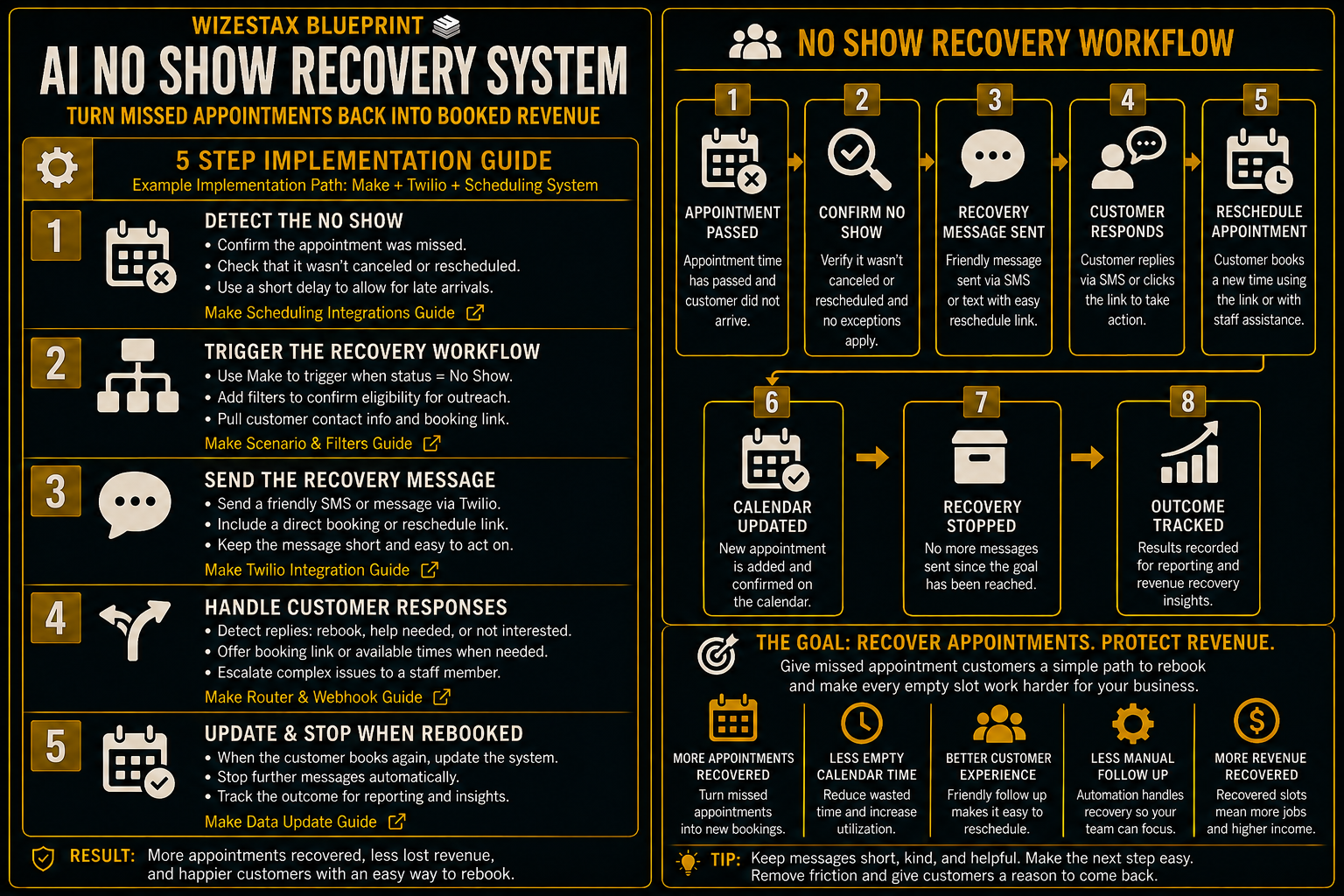
Step By Step Implementation Guide
The following setup demonstrates one implementation path using Make and Twilio connected to an existing scheduling system.
It is not a WIZESTAX recommendation or preferred Stax.
This architecture is used because it demonstrates the core recovery logic independently of any single scheduling platform. The same underlying process can be adapted to different booking systems when the required appointment status data and integrations are available.
Step 1: Define A True No Show
Determine exactly what must happen before recovery begins.
A useful rule might require:
Appointment Time Has Passed
The customer has been given the normal arrival window.
Appointment Remains Unfulfilled
The service did not occur.
No Cancellation Or Reschedule Exists
The customer has not already changed the appointment.
No Staff Exception Exists
Employees can prevent recovery when unusual circumstances make automated outreach inappropriate.
The trigger should represent a confirmed missed appointment rather than simply an appointment whose scheduled start time has passed.
Step 2: Connect The Appointment Status
Connect the business’s scheduling system to Make.
The automation needs enough appointment information to determine:
Customer Identity
Who missed the appointment.
Appointment Status
Whether the appointment is actually considered a no show.
Appointment Time
When the missed appointment occurred.
Contact Information
Where the approved recovery message should be sent.
Rebooking Destination
Where the customer should go if they want another appointment.
The exact connection depends on the scheduling platform already used by the business.
Step 3: Create The Recovery Logic
Create a Make scenario that receives or checks the relevant appointment information.
Add filters so the recovery path continues only when the appointment meets the business’s no show criteria.
The logic should prevent recovery messaging when the appointment was cancelled, already rescheduled, completed, or manually excluded.
Where necessary, add a short delay before the recovery message so staff have time to correct an appointment status or handle the situation personally.
Step 4: Send The Recovery Message
Connect Twilio to the recovery scenario.
Create a short message containing the customer’s approved rebooking link.
The message should focus on making the next step easy rather than explaining why missing the appointment was a problem.
Before sending, confirm that the customer is still eligible for recovery and has not already rebooked.
Twilio Messaging Documentation
Step 5: Test The Complete Recovery Path
Create several test appointments.
Test a genuine no show.
Test a cancelled appointment.
Test an appointment that was already rescheduled.
Test a customer excluded manually by staff.
Confirm that only the genuine no show enters the recovery process.
Verify that the message contains the correct booking link.
Complete a test rebooking and confirm that additional recovery communication stops.
The system is ready when the business can distinguish a recoverable missed appointment from an appointment that should receive no automated response.
Revenue Recovery Snapshot
The economic value of this system is the appointment revenue represented by customers who return after missing their original booking.
Consider an illustrative business with an average appointment value of $150.
| Monthly No Shows | Illustrative Rebooking Rate | Rebooked Appointments | Appointment Value Represented |
|---|---|---|---|
| 10 | 20% | 2 | $300 |
| 25 | 20% | 5 | $750 |
| 50 | 20% | 10 | $1,500 |
Illustrative scenario only. A 20% rebooking rate is an example assumption, not an expected result. Actual recovery rates, attendance, customer value and revenue will vary.
Rebooked appointment value should also not automatically be treated as recovered revenue.
A customer can rebook and miss again, cancel later, or occupy capacity that would otherwise have been filled by another customer.
The most useful measurements are:
Confirmed No Shows
How many appointments actually entered the recovery process.
Recovery Attempts
How many eligible customers received outreach.
Rebookings
How many customers scheduled another appointment.
Completed Rebookings
How many recovered appointments were actually fulfilled.
Completed Appointment Value
The economic value ultimately associated with successful recovery.
WIZESTAX Diagnostic Scorecard
| Category | Assessment |
|---|---|
| Economic Problem | Missed appointments can become permanent customer and revenue loss |
| Trigger Reliability Required | High |
| Automation Potential | High |
| Human Judgment Required | Low To Moderate |
| Customer Effort | Low |
| Data Dependency | Moderate |
| Scalability | High |
| Primary Value | Returning recoverable customers to the calendar |
| Primary Risk | Contacting customers incorrectly because appointment status is inaccurate |
Common Mistakes
| Mistake | Result |
|---|---|
| Treating every late appointment as a no show | Customers can receive incorrect recovery messages |
| Contacting customers immediately without a buffer | Staff may still be resolving the appointment |
| Making customers feel guilty | Recovery outreach can damage the relationship |
| Creating a complicated rebooking process | Customers face unnecessary friction |
| Continuing messages after rebooking | Customers receive irrelevant communication |
| Automating fee or policy disputes | Situations requiring judgment receive inappropriate responses |
| Measuring rebookings without completed appointments | Recovery performance can appear stronger than it actually is |
| Failing to distinguish prevention from recovery | The Blueprint begins solving a different business problem |
Related WIZESTAX Categories
| Category | Related Business Problem |
|---|---|
| Operations | Appointment Reminder And No Show Prevention |
| Scheduling | Abandoned Booking Recovery |
| Scheduling | Cancellation Fill |
| Customer Retention | Recurring Schedule Gap Detection |
| Operations | Customer Intake |
| Sales | Appointment Booking |
These remain separate problems. The AI No Show Recovery System begins after a scheduled customer has actually missed an appointment and focuses on returning that customer to the calendar. Appointment Reminder And No Show Prevention attempts to prevent the missed appointment before it happens. Cancellation Fill attempts to use newly available capacity after a customer cancels. Abandoned Booking Recovery addresses customers who begin the booking process but never complete an appointment. Recurring Schedule Gap Detection identifies expected recurring appointments that were never scheduled. Each Blueprint therefore owns a different economic or operational leak.
Get New WIZESTAX Blueprints Every Monday
Subscribe to receive new WIZESTAX Blueprints covering Customer Retention, Marketing, Sales, Finance and Operations directly to your inbox.


