
AI New Lead Response System
Respond While The Lead Is Still Interested
A new lead can lose value before anyone realizes an opportunity existed. Someone submits a website form, requests information, responds to an advertisement, or contacts the business after hours. The inquiry arrives, but nobody sees it immediately. By the time an employee responds, the prospect may already be speaking with another company. The AI New Lead Response System addresses the period between a new inquiry entering the business and a real sales conversation beginning. The system captures the inquiry, records the lead, sends an appropriate initial response, collects a small amount of useful information, and makes the next step clear while allowing staff to take over whenever human judgment is required.
This Blueprint does not assume that an automated response will convert a lead. Its purpose is to prevent avoidable response delays from becoming lost sales opportunities.
Which Stax Fits Your Business
| Business Need | Stax | Software | Cost |
|---|---|---|---|
| Flexible response system connecting existing forms and business tools | Starter Stax | Make + Brevo | Varies By Plan And Usage |
| Sales focused CRM with lead management and workflow automation | Growth Stax | Pipedrive | Varies By Plan And Users |
| Broader CRM environment connecting forms, automation and sales activity | Pro Stax | HubSpot | Varies By Plan And Features |
Pricing and capabilities change over time and should be confirmed directly with each software provider before purchase.
Software Linx
Starter
Growth
Pro
Blueprint Overview
| Metric | Value |
|---|---|
| Category | Lead Generation |
| Business Problem | New inquiries lose momentum while waiting for a response |
| Primary Objective | Acknowledge and organize new leads quickly |
| Core Inputs | Lead source, contact information, service interest and inquiry details |
| Setup Time | Approximately 45 To 120 Minutes |
| Difficulty | Beginner To Intermediate |
| Maintenance | Periodic workflow and message review |
| Best For | Businesses receiving inbound leads through digital channels |
| Primary Output | New lead recorded, acknowledged and directed toward an appropriate next step |
The Hidden Revenue Leak
| Without This Blueprint | With This Blueprint |
|---|---|
| New inquiries wait for staff attention | Initial acknowledgement can happen quickly |
| Employees manually check different lead sources | Incoming leads can enter a defined process |
| Some inquiries are overlooked | New submissions can be recorded systematically |
| Response timing depends on staff availability | Initial response follows defined rules |
| Lead information remains scattered | Important inquiry information can enter a lead record |
| Prospects are unsure what happens next | The next action can be made clear |
The economic problem is not simply slow messaging.
The deeper leak is paid acquisition and organic demand producing interested prospects that lose momentum before the business begins a meaningful conversation with them.
A business can spend money generating leads and still lose opportunities because the operational process immediately after the inquiry is unreliable.
Business Impact Snapshot
| Area | Potential Impact |
|---|---|
| Lead Coverage | New inquiries are less dependent on someone watching an inbox |
| Response Consistency | Initial communication follows a defined process |
| Staff Attention | Employees can see new opportunities in a structured system |
| Lead Experience | Prospects receive confirmation that the inquiry was received |
| Sales Process | Useful information can be collected before staff intervention |
| Management | Response handling becomes measurable rather than informal |
Speed matters, but speed alone is not the objective.
A fast response that confuses the prospect, asks irrelevant questions, or pretends to be a knowledgeable employee can damage the opportunity.
The system should create momentum without replacing judgment that belongs to a person.
Real World Example
A residential roofing company receives a website inquiry at 7:42 PM.
The office is closed.
The prospect wants someone to inspect a possible roof leak.
Without a response system, the inquiry remains in the website inbox until an employee checks it the following morning.
With a New Lead Response System, the inquiry enters the lead process immediately.
The prospect receives confirmation that the request was received and is asked for a small amount of useful information, such as the property location and nature of the problem.
The lead record is created and the information remains available for the sales team.
When an employee reviews the inquiry, the conversation has already started and the basic context is available.
The system did not sell the roofing job.
It prevented the first several hours of the opportunity from becoming dead time.
WIZESTAX Stax Options
Starter Stax
Make + Brevo
Best For
Businesses that already receive leads through website forms or other digital sources and want to add a flexible response layer without replacing their existing systems.
| Function | Software |
|---|---|
| Lead Source Connection | Existing Forms And Integrations |
| Automation | Make |
| Initial Communication | Brevo |
| Data Routing | Make |
| Existing Software Connection | Make Integrations |
Advantages
| Benefit |
|---|
| Can work around existing lead sources |
| Does not require replacing the current CRM |
| Flexible automation architecture |
| Individual components can be changed |
| Useful for relatively simple response processes |
Limitations
| Limitation |
|---|
| Multiple applications may be involved |
| Lead history can remain distributed |
| More complex sales processes require additional configuration |
| Troubleshooting may involve several systems |
Growth Stax
Pipedrive
Best For
Small and growing sales teams that want new leads, sales activities, follow up responsibilities, and pipeline movement organized inside a sales focused CRM.
| Function | Software |
|---|---|
| Lead Management | Pipedrive |
| CRM | Pipedrive |
| Sales Pipeline | Pipedrive |
| Workflow Automation | Pipedrive Automations |
| Staff Activities | Pipedrive |
| Lead Assignment | Pipedrive |
Pipedrive currently supports workflow automation for actions such as follow up outreach and staff tasks. Its lead management tools are designed around capturing, tracking, assigning, and progressing sales opportunities. (Pipedrive)
Advantages
| Benefit |
|---|
| Sales focused CRM architecture |
| Visual pipeline makes lead status easier to understand |
| Workflow automation can reduce repetitive sales tasks |
| Activities create clear staff responsibilities |
| Lead assignment can support growing sales teams |
Limitations
| Limitation |
|---|
| Automation capabilities depend on the selected plan |
| More sophisticated marketing automation may require additional software |
| Configuration is required to match the actual sales process |
| Poor pipeline design can simply automate an inefficient process |
Pro Stax
HubSpot
Best For
Businesses that need lead response connected to a broader CRM environment containing forms, contact records, sales activity, automation, segmentation, and reporting.
| Function | Software |
|---|---|
| CRM | HubSpot |
| Lead Capture | HubSpot Forms |
| Customer Records | HubSpot Smart CRM |
| Initial Automation | HubSpot Form Automation |
| Advanced Automation | HubSpot Workflows |
| Sales Management | HubSpot Sales Tools |
HubSpot currently allows forms to create or update CRM records and can trigger actions after submission. Its form automation can send follow up emails, notify users, add contacts to segments, and connect submissions to broader workflows where the account’s subscription supports them. (HubSpot Knowledge Base)
Advantages
| Benefit |
|---|
| Lead capture and CRM records can remain connected |
| Form submissions can trigger immediate actions |
| Broader sales and marketing infrastructure |
| Detailed customer history |
| Suitable for organizations with larger lead operations |
Limitations
| Limitation |
|---|
| Advanced capabilities can require higher subscription levels |
| More infrastructure than some small businesses need |
| Configuration becomes more involved as workflows expand |
| Software cost can increase substantially with additional features |
How The Three Stax Differ
| Stax | Primary Approach |
|---|---|
| Make + Brevo | Modular response layer around existing lead sources |
| Pipedrive | Sales focused lead and pipeline management |
| HubSpot | Broader CRM and lifecycle architecture |
These are different implementation architectures rather than rankings.
Make and Brevo fit businesses that want to preserve their existing systems while adding an automated response layer.
Pipedrive centers the process around managing the sales opportunity and the employee responsible for moving it forward.
HubSpot connects the initial inquiry to a broader customer lifecycle environment.
The appropriate architecture depends on where leads originate, how complicated the sales process is, how many employees handle inquiries, and what should happen after the initial response.
Copy And Paste Lead Response
“Hi {{first_name}}, thanks for contacting {{business_name}}. We received your request and would be happy to help. Can you tell us a little more about the service you are looking for?”
Copy And Paste After Hours Response
“Hi {{first_name}}, thanks for contacting {{business_name}}. We received your request. Our team is currently unavailable, but your information has been recorded for review. If you would like, you can send any additional details about what you need here.”
Copy And Paste AI Prompt
You are assisting a small business with initial responses to new inbound leads.
Your purpose is to acknowledge the inquiry, collect a small amount of useful information and help organize the lead for the next appropriate step.
Ask only for information necessary to understand the inquiry.
Relevant information may include the customer’s name, requested service, location, important job details and preferred timing.
Do not overwhelm the prospect with unnecessary questions.
Do not invent prices, availability, policies, service areas, appointment times or business information.
Do not represent an estimate or tentative answer as confirmed.
Do not pressure the prospect into booking.
If enough information is available and the business has provided an approved booking process, provide the appropriate next step.
If the request is unusual, urgent, unclear, outside established rules or requires judgment, route the conversation to a staff member.
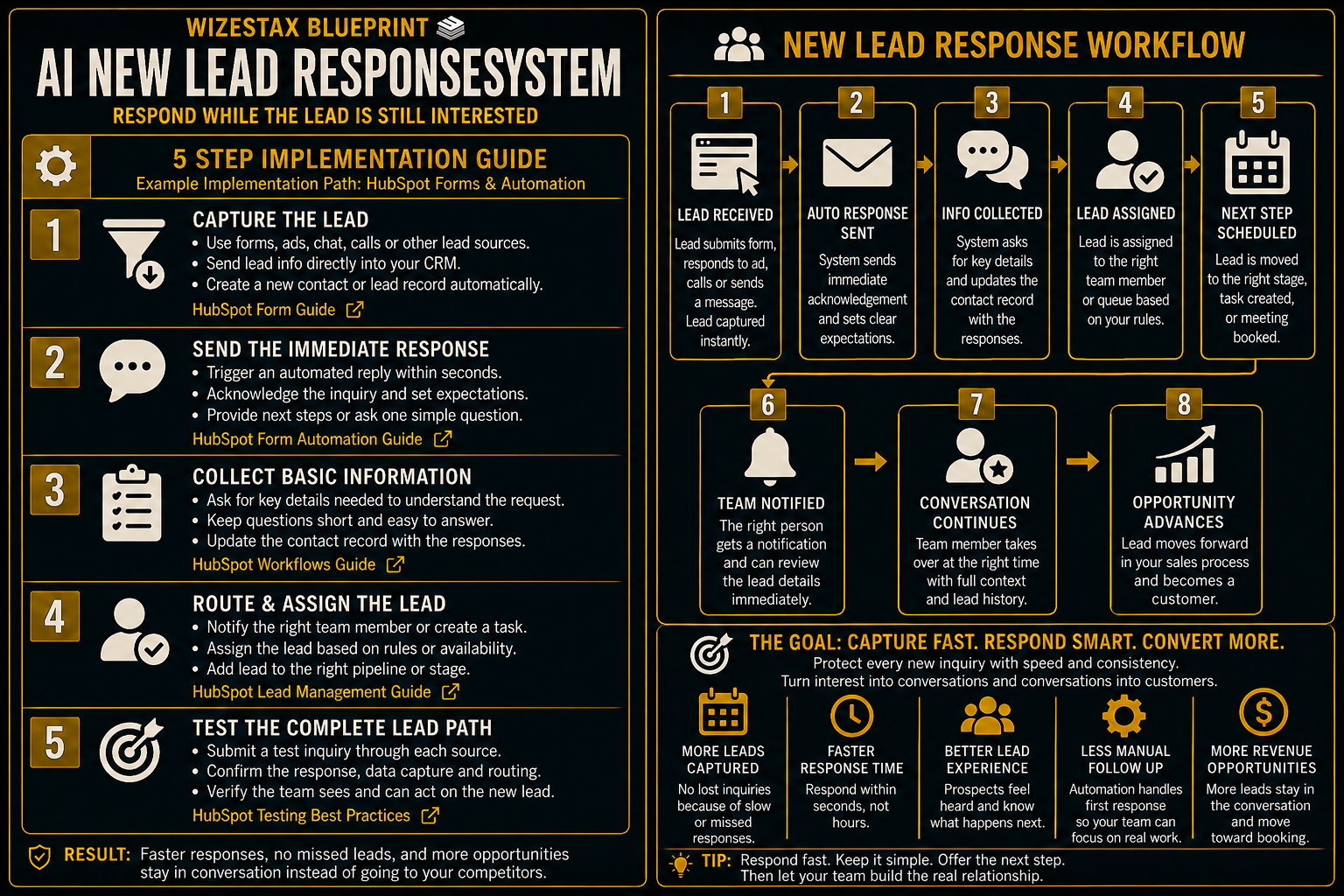
Step By Step Implementation Guide
The following setup demonstrates one implementation path using HubSpot Forms and form automation.
It is not a WIZESTAX recommendation or preferred Stax.
HubSpot is used here because its current forms can create or update CRM records and trigger automated actions immediately after a form submission, making the complete path from inquiry to acknowledgement easy to demonstrate. (HubSpot Knowledge Base)
Step 1: Define The Minimum Lead Information
Determine what the business actually needs at the beginning of a new inquiry.
For many service businesses this might include:
Contact Information
Name, email address or phone number.
Service Interest
What the prospect wants help with.
Location
Only when location affects service eligibility or routing.
Important Context
A short description of the problem or request.
Avoid turning the initial lead form into a complete customer intake process.
New Lead Response and Customer Intake solve different problems.
The first needs enough information to begin the sales conversation. Detailed operational information can be collected later if the prospect becomes a customer.
Step 2: Create The Lead Form
In HubSpot, navigate to Marketing → Forms and create the appropriate lead form.
Add only the fields necessary for the initial inquiry.
HubSpot forms can collect visitor information and create or update the corresponding CRM record. (HubSpot Knowledge Base)
HubSpot Create And Customize Forms Guide
Step 3: Create The Immediate Response
Open the automation options for the form.
Configure the action that should occur when a contact submits it.
HubSpot currently supports simple form workflows that can send an automated follow up email after submission. Other available actions include internal notifications and adding contacts to segments, depending on configuration and subscription. (HubSpot Knowledge Base)
The first message should confirm that the inquiry arrived and explain the next step.
It should not pretend that a staff member has personally reviewed the request when that has not happened.
Step 4: Create The Staff Response Process
Decide what happens internally after the lead enters the system.
The process might notify an employee, assign responsibility, create a sales activity, enroll the contact in another appropriate workflow, or place the lead into an established sales process.
The important control is ownership.
Automation should prevent the initial delay without creating a second problem where leads receive automated messages but nobody becomes responsible for the actual opportunity.
Step 5: Test The Complete Lead Path
Submit a test inquiry through the same form a real prospect will use.
Confirm that the CRM record is created or updated correctly.
Confirm that the acknowledgement arrives.
Check the wording and timing from the prospect’s perspective.
Confirm that the appropriate employee can see the lead and knows what to do next.
Test an inquiry containing incomplete or unusual information.
Verify that automation does not invent an answer or move the prospect into an inappropriate next step.
Only activate the workflow broadly after the complete path works correctly.
Opportunity At Risk Snapshot
The primary economic value of this system is not simply administrative labor saved.
It is the value of new business opportunities that may be exposed to avoidable response delays.
Consider an illustrative business receiving inbound leads with an average potential customer value of $500:
| Monthly New Leads | Average Potential Customer Value | Opportunity Value Entering The Business |
|---|---|---|
| 20 | $500 | $10,000 |
| 50 | $500 | $25,000 |
| 100 | $500 | $50,000 |
These figures represent opportunity value entering the business, not additional revenue created by automation.
A response system cannot guarantee that any of those prospects will become customers.
Its purpose is to reduce one preventable source of opportunity loss: allowing interested prospects to sit unanswered because the business did not have a reliable response process.
WIZESTAX Diagnostic Scorecard
| Category | Assessment |
|---|---|
| Economic Problem | New sales opportunities can deteriorate before meaningful contact begins |
| Response Speed Importance | High |
| Automation Potential | High |
| Human Judgment Required | Moderate |
| Data Dependency | Low To Moderate |
| Customer Effort | Low |
| Scalability | High |
| Primary Value | Protecting momentum immediately after an inbound inquiry |
| Primary Risk | Automating too much of the actual sales conversation |
Common Mistakes
| Mistake | Result |
|---|---|
| Waiting for employees to manually check every lead source | Response delays become inconsistent |
| Asking too many questions immediately | Prospects face unnecessary friction |
| Treating lead response as full customer intake | The first interaction becomes too demanding |
| Pretending automation is a human employee | Customer expectations can be misleading |
| Providing unverified prices or availability | Incorrect information reaches prospects |
| Sending repeated automated messages without context | Follow up becomes intrusive |
| Failing to assign human ownership | Leads receive messages but nobody manages the opportunity |
| Measuring messages instead of outcomes | Activity appears successful without showing whether opportunities progressed |
Related WIZESTAX Categories
| Category | Related Business Problem |
|---|---|
| Lead Generation | Lead Contact Data Verification |
| Sales | Lead Qualification |
| Sales | Sales Follow Up Timing |
| Sales | High Value Lead Prioritization |
| Operations | Customer Intake |
| Sales | Territory Lead Assignment |
These remain separate problems. The AI New Lead Response System owns the immediate gap between a new inbound inquiry and the beginning of a meaningful sales conversation. Lead Qualification determines whether the opportunity is a good fit. Sales Follow Up Timing manages what happens after the initial contact when the opportunity remains unresolved. High Value Lead Prioritization determines which opportunities deserve greater attention. Customer Intake collects the operational information needed once the business reaches the appropriate stage. Territory Lead Assignment determines which employee or location should own the opportunity. Each Blueprint therefore protects a different economic or operational leak.
Get New WIZESTAX Blueprints Every Monday
Subscribe to receive new WIZESTAX Blueprints covering Customer Retention, Marketing, Sales, Finance and Operations directly to your inbox.


