
AI Referral Request System
Turn Satisfied Customers Into A Consistent Source Of New Leads
A satisfied customer can become one of the strongest sources of new business, but referrals are often left entirely to chance. The service ends, the customer moves on, and even someone who would gladly recommend the business may never think to do it. The AI Referral Request System creates a consistent process for identifying customers who have had a successful experience, waiting until an appropriate moment, and giving them a simple way to recommend the business to someone they know. The purpose is not to pressure every customer for a referral. It is to make sure genuine referral opportunities are not lost simply because nobody remembered to ask.
Which Stax Is Best For You?
| Business Environment | Best Fit | Typical Cost |
|---|---|---|
| Solo operator or simple existing setup | Starter Stax | Low Cost + Usage |
| Small or growing service business | Growth Stax | Platform + Usage |
| Larger CRM based organization | Pro Stax | Varies By Configuration |
Software Linx
Starter: Google Forms + Make + Twilio + Google Sheets
Growth: GoHighLevel
Pro: HubSpot
Blueprint Overview
| Metric | Blueprint Diagnosis |
|---|---|
| Category | Marketing |
| Business Problem | Inconsistent Referral Generation |
| Primary Leak | Satisfied Customers Leave Without Being Asked For A Referral |
| Automation Goal | Create A Repeatable Referral Request Process |
| Setup Difficulty | Beginner To Intermediate |
| Customer Effort | Low |
| Maintenance | Low |
| Best For | Businesses With Completed Jobs, Services, Or Appointments |
The Hidden Revenue Leak
The problem is not necessarily a lack of satisfied customers.
The problem is that customer satisfaction and referral generation are two separate events.
A customer can be completely satisfied with a contractor, salon, HVAC company, photographer, dentist, cleaner, landscaper, repair company, or other service provider and still never send another customer their way.
Without a system, the business depends on someone remembering to ask at exactly the right moment.
| Without This Blueprint | With This Blueprint |
|---|---|
| Satisfied Customers Leave Unnoticed | Eligible Customers Enter A Referral Process |
| Staff Must Remember To Ask | Referral Requests Can Run Automatically |
| Timing Changes By Customer | Timing Follows Defined Rules |
| Customers May Not Know How To Refer | A Clear Referral Path Is Provided |
| Referral Activity Is Difficult To Measure | Referral Activity Can Be Recorded |
This Blueprint solves one specific leak:
Customers who may be willing to refer the business are never given a clear and timely opportunity to do so.
Business Impact Snapshot
| Area | Operational Effect |
|---|---|
| Referral Timing | Consistent After Confirmed Satisfaction |
| Staff Work | Fewer Manual Referral Reminders |
| Customer Effort | Low With A Simple Referral Link |
| Tracking | Referral Activity Can Be Connected To Customer Records |
| Maintenance | Low Once Tested |
| Scalability | High |
The economic value depends primarily on completed customer volume, the percentage of customers who are genuinely satisfied, referral participation, referred lead conversion, and average customer value.
Real World Example
A residential cleaning company finishes a customer’s scheduled cleaning.
The customer confirms that everything looks good.
Instead of relying on the cleaner or owner to remember to ask for a referral, the customer is marked Referral Ready.
The workflow waits until the chosen time and sends a short referral message with a simple link.
The customer sends that link to a neighbor who has been looking for a cleaning company.
The neighbor submits their information and becomes a new lead.
Nothing about the original service changed.
The difference is that the business created a deliberate path between customer satisfaction and a referral opportunity.
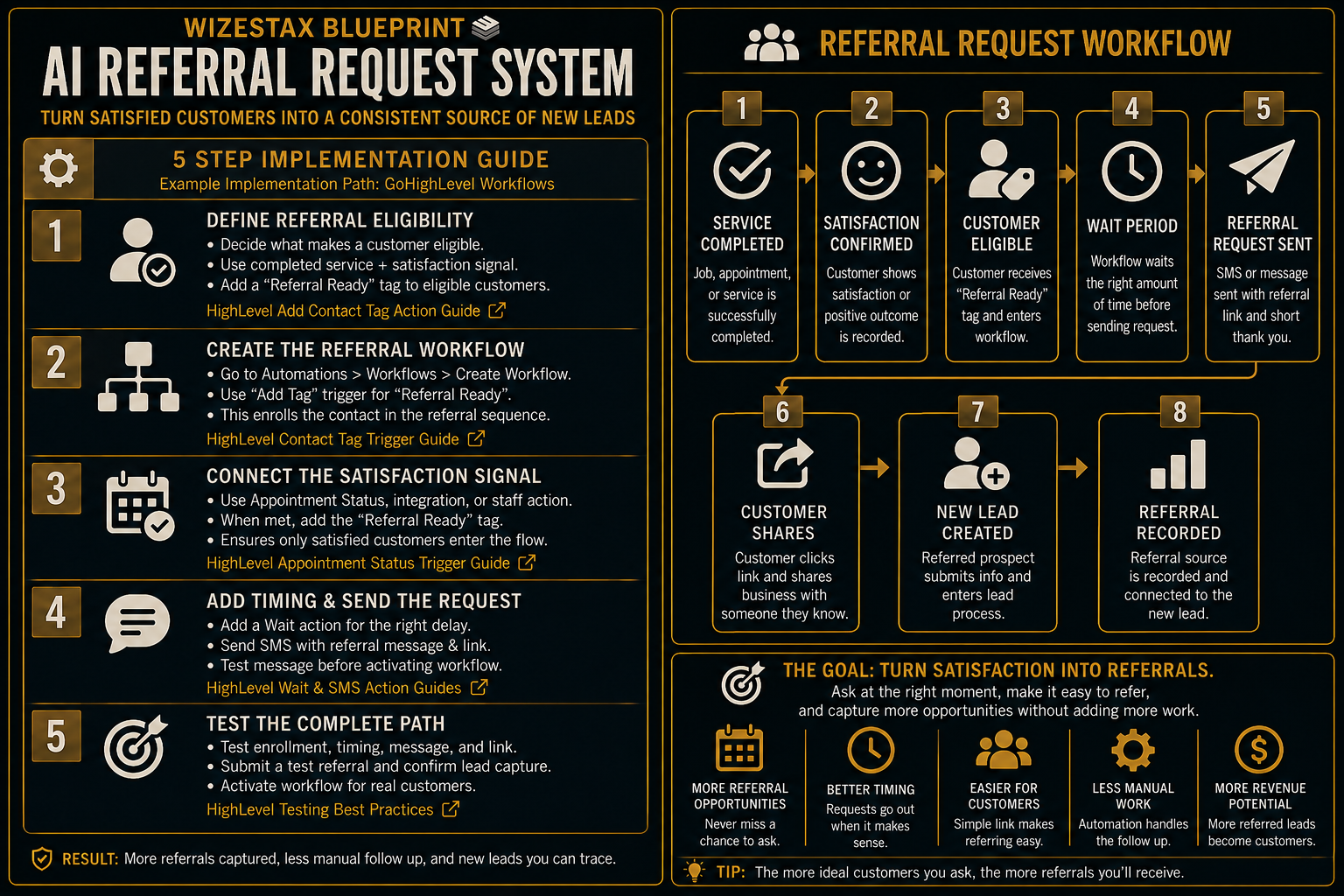
| Stage | Event |
|---|---|
| 1 | Service Completed |
| 2 | Satisfaction Confirmed |
| 3 | Customer Becomes Eligible |
| 4 | Wait Period Begins |
| 5 | Referral Request Sent |
| 6 | Customer Shares |
| 7 | New Lead Created |
| 8 | Referral Recorded |
WIZESTAX Stax Options
Starter Stax
Google Forms + Make + Twilio + Google Sheets
Best For
Solo operators and smaller businesses that already have a working customer process and mainly need an inexpensive automation layer for referrals.
| Function | Software |
|---|---|
| Referral Collection | Google Forms |
| Automation | Make |
| Messaging | Twilio |
| Tracking | Google Sheets |
How It Works
A completed customer record or qualifying event enters Make.
Make handles the referral logic and timing.
Twilio sends the referral request.
Google Forms provides a simple referral destination.
Google Sheets records referral activity.
Advantages
| Advantage |
|---|
| Works Around Existing Software |
| Individual Tools Can Be Changed |
| Low Infrastructure Requirement |
| Does Not Require A Full CRM Migration |
Limitations
| Limitation |
|---|
| Several Applications Must Stay Connected |
| Troubleshooting Can Involve Multiple Systems |
| Customer History Is Less Centralized |
| Advanced Attribution Requires More Configuration |
Growth Stax
GoHighLevel
Best For
Service businesses that want the referral workflow, customer record, messaging, automation, and resulting lead activity inside one primary system.
| Function | Software |
|---|---|
| Customer Record | GoHighLevel |
| Messaging | GoHighLevel |
| Automation | GoHighLevel Workflows |
| Referral Eligibility | Tags And Workflow Logic |
| Lead Tracking | GoHighLevel CRM |
How It Works
A completed appointment, successful service event, integration, or staff action identifies a satisfied customer.
The customer receives a Referral Ready tag.
That tag enters the customer into the referral workflow.
The workflow waits for the configured period.
The referral message is sent.
If the customer refers someone, the resulting lead enters the normal lead process.
Advantages
| Advantage |
|---|
| Centralized Customer Records |
| Built In Workflow Automation |
| Automated Messaging |
| Flexible Eligibility Logic |
| Referral Activity Can Connect To Lead Management |
Limitations
| Limitation |
|---|
| Requires Workflow Configuration |
| Can Duplicate Existing CRM Functions |
| Messaging Can Add Usage Costs |
| Depends On Accurate Customer Status Data |
Pro Stax
HubSpot
Best For
Organizations already operating around HubSpot or businesses requiring broader CRM reporting, segmentation, customer history, team controls, and marketing infrastructure.
| Function | Software |
|---|---|
| CRM | HubSpot |
| Customer Segmentation | HubSpot |
| Automation | HubSpot Workflows Where Available |
| Lead Management | HubSpot CRM |
| Reporting | HubSpot Reporting Tools |
How It Works
Customer information and service outcomes are stored inside the CRM.
Eligible customers can be identified using customer data and established business processes.
Referral outreach then becomes part of the organization’s larger CRM and marketing architecture rather than a standalone automation.
Advantages
| Advantage |
|---|
| Extensive CRM Infrastructure |
| Detailed Customer History |
| Broader Reporting Capabilities |
| Team And Organizational Controls |
| High Scalability |
Limitations
| Limitation |
|---|
| Advanced Features Can Require Higher Plans |
| Cost Can Increase With Required Features |
| Configuration Is More Involved |
| Can Be Excessive For A Simple Referral System |
Which Architecture Fits?
The Starter Stax is modular. It adds referral automation around software the business may already use.
The Growth Stax is centralized. It places customer records, referral eligibility, workflow logic, messaging, and lead activity inside one primary platform.
The Pro Stax is CRM centered. It makes more sense when referral generation needs to operate inside a larger customer data, reporting, and marketing environment.
None of these architectures is automatically better.
The right choice depends on what systems already exist, how much customer data needs to be managed, how complex the automation needs to become, and whether referrals are a standalone process or part of a larger CRM operation.
Copy & Paste Referral Message
“Hi {{first_name}}, thanks again for choosing us. If you know someone who could use our help, we would appreciate the referral. You can share this link with them: {{referral_link}}. Thanks for supporting our business.”
Copy & Paste AI Prompt
You are a customer service assistant helping a service business manage customer referrals.
Only assist with referral outreach after the customer has been identified as satisfied or otherwise eligible for a referral request.
When a customer responds positively, thank them and provide the appropriate referral link or contact information.
Keep responses short, helpful, and professional.
Never pressure a customer to provide a referral.
If the customer expresses dissatisfaction, reports a service problem, asks for a refund, or raises a complaint, stop the referral process and route the conversation to a staff member.
Do not invent discounts, referral rewards, policies, availability, or business information.
When information is unclear, route the conversation to a staff member rather than guessing.
Step By Step Implementation Guide
This implementation uses the Growth Stax with GoHighLevel. It demonstrates one way to build the Blueprint inside a centralized CRM and workflow environment.
Step 1: Define Referral Eligibility
Decide exactly what makes a customer eligible.
For an appointment based business, this could be a completed appointment combined with a positive customer outcome.
For another service business, eligibility could come from a completed job, staff confirmation, integration, or another satisfaction signal.
Create a clear eligibility tag such as:
Referral Ready
The important rule is that completing a transaction alone should not automatically mean the customer is satisfied.
HighLevel Add Contact Tag Action Guide
Step 2: Create The Referral Workflow
Go to Automations → Workflows → Create Workflow.
Create a workflow and add Contact Tag as the trigger.
Configure the trigger to activate when the Referral Ready tag is added.
This becomes the entry point into the referral sequence.
HighLevel Contact Tag Workflow Trigger Guide
Step 3: Connect The Satisfaction Signal
Appointment based businesses can use HighLevel’s Appointment Status workflow trigger when the business process supports it.
When the business’s satisfaction conditions are met, apply the Referral Ready tag.
Businesses using another booking, field service, or operational platform can instead pass the qualifying customer into HighLevel through the appropriate integration.
The architecture should remain:
Successful Customer Signal → Referral Eligibility
not simply:
Payment Received → Ask For Referral
HighLevel Appointment Status Workflow Trigger Guide
HighLevel Add Contact Tag Action Guide
Step 4: Add Timing And Send The Request
Add a Wait action after referral eligibility.
Choose a delay appropriate for the service and customer experience.
After the Wait action, add Send SMS.
Paste the referral message into the workflow and insert the actual referral link.
Use dynamic fields such as the customer’s first name where appropriate.
Send a test message before activating the workflow.
HighLevel Wait Workflow Action Guide
HighLevel Send SMS Workflow Action Guide
Step 5: Test The Complete Path
Create a test contact.
Trigger the same eligibility condition a real customer would experience.
Confirm that the customer receives the Referral Ready tag.
Confirm that the customer enters the workflow.
Confirm that the Wait action behaves correctly.
Confirm that the referral message contains the correct customer information and referral destination.
Open the referral link and complete a test referral.
Confirm that the resulting prospect enters the intended lead process and that the referral source can be identified.
Once the entire sequence works correctly, publish the workflow.
Economic Snapshot
Referral automation does not create customer satisfaction.
It creates more opportunities to convert existing customer satisfaction into introductions.
For example, imagine a business with 50 referral eligible customers in a month.
If 8 percent ultimately generate a new customer, that represents approximately four additional customers.
At an average customer value of $300, that would represent approximately $1,200 in customer value associated with those referrals.
| Eligible Customers | Resulting Customer Rate | New Customers | Avg Customer Value | Illustrative Value |
|---|---|---|---|---|
| 25 | 8% | 2 | $300 | $600 |
| 50 | 8% | 4 | $300 | $1,200 |
| 100 | 8% | 8 | $300 | $2,400 |
Illustrative scenarios only. Actual referral participation, conversion rates, customer value, software costs, and revenue will vary.
The most useful measurement is not simply how many referral messages were sent.
Track how many eligible customers were contacted, how many referred leads appeared, how many became customers, and how much customer value can reasonably be attributed to referrals.
WIZESTAX Diagnostic Scorecard
| Diagnostic Area | Assessment |
|---|---|
| Revenue Leak Visibility | High |
| Automation Suitability | High |
| Customer Effort Required | Low |
| Staff Effort After Setup | Low |
| Implementation Complexity | Low To Moderate |
| Dependence On Clean Customer Data | Moderate |
| Scalability | High |
Diagnostic Summary
This Blueprint is strongest when a business already produces satisfied customers but has no consistent mechanism for turning those experiences into referral opportunities. Its effectiveness decreases when customer satisfaction cannot be reliably identified, customer records are incomplete, or referral requests are automated before service quality problems are resolved. The automation solves the referral process. It does not solve customer satisfaction itself.
Common Mistakes
| Mistake | Result |
|---|---|
| Asking Every Customer Automatically | Dissatisfied Customers Can Receive Inappropriate Requests |
| Treating Completion As Proof Of Satisfaction | Referral Eligibility Becomes Unreliable |
| Waiting Too Long | The Customer Experience Becomes Less Immediate |
| Making Referrals Complicated | Customers Face Unnecessary Friction |
| Sending Repeated Requests | Outreach Can Become Annoying |
| Failing To Track Referral Sources | The Channel Cannot Be Properly Evaluated |
| Skipping Testing | Customers Can Receive Broken Links Or Incorrect Messages |
Related WIZESTAX Categories
| Category | Blueprint Connection |
|---|---|
| Marketing | Referral Generation |
| Sales | Referred Lead Conversion |
| Customer Service | Customer Satisfaction Signals |
| Operations | Automated Customer Outreach |
Get New WIZESTAX Blueprints Every Monday
Subscribe to receive new Lead Generation, Marketing, Sales, and Operations Blueprints delivered directly to your inbox.


