

AI Cancellation Fill System
Fill Newly Open Appointment Times Before They Become Lost Capacity
A cancellation does more than remove one customer from the calendar. It creates unused capacity that may be difficult to recover when the opening appears only hours or days before the appointment. The business may already have customers who would gladly take an earlier time, but staff must notice the cancellation, determine who is eligible, contact those customers and coordinate the replacement before the opening disappears. The AI Cancellation Fill System creates a defined process for that newly available capacity. When an appointment is cancelled, the system identifies the opening, checks the appropriate waitlist or eligible customer group and sends availability communication. If a customer claims the opening, the calendar is updated and additional outreach stops. The purpose is not to prevent cancellations. It is to give newly available appointment capacity another opportunity to be used.
Which Stax Fits Your Business
| Business Need | Stax | Software | Cost |
|---|---|---|---|
| Flexible cancellation recovery connected to an existing calendar | Starter Stax | Calendly, Make And Twilio | Varies by usage and plan |
| Appointment recovery with scheduling and communication inside one platform | Growth Stax | HighLevel | Varies by plan and usage |
| Custom waitlist management across more complex scheduling environments | Pro Stax | Airtable, Make And Twilio | Varies by usage and configuration |
Pricing and capabilities change over time and should be confirmed directly with each software provider before purchase.
Software Linx
Starter
Growth
Pro
Blueprint Overview
| Metric | Value |
|---|---|
| Category | Operations |
| Business Problem | Cancelled appointments create unused capacity that may remain empty |
| Primary Objective | Give eligible customers an opportunity to claim newly available appointment times |
| Core Signals | Cancellation status, appointment time, service, provider, location, waitlist status and eligibility |
| Setup Time | Approximately 45 to 90 minutes |
| Difficulty | Beginner To Intermediate |
| Maintenance | Low To Moderate |
| Best For | Appointment based businesses with meaningful cancellation costs |
| Primary Output | A controlled process for attempting to refill newly opened appointment capacity |
The Hidden Revenue Leak
| Without This Blueprint | With This Blueprint |
|---|---|
| Cancelled appointments create empty calendar space | Cancellations can trigger a recovery process |
| Staff must notice openings manually | Cancellation status can start automation |
| Employees search for replacement customers | Eligible customers can be identified systematically |
| Waitlist customers may hear about openings too late | Outreach can begin shortly after the opening appears |
| Multiple employees may contact the same customers | Recovery follows one defined process |
| Filled openings may continue generating messages | Outreach can stop when the recovery condition is satisfied |
| Available capacity disappears unused | Openings receive another opportunity to be filled |
The leak is not the cancellation itself.
The customer has already cancelled.
The problem is the newly available capacity that may remain unused because the business has no reliable process for matching that opening with another eligible customer.
Business Impact Snapshot
| Area | Potential Impact |
|---|---|
| Capacity Recovery | More cancelled appointment times receive another opportunity to be used |
| Response Speed | Eligible customers can hear about openings sooner |
| Staff Time | Manual waitlist outreach can be reduced |
| Waitlist Value | Customers waiting for earlier appointments become operationally useful |
| Customer Experience | Interested customers receive relevant availability opportunities |
| Calendar Control | Staff gain a defined process for handling unexpected openings |
| Scalability | Recovery can operate across larger appointment volumes |
Real World Example
A dental office has a two hour procedure scheduled for Thursday afternoon.
The patient cancels on Wednesday morning.
Without a cancellation recovery system, someone at the front desk would need to notice the opening, search the waitlist and begin calling patients individually.
Instead, the cancellation triggers the recovery process.
The system identifies patients waiting for the appropriate type of appointment who are eligible for that provider and location.
Those patients receive a message explaining that an earlier appointment has become available.
One patient accepts the opening and completes the booking process.
The calendar now contains the replacement appointment.
Additional recovery communication for that opening stops.
The system did not prevent the original cancellation.
It gave the newly available capacity another opportunity to be used.
WIZESTAX Stax Options
Starter Stax
Calendly, Make And Twilio
Best For
Smaller appointment based businesses that already use Calendly or a similar scheduling process and need a flexible recovery layer around newly available appointment times.
| Function | Software |
|---|---|
| Scheduling | Calendly |
| Automation | Make |
| Waitlist Data | Existing System |
| Communication | Twilio |
| Recovery Logic | Make |
| Booking | Calendly |
Advantages
| Benefit |
|---|
| Can work around an existing scheduling process |
| Flexible recovery logic |
| Does not require a full CRM replacement |
| Communication can begin when cancellation data becomes available |
| Useful for relatively simple waitlists |
Limitations
| Limitation |
|---|
| Multiple applications must remain connected |
| Waitlist information must be maintained separately |
| More technical configuration is required |
| Preventing duplicate claims requires careful booking logic |
Growth Stax
HighLevel
Best For
Businesses that want appointment status, workflow logic, customer communication and scheduling connected inside one platform.
| Function | Software |
|---|---|
| Calendar | HighLevel |
| Cancellation Trigger | Appointment Status |
| Customer Records | HighLevel |
| Conditional Logic | Workflows |
| Communication | HighLevel |
| Booking | HighLevel Calendar |
Advantages
| Benefit |
|---|
| Appointment status can trigger workflows |
| Cancellation status can be filtered directly |
| Appointment information can be used inside workflow conditions |
| Communication and customer records remain connected |
| Workflow logic can create different paths for appointment events |
| Calendar activity remains inside the same platform |
Limitations
| Limitation |
|---|
| Waitlist eligibility still requires thoughtful configuration |
| Complex recovery logic requires testing |
| Messaging costs and features depend on configuration |
| Businesses with several service rules may need more detailed segmentation |
HighLevel currently supports an Appointment Status workflow trigger that can respond to appointment status changes including cancellations. Appointment related workflows can also use appointment information inside conditional logic. (HighLevel Support Portal)
HighLevel Appointment Status Trigger
HighLevel Appointment Conditions Guide
Pro Stax
Airtable, Make And Twilio
Best For
Businesses that need a more structured waitlist containing eligibility information across several services, providers, locations or appointment requirements.
| Function | Software |
|---|---|
| Waitlist Database | Airtable |
| Eligibility Data | Airtable |
| Automation | Make |
| Communication | Twilio |
| Scheduling | Existing Scheduling System |
| Recovery Status | Airtable And Automation |
Advantages
| Benefit |
|---|
| Waitlist structure can reflect complex eligibility requirements |
| Customer records can contain service and location preferences |
| Existing scheduling software can remain in place |
| Recovery logic can be customized extensively |
| Useful when simple tags are not enough to manage eligibility |
Limitations
| Limitation |
|---|
| More applications must remain synchronized |
| Configuration is more technical |
| Waitlist data requires maintenance |
| Calendar status must remain synchronized with the recovery process |
| More complex systems create more points that require testing |
How The Three Stax Differ
| Stax | Primary Approach |
|---|---|
| Calendly, Make And Twilio | Flexible recovery around an existing scheduling process |
| HighLevel | Appointment recovery inside an integrated workflow and calendar platform |
| Airtable, Make And Twilio | Structured waitlist recovery using a customizable customer database |
These are different implementation architectures rather than rankings.
A smaller business may only need automation around an existing calendar.
Another business may prefer appointment status, communication and booking inside the same platform.
A business with several providers, locations or service restrictions may need a more structured waitlist database before automation can reliably determine who should receive each opening.
The appropriate architecture depends on the complexity of the appointment and the information required to determine customer eligibility.
Copy And Paste Waitlist Message
“Hi {{first_name}}, an earlier appointment has become available for {{appointment_time}}. If you would like this opening, you can check availability here: {{booking_link}}. The appointment remains available until another customer completes the booking.”
Copy And Paste Opening Filled Message
“Thanks for your interest. That appointment has already been taken. We will keep your current appointment and waitlist preferences unchanged unless you tell us otherwise.”
Copy And Paste AI Prompt
You are assisting a business with offering newly available appointment times to customers on an approved waitlist.
Use only confirmed appointment information and customer eligibility data.
Determine which customers are eligible for the newly available appointment based on the business rules.
These rules may include service type, provider, location, appointment duration or other confirmed scheduling requirements.
Do not contact customers who are not part of the approved waitlist or eligible customer group.
Provide the available appointment information and the correct booking path.
Do not tell a customer that an appointment is reserved until the scheduling system confirms the booking.
If the opening is filled, stop additional recovery communication for that appointment.
Do not invent availability, service compatibility, provider availability or scheduling policies.
Route scheduling conflicts, complaints, policy questions and unusual requests to a staff member.
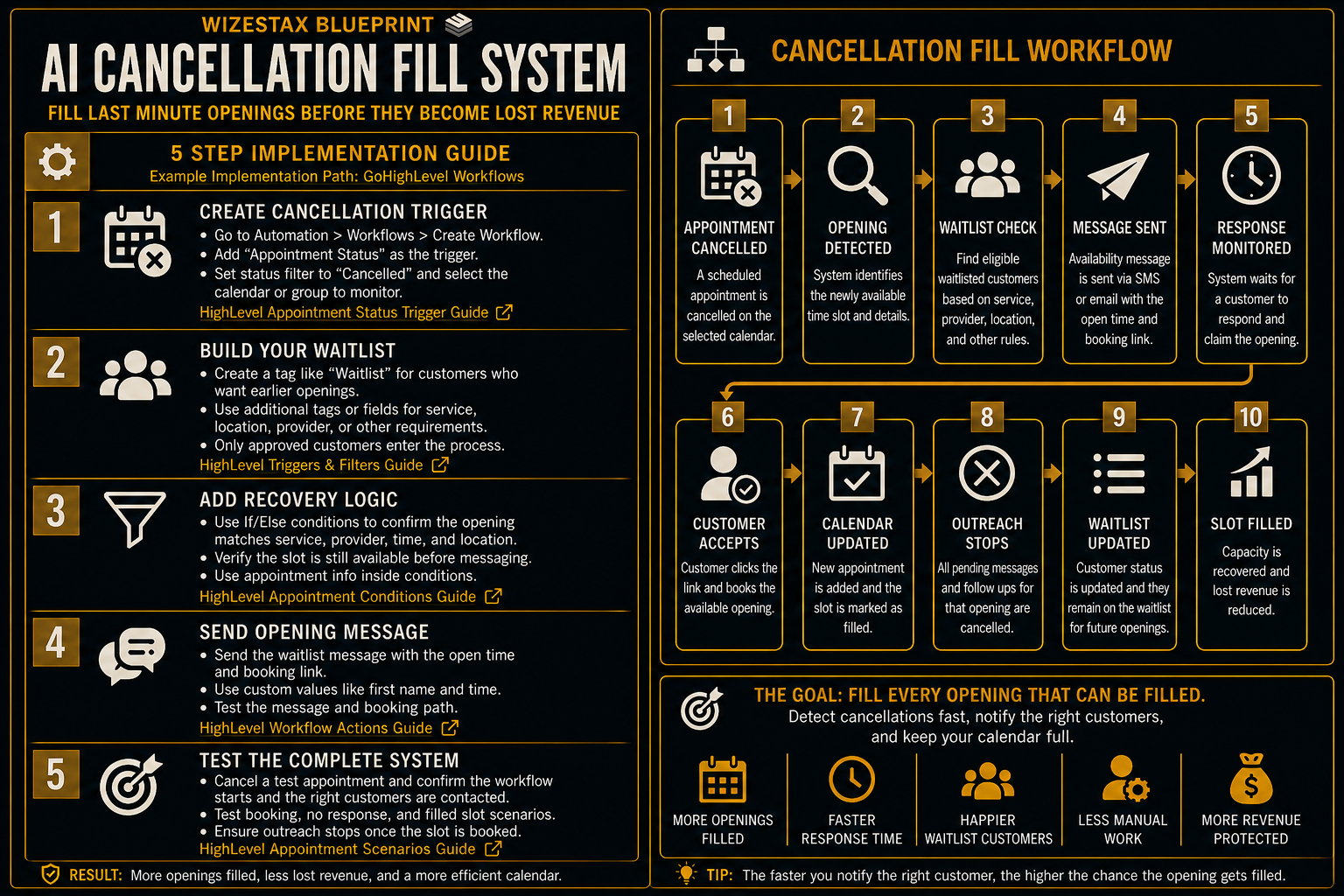
Step By Step Implementation Guide
The following setup demonstrates one implementation path using HighLevel.
It is not a WIZESTAX recommendation or preferred Stax.
HighLevel is used for this implementation example because its current workflow system can trigger from appointment status changes and use appointment information inside conditional workflow logic. (HighLevel Support Portal)
Step 1: Create The Cancellation Trigger
Open Automation in HighLevel and create a new workflow.
Add Appointment Status as the workflow trigger.
Configure the trigger for the calendar or calendar group the business wants to monitor.
Set the appropriate appointment status filter to Cancelled.
HighLevel currently allows the Appointment Status trigger to use filters including appointment status and calendar. (HighLevel Support Portal)
HighLevel Appointment Status Trigger Guide
Step 2: Define The Eligible Customer Group
Create a clear method for identifying customers who want earlier appointments.
Eligibility should reflect the actual scheduling requirements of the business.
This may include service type, provider, location or another requirement that determines whether the customer can use the opening.
Do not treat the entire customer database as a waitlist.
Only customers who should legitimately receive earlier appointment opportunities should enter the recovery process.
Step 3: Add The Appointment Logic
Add the conditions needed to determine whether the cancelled appointment should trigger recovery.
HighLevel currently provides appointment related options inside its If Else workflow action when the workflow begins with an appointment related trigger. These options include appointment start date, end date and rescheduling information. (HighLevel Support Portal)
Use the available appointment data together with the business’s customer eligibility rules to determine which recovery path should continue.
HighLevel Appointment Conditions Guide
Step 4: Send The Opening Communication
Send the approved waitlist message to the eligible customer group.
Include the available appointment time and the correct booking path.
The message should make clear that the opening remains available until a booking is successfully completed.
Avoid telling several customers that the appointment has already been reserved.
The booking system should remain the source of truth for whether the opening is still available.
Step 5: Test The Complete Recovery Path
Create a test appointment and cancel it.
Confirm that the cancellation starts the intended workflow.
Verify that only eligible customers enter the recovery process.
Test the customer booking path.
Confirm what happens when the opening is filled.
Test what happens when nobody accepts the appointment.
HighLevel documents specific workflow behavior when appointments are cancelled or rescheduled, making full testing important before the workflow is used with real customers. (HighLevel Support Portal)
HighLevel Appointment Workflow Scenarios
Once every important path behaves correctly, publish the workflow.
Capacity Recovery Snapshot
The economic value of this system depends primarily on the amount of appointment capacity that would otherwise remain unused.
| Monthly Cancellations | Average Appointment Value | Appointment Value Exposed To Cancellation |
|---|---|---|
| 10 | $150 | $1,500 |
| 25 | $150 | $3,750 |
| 50 | $150 | $7,500 |
| 100 | $150 | $15,000 |
Illustrative scenario using an average appointment value of $150. This represents appointment value exposed to cancellation, not guaranteed recovered revenue.
Actual recovery depends on customer demand, waitlist quality, timing, appointment eligibility and whether another customer ultimately books the opening.
WIZESTAX Diagnostic Scorecard
| Category | Assessment |
|---|---|
| Economic Problem | Cancelled appointments create unused capacity that may be difficult to replace |
| Data Quality Required | High |
| Automation Potential | High |
| Human Judgment Required | Low for routine matches and higher for scheduling exceptions |
| Implementation Complexity | Moderate |
| Scalability | High |
| Primary Value | Giving newly available appointment capacity another opportunity to be used |
| Primary Risk | Offering an unavailable or inappropriate appointment to a customer |
Common Mistakes
| Mistake | Result |
|---|---|
| Contacting the entire customer list | Customers receive irrelevant availability messages |
| Maintaining an outdated waitlist | Wrong customers receive offers |
| Ignoring service eligibility | Customers are offered appointments they cannot use |
| Treating interest as a confirmed booking | Multiple customers may believe they own the same opening |
| Continuing outreach after the slot is filled | Customers receive offers for unavailable appointments |
| Creating a complicated booking path | Interested customers may not complete the booking |
| Failing to test simultaneous interest | Duplicate booking problems can appear |
Related WIZESTAX Categories
| Category | Related Business Problem |
|---|---|
| Scheduling | Appointment Cancellation Prevention |
| Scheduling | Appointment Reminder Failure |
| Scheduling | Appointment Rescheduling Friction |
| Operations | Waitlist Management |
| Operations | Unused Capacity |
| Customer Retention | Customer Reactivation |
These remain separate problems. The AI Cancellation Fill System addresses appointment capacity that becomes available after a customer cancels. Appointment Cancellation Prevention addresses reducing avoidable cancellations before they occur. Appointment Reminder Failure addresses customers who forget scheduled appointments. Appointment Rescheduling Friction addresses customers who want to change an appointment rather than abandon it. Waitlist Management addresses maintaining an accurate pool of customers who want earlier availability. Customer Reactivation addresses previous customers who have stopped purchasing. This Blueprint owns the process of attempting to refill newly opened appointment capacity after a cancellation occurs.
Get New WIZESTAX Blueprints Every Monday
Subscribe to receive new WIZESTAX Blueprints covering Customer Retention, Marketing, Sales, Finance and Operations directly to your inbox.


