

Job Cost Overrun Warning System
Detect Jobs Consuming More Labor, Materials, And Resources Than Planned Before The Overrun Becomes The Final Result
A job can look healthy at the beginning and still become financially dangerous while the work is underway.
Labor takes longer than estimated. Material usage increases. A subcontractor costs more than expected. Equipment expenses appear. Purchase orders consume money that has not yet reached the accounting system. Individually, each change may look manageable. Together, they can push the job beyond its planned cost before anyone recognizes the pattern.
The Job Cost Overrun Warning System compares planned job costs against actual and committed costs as work progresses. When spending begins approaching or exceeding an approved threshold, the system creates an internal warning so someone can investigate the cause while there is still an opportunity to respond.
The purpose is not to automatically cut spending or blame the customer, estimator, or crew. It is to identify deteriorating cost performance early enough for the business to understand what is happening.
Which Stax Fits Your Business?
| Business Environment | Stax | Primary Strength |
|---|---|---|
| Small service business | Jobber | Job costing and profit alerts |
| Accounting centered business | QuickBooks Online | Project income and cost visibility |
| Complex project operation | ServiceTitan | Budget, actual, committed cost and forecasting visibility |
Software Linx
Starter Stax: Jobber
Growth Stax: QuickBooks Online
Pro Stax: ServiceTitan
Blueprint Overview
| Category | Details |
|---|---|
| Category | Finance And Operations |
| Business Problem | Job costs increase beyond their planned level without being recognized early |
| Primary Objective | Detect deteriorating cost performance while work is still underway |
| Core Signal | Actual and committed costs approach or exceed an approved job cost threshold |
| Setup Time | Approximately 90 To 180 Minutes |
| Difficulty | Intermediate |
| Maintenance | Requires accurate budgets, labor records, material costs and job expenses |
| Best For | Contractors, field services, construction, repair businesses and project based operations |
| Primary Output | Internal cost overrun warning |
The Hidden Revenue Leak
The most dangerous job overrun is not necessarily the largest one.
It is the one nobody notices until the work is finished.
A business may carefully estimate a job at the beginning, but the estimate becomes less useful if actual costs are not compared against it as work progresses.
Consider a job with $10,000 of planned direct cost.
After several days, $6,500 has already been spent.
Another $2,000 is committed through materials or purchase orders.
Significant work remains.
Nothing has technically exceeded the original budget yet, but the job may already be heading toward an overrun.
That early warning window is where this system creates value.
Business Impact Snapshot
| Area | Potential Impact |
|---|---|
| Labor | Additional hours consume the planned labor budget |
| Materials | Usage or purchasing exceeds the estimate |
| Subcontractors | External costs exceed expected amounts |
| Equipment | Unexpected equipment expenses reduce margin |
| Cash Flow | More cash is required to complete the job |
| Profitability | Fixed revenue supports increasing costs |
| Management | Problems are discovered after fewer corrective options remain |
The system creates visibility between the original cost expectation and what the job is actually consuming.
Real World Example
A roofing contractor sells a project for $24,000.
The business expects:
Labor: $6,000
Materials: $8,000
Equipment And Other Direct Costs: $2,000
Planned Direct Cost: $16,000
Halfway through the project, the records show:
Labor Used: $4,500
Materials Used: $6,800
Equipment And Other Costs: $1,300
Additional Committed Materials: $2,100
The business has already spent or committed $14,700 of the $16,000 planned direct cost while substantial work remains.
The warning system flags the job.
Management investigates and discovers that material waste is running above the estimate and labor productivity has been lower than expected.
The system does not decide how to fix the job.
It identifies the deteriorating economics early enough for management to investigate them.
WIZESTAX Stax Options
Starter Stax
Jobber
Best For: Smaller service businesses already managing quotes, jobs, employee time and expenses in Jobber.
Jobber’s current job costing system calculates profitability using employee timesheets, line item costs and job expenses. For active jobs, it shows costs accumulated so far rather than presenting an incomplete final profit percentage. (Jobber Help Center)
| Function | Jobber Role |
|---|---|
| Expected Revenue | Job and line items |
| Labor Cost | Employee timesheets |
| Material Cost | Line item costs |
| Additional Cost | Job expenses |
| Cost Monitoring | Job costing |
| Warning Signal | Profit alert |
Advantages
Operational cost information can remain attached directly to the job.
Jobber also supports an account wide profit margin alert for qualifying one off jobs. When a job falls below the configured threshold, Jobber can display a warning on the job detail page, reports, Insights dashboard and activity feed. (Jobber Help Center)
Limitations
Jobber’s profit alerts currently apply to qualifying one off jobs rather than recurring jobs. (Jobber Help Center)
Businesses also need consistent cost recording. Jobber specifically warns that recording the same material as both a line item cost and an expense can double count that cost and make profitability appear worse than it really is. (Jobber Help Center)
A profitability warning also identifies an economic problem, not necessarily its cause.
Growth Stax
QuickBooks Online
Best For: Businesses whose strongest job cost records already live inside their accounting workflow.
| Function | QuickBooks Role |
|---|---|
| Customer | Customer record |
| Job Economics | Project |
| Revenue | Project income |
| Direct Costs | Project expenses |
| Financial Review | Project profitability |
| Investigation | Compare recorded project economics |
Advantages
This architecture keeps the investigation close to the financial records.
It can work especially well when the business already records project related income and expenses consistently and wants accounting to serve as the primary source for job economics.
Limitations
Accounting records can reveal an overrun later than an operational field system if labor, purchases, or other costs have not yet reached the books.
A financial variance also does not explain its own cause.
Management still needs to determine whether the overrun came from estimating, productivity, material usage, rework, scope changes, purchasing, or another factor.
Pro Stax
ServiceTitan
Best For: Larger project and field operations requiring detailed budget and cost visibility while work remains underway.
ServiceTitan’s current Budget vs Actual system compares project budgets against actual expenses and can break costs into areas such as labor, materials, subcontractors and equipment. It also exposes committed costs from qualifying purchase orders and supports forecasting of expected final project costs. (ServiceTitan)
| Function | ServiceTitan Role |
|---|---|
| Planned Cost | Project budget |
| Spent Cost | Actual cost |
| Future Exposure | Committed costs |
| Remaining Work | Forecasted cost to complete |
| Expected Final Cost | Forecasted cost at complete |
| Warning Signal | Variance and projected overrun |
Advantages
This architecture can detect financial pressure before all costs have actually posted.
ServiceTitan defines Balance to Finish using the project budget against projected costs, including committed and actual costs. Its forecasting tools can then incorporate expected remaining costs to estimate where the project may finish financially. (ServiceTitan)
Managers can also drill into actual cost figures to investigate specific labor hours, material receipts or subcontractor charges contributing to the variance. (ServiceTitan)
Limitations
The system requires more detailed configuration and disciplined project data.
ServiceTitan states that Budget vs Actual requires Project Management and account configuration, with additional configuration required for some committed cost functionality. (ServiceTitan)
Forecasts also depend on the quality of the assumptions entered by the business.
How The Three Stax Differ
| Stax | Detection Perspective | Best Environment |
|---|---|---|
| Jobber | Job costs and profitability | Smaller service operations |
| QuickBooks Online | Recorded project economics | Accounting centered businesses |
| ServiceTitan | Budget, actual, committed and forecasted costs | Complex project operations |
Each architecture observes job cost pressure from a different operational position.
The appropriate architecture depends primarily on where the business records its planned costs and where actual costs become visible first.
Copy And Paste Job Cost Warning
Internal Alert
Cost review required for [JOB OR PROJECT].
Planned direct cost: [PLANNED COST]
Actual cost to date: [ACTUAL COST]
Committed cost: [COMMITTED COST]
Estimated work remaining: [REMAINING WORK]
Current variance or threshold status: [STATUS]
Please review the underlying labor, materials, equipment, subcontractor and other approved cost categories before additional spending continues.
Identify the verified cost driver before determining the appropriate response.
Copy And Paste AI Prompt
Prompt:
Review the following job information for possible cost overrun risk.
Use only the approved job budget, labor records, material costs, expenses, purchase orders, subcontractor costs, equipment costs, completed work, remaining work and other verified information provided.
Compare planned job costs against actual costs and committed costs.
Where reliable forecast information is available, incorporate the expected cost required to finish the job.
Do not invent missing costs.
Do not assume every cost variance represents a problem.
Do not assume a cost overrun was caused by the customer.
Do not assume scope creep unless the approved scope and actual work support that conclusion.
Do not automatically recommend reducing quality, labor, materials or customer service.
Identify the largest verified cost differences.
Separate confirmed facts from possible explanations.
Possible investigation categories may include labor productivity, material usage, purchasing, subcontractor costs, equipment costs, rework, estimating error, scope changes or other verified factors.
If important information is missing, label the assessment incomplete rather than estimating it.
If the approved warning threshold is crossed, flag the job for human review.
The goal is to identify jobs moving beyond their planned cost early enough for management to investigate the cause and decide what should happen next.
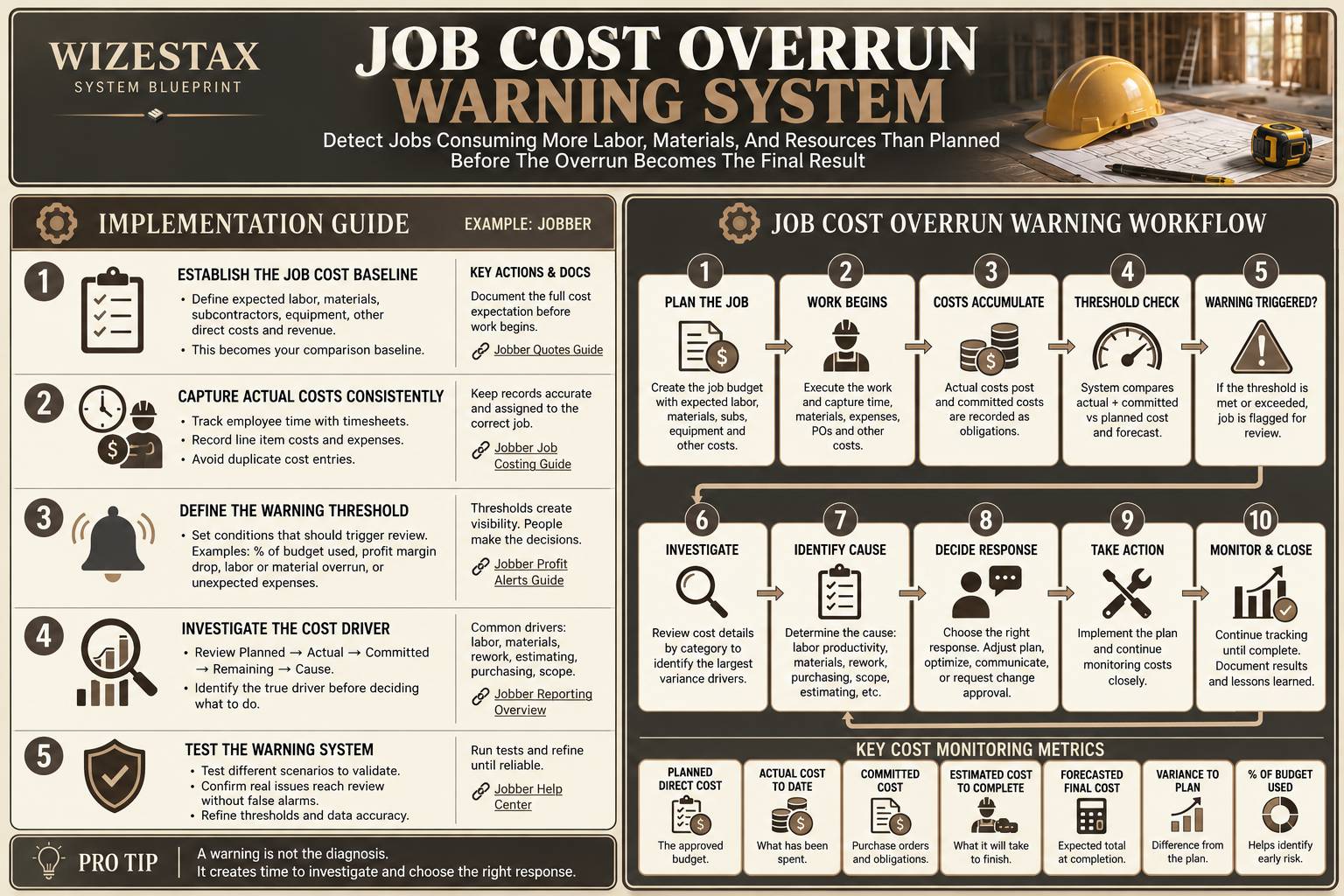
Step By Step Implementation Guide
Example Implementation: Jobber
This example uses Jobber because its current combination of job costing, timesheets, expenses and profit alerts provides a straightforward way to demonstrate the warning logic. It is an implementation example, not a WIZESTAX recommendation.
Step 1: Establish The Job Cost Baseline
Before work begins, define what the job is expected to consume.
Record the expected:
Labor
Materials
Subcontractor costs when applicable
Equipment
Other approved direct costs
Expected revenue
The warning system needs a reliable baseline before it can identify meaningful deterioration.
Step 2: Capture Actual Costs Consistently
Configure employee labor costs and ensure time is assigned to the correct jobs.
Record line item costs and job expenses consistently.
Jobber currently uses timesheets, line item costs and expenses when calculating job profitability. (Jobber Help Center)
Avoid recording the same cost through multiple inputs because duplicate cost entries can distort the calculation. (Jobber Help Center)
Step 3: Define The Warning Threshold
Choose the condition that deserves management attention.
Examples might include:
Actual costs reach an approved percentage of expected cost while substantial work remains
Labor exceeds its planned amount
Material spending exceeds its planned amount
Unexpected expenses appear
Job profitability falls below an approved threshold
The threshold should trigger investigation.
It should not automatically determine the response.
Step 4: Investigate The Cost Driver
When the warning appears, review:
Planned Cost → Actual Cost → Variance → Remaining Work → Cause
Possible causes include:
Labor productivity
Material usage
Purchasing
Rework
Estimating error
Scope changes
Subcontractor expense
Equipment expense
Unexpected site conditions
The system should route the job toward the correct diagnosis rather than treating every overrun as the same problem.
Step 5: Test The Warning System
Test several situations:
A job tracking exactly to plan
A labor overrun
A material overrun
A legitimate approved scope change
A rework problem
An estimating mistake
A duplicate expense
A job with incomplete cost records
The system is ready when meaningful cost deterioration reliably reaches human review without creating confident conclusions from incomplete or inaccurate data.
Cost Exposure Snapshot
Consider an illustrative project:
Planned Direct Cost: $20,000
Actual Cost To Date: $14,000
Committed Cost: $3,000
At first glance, the project has not exceeded its $20,000 cost plan.
But actual and committed costs already total:
$17,000
If completing the remaining work is expected to require another:
$5,000
The expected final direct cost becomes:
$22,000
That creates a potential:
$2,000 Cost Overrun
The useful warning occurs before the final $5,000 is completely spent.
These numbers are illustrative only. Actual job economics depend on the business’s accounting practices, cost allocation, labor model, project structure and definition of direct cost.
WIZESTAX Diagnostic Scorecard
| Diagnostic Area | Assessment |
|---|---|
| Economic Problem | Job resources are consumed faster or at greater cost than planned |
| Financial Data Accuracy Required | Very High |
| Automation Potential | High |
| Human Judgment Required | High |
| Customer Effort | None |
| Timing Dependency | Very High |
| Financial Sensitivity | Very High |
| Scalability | High |
| Primary Value | Earlier visibility into deteriorating job economics |
| Primary Risk | Acting on incomplete or incorrectly recorded cost data |
Common Mistakes
Waiting Until The Job Is Finished
A final profitability report explains what happened. A warning system should help identify what is happening.
Monitoring Only Actual Spending
Committed purchases and remaining work can create financial exposure before those costs appear as completed expenses.
Using Poor Cost Data
Missing labor, delayed expenses and duplicate costs can create misleading warnings.
Treating The Warning As The Diagnosis
The overrun is the economic condition.
Its cause still needs investigation.
Automatically Blaming Scope Creep
A job can exceed its cost plan without the customer requesting any additional work.
Ignoring Remaining Work
Spending $15,000 of a $20,000 budget means something very different when the job is 90 percent complete than when it is 40 percent complete.
Reacting By Cutting Quality
A warning should create visibility and investigation. It should not automatically instruct workers to reduce materials, rush labor or compromise the promised result.
Related WIZESTAX Categories
Scope Creep Detection System
Detects work moving beyond what was originally approved.
Job Profit Margin Warning
Detects deterioration in the overall economics of an individual job.
Job Rework Detection
Identifies corrective work that must be performed again.
Underpriced Service Detection
Identifies services whose pricing may systematically fail to support their underlying economics.
Unprofitable Customer Detection
Examines whether the broader customer relationship generates sufficient economic contribution.
Job Cost Overrun Warning is different.
Its specific problem is the cost of completing an individual job moving beyond the amount the business planned to spend.
A job can exceed its cost plan without experiencing scope creep.
A job can remain within its cost plan while still producing an unacceptable margin because it was underpriced.
A customer can be profitable overall even when one job experiences an overrun.
Keeping those diagnoses separate helps management investigate the actual economic leak instead of treating every profitability problem as the same condition.
Catch The Cost Problem While There Is Still Time To Respond
A completed job can tell you whether money was made or lost. A warning system should tell you when the economics are beginning to move in the wrong direction.
The Job Cost Overrun Warning System connects the original cost expectation with actual spending, committed costs and remaining work so the business can identify financial pressure earlier, investigate the cause, and make a deliberate decision before the overrun simply becomes history.
Subscribe to WIZESTAX for practical business system Blueprints built around specific operational and economic leaks.


