

Table of Contents
ToggleAI Lead Routing System
Automatically Send New Leads To The Right Person, Team, Location Or Service Path
Generating a new lead does not guarantee that the right person will see it. A customer may contact a business about a specific service, location or project while every inquiry enters the same general intake process. Someone then has to read the request, determine what the customer needs, identify who should handle it and manually move the lead to the correct place. That creates an operational bottleneck between lead capture and lead ownership. The AI Lead Routing System removes that bottleneck. Information collected when the lead enters the business is evaluated against predefined routing rules. The system then sends the lead to the appropriate person, team, location or service path. The purpose is not to decide whether the lead is valuable or qualified. It is to make sure the lead reaches the correct destination without depending on someone manually sorting every inquiry.
Which Stax Fits Your Business
| Business Need | Stax | Software | Cost |
|---|---|---|---|
| Flexible routing connected to existing forms and business tools | Starter Stax | Make And Airtable | Varies by usage |
| CRM based criteria routing and team assignment | Growth Stax | Pipedrive | Varies by plan and users |
| Advanced criteria, availability and team based assignment | Pro Stax | Zoho CRM | Varies by edition and users |
Pricing and capabilities change over time and should be confirmed directly with each software provider before purchase.
Software Linx
Starter
Growth
Pro
Blueprint Overview
| Metric | Value |
|---|---|
| Category | Lead Management |
| Business Problem | New leads require manual sorting before reaching the correct destination |
| Primary Objective | Establish reliable ownership or routing immediately after lead capture |
| Core Signals | Service, location, request type, territory, source and other collected lead information |
| Setup Time | Approximately 45 to 90 minutes |
| Difficulty | Beginner To Intermediate |
| Maintenance | Low To Moderate |
| Best For | Businesses with multiple lead destinations |
| Primary Output | Correctly routed lead with defined ownership or next path |
The Hidden Revenue Leak
| Without This Blueprint | With This Blueprint |
|---|---|
| Leads enter a shared intake queue | Lead information determines the correct route |
| Staff manually sort incoming inquiries | Routine routing decisions happen automatically |
| Leads are passed between employees | Ownership can be established immediately |
| Location requests require manual review | Territory or location can determine routing |
| Different services enter the same path | Service information can determine destination |
| Unusual inquiries may be forced into the wrong process | Unmatched leads can enter a manual review path |
| Routing depends on staff availability | Defined rules remain active as lead volume grows |
The leak is not lead generation.
The lead already exists.
The problem is the delay and operational uncertainty between lead capture and correct ownership.
Business Impact Snapshot
| Area | Potential Impact |
|---|---|
| Routing Speed | Leads can receive ownership immediately after entering the system |
| Staff Time | Routine sorting requires less manual work |
| Accountability | Each routed lead has a defined destination |
| Customer Experience | Customers are less likely to be repeatedly transferred |
| Routing Accuracy | Consistent rules replace informal employee decisions |
| Scalability | Higher lead volume does not require proportional manual sorting |
Real World Example
A landscaping company serves three geographic areas and offers residential maintenance, irrigation repair and larger landscape projects.
A homeowner submits the company’s inquiry form.
The customer selects irrigation repair and provides their service location.
The system reads those fields.
The location falls inside the north service territory and the request is categorized as irrigation.
The lead is assigned to the employee responsible for irrigation work in that territory.
That employee receives the lead record and can continue the customer conversation.
Another inquiry arrives with an address outside the company’s defined service areas.
Instead of forcing that customer into an incorrect route, the system sends the inquiry to a manual review queue.
The automation did not determine whether either lead was worth pursuing.
It simply established the correct operational destination.
WIZESTAX Stax Options
Starter Stax
Make And Airtable
Best For
Businesses that already collect lead information through an existing website or form and need a flexible routing layer without replacing their current systems.
| Function | Software |
|---|---|
| Lead Capture | Existing Form |
| Routing Logic | Make |
| Routing Data | Airtable |
| Lead Destination | Existing CRM Or Business Software |
| Team Notification | Existing Communication Tool |
| Exception Handling | Manual Review Path |
Advantages
| Benefit |
|---|
| Can connect existing business systems |
| Highly customizable routing logic |
| Does not require replacing the primary CRM |
| Useful for unusual routing architectures |
| Routing tables can be maintained separately from automation |
Limitations
| Limitation |
|---|
| Multiple applications must remain connected |
| More technical configuration is required |
| Complex scenarios can become difficult to maintain |
| Reliability depends on every integration in the workflow |
Growth Stax
Pipedrive
Best For
Sales teams that want incoming leads assigned automatically according to defined conditions inside their CRM.
| Function | Software |
|---|---|
| CRM | Pipedrive |
| Lead Management | Pipedrive |
| Routing Conditions | Automatic Assignment |
| Individual Assignment | Pipedrive |
| Team Distribution | Pipedrive |
| Assignment History | Pipedrive |
Advantages
| Benefit |
|---|
| Automatic assignment remains inside the CRM |
| Conditions determine which leads enter each assignment rule |
| Leads can be assigned directly to individual users |
| Team assignment can distribute leads between members |
| Assignment history provides visibility into routing activity |
Limitations
| Limitation |
|---|
| Automatic assignment requires qualifying plans |
| Team distribution depends on supported team functionality |
| Complex service routing may require careful rule design |
| Rules still depend on accurate lead information |
Pipedrive Automatic Assignment Guide
Pro Stax
Zoho CRM
Best For
Businesses with more complex routing requirements involving territories, products, teams, employee availability or multiple assignment conditions.
| Function | Software |
|---|---|
| CRM | Zoho CRM |
| Lead Records | Zoho CRM |
| Assignment Criteria | Assignment Rules |
| Team Distribution | Zoho CRM |
| Availability Logic | Zoho CRM |
| Default Assignment | Zoho CRM |
Advantages
| Benefit |
|---|
| Assignment can use defined record criteria |
| Leads can route to individual users, roles or groups |
| Multiple selected users can receive records through round robin distribution |
| User availability can be considered during assignment |
| A default user can handle records that cannot follow the normal assignment path |
| Follow up tasks can be created as part of assignment |
Limitations
| Limitation |
|---|
| Assignment architecture requires careful planning |
| Permissions affect who can configure rules |
| Native assignment rules apply to supported lead entry methods |
| More sophisticated routing creates additional administration |
Zoho CRM Assignment Rules Guide
How The Three Stax Differ
| Stax | Primary Approach |
|---|---|
| Make And Airtable | Custom routing layer connecting existing systems |
| Pipedrive | CRM based conditional lead assignment |
| Zoho CRM | Advanced criteria and availability based assignment |
These are different implementation architectures rather than rankings.
A business with established software may only need a flexible routing layer between its intake form and existing systems.
A sales team may prefer routing to remain inside its CRM.
A business with several territories, specialties or teams may need more detailed assignment logic.
The appropriate architecture depends on how many destinations exist and what information determines where each lead belongs.
Copy And Paste Lead Routing Response
“Hi {{first_name}}, thank you for contacting us about {{service_name}}. We received your request and have sent your information to the appropriate team. If we need any additional information to determine the correct next step, we will contact you.”
Copy And Paste Team Notification
“New lead assigned. {{first_name}} contacted us about {{service_name}} in {{location}}. Review the lead information here: {{contact_link}}.”
Copy And Paste Missing Information Message
“Hi {{first_name}}, thank you for contacting us. We need a little more information before we can send your request to the correct team. Please provide {{missing_information}} and we can continue routing your request.”
Copy And Paste AI Prompt
You are assisting a business with routing new customer inquiries.
Use only information provided by the customer and the business routing rules.
Determine the appropriate person, team, location or service path for the inquiry.
Do not decide whether the lead is valuable or qualified unless explicit qualification rules are provided.
Do not guess when information required for routing is missing.
If a reliable route cannot be determined, request the missing information or send the lead to the defined manual review path.
Do not invent service availability, geographic coverage, pricing, appointment availability or employee responsibilities.
If multiple routes appear equally valid, send the lead for human review unless the business has provided a rule for resolving that situation.
Keep routing decisions consistent with the business rules.
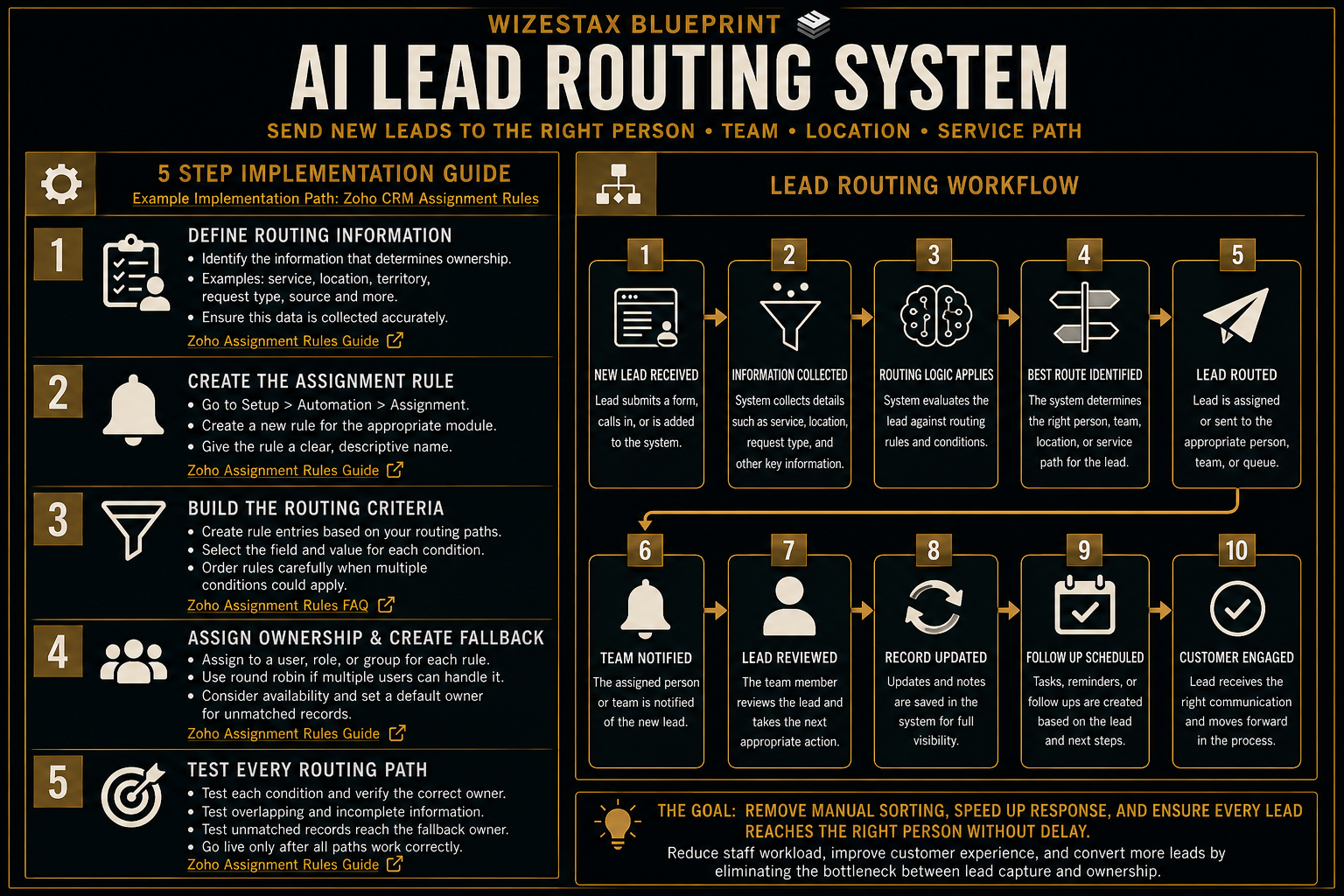
Step By Step Implementation Guide
The following setup demonstrates one implementation path using Zoho CRM.
It is not a WIZESTAX recommendation or preferred Stax.
Zoho CRM is used for this implementation example because its assignment system provides a native process for creating criteria based routing rules, distributing records and establishing a fallback owner.
Step 1: Define The Routing Information
Before creating an assignment rule, identify the information that actually determines ownership.
This could include service type, territory, product interest, lead source or another field collected during lead intake.
Only use information that creates a meaningful routing distinction.
Make sure the necessary fields are consistently populated when leads enter the CRM.
Zoho CRM assignment rules can evaluate incoming records against defined field criteria.
Zoho CRM Assignment Rules Guide
Step 2: Create The Assignment Rule
In Zoho CRM, open Setup.
Select Automation.
Open Assignment.
Create a new assignment rule.
Choose the appropriate module and give the rule a clear name.
Assignment rules can be created for leads and other supported CRM modules.
Zoho CRM Assignment Rules Guide
Step 3: Build The Routing Criteria
Create rule entries representing the business’s actual routing paths.
Select the field and value that should determine each route.
For example, a company could route leads according to territory or product interest.
Order the rules carefully when more than one condition could potentially apply.
Zoho CRM evaluates rule entries according to their configured criteria and order.
Step 4: Assign Ownership And Create A Fallback
Choose the user, role or group that should receive each matching record.
If several users can handle the same route, configure the appropriate distribution method.
Decide whether user availability should be considered.
Then establish a default user for records that cannot be assigned through the normal route.
The fallback prevents routing failures from leaving a lead without clear ownership.
Zoho CRM Assignment Rules Guide
Step 5: Test Every Routing Path
Create test leads representing each major routing condition.
Confirm that every lead reaches the intended owner or team.
Test overlapping conditions.
Test incomplete information.
Test a record that should reach the fallback owner.
Verify that lead ownership remains correct before using the routing system with real inquiries.
Routing automation should reduce manual sorting without creating invisible assignment mistakes.
Operational Value Snapshot
The direct operational value comes from reducing the amount of staff time required to inspect and manually distribute incoming leads.
| Monthly New Leads | Manual Routing Time Per Lead | Staff Time Represented |
|---|---|---|
| 50 | 5 Minutes | 4.2 Hours |
| 100 | 5 Minutes | 8.3 Hours |
| 200 | 5 Minutes | 16.7 Hours |
| 500 | 5 Minutes | 41.7 Hours |
Illustrative scenario using five minutes of manual routing time per lead. Actual time savings depend on the existing intake and assignment process.
This calculation represents operational time, not additional revenue or guaranteed sales.
WIZESTAX Diagnostic Scorecard
| Category | Assessment |
|---|---|
| Economic Problem | Staff time and response speed are lost while new leads wait for manual routing |
| Data Quality Required | High |
| Automation Potential | High |
| Human Judgment Required | Low for established routes and higher for exceptions |
| Implementation Complexity | Moderate |
| Scalability | High |
| Primary Value | Reliable ownership immediately after lead capture |
| Primary Risk | Incorrect lead information causing incorrect routing |
Common Mistakes
| Mistake | Result |
|---|---|
| Collecting too little routing information | The system cannot determine the correct destination |
| Creating unnecessary routing conditions | The system becomes difficult to maintain |
| Using unreliable lead fields | Leads can reach the wrong owner |
| Leaving no fallback route | Unmatched leads can remain unassigned |
| Creating overlapping rules without testing | Routing becomes unpredictable |
| Treating routing as qualification | Leads may be rejected for the wrong reason |
| Failing to test every destination | Assignment errors remain hidden |
Related WIZESTAX Categories
| Category | Related Business Problem |
|---|---|
| Lead Management | Lead Qualification |
| Sales | Lead Response Delay |
| Sales | Lead Ownership Failure |
| Operations | Territory Assignment |
| Customer Service | Inquiry Escalation |
| Marketing | Lead Capture Failure |
These remain separate problems. The AI Lead Routing System determines where a new lead belongs after the business receives it. Lead Qualification determines whether the lead meets defined business criteria. Lead Response addresses how quickly the business communicates with the lead. Lead Capture addresses whether the inquiry enters the system correctly in the first place. Territory Assignment addresses geographic ownership when geography itself is the operational problem. This Blueprint owns the routing layer between capture and ownership.
Get New WIZESTAX Blueprints Every Monday
Subscribe to receive new WIZESTAX Blueprints covering Customer Retention, Marketing, Sales, Finance and Operations directly to your inbox.


