
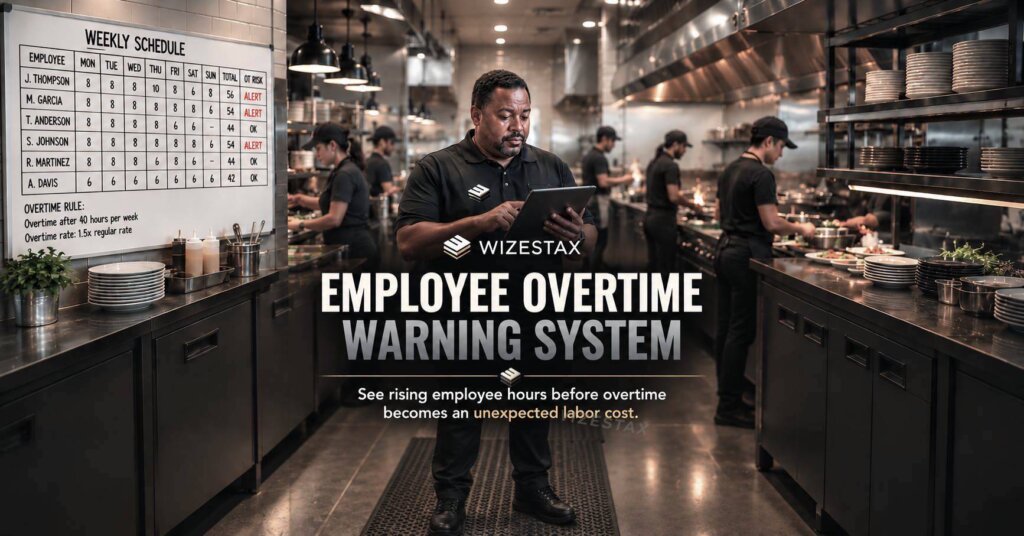
Employee Overtime Warning System
Catch Rising Labor Hours Before They Become Unexpected Overtime Cost
Overtime often becomes visible too late. An employee stays longer than scheduled several times during the week, covers an extra shift, or accumulates more hours than a manager realizes. By the time payroll is reviewed, the additional labor cost has already occurred.
The Employee Overtime Warning System moves that visibility earlier. It monitors scheduled or worked hours against the overtime rules that apply to the employee and surfaces a warning while management still has an opportunity to review staffing decisions.
This Blueprint is not designed to eliminate legitimate overtime. Overtime may be necessary, productive, or legally required to be paid. The purpose is to prevent unplanned overtime caused by poor visibility into accumulating labor hours.
Overtime requirements vary by jurisdiction, employee classification, industry, and other circumstances. Businesses should configure any system according to the rules that actually apply to their workforce rather than assuming one universal threshold.
Which Stax Fits Your Business
| Business Need | Stax | Software | Cost |
|---|---|---|---|
| Small hourly team needing scheduling and labor visibility | Starter Stax | Homebase | Free plan available |
| Shift based business wanting warnings during scheduling | Growth Stax | Deputy | From $5 per user per month |
| Business already using QuickBooks that wants configurable overtime alerts | Pro Stax | QuickBooks Time | From $20 per month plus $10 per user |
Homebase currently offers Basic at $0 for one location and up to 10 employees, with paid plans adding more advanced scheduling, time tracking and labor management capabilities. Deputy currently lists Lite at $5 per user per month. QuickBooks Time Premium lists a standard base price of $20 per month plus $10 per user and requires QuickBooks Online. Promotional pricing may differ. (Homebase)
Software Linx
Starter
Growth
Pro
Blueprint Overview
| Metric | Value |
|---|---|
| Category | Workforce Operations |
| Business Problem | Overtime exposure becomes visible after labor decisions are already made |
| Primary Objective | Warn management before scheduled or worked hours cross relevant thresholds |
| Core Signals | Worked hours, scheduled hours, pay rules, employee and work period |
| Setup Time | Approximately 45 to 90 minutes |
| Difficulty | Intermediate |
| Maintenance | Periodic review |
| Best For | Businesses managing hourly employees |
| Primary Output | Overtime warning and management review |
The Hidden Labor Cost Leak
| Without This Blueprint | With This Blueprint |
|---|---|
| Managers discover overtime after it occurs | Overtime exposure becomes visible earlier |
| Extra shifts are assigned without full hour context | Cumulative employee hours inform scheduling |
| Actual hours can drift from scheduled hours unnoticed | Worked time can be monitored separately |
| Managers manually calculate weekly totals | Software monitors defined thresholds |
| Overtime becomes a payroll surprise | Managers receive warning before or as risk develops |
| Repeated overtime patterns remain difficult to see | Patterns can inform future staffing decisions |
The goal is visibility, not automatic labor reduction. A manager may review a warning and intentionally approve the overtime because keeping an experienced employee on the job is the best operational decision.
Business Impact Snapshot
| Area | Potential Impact |
|---|---|
| Labor Cost | Fewer unexpected overtime expenses |
| Scheduling | Better information before assigning additional shifts |
| Operations | Earlier visibility into staffing pressure |
| Payroll | Fewer surprises at the end of the pay period |
| Management | Less manual hour checking |
| Workforce Planning | Recurring overtime can reveal capacity problems |
Real World Example
A restaurant employee has already worked 34 hours by Thursday evening.
A manager begins filling the weekend schedule and assigns that employee another eight hour shift.
Without visibility into cumulative hours, the shift looks ordinary.
An overtime warning system evaluates the proposed schedule against the employee’s applicable pay rules and flags the shift before the schedule is finalized.
The manager reviews the warning.
If another qualified employee has available hours, the shift can be reassigned. If the original employee is still the right person for the shift, management can knowingly accept the additional labor cost.
The system does not make the staffing decision.
It exposes the cost consequence before the decision becomes harder to change.
WIZESTAX Stax Options
Starter Stax
Homebase
Best For
Small hourly teams that want scheduling, time tracking and labor management in one system without building a complicated workforce technology stack.
| Function | Software |
|---|---|
| Employee Scheduling | Homebase |
| Time Tracking | Homebase |
| Labor Visibility | Scheduling And Timesheets |
| Team Communication | Homebase |
| Payroll Option | Homebase Payroll |
Homebase combines scheduling and time tracking, while its higher plans add more sophisticated labor cost management. Its Basic plan currently includes basic scheduling and time tracking for one location with up to 10 employees. (Homebase)
Advantages
| Benefit |
|---|
| Free entry level plan |
| Scheduling and actual time live in the same environment |
| Designed around hourly teams |
| Paid plans provide more advanced labor management |
| Pricing is location based rather than purely employee based on core plans |
Limitations
| Limitation |
|---|
| Basic plan has fewer labor management capabilities |
| More advanced controls require paid plans |
| Payroll is an additional service |
| Businesses still need correctly configured labor policies |
Growth Stax
Deputy
Best For
Shift based businesses that want overtime risk visible while schedules are being created or changed.
| Function | Software |
|---|---|
| Scheduling | Deputy |
| Time And Attendance | Deputy |
| Pay Rules | Pay Rate Library |
| Overtime Visibility | Schedule Warnings |
| Labor Planning | Schedule Insights |
| Manager Decision | Review Or Replace Shift |
Deputy can identify a shift that triggers overtime under an employee’s configured pay rate and display an overtime warning during scheduling. Managers can inspect the cost breakdown and either find another employee or deliberately schedule the shift anyway. Deputy notes that this schedule warning feature is currently in beta and may not yet appear in every account. (Deputy Help Center)
Deputy also supports stress profiles that can establish limits such as maximum hours per week, maximum hours per day and maximum days per week, with optional manager notifications when configured thresholds are triggered. (Deputy Help Center)
Advantages
| Benefit |
|---|
| Warning can appear during the scheduling decision |
| Pay rules inform overtime calculations |
| Manager can inspect the reason for the warning |
| Stress profiles provide another layer of hour monitoring |
| Schedule budgets can track hours or wage costs against planned limits |
Deputy also allows businesses to create daily or weekly scheduled hour and wage budgets and compare scheduled labor against those budgets. (Deputy Help Center)
Limitations
| Limitation |
|---|
| Overtime schedule warnings are currently beta |
| Configuration depends on appropriate pay rates |
| Legacy pay rate configurations may not support the new warning feature |
| More complex workforces require careful rule setup |
Pro Stax
QuickBooks Time
Best For
Businesses already operating in the QuickBooks environment that want explicit daily or weekly overtime alerts tied to employee time.
| Function | Software |
|---|---|
| Time Tracking | QuickBooks Time |
| Overtime Calculation | Payroll And Overtime Settings |
| Warning Logic | Overtime Alerts |
| Employee Specific Rules | Alert Rules |
| Reporting | QuickBooks Time Reports |
| Payroll Connection | QuickBooks |
QuickBooks Time allows administrators to configure overtime tracking and separately install Overtime Alerts. Alert rules can be applied across the company, to groups, or to individual employees. (QuickBooks)
Advantages
| Benefit |
|---|
| Dedicated overtime alert feature |
| Daily and weekly alert options |
| Company, group and employee level rules |
| Time data can connect with accounting and payroll workflows |
| Overtime appears in payroll and other reports |
Limitations
| Limitation |
|---|
| QuickBooks Online is required |
| Per user pricing grows with team size |
| Only administrators can manage overtime alerts |
| Alert hour values are rounded to the nearest whole number |
| Correct overtime configuration remains the employer’s responsibility |
QuickBooks notes that each person can have one weekly and one daily overtime alert and that alert thresholds are rounded to the nearest whole hour. (QuickBooks)
How The Three Stax Differ
| Stax | Primary Approach |
|---|---|
| Homebase | Accessible scheduling and time tracking for smaller hourly teams |
| Deputy | Overtime visibility during workforce scheduling and labor planning |
| QuickBooks Time | Configurable overtime alerts built around recorded employee time |
These are alternative architectures rather than rankings.
Homebase provides the simplest workforce management environment. Deputy moves overtime visibility directly into scheduling decisions. QuickBooks Time provides explicit configurable overtime alert rules and fits naturally into businesses already using QuickBooks.
Copy And Paste Manager Warning
Overtime review needed for {{employee_name}}. Current hours: {{current_hours}}. Additional scheduled hours: {{scheduled_hours}}. Review the employee’s applicable overtime rules and staffing options before confirming additional time.
Copy And Paste Scheduling Alert
Labor threshold approaching. {{employee_name}} is nearing the configured hour limit for this work period. Review current worked hours, remaining scheduled shifts and applicable pay rules before assigning additional time.
Copy And Paste AI Prompt
You are assisting a business manager with overtime risk review.
Review the supplied employee hours, remaining scheduled shifts, work period, pay information and configured overtime rules.
Identify employees whose worked or scheduled hours appear likely to cross the supplied overtime threshold.
Do not assume that 40 hours per week is the correct overtime rule unless that rule is explicitly provided.
Do not make legal conclusions about employee classification or overtime eligibility.
Do not recommend withholding legally owed overtime compensation.
For each employee flagged, show the hours already worked, remaining scheduled hours, supplied threshold and the operational reason management should review the schedule.
If the applicable rule or required information is missing, state that the case requires human review.
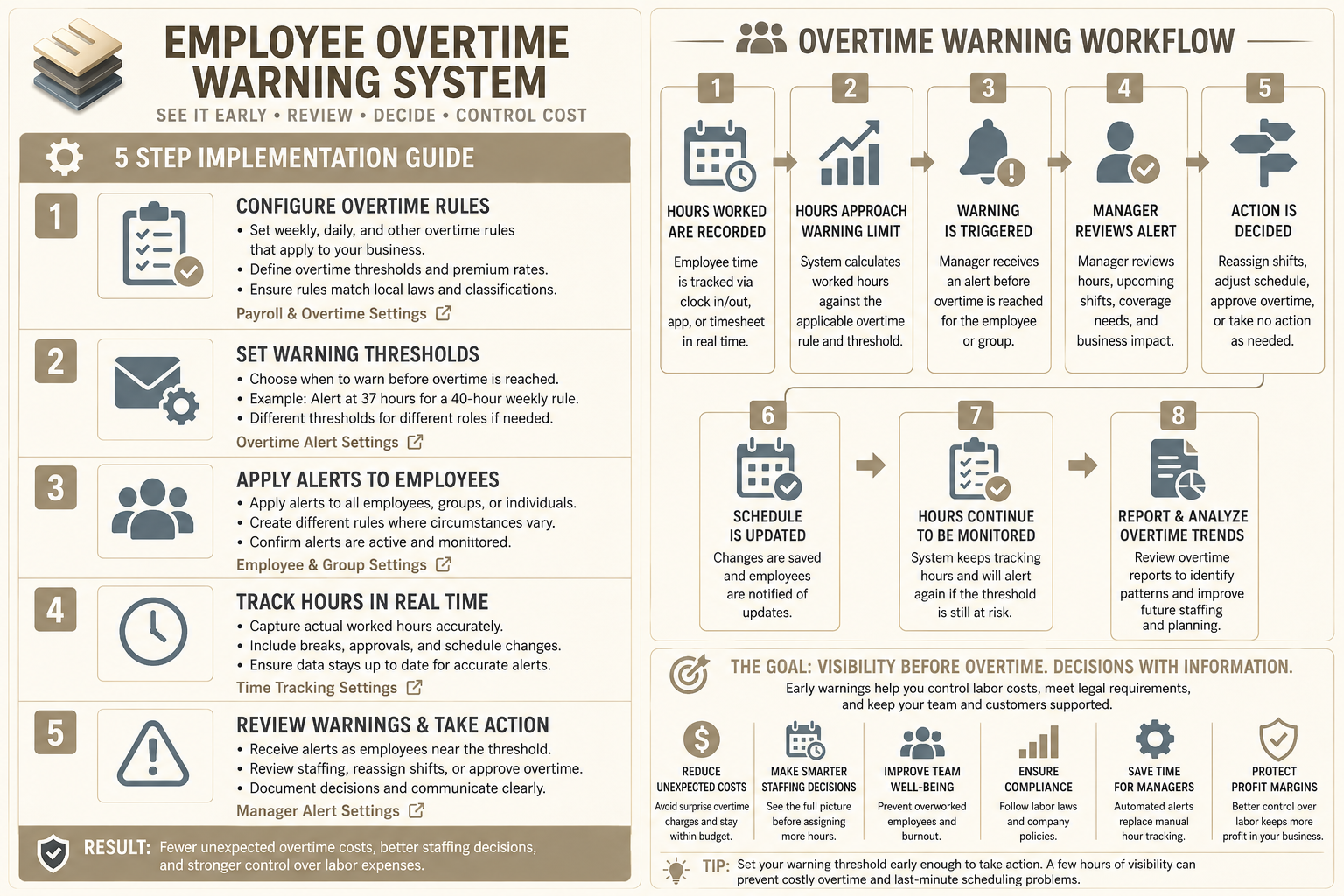
Step By Step Implementation Guide
The following setup demonstrates one implementation path using QuickBooks Time.
It is not a WIZESTAX recommendation or preferred Stax.
QuickBooks Time is used because its dedicated Overtime Alerts feature provides a particularly clear example of threshold based warning logic. (QuickBooks)
Step 1: Configure The Applicable Overtime Rules
Open QuickBooks Time.
Navigate to Company Settings, then Payroll & Overtime, then Overtime.
Configure the weekly, daily, double time, or other supported rules that actually apply to the workforce.
QuickBooks Time supports configurable weekly and daily overtime thresholds and also provides additional rule options through its Pay Rate Engine. (QuickBooks)
QuickBooks Overtime Tracking Guide
Step 2: Install Overtime Alerts
Open Feature Add Ons and select Manage Add Ons.
Locate Overtime Alerts and install the feature.
Only QuickBooks Time administrators can manage these alerts. (QuickBooks)
QuickBooks Overtime Alerts Guide
Step 3: Define The Warning Threshold
Create an alert before the employee reaches the actual overtime threshold.
For example, if the configured rule begins overtime after a certain number of weekly hours, management might choose an earlier alert that provides enough time to review remaining shifts.
The warning threshold should reflect the business’s staffing process rather than functioning as a universal recommendation.
Step 4: Apply Alerts To The Right Employees
Apply the rule company wide where appropriate, or create different alerts for groups or individual employees when their circumstances require different monitoring.
QuickBooks Time allows conflicting group or individual alerts to override broader company alerts, which makes differentiated warning structures possible. (QuickBooks)
Step 5: Test The Full Workweek
Create representative employee time scenarios.
Test an employee safely below the warning threshold.
Test an employee approaching the threshold.
Test an employee who legitimately crosses into overtime.
Test different groups if they use different alert rules.
Confirm that management receives useful warnings without treating every additional hour as an operational problem.
Overtime Exposure Snapshot
The economic issue is labor cost becoming committed before management sees the overtime consequence.
| Employees Entering Overtime | Overtime Hours Each | Example Base Rate | Additional Premium Above Straight Time |
|---|---|---|---|
| 2 | 5 | $25 | $125 |
| 5 | 5 | $25 | $312.50 |
| 10 | 5 | $25 | $625 |
Illustrative example only. This table assumes overtime is paid at 1.5 times a $25 base hourly rate and therefore shows only the additional 0.5 times premium above straight time. Actual overtime requirements, rates and calculations depend on the applicable laws, employee circumstances and pay rules.
WIZESTAX Diagnostic Scorecard
| Category | Assessment |
|---|---|
| Economic Problem | Unplanned overtime becomes visible after labor cost is already committed |
| Signal Quality Required | High |
| Automation Potential | High |
| Human Judgment Required | High |
| Data Dependency | High |
| Scalability | High |
| Primary Value | Earlier labor cost visibility |
| Primary Risk | Incorrect overtime rules or treating necessary overtime as inherently undesirable |
Common Mistakes
| Mistake | Result |
|---|---|
| Assuming one overtime rule applies to everyone | Warnings may be inaccurate |
| Monitoring schedules but ignoring actual worked hours | Employees can cross thresholds through schedule variance |
| Alerting only after overtime begins | Management loses the opportunity for earlier review |
| Automatically removing employees from shifts | Operational coverage can be damaged |
| Treating every overtime warning as a problem | Necessary or valuable overtime may be discouraged |
| Using incorrect pay rules | Labor cost projections become unreliable |
| Ignoring recurring overtime patterns | Underlying staffing capacity problems remain unresolved |
Related WIZESTAX Categories
| Category | Related Business Problem |
|---|---|
| Workforce | Employee Scheduling Conflict Detection System |
| Workforce | Employee Absence Coverage System |
| Workforce | Employee Workload Balance System |
| Finance | Labor Cost Forecasting System |
| Operations | Capacity Planning System |
| Finance | Job Cost Overrun Warning System |
These solve neighboring but different problems. Employee Overtime Warning focuses specifically on employees approaching overtime exposure before additional labor cost becomes a surprise. Scheduling Conflict Detection identifies incompatible shifts. Workload Balance examines distribution of work. Labor Cost Forecasting estimates broader workforce expense. Job Cost Overrun Warning monitors individual job economics rather than employee overtime.
Get New WIZESTAX Blueprints Every Monday
Subscribe to receive new WIZESTAX Blueprints covering Customer Retention, Marketing, Sales, Finance and Operations directly to your inbox.


