

Sales Opportunity Aging Alert System
Identify Sales Opportunities That Have Remained In The Same Stage Longer Than Expected
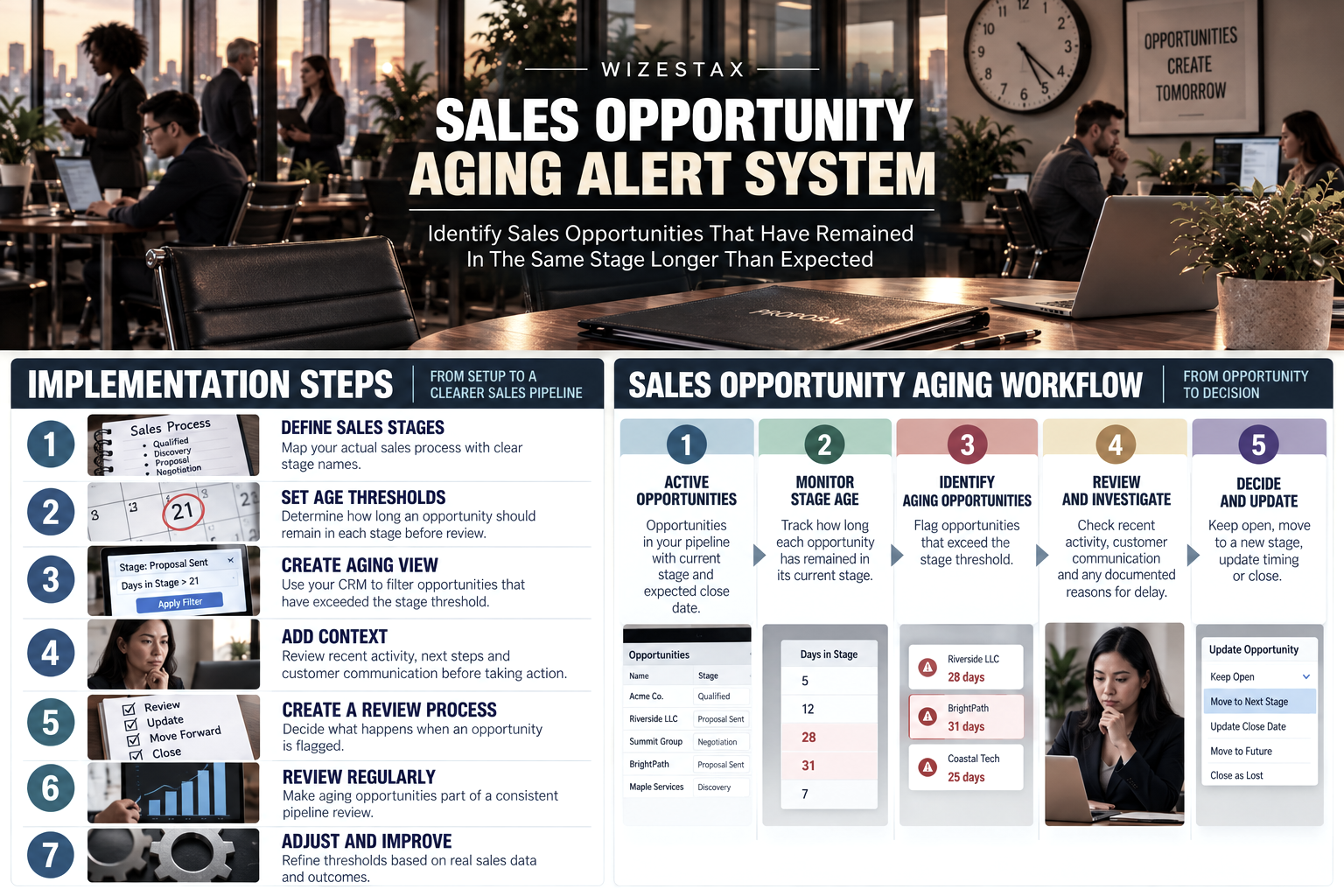
A sales pipeline can look healthy while individual opportunities quietly stop moving. A proposal has been delivered, but the deal remains in the same stage for several weeks. Another opportunity completed its discovery meeting but never progresses to pricing. A salesperson may still consider both opportunities active, even though neither has moved according to the normal sales cycle.
As more opportunities accumulate, these aging deals can make the pipeline increasingly difficult to interpret. Staff attention remains attached to opportunities that may require intervention, while managers can see pipeline value without immediately seeing how long individual deals have remained unchanged.
The Sales Opportunity Aging Alert System measures how long active opportunities remain in important sales stages and identifies records that exceed reasonable age thresholds.
The purpose is not to assume an older opportunity is lost. Some legitimate sales cycles take months. Others pause because of budgets, approvals, seasonal timing or customer circumstances. An aging alert simply makes unusual delay visible so someone can determine whether the opportunity should move forward, remain open, change status or close.
This Blueprint focuses specifically on individual opportunity age. Pipeline wide bottlenecks belong to the Sales Pipeline Bottleneck Detection System, while communication cadence belongs to the Sales Follow Up Timing System. The distinct problem here is an individual active opportunity remaining in its current sales state longer than expected.
Which Stax Fits Your Business
| Business Need | Stax | Software | Cost |
|---|---|---|---|
| Straightforward visibility into opportunities remaining in a sales status too long | Starter Stax | Close | Varies by plan and users |
| Customizable CRM alerts using inactivity, stage changes and upcoming dates | Growth Stax | monday CRM | Varies by plan and users |
| Flexible sales workflow monitoring connected with tasks, automation and broader operational work | Pro Stax | ClickUp | Varies by plan and users |
Pricing and capabilities change over time and should be confirmed directly with each software provider before purchase.
Software Linx
Starter
Growth
Pro
Blueprint Overview
| Metric | Value |
|---|---|
| Category | Sales Operations |
| Business Problem | Active sales opportunities remain unchanged longer than expected without becoming clearly visible |
| Primary Objective | Identify individual opportunities exceeding reasonable age thresholds |
| Core Signals | Current stage, time in stage, opportunity age, recent activity, next action and expected close date |
| Setup Time | Approximately 60 to 120 minutes |
| Difficulty | Intermediate |
| Maintenance | Periodic threshold review |
| Best For | Businesses managing multiple active opportunities through defined sales stages |
| Primary Output | Aging opportunity status and internal alert |
The Hidden Revenue Leak
| Without This Blueprint | With This Blueprint |
|---|---|
| Old opportunities remain mixed with active opportunities | Aging opportunities become easier to identify |
| Staff rely on memory to recognize stalled deals | Defined age thresholds create consistent visibility |
| Pipeline value can include opportunities with little recent movement | Older opportunities can be reviewed separately |
| Salespeople may continue carrying inactive deals | Aging records receive a deliberate review |
| Managers see stage position without immediate age context | Opportunity age becomes part of pipeline evaluation |
| Old records accumulate over time | Aging alerts create a reason to investigate their current status |
Opportunity age should provide context rather than determine the outcome automatically. A long sales cycle can be completely legitimate when the customer is still engaged and the timing is understood.
Business Impact Snapshot
| Area | Potential Impact |
|---|---|
| Pipeline Visibility | Older opportunities become easier to distinguish from recently active deals |
| Sales Attention | Staff can review opportunities that have remained unchanged unusually long |
| Forecast Quality | Aging opportunities can receive additional scrutiny before being treated as active pipeline |
| Sales Management | Managers gain another signal for reviewing opportunity health |
| Pipeline Maintenance | Old records receive a defined review process |
| Accountability | Opportunity owners can see which deals require a status decision |
Real World Example
A commercial printing company manages custom orders through a sales pipeline.
A prospective customer requests pricing for a large recurring print contract. The salesperson completes discovery, prepares the estimate and moves the opportunity into the Proposal Sent stage.
The customer says several people need to review the proposal.
Two weeks pass.
Nothing about that delay necessarily means the opportunity is lost. The customer may genuinely need additional approval.
Another two weeks pass and the opportunity remains in exactly the same stage.
Without an aging system, the deal can continue appearing alongside recently submitted proposals. Unless the salesperson remembers the history, nothing clearly separates the month old proposal from one sent yesterday.
The company has determined that proposals normally receive some form of decision or meaningful movement within 21 days.
When the opportunity crosses that threshold, its aging status changes and the owner receives an internal alert.
The salesperson reviews the record and sees that the customer has not rejected the proposal, but the expected decision date has passed. The salesperson contacts the customer and learns that the project has been postponed until the next quarter.
The opportunity remains legitimate, but its timing and expected close date are updated.
The system did not predict whether the sale would close. It exposed an opportunity whose recorded pipeline position no longer reflected what was actually happening.
WIZESTAX Stax Options
Starter Stax
Close
Best For
Sales teams that want a focused CRM method for identifying opportunities that have remained in a particular status longer than expected.
| Function | Software |
|---|---|
| CRM | Close |
| Opportunities | Opportunities |
| Sales Status | Opportunity Status |
| Aging Signal | Status Change Date |
| Monitoring | Smart Views |
| Review | Opportunity Lists And Reports |
Close provides Smart Views that can identify leads and opportunities according to the date of their last status change. Its own guidance demonstrates using this specifically to surface opportunities that may be losing momentum after remaining in a sales status beyond an expected period. (Close Help Center)
Advantages
| Benefit |
|---|
| Opportunity age can be evaluated from actual status change information |
| Different sales statuses can use different age expectations |
| Smart Views can isolate aging opportunities |
| Salespeople can work directly from filtered opportunity groups |
| The architecture remains focused on sales rather than broader operational management |
Limitations
| Limitation |
|---|
| Useful thresholds require understanding the normal sales cycle |
| Long legitimate sales cycles can appear unusual without appropriate criteria |
| More advanced alert behavior may require additional automation |
| Status discipline matters because inaccurate stage information weakens the aging signal |
Close also supports opportunity status change reporting, providing additional visibility into how opportunities move between statuses over time. (Close Developer Platform)
Growth Stax
monday CRM
Best For
Businesses that want opportunity aging alerts inside a customizable CRM with broader automation and deal health monitoring.
| Function | Software |
|---|---|
| CRM | monday CRM |
| Pipeline | Deals |
| Aging Signals | Inactivity, Stage Changes And Dates |
| Automation | CRM Automations |
| Risk Visibility | Deal Health |
| Internal Response | Alerts, Tasks And Workflow Actions |
monday CRM currently supports automation based on stage changes, inactivity and upcoming dates. Its sales pipeline documentation specifically gives an example where seven days without logged activity can notify the owner and manager and flag a deal as at risk. (monday.com)
Advantages
| Benefit |
|---|
| Inactivity can contribute directly to opportunity alerts |
| Stage changes and dates can trigger workflow actions |
| Deal health information can provide additional context |
| Alerts can connect with tasks and other sales actions |
| Pipeline design is highly customizable |
Limitations
| Limitation |
|---|
| Flexible configuration requires clear internal rules |
| Inactivity and opportunity age are related but not identical signals |
| Poorly selected thresholds can create excessive alerts |
| Businesses may use more functionality than is necessary for a simple aging system |
monday CRM also describes deal health visibility using inactivity, buyer disengagement and missed signals, which allows age to be considered alongside other information rather than treated as proof that an opportunity is failing. (monday.com)
Pro Stax
ClickUp
Best For
Businesses that want opportunity aging monitoring connected with sales tasks, internal work and broader operational workflows.
| Function | Software |
|---|---|
| Sales Workspace | ClickUp |
| Pipeline | Custom CRM Workflow |
| Opportunity Stage | Custom Statuses |
| Aging Context | Dates, Activity And Tasks |
| Automation | ClickUp Automations |
| Internal Response | Tasks, Alerts And Assigned Actions |
ClickUp supports customizable sales pipelines, deal stages and automated follow up actions. Its current sales tools can also monitor pipeline hygiene and identify stale activity and overdue next steps. (ClickUp)
Advantages
| Benefit |
|---|
| Sales opportunities can connect directly with operational tasks |
| Custom workflows allow businesses to model their own sales process |
| Automation can trigger follow up and status actions |
| Aging opportunities can be evaluated alongside overdue work |
| Useful when sales and delivery teams already operate inside ClickUp |
Limitations
| Limitation |
|---|
| ClickUp is broader than a dedicated sales CRM |
| The business must design its pipeline structure carefully |
| Opportunity aging logic may require more configuration |
| Excessive customization can make a simple sales process unnecessarily complicated |
ClickUp represents a different architecture because opportunity monitoring can exist inside the same workspace used for tasks, projects and operational work rather than inside a dedicated CRM alone.
How The Three Stax Differ
| Stax | Primary Approach |
|---|---|
| Close | Status age monitoring through sales focused Smart Views |
| monday CRM | Custom CRM alerts using inactivity, stage activity and dates |
| ClickUp | Opportunity monitoring connected with broader work and task automation |
These are different implementation architectures rather than rankings.
Close provides the most direct example of examining how long an opportunity has remained in a particular sales status.
monday CRM combines aging related signals with customizable deal health and workflow automation.
ClickUp allows opportunity monitoring to operate alongside the tasks and operational work associated with moving the sale forward.
The appropriate architecture depends on whether the business primarily needs a focused sales CRM, a customizable revenue workspace or a broader work management environment connected to the sales process.
Copy And Paste Opportunity Aging Alert
“Opportunity aging alert for {{opportunity_name}}. This opportunity has remained in {{current_stage}} longer than the review threshold established for this stage. Review recent activity, customer communication, next action and expected close date before deciding whether the opportunity should remain unchanged.”
Copy And Paste Opportunity Review Note
“Opportunity reviewed on {{review_date}}. Current status: {{current_stage}}. Last meaningful customer activity: {{last_activity}}. Next expected action: {{next_action}}. Expected decision date: {{decision_date}}. Update the opportunity stage or timing if the current CRM record no longer reflects the actual sales situation.”
Copy And Paste AI Prompt
You are assisting a small business with sales opportunity aging analysis.
Review the opportunity information provided and compare its current age with the sales stage expectations supplied by the business.
Consider the current sales stage, time in that stage, total opportunity age, recent customer activity, next scheduled action, expected close date and any documented reason for delay.
Identify opportunities that have remained unchanged beyond the normal range for their current stage.
Do not assume that an older opportunity is lost.
Do not assume that recent internal activity means the customer is still actively engaged.
Do not invent customer activity or expected decision dates.
Explain which aging signals caused the opportunity to be flagged.
Distinguish a documented long sales cycle from an opportunity that has simply received no meaningful review.
If the available information is insufficient to determine whether the delay is unusual, state that additional review is required.
Step By Step Implementation Guide
The following setup demonstrates one implementation path using Close.
It is not a WIZESTAX recommendation or preferred Stax.
Close is used here because its Smart Views provide a clear example of using opportunity status change dates to identify deals that have remained in a particular sales state longer than expected. Close specifically documents this type of workflow as a method for identifying opportunities that may be losing momentum. (Close Help Center)
Step 1: Define The Sales Stages
Begin with the actual sales process.
A small business might use stages such as:
Qualified
Discovery Complete
Estimate Prepared
Proposal Sent
Decision Pending
Contract Review
The stages should describe meaningful changes in the sales process.
Avoid creating stages simply to make the pipeline appear more detailed.
Step 2: Establish A Normal Age Range
Determine how long an opportunity can reasonably remain in each stage before someone should review it.
The threshold does not have to represent failure.
It represents the point where additional attention becomes appropriate.
For example, a business may normally expect discovery to progress within seven days but allow 21 days after a formal proposal because customers need more time to make a decision.
Historical sales records can provide better thresholds than arbitrary assumptions.
Step 3: Create The Aging View
Inside Close, create a Smart View using the opportunity status and status change date.
For example, the business could identify opportunities where:
Current opportunity status is Proposal Sent.
The last status change occurred more than 21 days ago.
Close documents this exact concept using Smart Views that search for opportunities remaining in a status beyond a specified period. (Close Help Center)
Close Smart View Guide For Aging Opportunities
Step 4: Create Separate Thresholds Where Necessary
Not every stage should use the same aging threshold.
A newly qualified opportunity might deserve review after several days.
A contract under legal review may reasonably remain unchanged for several weeks.
Create thresholds based on how the sales process actually behaves.
This prevents the system from treating every slow stage as equally concerning.
Step 5: Add Context Before Escalating
Opportunity age should not operate alone.
When an opportunity crosses the threshold, review:
Recent customer communication
Next scheduled activity
Expected close date
Documented customer delay
Proposal status
Internal dependencies
Recent stage movement
An opportunity waiting for a scheduled customer decision next week is different from one that has had no meaningful customer interaction for a month.
Step 6: Create The Review Process
Decide what happens when an opportunity exceeds its threshold.
The first response should normally be an internal review.
The owner can determine whether the opportunity should:
Remain open
Receive a new next action
Move to another stage
Receive an updated expected close date
Enter a future opportunity category
Close as lost
The aging system should create a decision point rather than automatically decide the outcome.
Step 7: Review Aging Opportunities Regularly
Aging alerts become less valuable if nobody reviews them.
Create a regular opportunity review process appropriate to the sales volume.
A small sales team might review aging opportunities weekly.
A business with a large active pipeline may review them more frequently.
The purpose is to prevent old opportunities from remaining indefinitely simply because nobody made a deliberate decision about them.
Step 8: Adjust The Thresholds
Compare aging alerts with actual sales outcomes.
If healthy opportunities are constantly being flagged, the threshold may be too short.
If obviously inactive opportunities remain unnoticed for months, the threshold may be too long.
The rules should gradually reflect the real sales cycle rather than an assumed one.
Pipeline Value Under Review Snapshot
The economic issue behind opportunity aging is not that every old opportunity represents lost revenue.
The more useful question is how much recorded pipeline value is sitting inside opportunities that have exceeded the business’s normal age expectations.
| Aging Opportunities | Average Opportunity Value | Pipeline Value Under Review |
|---|---|---|
| 5 | $2,000 | $10,000 |
| 10 | $2,000 | $20,000 |
| 25 | $2,000 | $50,000 |
Illustrative scenario using an average opportunity value of $2,000. Pipeline value under review is not revenue lost or revenue recoverable. An aging opportunity may still close successfully.
The snapshot simply shows how much recorded opportunity value deserves additional scrutiny when those opportunities have remained unchanged beyond their expected stage duration.
WIZESTAX Diagnostic Scorecard
| Category | Assessment |
|---|---|
| Economic Problem | Aging opportunities can remain inside the active pipeline without receiving deliberate review |
| Signal Quality Required | Moderate |
| Automation Potential | High |
| Human Judgment Required | Moderate |
| Data Dependency | Moderate To High |
| Scalability | High |
| Primary Value | Earlier visibility into individual opportunities that remain unchanged unusually long |
| Primary Risk | Treating normal long sales cycles as evidence that an opportunity is failing |
Common Mistakes
| Mistake | Result |
|---|---|
| Using one age threshold for every stage | Normal differences between sales stages create unnecessary alerts |
| Treating an aging alert as proof of failure | Legitimate long cycle opportunities can be closed prematurely |
| Measuring only total opportunity age | A deal that recently progressed can appear older than its current situation suggests |
| Allowing internal record edits to disguise customer inactivity | The CRM appears active even when the buyer is not |
| Ignoring documented customer timing | Known delays create unnecessary warnings |
| Leaving old opportunities open indefinitely | Pipeline value becomes increasingly difficult to interpret |
| Automatically closing aging opportunities | Software makes a sales decision that may require human context |
| Never recalibrating thresholds | Aging rules stop reflecting the actual sales cycle |
Get New WIZESTAX Blueprints Every Monday
Subscribe to receive new WIZESTAX Blueprints covering Customer Retention, Marketing, Sales, Finance and Operations directly to your inbox.


