

Supplier Cost Increase Detection System
Identify Rising Supplier Costs Before They Quietly Reduce Business Margins
Supplier costs rarely need to jump dramatically to hurt a business. A material that cost $18 may become $19.25. Packaging increases by a few cents per unit. A regularly purchased component receives another small increase. Freight or other purchasing costs change. Each new invoice still looks reasonable, so the business continues buying without recognizing how much its underlying cost structure has changed.
Over time, those increases can accumulate while customer pricing and job estimates remain unchanged. The Supplier Cost Increase Detection System creates a consistent way to compare current purchasing costs with previous costs, expected costs or defined thresholds. Instead of discovering cost increases after margins deteriorate, the business can identify meaningful changes closer to the purchase itself.
This Blueprint does not assume that every supplier price increase is unreasonable or requires changing vendors. Costs legitimately change. Its purpose is to make those changes visible so the business can determine whether pricing, purchasing quantities, sourcing or margins need review.
Which Stax Fits Your Business
| Business Need | Stax | Software | Cost |
|---|---|---|---|
| Straightforward vendor purchasing and price list management | Starter Stax | Zoho Inventory | Free plan available, paid plans vary |
| Custom historical supplier cost tracking and threshold alerts | Growth Stax | Airtable | Varies by plan and users |
| Procurement connected price monitoring using purchase orders, invoices and catalog costs | Pro Stax | Precoro | Confirm current pricing with provider |
Zoho Inventory currently supports purchase price lists, vendor relationships, purchase orders and purchasing records. Its paid plans currently begin at $29 per organization per month when billed annually, although requirements and features vary by tier.
Software Linx
Starter
Growth
Pro
Pricing and capabilities change over time and should be confirmed directly with each software provider before purchase.
Blueprint Overview
| Metric | Value |
|---|---|
| Category | Supply Chain |
| Business Problem | Supplier cost increases accumulate without receiving timely management attention |
| Primary Objective | Identify meaningful changes in purchasing costs earlier |
| Core Signals | Current unit cost, previous cost, expected cost, percentage change, purchasing volume and supplier |
| Setup Time | Approximately 60 to 120 minutes |
| Difficulty | Intermediate |
| Maintenance | Ongoing purchasing data and periodic threshold review |
| Best For | Businesses that repeatedly purchase inventory, materials, components or operating supplies |
| Primary Output | Supplier cost change alert and purchasing review |
The Hidden Margin Leak
| Without This Blueprint | With This Blueprint |
|---|---|
| New supplier prices replace old prices without comparison | Historical costs remain available for comparison |
| Small increases appear insignificant individually | Cumulative cost changes become easier to recognize |
| Staff notice increases inconsistently | Defined thresholds create repeatable review |
| Estimates may continue using outdated costs | Current purchasing information can trigger pricing review |
| High volume items receive the same attention as minor purchases | Cost changes can be considered alongside purchasing volume |
| Margin compression appears downstream | Input cost changes become visible closer to their source |
A percentage increase alone does not establish its importance. A small increase on a high volume material may have a larger economic effect than a large increase on something the business rarely purchases.
Business Impact Snapshot
| Area | Potential Impact |
|---|---|
| Purchasing | Buyers gain clearer visibility into changing supplier costs |
| Pricing | Material cost changes can trigger review of customer pricing or estimates |
| Margin | Input cost pressure becomes visible before it remains embedded for long periods |
| Negotiation | Historical pricing provides evidence during supplier discussions |
| Forecasting | Current costs provide better information for future purchasing plans |
| Management | Attention can focus on cost changes with meaningful economic consequences |
Real World Example
A small cabinet shop purchases the same sheet material throughout the year.
The supplier remains dependable. Orders arrive on time and the material quality remains consistent.
The price, however, moves from $52 per sheet to $54, then $56 and eventually $59.
Because each increase arrives separately, nobody treats any single invoice as a serious problem.
The shop uses approximately 150 sheets per month.
At the original price, that material represented $7,800 in monthly purchasing.
At $59 per sheet, the same volume represents $8,850.
That is a $1,050 monthly difference before considering any other changing input costs.
The system flags the cumulative increase and gives management a reason to review current estimates, margins, purchasing quantities and alternative sourcing.
The supplier has not necessarily done anything wrong.
The business simply has better information about what the supplier relationship now costs.
WIZESTAX Stax Options
Starter Stax
Zoho Inventory
Best For
Businesses that already need inventory and purchasing management and want vendor pricing information connected with normal purchase transactions.
| Function | Software |
|---|---|
| Vendors | Zoho Inventory |
| Purchase Orders | Purchases |
| Vendor Pricing | Purchase Price Lists |
| Item Costs | Item Records |
| Purchase History | Transactions |
| Cost Review | Inventory And Purchasing Reports |
Zoho Inventory supports purchase price lists that can be associated with vendors and purchasing transactions. Price lists can use percentage adjustments or individually entered item rates, and the platform maintains purchasing and vendor information alongside inventory activity.
Advantages
| Benefit |
|---|
| Vendor pricing connects with actual inventory management |
| Purchase price lists support vendor specific rates |
| Purchase orders preserve purchasing activity |
| Item and purchasing records remain in one environment |
| Suitable for businesses already managing physical inventory |
Limitations
| Limitation |
|---|
| Detecting cumulative cost changes still requires deliberate monitoring |
| Price lists alone do not determine whether an increase is economically significant |
| Purchasing information must remain accurate |
| Features and transaction limits vary by plan |
| Businesses without inventory may not need the broader platform |
Growth Stax
Airtable
Best For
Businesses that want to build their own supplier cost history and define exactly which cost changes should trigger attention.
| Function | Software |
|---|---|
| Supplier Database | Airtable |
| Purchase Records | Linked Records |
| Historical Costs | Cost Fields |
| Cost Change Calculation | Formulas |
| Review Views | Filters And Interfaces |
| Internal Alerts | Automations |
Airtable’s configurable records, formulas, filtered views and automations make it suitable for a custom architecture in which each purchase or supplier price update is stored rather than simply overwriting the previous value.
Advantages
| Benefit |
|---|
| Cost history can be structured around the business’s actual purchasing process |
| Percentage and dollar changes can be calculated automatically |
| Thresholds can vary by item or supplier |
| High impact items can receive greater visibility |
| Alerts can be built around defined conditions |
Limitations
| Limitation |
|---|
| Requires more initial design |
| Purchasing data may need manual entry or integration |
| It is not a dedicated procurement system |
| Poor data structure can create misleading comparisons |
| Thresholds require periodic calibration |
Pro Stax
Precoro
Best For
Businesses that want changing supplier prices connected directly with formal purchasing and procurement activity.
| Function | Software |
|---|---|
| Supplier Records | Precoro |
| Expected Costs | Catalog |
| Purchase Evidence | Purchase Orders |
| Invoice Evidence | Invoices |
| Current Costs | Automatic Catalog Price Updates |
| Procurement Review | Purchasing Data And Reports |
Precoro can automatically update catalog prices based on the latest approved purchase order or invoice. When an eligible document reaches the required status, the system checks whether its item price differs from the catalog price and can update the catalog accordingly when the feature is enabled.
Advantages
| Benefit |
|---|
| Price changes originate from actual procurement activity |
| Purchase orders and invoices provide documented cost evidence |
| Catalog prices can stay aligned with recent approved purchases |
| Supplier and purchasing information remain connected |
| Suitable for businesses with more structured procurement processes |
Limitations
| Limitation |
|---|
| More procurement infrastructure than many small businesses require |
| Automatic catalog updates should not erase the need for historical analysis |
| Purchasing processes must be followed consistently |
| Configuration determines which items receive automatic price updates |
| Human review is still necessary to determine the response to a cost increase |
How The Three Stax Differ
| Stax | Primary Approach |
|---|---|
| Zoho Inventory | Inventory connected vendor and purchase pricing |
| Airtable | Custom historical supplier cost monitoring |
| Precoro | Procurement connected purchase price monitoring |
These are different implementation architectures rather than rankings.
Zoho Inventory works naturally where vendor pricing is already part of inventory management. Airtable gives the business greater control over historical comparisons and custom thresholds. Precoro places price monitoring inside a more formal procurement process built around catalogs, purchase orders and invoices.
Copy And Paste Supplier Cost Alert
“Supplier cost warning for {{supplier_name}}. The current cost of {{item_name}} has moved outside the defined comparison range. Review the previous cost, current cost, percentage change, purchasing volume and recent supplier history before deciding whether pricing or purchasing action is appropriate.”
Copy And Paste Purchasing Review
“Review the recent cost change for {{item_name}} from {{supplier_name}}. Confirm that the new price is accurate, calculate the effect at normal purchasing volume and determine whether estimates, customer pricing, purchasing quantities or sourcing require further review.”
Copy And Paste AI Prompt
You are assisting a small business with supplier cost analysis.
Review the purchasing information provided and identify meaningful supplier cost changes.
Compare current unit costs with previous costs and expected costs where available.
Consider both percentage change and normal purchasing volume.
Separate isolated pricing differences from sustained or recurring cost increases.
Explain which items and suppliers are creating the largest economic exposure.
Do not assume that a supplier price increase is improper.
Do not automatically recommend changing suppliers.
Do not invent purchasing information.
If the available history is insufficient, state that additional purchasing data is required.
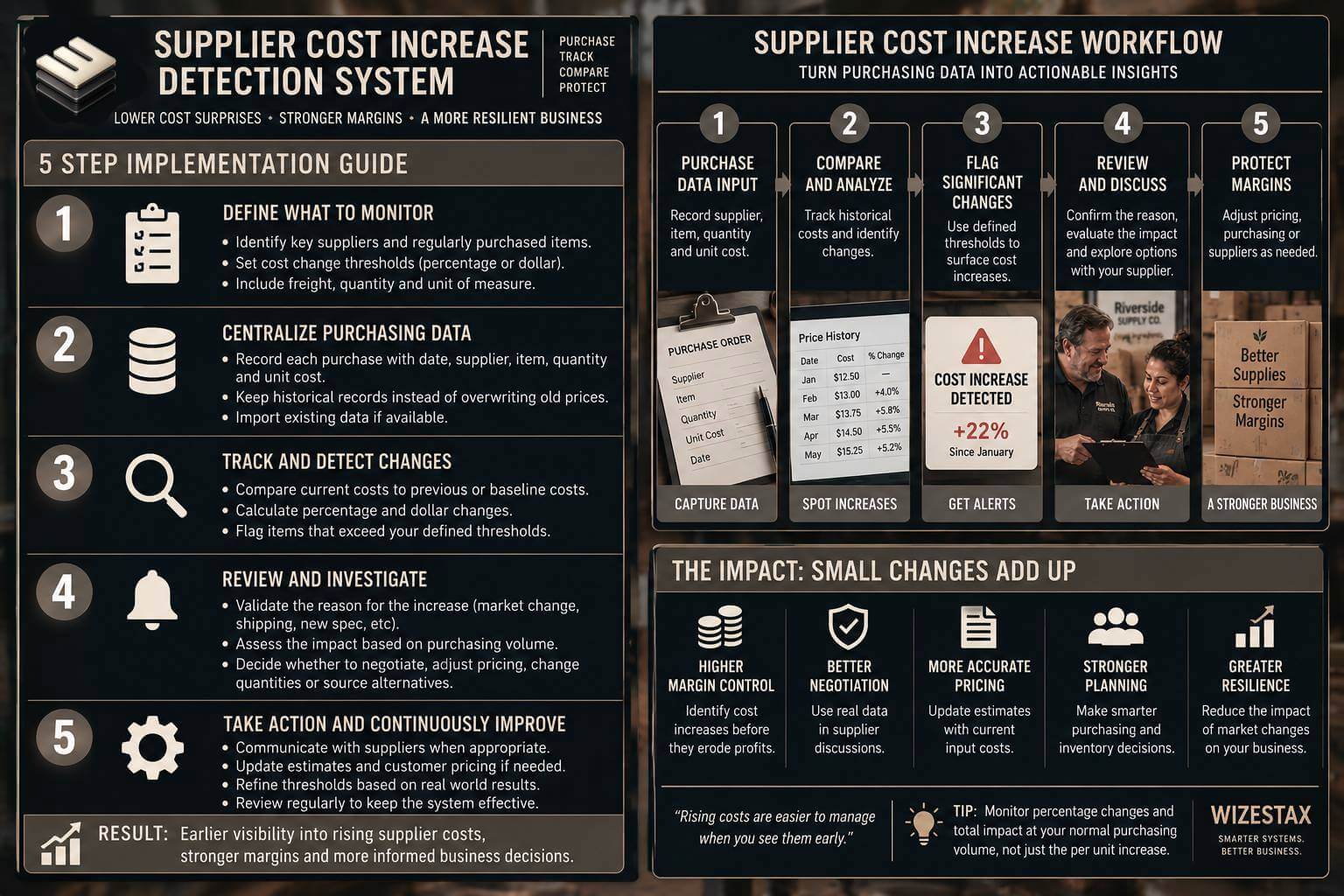
Step By Step Implementation Guide
The following setup demonstrates one implementation path using Airtable.
It is not a WIZESTAX recommendation or preferred Stax.
Airtable is used here because a historical record architecture clearly demonstrates an important principle of supplier cost detection: the business needs to preserve previous costs rather than simply replacing them with the newest number.
Step 1: Create The Supplier And Item Records
Create records for the suppliers and regularly purchased items the business wants to monitor.
Connect each item with the appropriate supplier or suppliers.
Include units of measure so historical comparisons remain meaningful.
A case, individual unit, gallon and pallet should not accidentally be compared as though they represent the same quantity.
Step 2: Create A Purchase Cost History
Create a separate record whenever a relevant purchase occurs or a supplier communicates a new price.
Record the supplier, item, date, quantity, unit cost and other information needed for comparison.
Do not overwrite the previous unit cost.
Historical records are what allow the system to distinguish today’s price from previous purchasing conditions.
Step 3: Calculate Cost Changes
Create formula fields comparing the current unit cost with the previous or baseline cost.
Track both the dollar difference and percentage difference.
Where useful, multiply the unit increase by normal purchasing volume to estimate the operational significance of the change.
A 2 percent increase should not automatically receive less attention than a 10 percent increase. Volume determines part of the economic effect.
Step 4: Create Review Thresholds
Determine which changes deserve management attention.
The threshold could consider percentage change, dollar change, cumulative increase or estimated effect at normal purchasing volume.
Create filtered views that surface records meeting those conditions.
Automations can then notify the appropriate employee when a record enters the review group.
Step 5: Review And Calibrate
Compare alerts with actual purchasing consequences.
Determine whether thresholds are identifying economically meaningful changes or simply generating noise.
Review whether seasonal prices, quantity discounts, freight, currency changes or different product specifications are creating misleading comparisons.
Adjust the system as purchasing conditions change.
Margin Exposure Snapshot
The primary economic value of this system is purchasing cost increases that become visible before they remain embedded in the business.
| Monthly Units Purchased | Increase Per Unit | Monthly Cost Increase |
|---|---|---|
| 100 | $1.50 | $150 |
| 500 | $1.50 | $750 |
| 1,000 | $1.50 | $1,500 |
Illustrative scenario using a $1.50 increase per unit. Cost increase represented is not guaranteed savings. The appropriate response may involve accepting the new cost, changing purchasing quantities, negotiating, adjusting customer pricing or investigating other suppliers.
WIZESTAX Diagnostic Scorecard
| Category | Assessment |
|---|---|
| Economic Problem | Supplier cost increases can compress margin before their cumulative effect is recognized |
| Signal Quality Required | High |
| Automation Potential | High |
| Human Judgment Required | Moderate |
| Data Dependency | High |
| Scalability | High |
| Primary Value | Earlier visibility into changing input costs |
| Primary Risk | Comparing prices without accounting for quantity, units, specifications or purchasing conditions |
Common Mistakes
| Mistake | Result |
|---|---|
| Overwriting the previous supplier price | Historical cost movement disappears |
| Watching percentage changes without purchasing volume | Economic importance can be misunderstood |
| Comparing different quantities or units | False cost increases appear |
| Ignoring freight or purchasing conditions | Effective cost changes remain incomplete |
| Treating every increase as a supplier problem | Legitimate market changes are misinterpreted |
| Monitoring only the largest purchases | Smaller recurring increases can accumulate |
| Never updating thresholds | Alerts become noisy or economically irrelevant |
Related WIZESTAX Categories
| Category | Related Business Problem |
|---|---|
| Supply Chain | Supplier Reliability Tracking |
| Supply Chain | Supplier Delivery Performance |
| Procurement | Purchase Price Variance |
| Finance | Recurring Business Expense Increase Alert |
| Inventory | Inventory Forecasting |
| Inventory | Excess Inventory Warning |
| Operations | Job Cost Overrun Warning |
These remain separate problems.
The Supplier Cost Increase Detection System identifies changes in what suppliers charge over time. Supplier Reliability Tracking measures the broader dependability of the supplier relationship. Supplier Delivery Performance focuses specifically on delivery execution. Purchase Price Variance compares an actual purchase price against an expected or authorized purchasing price. Recurring Business Expense Increase Alert covers recurring operating expenses more broadly rather than supplier item costs.
That distinction keeps this Blueprint centered on one leak: input costs rising quietly enough that the business fails to respond before margins are affected.
Get New WIZESTAX Blueprints Every Monday
Subscribe to receive new WIZESTAX Blueprints covering Customer Retention, Marketing, Sales, Finance and Operations directly to your inbox.


