

Sales Follow Up Timing System
Keep Active Sales Opportunities Moving With Consistent, Timed Follow Up
Sales opportunities can become harder to close when follow up depends on memory. An estimate is sent. A consultation ends. A proposal reaches the customer. A prospect says they need several days to think. The opportunity remains active, but the next contact may not have a defined date.
Some prospects receive another message immediately. Others are contacted much later. Some remain untouched until someone notices the opportunity sitting in the pipeline. The Sales Follow Up Timing System creates a repeatable process for determining when active opportunities should return to the salesperson’s attention.
This Blueprint does not assume that more follow up produces more sales. Its purpose is to make appropriate follow up timing visible and consistent while preserving the judgment required for individual customer situations.
Which Stax Fits Your Business
| Business Need | Stax | Software | Cost |
|---|---|---|---|
| Straightforward sales activities and follow up sequences inside a CRM | Starter Stax | Pipedrive | Varies by plan and users |
| Structured sales sequences with configurable timing and task management | Growth Stax | HubSpot Sales Hub | Varies by plan and users |
| Multichannel follow up using email, SMS, calls and tasks | Pro Stax | Close | Varies by plan and users |
Pricing and capabilities change over time and should be confirmed directly with each software provider before purchase.
Software Linx
Starter
Growth
Pro
Blueprint Overview
| Metric | Value |
|---|---|
| Category | Sales |
| Business Problem | Active opportunities lose momentum because the next follow up is not consistently scheduled |
| Primary Objective | Give appropriate sales opportunities a defined next contact point |
| Core Signals | Last contact, sales stage, customer response, next action and requested timing |
| Setup Time | Approximately 60 to 120 minutes |
| Difficulty | Intermediate |
| Maintenance | Periodic timing review |
| Best For | Businesses using consultations, estimates, proposals or longer sales conversations |
| Primary Output | Scheduled next action and follow up status |
The Hidden Revenue Leak
| Without This Blueprint | With This Blueprint |
|---|---|
| Follow up depends on salesperson memory | Active opportunities receive a defined next action |
| Timing varies between employees | Common timing rules create greater consistency |
| Quiet opportunities can disappear in the pipeline | Opportunities without a next action become easier to identify |
| Customer requested timing can become disconnected from the sales record | Requested timing can guide the next contact |
| Staff repeatedly review old conversations | Tasks and sequences surface opportunities when attention is needed |
| Management sees open deals without knowing whether follow up is scheduled | Follow up status becomes part of pipeline visibility |
Follow up timing should reflect the customer situation rather than applying one universal schedule to every opportunity.
Business Impact Snapshot
| Area | Potential Impact |
|---|---|
| Sales Consistency | Active opportunities receive clearer next actions |
| Pipeline Visibility | Opportunities without scheduled follow up become easier to identify |
| Staff Attention | Salespeople can focus on opportunities requiring action |
| Customer Experience | Requested timing can remain part of the follow up process |
| Accountability | Missed follow up becomes easier to recognize |
| Revenue | Viable opportunities receive continued attention while the sales conversation remains active |
Real World Example
A custom cabinet company completes an in home consultation and sends a $14,000 proposal.
The homeowner says she needs several days to discuss the project with her partner.
The salesperson records the proposal but does not create another activity.
Eight days later, the opportunity appears during a pipeline review.
The customer has not rejected the proposal. The salesperson has not intentionally abandoned the opportunity. The process simply did not define when the conversation should resume.
With a Sales Follow Up Timing System, the customer’s requested review period becomes part of the opportunity record and a future action is scheduled.
When that date arrives, the salesperson can review the account and determine whether contact is appropriate.
The value of the system is not contacting prospects more frequently. It is preventing viable opportunities from becoming inactive because the next step was never defined.
WIZESTAX Stax Options
Starter Stax
Pipedrive
Best For
Businesses that want straightforward follow up activities and repeatable sales sequences inside an existing CRM.
| Function | Software |
|---|---|
| CRM | Pipedrive |
| Opportunity Tracking | Deals |
| Follow Up Management | Activities |
| Sales Sequences | Sequences |
| Email Follow Up | Sequence Emails |
| Internal Response | Activities |
Advantages
| Benefit |
|---|
| Sales opportunities and follow up activity remain connected |
| Activities create clear next responsibilities |
| Sequences create repeatable email and task workflows |
| Pipeline records can remain connected with scheduled activity |
Pipedrive currently describes Activities as actions such as calls, meetings, tasks and emails that can be linked directly to deals and leads. Its Sequences feature supports structured workflows containing email and follow up activity steps. (Pipedrive Support)
Limitations
| Limitation |
|---|
| More complex sales logic may require Pipedrive Automations |
| Sequence availability depends on plan |
| Timing rules still require thoughtful configuration |
| Customer context cannot be reduced to a sequence alone |
Pipedrive distinguishes Sequences from its broader Automations system. Sequences are designed as relatively simple sales engagement flows, while Automations support more complex event driven processes. (Pipedrive Support)
Growth Stax
HubSpot Sales Hub
Best For
Businesses that need structured sales sequences with more control over timing, tasks and customer responses.
| Function | Software |
|---|---|
| CRM | HubSpot Smart CRM |
| Sales Sequences | Sequences |
| Automated Email | Sequence Emails |
| Sales Tasks | Tasks |
| Timing | Sequence Delays |
| Sequence Exit | Automatic Unenrollment |
Advantages
| Benefit |
|---|
| Automated emails and sales tasks can operate within the same sequence |
| Timing can be configured between sequence steps |
| Follow up email sending windows can be controlled |
| Replies or booked meetings can remove contacts from a sequence |
HubSpot currently supports automated emails plus manual email, call and general task reminders inside Sequences. Delays can be configured between steps, and contacts can be unenrolled when they reply or book a meeting. (HubSpot Knowledge Base)
Limitations
| Limitation |
|---|
| Sequences require qualifying HubSpot subscriptions and seats |
| More configuration than some small businesses require |
| Poor sequence design can create unnecessary contact |
| Salesperson judgment remains necessary when customer circumstances change |
HubSpot currently lists Sequences for qualifying Sales Hub and Service Hub Professional and Enterprise subscriptions with the appropriate seat requirements. (HubSpot Knowledge Base)
Pro Stax
Close
Best For
Businesses that want sales follow up across email, SMS, calls and internal tasks within the same CRM environment.
| Function | Software |
|---|---|
| CRM | Close |
| Email Follow Up | Workflows |
| SMS Follow Up | Workflows |
| Call Tasks | Workflows |
| Timing | Workflow Delays |
| Sequence Exit | Workflow Goals |
Advantages
| Benefit |
|---|
| Multiple communication channels can operate inside one workflow |
| Delays create structured timing between actions |
| Communication windows control when outreach occurs |
| Workflow Goals can stop future actions when the sales situation changes |
Close currently supports workflow steps for email, SMS, calls and tasks. Delays can range from minutes to days, while Workflow Goals can stop a running workflow after events such as an incoming message or booked meeting. (Close Help Center)
Limitations
| Limitation |
|---|
| Workflows currently require Growth or Scale plans |
| Multichannel automation requires more configuration |
| Poor stop conditions can create unnecessary outreach |
| Not every sales process requires this level of automation |
How The Three Stax Differ
| Stax | Primary Approach |
|---|---|
| Pipedrive | CRM based activities and straightforward sales sequences |
| HubSpot Sales Hub | Structured sales sequences with deeper timing and task controls |
| Close | Multichannel follow up using email, SMS, calls and tasks |
These are different implementation architectures rather than rankings.
The appropriate architecture depends on the length of the sales process, communication channels already used, number of active opportunities and how much automation the business actually needs.
Copy And Paste Sales Follow Up Alert
“Sales follow up due for {{customer_name}}. Review the last conversation, current opportunity stage, customer requested timing and previous activity before deciding whether contact is appropriate.”
Copy And Paste Customer Follow Up
“Hi {{first_name}}, I wanted to follow up on the {{estimate / proposal / conversation}} we discussed. I know you may still be reviewing everything, so I wanted to check whether you had any questions or needed anything else from us. Thanks, {{name}}”
Copy And Paste AI Prompt
You are assisting a small business with sales follow up timing.
Review the active sales opportunities provided and identify opportunities that do not have a clear next action.
Consider the last meaningful customer interaction, current sales stage, customer response and any timing the customer explicitly requested.
Do not assume that every quiet prospect should be contacted immediately.
Do not recommend contacting a prospect before a date they asked the business to respect.
Separate active opportunities from opportunities that appear inactive or closed.
Explain why each opportunity was flagged.
Do not invent customer intent.
If the appropriate timing cannot be determined from the available information, state that staff review is required.
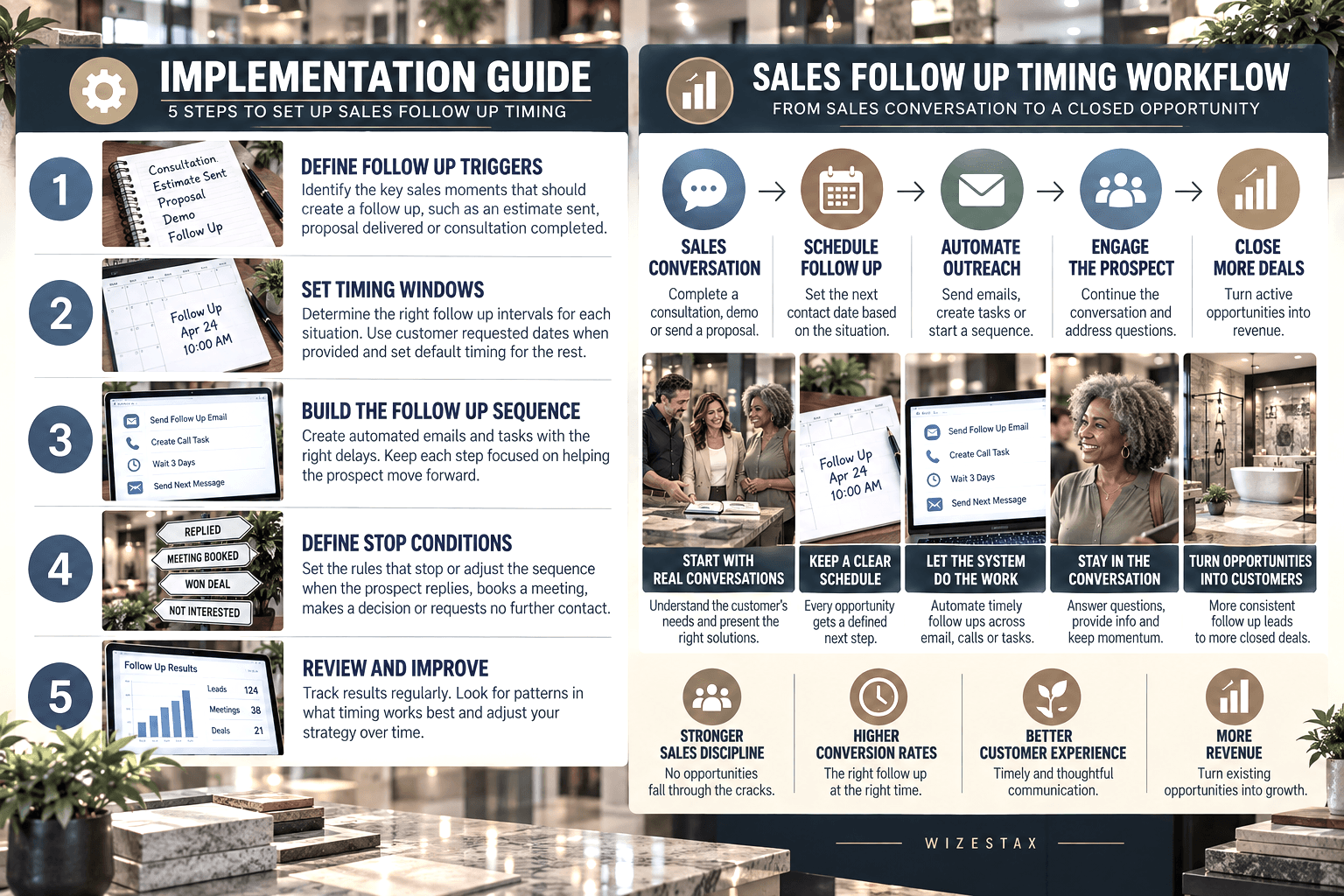
Step By Step Implementation Guide
The following setup demonstrates one implementation path using Pipedrive.
It is not a WIZESTAX recommendation or preferred Stax.
Pipedrive is used here because its Activities and Sequences provide a practical example of converting sales events into defined future actions. (Pipedrive Support)
Step 1: Define Follow Up Triggers
Identify the sales events that should normally create another action.
An estimate may be sent. A proposal may be delivered. A consultation may end without a decision. A prospect may request additional information or ask the salesperson to reconnect later.
The trigger should represent a genuine reason for the opportunity to return to staff attention.
Step 2: Define Timing Rules
Determine how the business decides when another action should occur.
Timing can depend on the sales stage, type of proposal, previous conversation or a date requested directly by the customer.
Customer requested timing should normally take priority over a default sequence.
The objective is consistency without removing judgment.
Step 3: Build The Follow Up Process
Open Pipedrive and create the appropriate Activities or Sequence.
Activities can represent calls, meetings, tasks and emails and can be linked directly to a deal or lead. Sequences can combine follow up activities with email steps. (Pipedrive Support)
Each step should have a clear purpose.
One step may create an email. Another may schedule a call. A later step may return the opportunity to the salesperson for personal review.
Avoid adding communication simply to make the sequence longer.
Pipedrive Sequences Setup Guide
Step 4: Define The Stop Process
Determine what should happen when the sales situation changes.
A response, booked meeting, accepted proposal, declined opportunity or request for no further contact should prevent an outdated follow up process from continuing.
The system should respond to the current state of the opportunity rather than blindly completing every scheduled action.
More complex conditional behavior may require Pipedrive Automations rather than relying entirely on Sequences. (Pipedrive Support)
Pipedrive Sequences And Automations Guide
Step 5: Test And Calibrate The System
Review opportunities that converted, went inactive or remained open unusually long.
Look for follow up that consistently occurs too early or too late.
Review whether employees are overriding the timing rules frequently and why.
Adjust the system around actual customer behavior and the normal sales cycle.
A system that works for a short residential estimate may not be appropriate for a commercial proposal requiring several weeks of internal review.
Revenue Opportunity Snapshot
The primary economic value of this system is not the number of follow up messages sent.
It is the value of active opportunities that remain visible long enough to reach a clear sales outcome.
| Active Opportunities Missing A Next Action | Average Opportunity Value | Opportunity Value Represented |
|---|---|---|
| 5 | $2,500 | $12,500 |
| 10 | $2,500 | $25,000 |
| 25 | $2,500 | $62,500 |
Illustrative scenario using an average opportunity value of $2,500. Opportunity value represented is not additional revenue or guaranteed sales.
WIZESTAX Diagnostic Scorecard
| Category | Assessment |
|---|---|
| Economic Problem | Active sales opportunities can lose momentum when the next contact is not defined |
| Signal Quality Required | Moderate To High |
| Automation Potential | High |
| Human Judgment Required | Moderate |
| Data Dependency | Moderate |
| Scalability | High |
| Primary Value | More consistent management of active sales opportunities |
| Primary Risk | Automated follow up that ignores customer context |
Common Mistakes
| Mistake | Result |
|---|---|
| Using identical timing for every opportunity | Follow up becomes disconnected from the buying situation |
| Ignoring customer requested dates | Customers can be contacted earlier than expected |
| Continuing sequences after a response | Automated communication conflicts with the live conversation |
| Adding unnecessary follow up steps | Communication becomes excessive |
| Leaving active opportunities without a next action | Viable sales conversations can disappear from attention |
| Measuring message volume instead of sales outcomes | Activity is mistaken for progress |
| Ignoring sales stage | Timing loses context |
| Never recalibrating the system | Old timing rules continue after the sales process changes |
Related WIZESTAX Categories
| Category | Related Business Problem |
|---|---|
| Sales | New Lead Response |
| Sales | Lead Routing |
| Sales | Abandoned Lead Recovery |
| Sales | Sales Pipeline Velocity |
| Sales | Lead Source Profitability |
| Customer Communication | Customer Response Delay Alert |
These remain separate problems.
New Lead Response addresses the first response after an inquiry enters the business. Abandoned Lead Recovery addresses leads that have already fallen out of active attention. Sales Pipeline Velocity examines movement through the broader sales process.
The Sales Follow Up Timing System owns the narrower operational leak created when an active sales opportunity does not have a clearly defined next contact point.
Get New WIZESTAX Blueprints Every Monday
Subscribe to receive new WIZESTAX Blueprints covering Customer Retention, Marketing, Sales, Finance and Operations directly to your inbox.


