

Lead Contact Data Verification System
Identify Incomplete Or Unreliable Lead Information Before It Disrupts Sales Follow Up
A new lead can look perfectly usable when it first enters a CRM. A name is present, an email address has been submitted and perhaps a phone number or company name has been included. The record moves into the sales process and appears ready for contact.
The problem becomes visible when someone actually tries to use the information. An email address may be invalid. A phone number may be incomplete. The company information may be missing. Another record for the same person may already exist. Required fields may contain inconsistent information. A form submission may even contain spam or fabricated contact details.
The Lead Contact Data Verification System creates a checkpoint between lead capture and sales activity. Instead of assuming every incoming record is usable, the system checks important contact information, identifies records that need attention and separates questionable data from leads that are ready for normal follow up.
This Blueprint does not assume that every incomplete record is a bad lead. Its purpose is to make data quality problems visible before unreliable information spreads through the sales process.
Which Stax Fits Your Business
| Business Need | Stax | Software | Cost |
|---|---|---|---|
| Simple CRM based control of required lead information | Starter Stax | Zoho CRM | Varies by edition and users |
| Sales focused lead records with duplicate management and structured fields | Growth Stax | Pipedrive | Varies by plan and users |
| Broader CRM data quality monitoring, enrichment and duplicate management | Pro Stax | HubSpot Data Hub | Varies by plan and users |
Pricing and capabilities change over time and should be confirmed directly with each software provider before purchase.
Software Linx
Starter
Growth
Pro
Blueprint Overview
| Metric | Value |
|---|---|
| Category | Sales Operations |
| Business Problem | Sales activity begins with incomplete, duplicate or unreliable lead information |
| Primary Objective | Identify contact data problems before normal sales follow up |
| Core Signals | Missing fields, invalid information, duplicate records, formatting problems and inconsistent lead data |
| Setup Time | Approximately 60 to 120 minutes |
| Difficulty | Intermediate |
| Maintenance | Periodic review |
| Best For | Businesses receiving leads from forms, imports, advertising, referrals and multiple acquisition channels |
| Primary Output | Verified lead status or internal review status |
The Hidden Revenue Leak
| Without This Blueprint | With This Blueprint |
|---|---|
| Sales staff discover bad information while attempting contact | Data problems can surface before normal outreach begins |
| Incomplete records enter the pipeline | Important fields can be checked before the lead progresses |
| Duplicate leads create fragmented histories | Potential duplicates can be identified and reviewed |
| Formatting problems accumulate inside the CRM | Data standards make records more consistent |
| Staff spend time investigating unusable records | Questionable records can be separated for review |
| Reporting relies on inconsistent lead information | Cleaner records support more reliable sales reporting |
Contact data verification should improve confidence in the record without pretending that software can prove every person or business is legitimate.
Business Impact Snapshot
| Area | Potential Impact |
|---|---|
| Sales Time | Less time spent discovering obvious data problems during outreach |
| Lead Management | Records requiring attention become easier to identify |
| CRM Quality | Duplicate, incomplete and inconsistent records become more visible |
| Reporting | Cleaner source information can improve downstream analysis |
| Automation | Workflows operate on more consistent lead information |
| Customer Experience | Fewer outreach attempts are directed using obviously incorrect information |
Real World Example
A home improvement company receives leads from its website, advertising campaigns and local referral partners.
A new form submission enters the CRM with a name, email address and phone number.
The phone number is missing a digit. The company also discovers that another record already exists for the same person under a different email address.
Without a verification process, the new record could be assigned to a salesperson as a separate lead. The employee might attempt the invalid phone number, create additional notes and unknowingly split the customer’s history between two records.
With a verification process, the record is flagged before normal follow up.
A staff member reviews the questionable phone number and checks whether the records belong to the same person. The CRM can then contain a more accurate customer history before sales activity continues.
The value of the system is not proving that every lead is genuine. It is preventing obvious contact data problems from quietly becoming sales process problems.
WIZESTAX Stax Options
Starter Stax
Zoho CRM
Best For
Businesses that want to establish structured lead records and basic data controls inside their CRM.
| Function | Software |
|---|---|
| CRM | Zoho CRM |
| Lead Records | Zoho CRM Leads |
| Required Information | CRM Fields |
| Duplicate Control | CRM Record Management |
| Internal Review | CRM Workflow Rules |
Advantages
| Benefit |
|---|
| Lead information remains inside the CRM |
| Required information can be standardized |
| Existing records can be checked before unnecessary duplication |
| Workflow rules can support internal review processes |
Limitations
| Limitation |
|---|
| Verification depth depends on configuration |
| External contact information may still require another verification source |
| Poorly designed fields can create unnecessary friction |
| Staff review remains important for ambiguous records |
Growth Stax
Pipedrive
Best For
Sales focused businesses that want structured contact records and straightforward lead management without building a larger data operations environment.
| Function | Software |
|---|---|
| CRM | Pipedrive |
| Lead Management | Leads Inbox |
| Contact Records | People And Organizations |
| Data Structure | Custom Fields |
| Duplicate Management | Merge Duplicates |
| Sales Response | Activities And Automations |
Advantages
| Benefit |
|---|
| Sales records and contact activity remain closely connected |
| Custom fields can standardize important lead information |
| Duplicate management helps reduce fragmented records |
| Activities can give employees clear responsibility after review |
Limitations
| Limitation |
|---|
| Not primarily a specialized data verification platform |
| Advanced verification may require integrations |
| Data quality still depends on how information enters the CRM |
| Automation capabilities depend on the selected plan |
Pro Stax
HubSpot Data Hub
Best For
Businesses with larger lead databases, multiple acquisition channels or enough CRM activity to justify dedicated data quality monitoring.
| Function | Software |
|---|---|
| CRM | HubSpot Smart CRM |
| Data Monitoring | Data Quality |
| Duplicate Detection | Manage Duplicates |
| Record Enrichment | Data Enrichment |
| Formatting | Data Quality Tools |
| Internal Response | CRM Workflows |
HubSpot currently provides tools for monitoring duplicates, formatting problems, enrichment coverage and broader database health. Its duplicate system compares contact information such as names, email addresses, phone numbers and other record properties. (HubSpot Knowledge Base)
Advantages
| Benefit |
|---|
| Data quality monitoring is connected directly to CRM records |
| Duplicate contacts and companies can be identified |
| Formatting problems can be surfaced |
| Record enrichment can fill some missing information |
| Larger databases can be monitored from a centralized data quality environment |
Limitations
| Limitation |
|---|
| Advanced data quality capabilities can require higher subscription levels |
| Enrichment does not guarantee that every record is correct |
| Duplicate detection still requires sensible matching criteria |
| Larger systems require governance to prevent poor information from returning |
How The Three Stax Differ
| Stax | Primary Approach |
|---|---|
| Zoho CRM | Structured CRM data control |
| Pipedrive | Sales focused contact and duplicate management |
| HubSpot Data Hub | Broader CRM data quality monitoring and enrichment |
These are different implementation architectures rather than rankings.
The appropriate architecture depends on how many leads the business receives, where those leads originate, how much information must be verified and whether the business needs simple CRM discipline or broader data quality infrastructure.
Copy And Paste Lead Review Alert
“Lead data review required for {{lead_name}}. One or more important contact fields appear incomplete, inconsistent or potentially duplicated. Review the record before normal sales follow up continues.”
Copy And Paste Verification Request
“Hi {{first_name}}, thanks for getting in touch with us. We want to make sure we have the correct contact information for your request. Please confirm the best email address and phone number to reach you. Thank you.”
Copy And Paste AI Prompt
You are assisting a small business with lead data quality review.
Review the lead information provided and identify missing, inconsistent or potentially unreliable contact information.
Consider the person’s name, email address, phone number, company information, location, lead source and any other required fields supplied by the business.
Identify obvious formatting problems and information that requires human review.
Do not assume that incomplete information means the lead is fraudulent.
Do not invent missing information.
Do not automatically delete questionable records.
Explain which information caused the record to be flagged.
If the available information is insufficient to verify the record, state that additional review is required.
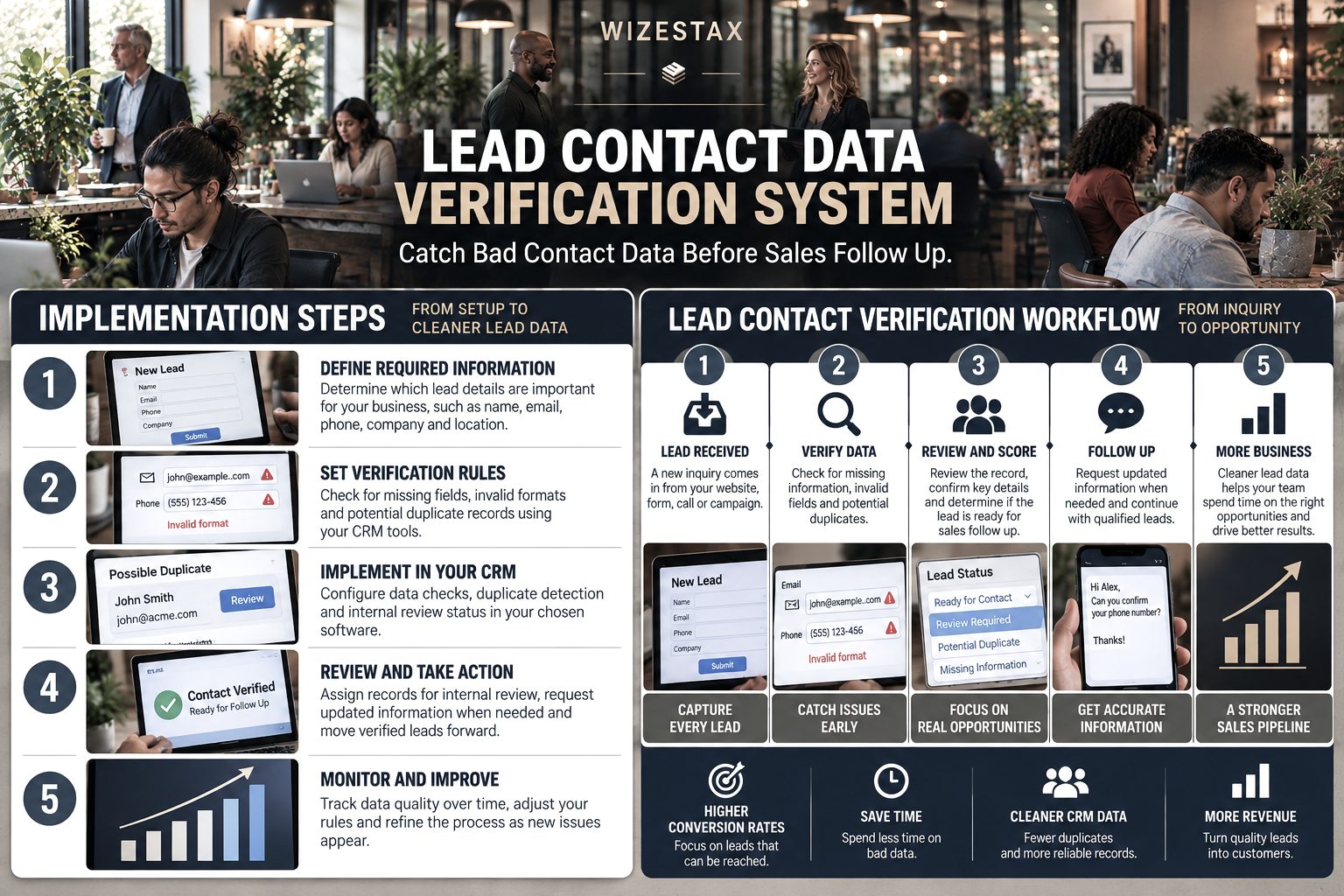
Step By Step Implementation Guide
The following setup demonstrates one implementation path using HubSpot Data Hub.
It is not a WIZESTAX recommendation or preferred Stax.
HubSpot is used here because its current data quality environment provides a practical example of how duplicate detection, formatting controls and enrichment can become part of a CRM data verification process. (HubSpot)
Step 1: Define The Required Lead Information
Determine which information must be present before a lead is considered ready for normal sales activity.
A local service business may require a name, phone number, email address, service location and requested service.
A business selling to other businesses may also require a company name, company website or job role.
Only require information that actually matters to the sales process. Excessive requirements can make lead capture unnecessarily difficult.
Step 2: Standardize Incoming Data
Identify every place where leads enter the CRM.
This may include website forms, advertising forms, manual entry, imported lists and connected applications.
Use consistent CRM properties for the same information regardless of where the lead originated.
HubSpot recommends controlling incoming information through structured ingestion, spam filtering, data enrichment and connected systems so duplicate or inconsistent information does not unnecessarily enter the database. (HubSpot Knowledge Base)
Step 3: Configure Duplicate Detection
Determine which properties provide reasonable evidence that two records may represent the same person.
Email address is an important identifier, but businesses may also need to review names, phone numbers, company information or unique customer identifiers.
HubSpot automatically deduplicates contacts using email addresses and companies using domain names. Its dedicated duplicate management tools can compare additional properties for potential duplicate records. (HubSpot Knowledge Base)
HubSpot Duplicate Management Guide
Step 4: Create The Verification Status
Create a property that describes the current condition of the lead record.
Possible values include:
Ready For Contact
Review Required
Missing Information
Potential Duplicate
Unable To Verify
The status should describe the condition of the data rather than the expected quality of the sales opportunity.
A lead with incomplete contact information may still become an excellent customer once the information is corrected.
Step 5: Build The Internal Review Process
Decide what happens when a record fails the verification rules.
The first response should normally be internal review rather than deletion.
An employee can inspect the original submission, check existing CRM records and determine whether the information can reasonably be corrected.
If the business needs confirmation from the lead, a simple verification message can be sent before the normal sales sequence continues.
Step 6: Monitor Data Quality Over Time
Verification is not only an intake problem.
Contact information changes. Employees modify records. Integrations can introduce inconsistent formatting. Imports can create duplicates.
Review data quality periodically and adjust the rules when recurring problems appear.
HubSpot currently supports a weekly data quality digest that can report changes involving duplicate records, formatting issues and other database health concerns. (HubSpot Knowledge Base)
Revenue At Risk Snapshot
The economic value of this system comes primarily from protecting sales time and opportunities that depend on usable contact information.
| Leads Requiring Review Monthly | Average Potential Lead Value | Opportunity Value Represented |
|---|---|---|
| 10 | $500 | $5,000 |
| 25 | $500 | $12,500 |
| 50 | $500 | $25,000 |
Illustrative scenario using an average potential lead value of $500. Opportunity value represented is not recovered revenue. Lead conversion cannot be guaranteed.
WIZESTAX Diagnostic Scorecard
| Category | Assessment |
|---|---|
| Economic Problem | Sales opportunities can be delayed or lost when contact information cannot be reliably used |
| Signal Quality Required | Moderate |
| Automation Potential | High |
| Human Judgment Required | Moderate |
| Data Dependency | High |
| Scalability | High |
| Primary Value | Cleaner lead records before sales activity |
| Primary Risk | Treating imperfect information as proof that a lead is invalid |
Common Mistakes
| Mistake | Result |
|---|---|
| Requiring too much information | Legitimate prospects may abandon lead capture |
| Treating missing information as a bad lead | Potential customers can be discarded unnecessarily |
| Automatically deleting suspected duplicates | Legitimate records or activity history can be lost |
| Checking only email addresses | Other important contact problems remain unnoticed |
| Allowing every source to use different fields | CRM information becomes inconsistent |
| Never reviewing verification rules | Old rules continue creating unnecessary flags |
| Assuming enrichment proves identity | Supplemental information is treated as certainty |
Get New WIZESTAX Blueprints Every Monday
Subscribe to receive new WIZESTAX Blueprints covering Customer Retention, Marketing, Sales, Finance and Operations directly to your inbox.


