

Recurring Business Expense Increase Alert System
Detect Recurring Costs That Are Quietly Increasing Before They Become Permanent Overhead
Recurring business expenses rarely become expensive all at once. A software subscription increases at renewal. A service provider adjusts its monthly rate. Usage pushes a recurring account into a higher tier. A vendor charge that once seemed insignificant gradually becomes a meaningful operating expense.
Individually, these changes can be easy to overlook. Across dozens of recurring expenses, however, small increases can accumulate into substantial additional overhead.
The Recurring Business Expense Increase Alert System creates a repeatable process for identifying changes in recurring expenses, comparing current charges with established baselines and directing meaningful increases to someone for review.
This Blueprint does not assume that every increase represents unnecessary spending. Prices change, businesses grow and additional usage can be legitimate. Its purpose is to make increases visible so the business can determine whether the additional expense is expected, justified or worth investigating.
Which Stax Fits Your Business
| Business Need | Stax | Software | Cost |
|---|---|---|---|
| Periodic review of recurring vendor expenses using existing accounting records | Starter Stax | QuickBooks Online | Varies by plan |
| Active control of recurring company spending through budgets, cards and transaction visibility | Growth Stax | BILL Spend & Expense | Varies by product and eligibility |
| Automated identification of significant spending increases and potential savings opportunities | Pro Stax | Ramp | Free core platform with paid features available |
Pricing and capabilities change over time and should be confirmed directly with each software provider before purchase.
Software Linx
Starter
Growth
Pro
Blueprint Overview
| Metric | Value |
|---|---|
| Category | Finance |
| Business Problem | Recurring expenses increase without receiving timely review |
| Primary Objective | Make meaningful recurring cost increases visible |
| Core Signals | Vendor, amount, billing frequency, historical amount, percentage change and renewal information |
| Setup Time | Approximately 60 to 120 minutes |
| Difficulty | Intermediate |
| Maintenance | Periodic review and threshold adjustment |
| Best For | Businesses with multiple subscriptions, recurring services and repeat vendor expenses |
| Primary Output | Expense increase alert or review queue |
The Hidden Revenue Leak
| Without This Blueprint | With This Blueprint |
|---|---|
| Recurring charges are reviewed individually | Current charges can be compared with previous amounts |
| Small increases disappear among ordinary transactions | Material changes become easier to identify |
| Owners discover higher overhead during broader financial review | Expense changes can surface closer to when they occur |
| Subscription increases may continue without evaluation | Changed recurring costs can be reviewed |
| Staff rely on memory to recognize previous prices | Historical expense data provides a baseline |
| Cost increases become part of normal overhead | Increases can be investigated before becoming accepted spending |
An increase should not automatically be classified as waste. The system identifies a financial change. A person still determines whether that change is appropriate.
Business Impact Snapshot
| Area | Potential Impact |
|---|---|
| Expense Visibility | Recurring cost changes become easier to identify |
| Financial Control | Unexpected increases receive deliberate review |
| Vendor Management | Changed pricing can trigger investigation before becoming routine |
| Budgeting | Current recurring costs remain more visible |
| Subscription Management | Increased software charges are less likely to disappear among ordinary expenses |
| Management | Recurring overhead becomes a monitored process rather than an occasional cleanup project |
Real World Example
A small design agency pays a collection of monthly expenses for software, cloud storage, communications, insurance and outside services.
One software account has historically cost $120 per month.
The next charge is $156.
The payment itself is legitimate and the service is still being used. Nothing about the transaction necessarily indicates an error.
The system compares the new charge with the established recurring amount and identifies a $36 increase, or 30 percent.
The expense is placed into a review queue.
A manager checks the account and discovers that additional user seats moved the subscription into a more expensive configuration.
The business can now decide whether those seats are still necessary.
The value of the system is not automatically reducing the bill. It is preventing the increase from becoming invisible.
WIZESTAX Stax Options
Starter Stax
QuickBooks Online
Best For
Businesses already using QuickBooks that want to establish a recurring expense review process without adopting a dedicated spend management platform.
| Function | Software |
|---|---|
| Accounting | QuickBooks Online |
| Vendor Records | QuickBooks Online |
| Expense History | Expenses by Vendor Summary |
| Monthly Comparison | Monthly expense reporting |
| Investigation | Transaction and vendor records |
| Internal Response | Manual financial review |
Advantages
| Benefit |
|---|
| Uses accounting information the business may already maintain |
| Monthly vendor expenses can be viewed across reporting periods |
| Vendor totals provide a straightforward starting point for comparison |
| Reports can be saved for repeated review |
| No separate expense monitoring system is necessary for basic analysis |
QuickBooks currently documents an Expenses by Vendor Summary report that can display vendor expenses by month and be saved for repeated use.
Limitations
| Limitation |
|---|
| Primarily a reporting architecture rather than an automatic increase detection system |
| Someone must review the expense information |
| Changes caused by usage and changes caused by price increases can look similar |
| Expense categorization and vendor consistency affect the quality of comparisons |
| Large numbers of recurring vendors can make manual review cumbersome |
Growth Stax
BILL Spend & Expense
Best For
Businesses that want recurring spending connected with budgets, company cards, transaction controls and real time expense visibility.
| Function | Software |
|---|---|
| Expense Management | BILL Spend & Expense |
| Recurring Spend Control | Virtual Cards |
| Budget Management | BILL Budgets |
| Transaction Visibility | Real Time Expense Tracking |
| Spend Restrictions | Limits And Controls |
| Accounting | Accounting Integrations |
Advantages
| Benefit |
|---|
| Transactions become visible as spending occurs |
| Budgets can be created by team, department, project or vendor |
| Spending limits and merchant controls can constrain recurring expenses |
| Virtual cards can help control recurring subscriptions |
| Transactions can sync with the accounting system |
BILL states that its platform provides real time expense visibility and allows businesses to establish limits and transaction controls. Its documentation specifically identifies virtual cards as a way to keep recurring subscriptions controlled.
Limitations
| Limitation |
|---|
| Works best when spending flows through the controlled environment |
| Not every recurring business expense will necessarily use a company card |
| A higher charge can be legitimate and still require human interpretation |
| Existing payment processes may need to change |
| Product availability and requirements should be confirmed for the individual business |
Pro Stax
Ramp
Best For
Businesses with enough recurring vendor and software spending to benefit from automated analysis of spending changes, subscriptions, contracts and potential savings opportunities.
| Function | Software |
|---|---|
| Spend Management | Ramp |
| Increase Detection | Savings Insights |
| Software Cost Analysis | Price Intelligence |
| Recurring Controls | Cards And Spend Programs |
| Contract Monitoring | Contracts And Renewals |
| Internal Response | Finance Review |
Advantages
| Benefit |
|---|
| Savings Insights can identify significant monthly spending increases |
| Transaction analysis can surface redundant or duplicate subscriptions |
| Price Intelligence can provide additional context for software pricing |
| Contracts and renewal dates can be monitored |
| Spend limits can create controls around recurring purchases |
Ramp’s current Savings Insights documentation specifically shows alerts for significant monthly spend increases, along with redundant subscriptions and other potential savings opportunities. Ramp also provides software Price Intelligence based on pricing and transaction information, although Ramp itself cautions that those estimates can sometimes be incomplete or inaccurate.
Limitations
| Limitation |
|---|
| More infrastructure than some very small businesses require |
| Some contract and procurement capabilities require paid products |
| Automated insights still require human review |
| Price Intelligence should not be treated as definitive market pricing |
| Stronger results depend on sufficient spending information flowing through the platform |
How The Three Stax Differ
| Stax | Primary Approach |
|---|---|
| QuickBooks Online | Historical accounting review |
| BILL Spend & Expense | Active recurring spend control |
| Ramp | Automated spend increase and savings analysis |
These are different implementation architectures rather than rankings.
The appropriate architecture depends on where recurring expenses are currently recorded, how many recurring vendors the business manages, whether spending can be routed through controlled payment methods and how much automation is necessary.
Copy And Paste Expense Increase Alert
Recurring expense change detected for {{vendor_name}}. The current charge is {{current_amount}}, compared with the previous recurring amount of {{previous_amount}}. Review the account, usage, pricing and recent changes before determining whether action is necessary.
Copy And Paste Vendor Review Message
Hello, we are reviewing our recurring business expenses and noticed that our recent charge changed from {{previous_amount}} to {{current_amount}}. Could you please provide the reason for the change and confirm our current pricing and service configuration? Thank you.
Copy And Paste AI Prompt
You are assisting a small business with recurring expense analysis.
Review the recurring expense information provided and identify meaningful changes from the normal historical amount.
Consider the vendor, current charge, previous charges, billing frequency, percentage change, usage changes, service changes and available contract information.
Do not assume that every increase represents waste or an incorrect charge.
Separate normal variation from changes that deserve financial review.
Explain which expense changes caused an item to be flagged.
Do not invent transaction, vendor or contract information.
Do not automatically recommend cancelling a service.
If the available information does not explain the increase, state that additional review is required.
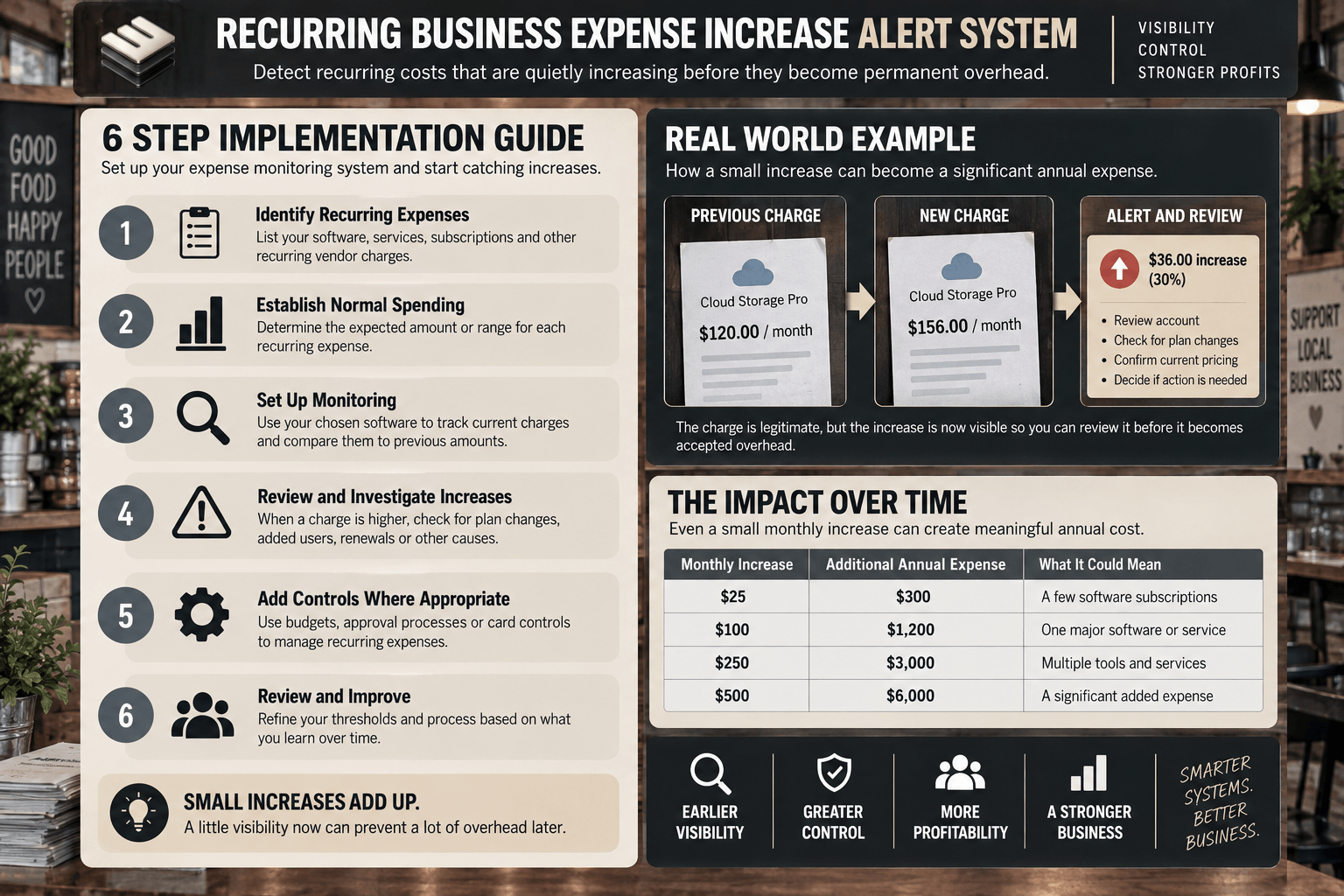
Step By Step Implementation Guide
The following setup demonstrates one implementation path using Ramp.
It is not a WIZESTAX recommendation or preferred Stax.
Ramp is used here because its current Savings Insights system provides a practical example of software automatically analyzing transaction activity and surfacing significant monthly spending increases.
Step 1: Establish Recurring Expense Visibility
Identify the recurring expenses that materially affect the business.
Include software subscriptions, communications services, insurance, professional services, recurring vendor arrangements and other predictable operating expenses.
The objective is not to flag every repeated purchase. Focus on expenses where an unexpected increase could continue affecting future periods.
Step 2: Establish Normal Spending
Allow recurring transactions to establish recognizable vendor spending patterns.
For each important expense, determine the expected amount or reasonable operating range.
Some expenses will remain fixed. Others naturally vary with usage.
That difference matters because a variable utility bill should not be evaluated using the same logic as a fixed software subscription.
Step 3: Review Savings Insights
In Ramp, open Insights and review the available savings recommendations.
Ramp analyzes transaction activity and can surface categories such as significant monthly spending increases, redundant subscriptions and duplicate spending.
Treat an insight as a reason to investigate rather than proof that spending is unnecessary.
Step 4: Investigate The Increase
Compare the current charge with previous transactions.
Determine whether the change came from a price increase, additional usage, added employees, a plan change, a contract renewal, taxes, fees or another legitimate cause.
For software expenses, Ramp’s Price Intelligence can provide additional pricing context. Its estimates should be independently evaluated because Ramp notes that its analysis can contain incomplete or inaccurate information.
Step 5: Add Controls Where Appropriate
For predictable recurring spending, establish spending limits or controlled payment methods where they make operational sense.
Ramp supports recurring spend programs with configurable amounts, frequencies and controls.
Contract based expenses can also be tracked with renewal dates, amounts and reminders so the business has an opportunity to review the expense before another commitment is made.
Step 6: Review And Calibrate
Review which alerts resulted in meaningful action and which represented ordinary business variation.
If legitimate increases repeatedly trigger unnecessary review, adjust the process.
If small recurring increases are escaping attention, lower the threshold for the expense categories where those changes matter.
The system should focus staff attention on financially meaningful changes rather than producing constant noise.
Annual Expense Exposure Snapshot
The economic effect of recurring increases becomes clearer when the additional monthly cost is annualized.
| Monthly Increase | Additional Annual Expense |
|---|---|
| $25 | $300 |
| $100 | $1,200 |
| $250 | $3,000 |
| $500 | $6,000 |
Illustrative scenario only. Additional annual expense assumes the monthly increase continues for twelve months. It does not represent guaranteed savings.
WIZESTAX Diagnostic Scorecard
| Category | Assessment |
|---|---|
| Economic Problem | Recurring overhead can increase without deliberate review |
| Signal Quality Required | Moderate |
| Automation Potential | High |
| Human Judgment Required | Moderate |
| Data Dependency | Moderate To High |
| Scalability | High |
| Primary Value | Earlier visibility into recurring cost increases |
| Primary Risk | Treating legitimate variable spending as unnecessary cost |
Common Mistakes
| Mistake | Result |
|---|---|
| Flagging every expense increase | Staff receives excessive noise |
| Treating variable expenses as fixed expenses | Normal usage changes create false alerts |
| Automatically cancelling increased subscriptions | Necessary business services can be interrupted |
| Ignoring changes in employee or customer volume | Legitimate growth expenses appear abnormal |
| Monitoring only software | Other recurring overhead remains invisible |
| Looking only at percentage change | Small expenses can appear disproportionately important |
| Looking only at dollar change | Repeated smaller increases can be overlooked |
| Never updating expense baselines | Old spending expectations create misleading alerts |
Related WIZESTAX Categories
| Category | Related Business Problem |
|---|---|
| Finance | Upcoming Cash Shortfall Warning System |
| Finance | Accounts Payable Due Date System |
| Operations | Vendor Contract Renewal System |
| Operations | Purchase Price Variance System |
| Finance | Business KPI Anomaly Alert System |
| Operations | Supplier Cost Increase Detection System |
These remain separate problems. Recurring Business Expense Increase Alert System monitors changes in repeating overhead. Supplier Cost Increase Detection System focuses on supplier pricing. Purchase Price Variance System compares purchasing costs against expected or standard prices. Vendor Contract Renewal System focuses on renewal timing and contractual commitments. Upcoming Cash Shortfall Warning System addresses future liquidity rather than the cause of an individual expense increase.
Download our free automation toolkit and Subscribe for new blueprints every week.


