

Territory Lead Assignment System
Route New Leads To The Right Sales Owner Before Follow Up Begins
A new lead can enter a business with every detail needed for a productive sales conversation and still lose valuable time because nobody knows who should handle it.
This becomes especially common when a business operates across multiple cities, service areas, branches or sales territories. One representative may cover a particular county while another handles neighboring postal codes. A national company may divide responsibility by state or region. Other businesses combine geography with account type, product category or existing customer ownership.
When those rules live primarily in staff knowledge, someone has to interpret the location of each new opportunity and decide where it belongs. That process may work when lead volume is low, but it becomes harder to maintain as the business expands.
The Territory Lead Assignment System creates a consistent routing layer between lead capture and sales ownership. Incoming location data is compared with defined territory rules. A matching lead can then be directed to the appropriate representative, branch or sales group. Records that do not produce a clear match can be separated for review rather than assigned arbitrarily.
This Blueprint does not assume that geography should determine ownership for every business. Its purpose is to create reliable routing where geographic responsibility is already part of the sales structure.
Which Stax Fits Your Business
| Business Need | Stax | Software | Cost |
|---|---|---|---|
| Flexible location based routing across forms, CRMs and connected applications | Starter Stax | Make | Varies by plan and operations |
| CRM based territory assignment with sales owner distribution | Growth Stax | Freshsales | Varies by plan and users |
| Structured territory management for larger sales organizations | Pro Stax | Salesforce | Varies by edition and configuration |
Pricing and capabilities change over time and should be confirmed directly with each software provider before purchase.
Software Linx
Starter Stax
Growth Stax
Pro Stax
Blueprint Overview
| Category | Details |
|---|---|
| Category | Sales Operations |
| Business Problem | Geographic leads are manually or inconsistently assigned |
| Primary Objective | Route incoming leads according to defined territory ownership |
| Core Signals | Country, state, region, city, postal code, service location and existing account ownership |
| Setup Time | Approximately 60 to 120 minutes |
| Difficulty | Intermediate |
| Maintenance | Periodic territory review |
| Best For | Businesses serving multiple regions, branches, territories or geographic sales areas |
| Primary Output | Assigned territory and sales owner |
The Hidden Revenue Leak
| Without This Blueprint | With This Blueprint |
|---|---|
| New leads can wait for manual assignment | Geographic rules can determine ownership automatically |
| Staff inspect locations individually | Location information can trigger routing logic |
| Leads can reach the wrong representative | Defined territories create more consistent ownership |
| Territory knowledge depends on individual employees | Assignment logic documents how coverage works |
| Ambiguous leads can disappear into shared queues | Exceptions can be separated for review |
| Expansion creates more administrative routing work | Routing logic can support increasing lead volume |
The objective is not to eliminate human judgment entirely. Territory routing works best when clear geographic rules handle predictable cases and unusual records remain visible for review.
Business Impact Snapshot
| Area | Potential Impact |
|---|---|
| Response Time | Ownership can be established sooner after lead capture |
| Sales Administration | Less manual sorting of geographic opportunities |
| Accountability | Incoming leads can receive a defined owner |
| Territory Control | Coverage becomes more consistent across the sales organization |
| Scalability | Increased lead volume does not require equivalent increases in manual routing |
| Reporting | Territory activity becomes easier to examine when ownership follows consistent rules |
Real World Example
A commercial landscaping company operates through three regional sales teams.
A property manager submits a request through the company website for landscaping services at a new commercial property.
The inquiry contains the property address and postal code.
Without a territory assignment system, the request enters a shared queue. Someone has to inspect the location, determine which office serves that area and then assign the opportunity manually.
With territory routing in place, the postal code enters the routing workflow immediately.
The system compares the location with the company’s territory table. The postal code belongs to the northern service area, so the lead is assigned to the appropriate sales team. The representative can begin reviewing the opportunity without waiting for another employee to determine ownership.
If the postal code falls outside the defined service areas, the lead does not disappear or receive a random owner. It enters a review path so the business can decide how to handle it.
The economic problem is therefore not simply administrative inconvenience. Unclear ownership can delay the point at which a legitimate sales opportunity reaches someone responsible for acting on it.
WIZESTAX Stax Options
Starter Stax
Make
Best For
Businesses that want flexible territory routing between forms, spreadsheets, CRMs and other connected applications without moving the entire sales process into a new CRM.
| Function | Software |
|---|---|
| Workflow Automation | Make |
| Lead Capture | Connected Form Or Application |
| Location Evaluation | Filters And Routing Logic |
| Territory Reference | CRM, Spreadsheet Or Data Store |
| Assignment | Connected CRM Or Sales Application |
| Exception Handling | Review Route And Notification |
Make specifically describes geography based lead routing as a sales automation use case. Its workflow environment can evaluate lead information and route records between connected applications, which makes it suitable when the business already has several systems in place. (Make)
Advantages
| Benefit |
|---|
| Territory routing can connect existing software rather than replacing it |
| Geographic information can be evaluated before a lead reaches the sales team |
| Different routing paths can be created for separate regions |
| Unmatched leads can follow an exception path |
| The workflow can connect forms, spreadsheets, CRMs and communication tools |
Limitations
| Limitation |
|---|
| Make is an automation layer rather than a dedicated CRM |
| Territory information must exist somewhere the workflow can reference |
| Complex routing requires careful scenario design |
| Incorrect location data can still produce incorrect routing |
| Changes to territories must also be reflected in the workflow or reference data |
This architecture is especially relevant when the business already has a CRM but does not want territory logic tied entirely to that CRM.
Growth Stax
Freshsales
Best For
Growing sales teams that want territory assignment, sales ownership and lead management inside the same CRM environment.
| Function | Software |
|---|---|
| CRM | Freshsales |
| Contact And Deal Management | Freshsales CRM |
| Routing Criteria | Auto Assignment Rules |
| Territory Structure | Teams And Territories |
| Distribution | Sales Owners |
| Assignment Method | Rule Based And Round Robin Distribution |
Freshsales allows businesses to automatically assign contacts, accounts and deals to sales owners. Its assignment rules can also be applied to territories. Freshworks gives examples including grouping records from the same country, industry or lifecycle stage, then distributing matching records among selected territory users. (Freshsales)
Advantages
| Benefit |
|---|
| Territory rules operate inside the CRM |
| Geographic criteria can contribute directly to ownership |
| Matching records can be distributed among territory users |
| Round robin distribution can spread records across selected representatives |
| Sales activity remains connected to the assigned record |
Limitations
| Limitation |
|---|
| Routing quality depends on accurate CRM fields |
| Businesses with complicated overlapping territories may require additional planning |
| Existing sales processes may need adjustment during implementation |
| Territory rules require maintenance when staffing or coverage changes |
Freshsales creates a different architecture from Make because the routing logic and sales ownership remain inside the CRM rather than operating through an external automation layer. (Freshsales)
Pro Stax
Salesforce
Best For
Larger sales organizations that require formal territory structures, multiple layers of ownership or more complex account and lead distribution rules.
| Function | Software |
|---|---|
| CRM | Salesforce |
| Lead Assignment | Lead Assignment Rules |
| Territory Structure | Sales Territories |
| Territory Planning | Territory Planning |
| Ownership Control | Users, Queues And Territory Models |
| Geographic Criteria | Lead And Account Fields |
Salesforce supports lead assignment rules that can use criteria such as geography to distribute leads to users or queues. Salesforce also provides Sales Territories and Territory Planning for more structured sales coverage models. (Salesforce)
Salesforce territory tools deserve an important distinction. Standard territory assignment rules primarily automate account territory assignment. Salesforce recommends using standard lead assignment rules or a separate process when automatically routing leads rather than forcing leads through the account territory engine. (Salesforce)
Advantages
| Benefit |
|---|
| Formal territory models can represent complex sales structures |
| Lead assignment rules can use geographic criteria |
| Users and accounts can participate in broader territory hierarchies |
| Territory models can support larger organizations and realignments |
| Assignment rules can operate alongside broader Salesforce sales infrastructure |
Limitations
| Limitation |
|---|
| Territory configuration can become complex |
| Some territory capabilities require specific editions or additional products |
| Automatic lead routing and account territory assignment use different mechanisms |
| Large territory structures require governance and testing |
| Implementation may require experienced administration |
Salesforce is therefore most appropriate here as an example of a structured territory environment rather than simply another CRM with a few routing rules.
How The Three Stax Differ
| Stax | Primary Approach |
|---|---|
| Make | External automation layer connecting lead sources with geographic routing logic |
| Freshsales | CRM based territory assignment and owner distribution |
| Salesforce | Formal territory and lead assignment infrastructure for complex organizations |
These are different implementation architectures rather than rankings.
Make allows an existing software stack to gain a routing layer without replacing its CRM.
Freshsales places assignment directly inside the sales environment and is suited to organizations that want territory ownership managed alongside contacts, accounts and deals.
Salesforce provides a deeper territory structure for organizations that require formal models, account coverage rules and separate lead assignment processes.
The appropriate structure depends on the number of territories, how frequently those territories change, the number of sales representatives and how much infrastructure the business already operates.
Copy And Paste Territory Assignment Alert
New lead assigned to {{owner_name}}.
The lead matched the {{territory_name}} routing criteria using the geographic information currently available.
Review the record and confirm that ownership is appropriate before beginning sales activity.
Copy And Paste Territory Exception Alert
Territory assignment review required for {{lead_name}}.
The available location information did not produce a clear territory match.
Review the customer location and assign the appropriate owner before normal sales follow up continues.
Copy And Paste AI Prompt
You are assisting a small business with territory based lead routing.
Review the lead information provided and compare it with the territory rules supplied by the business.
Consider the country, state, region, city, postal code, service address and any existing account ownership information that is relevant.
Identify the territory that matches the supplied business rules.
Do not invent missing geographic information.
Do not assume physical proximity determines ownership unless the business rules explicitly say so.
If multiple territories appear to match, identify the conflict instead of choosing one arbitrarily.
If no territory can be determined from the available information, state that manual review is required.
Explain which information produced the territory match.
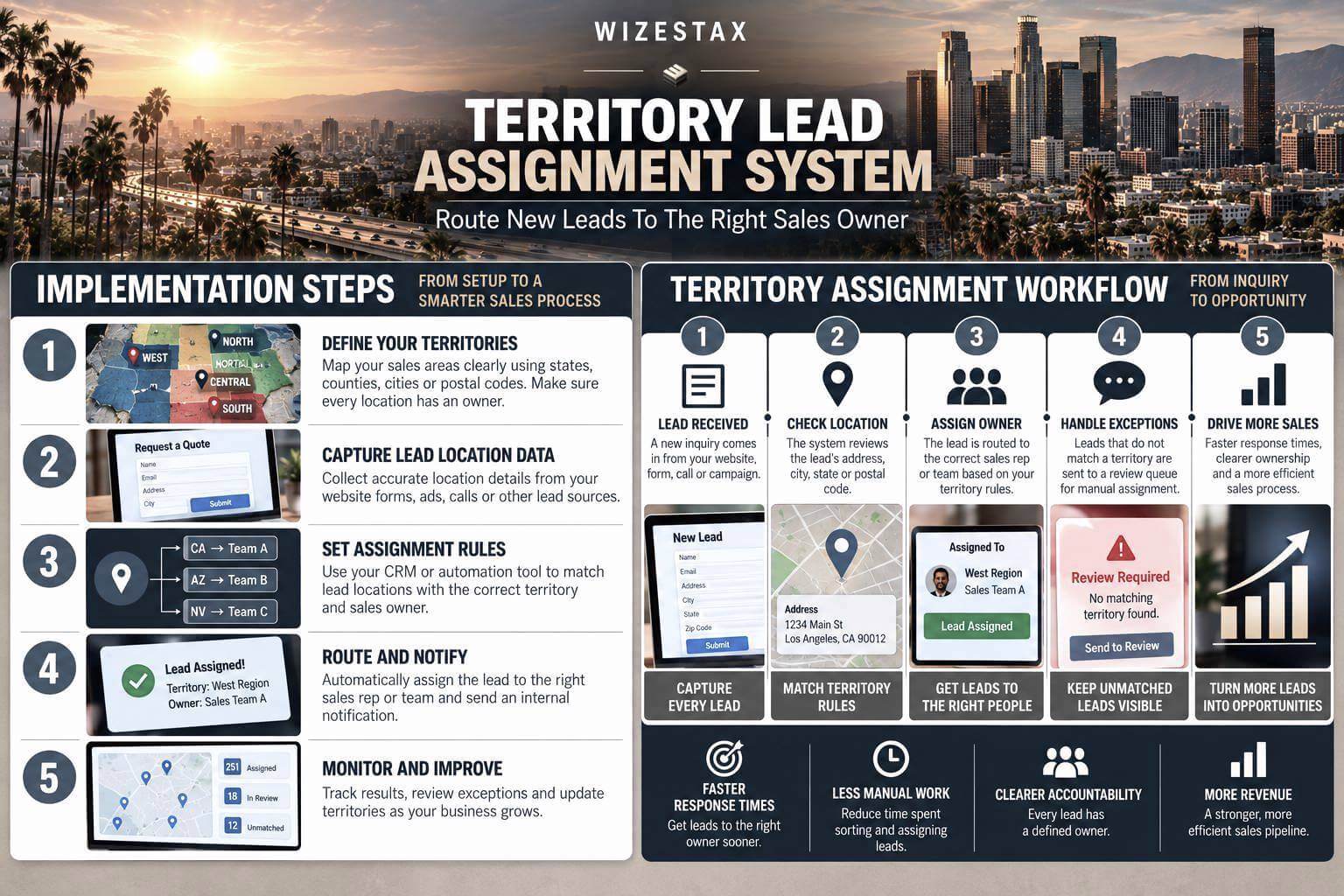
Step By Step Implementation Guide
The following setup demonstrates one implementation path using Make.
It is not a WIZESTAX recommendation or preferred Stax.
Make is used here because the workflow clearly demonstrates how geographic lead information can be evaluated and routed before the record reaches the appropriate salesperson. Make also specifically identifies geography based lead routing as one of its lead processing capabilities. (Make)
Step 1: Define The Territory Map
Start outside the software.
Document exactly how the business divides geographic responsibility.
A local service business might use postal codes.
A regional company might divide coverage by county or city.
A national sales organization might divide territories by state or broader region.
The important requirement is that each territory has a definition that software can evaluate.
A description such as north side may make sense to employees but is difficult to automate unless the business defines exactly which locations belong to that area.
Step 2: Choose The Geographic Field
Determine which information should control the assignment.
Possible fields include:
Country
State
County
City
Postal code
Service address
Business location
Use the field that represents where the customer will actually receive service.
For example, a contractor may receive a billing address that is different from the job location. Routing according to the billing address could send the opportunity to the wrong territory.
Step 3: Create A Territory Reference
Build a simple source that tells the workflow which locations belong to which territories.
A small business could maintain this inside a spreadsheet.
A larger organization could store the information in its CRM or another structured database.
For example:
| Postal Code | Territory | Owner |
|---|---|---|
| 92001 | North Region | Sales Team A |
| 92002 | Central Region | Sales Team B |
| 92003 | South Region | Sales Team C |
The actual territory table should reflect the company’s real coverage rather than the example above.
Step 4: Capture The Lead
Connect the source that generates the lead.
This might be a website form, advertising platform, CRM, scheduling system or another connected application.
The incoming record should include the geographic field selected earlier.
If that information is absent, the workflow should not guess.
Send the record to the exception path instead.
Step 5: Compare The Location
Create the routing logic inside Make.
The scenario reads the lead location and compares it with the territory reference.
For a small territory structure, filters can direct records into separate routes.
For a larger territory structure, the workflow can reference a structured source containing the territory mapping.
Make supports filters and routing across connected applications, and its current sales automation material specifically includes geography based lead routing. (Make)
Step 6: Assign The Sales Owner
Once a territory match is found, send the corresponding ownership information to the CRM or sales application.
The workflow might:
Assign the representative
Assign the sales team
Update the territory field
Create a follow up activity
Send an internal notification
The exact action depends on the software already used by the business.
Step 7: Build The Exception Path
Not every lead will match successfully.
A postal code may be missing.
A customer may be outside the normal service area.
Two territories may overlap.
A new location may not yet exist in the territory table.
Create a separate route for these records.
The exception route might place the lead into a review queue and notify someone responsible for territory decisions.
The purpose is to make ambiguity visible rather than disguise it with an arbitrary assignment.
Step 8: Test The Boundaries
Create test leads from several geographic areas.
Test normal locations.
Test locations close to territory boundaries.
Test missing postal codes.
Test locations outside the service area.
Test areas that recently changed ownership.
Every record should either reach the intended owner or enter the review path.
Step 9: Review Territory Changes
Territory routing is not a permanent setup.
Sales employees change.
Branches open.
Coverage expands.
Territories are divided.
Service areas contract.
Whenever responsibility changes, update the territory reference and test the affected locations again.
Sales Response Delay Snapshot
The economic issue behind territory routing is not that every routed lead produces revenue. The more direct risk is that unclear ownership creates additional time before an opportunity reaches someone responsible for responding.
Consider a business receiving 100 geographically assigned leads each month.
| Routing Condition | Leads | Average Assignment Delay | Staff Waiting Time Represented |
|---|---|---|---|
| Automatic Territory Match | 80 | Minimal | Minimal |
| Manual Territory Review | 15 | 15 Minutes | 225 Minutes |
| Complex Assignment Review | 5 | 30 Minutes | 150 Minutes |
In this illustrative example, the manually routed records represent 375 minutes of assignment activity each month, or more than 6 hours before considering additional communication between employees.
This example does not represent guaranteed labor savings or recovered revenue. Actual results depend on lead volume, territory complexity and the current assignment process.
WIZESTAX Diagnostic Scorecard
| Category | Assessment |
|---|---|
| Economic Problem | Sales opportunities can wait or reach the wrong employee when geographic ownership is unclear |
| Signal Quality Required | Moderate To High |
| Automation Potential | High |
| Human Judgment Required | Low To Moderate |
| Data Dependency | High |
| Scalability | High |
| Primary Value | Consistent geographic ownership before sales activity begins |
| Primary Risk | Incorrect routing caused by incomplete location information or poorly designed territories |
Common Mistakes
| Mistake | Result |
|---|---|
| Using vague territory definitions | Employees and software interpret coverage differently |
| Routing from the wrong location field | Leads reach representatives who do not serve the actual customer location |
| Allowing territories to overlap unintentionally | Multiple owners appear appropriate |
| Providing no exception route | Unclear records are assigned incorrectly or overlooked |
| Automatically guessing missing locations | Bad information becomes an ownership decision |
| Never testing boundary locations | Routing problems remain hidden until real opportunities arrive |
| Leaving old rules active after staffing changes | Leads continue reaching former territory owners |
| Creating unnecessary territory complexity | Maintenance becomes harder than the original routing problem |
Get New WIZESTAX Blueprints Every Monday
Subscribe to receive new WIZESTAX Blueprints covering Customer Retention, Marketing, Sales, Finance and Operations directly to your inbox.


