
Customer Service Backlog Alert System
Detect When Unresolved Customer Requests Are Accumulating Faster Than The Team Can Clear Them
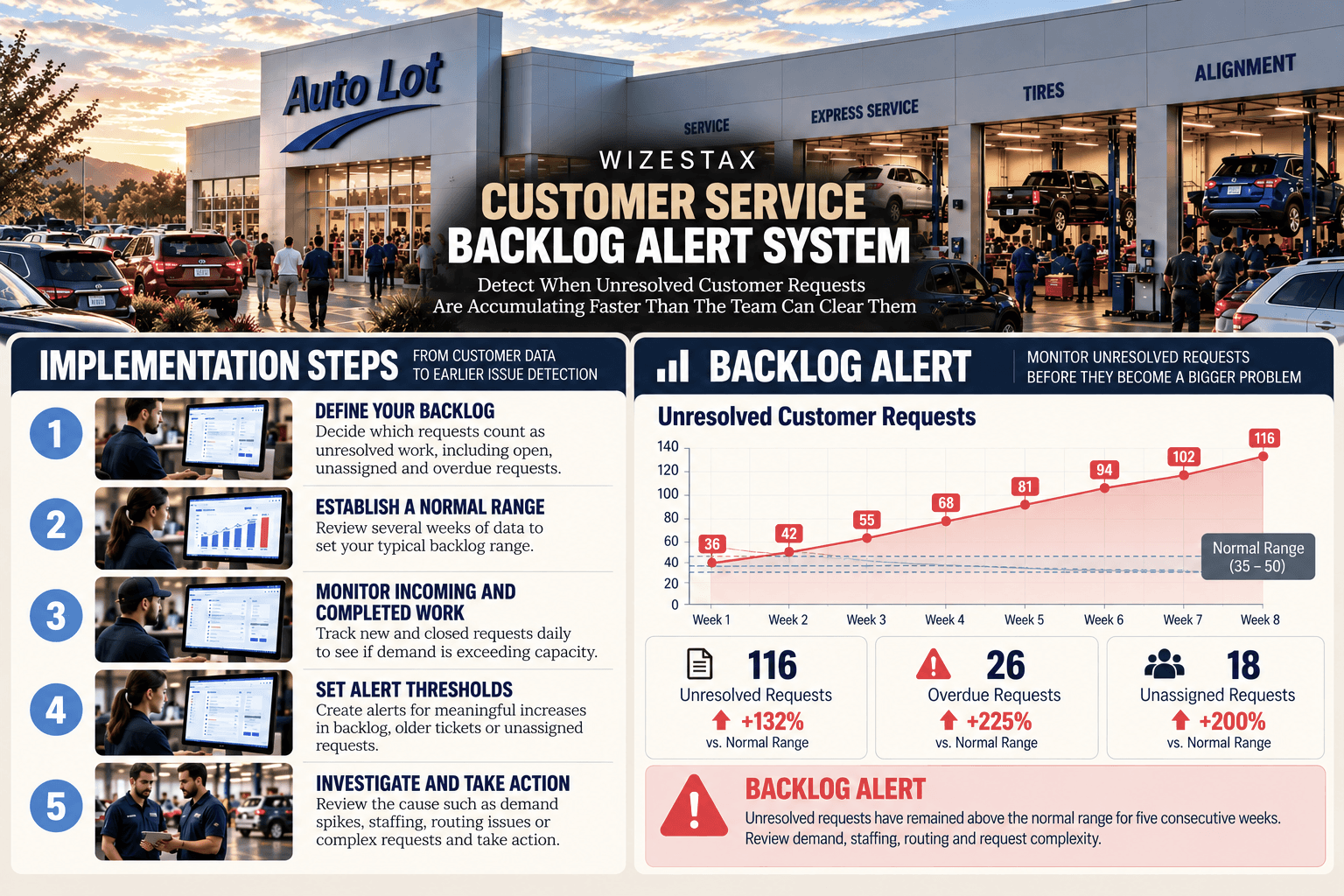
Customer service teams can remain busy while unresolved work quietly accumulates. New requests continue arriving, employees continue answering customers and tickets continue closing, but the number of unresolved conversations can still increase. A temporary increase may be normal. A sustained increase can indicate that incoming demand is exceeding the team’s current ability to process it.
The Customer Service Backlog Alert System monitors unresolved workload over time and identifies when the queue moves materially outside its normal operating range.
The purpose is not to treat every open ticket as a problem. Some requests legitimately remain open while the business waits for customer information, another department or an outside dependency. The system provides an early operating signal so the business can investigate why unresolved work is accumulating before deciding how to respond.
Which Stax Fits Your Business
| Business Need | Stax | Software | Cost |
|---|---|---|---|
| Straightforward support volume and workload visibility | Starter Stax | Help Scout | Varies by plan and billing model |
| Real time support workload and team capacity monitoring | Growth Stax | Intercom | Varies by plan, seats and usage |
| Advanced queue, backlog and service operations monitoring | Pro Stax | Zendesk | Varies by plan and users |
Pricing and capabilities change over time and should be confirmed directly with each software provider before purchase.
Software Linx
Starter: Help Scout
Growth: Intercom
Pro: Zendesk
Blueprint Overview
| Metric | Value |
|---|---|
| Category | Customer Service |
| Business Problem | Unresolved customer requests accumulate without enough visibility into growing support workload |
| Primary Objective | Detect sustained increases in unresolved customer service work before the backlog becomes difficult to clear |
| Core Signals | Open requests, incoming volume, completed volume, ticket age, unassigned work, overdue requests and team capacity |
| Setup Time | Approximately 60 to 120 minutes |
| Difficulty | Intermediate |
| Maintenance | Weekly monitoring with periodic baseline review |
| Best For | Businesses managing recurring customer service requests through a shared support operation |
| Primary Output | Backlog status and investigation trigger |
The Hidden Revenue Leak
| Without This Blueprint | With This Blueprint |
|---|---|
| Employees can remain busy while unresolved work grows | Total unresolved workload is monitored |
| Daily ticket volume can hide accumulation | Incoming and completed work can be compared |
| Older requests remain mixed with newer requests | Ticket age provides additional context |
| Unassigned work can remain difficult to see | Ownership gaps become more visible |
| Managers react after the queue becomes difficult to clear | Sustained backlog growth can trigger earlier investigation |
| Staffing decisions rely heavily on perception | Workload trends provide an operating baseline |
A growing backlog does not automatically mean the team is understaffed or performing poorly. Product incidents, seasonal demand, complex cases, staffing absences and temporary spikes can all increase unresolved work. The alert should initiate investigation rather than automatically assign a cause.
Business Impact Snapshot
| Area | Potential Impact |
|---|---|
| Customer Service | Growing unresolved workload becomes visible earlier |
| Capacity | Managers gain a clearer view of demand relative to available support resources |
| Operations | Temporary spikes can be separated from sustained accumulation |
| Customer Experience | Older unresolved requests can receive additional attention |
| Management | Support workload becomes easier to review consistently |
| Planning | Historical backlog patterns can inform staffing and process decisions |
Real World Example
A small ecommerce business normally carries between 35 and 45 unresolved customer conversations at the end of the day.
A promotion increases order volume, and customer questions rise with it.
The support team continues closing tickets, so daily activity appears healthy. Over five business days, however, unresolved conversations increase from 42 to 71.
The business also finds that incoming requests have exceeded completed requests each day, several older conversations remain unresolved and part of the queue is still unassigned.
The system does not conclude that the company needs another employee.
Instead, it alerts the support manager that unresolved workload is accumulating. The manager can then investigate whether the increase comes from temporary demand, routing problems, repeated issues, staffing availability, unusually complex requests or another cause.
WIZESTAX Stax Options
Starter Stax
Help Scout
Best For
Small businesses that need straightforward visibility into customer service volume, workload patterns and how busy their support operation has become.
| Function | Software |
|---|---|
| Customer Support | Help Scout |
| Shared Support | Inboxes |
| Workload Analysis | All Channels Report |
| Volume Analysis | Conversation Reporting |
| Issue Analysis | Tags And Reporting |
| Team Analysis | User Reporting |
Help Scout’s All Channels report is designed around support volume and workload. It provides visibility into total conversations, busy periods and changes in the amount of customer service work being handled. Help Scout specifically positions this reporting as a way to understand how busy the help desk is and whether support schedules may need adjustment. Help Scout
Advantages
| Benefit |
|---|
| Relatively simple support environment for smaller teams |
| Conversation volume can be monitored over time |
| Busy periods can inform staffing reviews |
| Reporting remains connected to the customer service inbox |
| Historical patterns can provide context for unusual workload |
Limitations
| Limitation |
|---|
| Less specialized for advanced real time backlog operations |
| Volume alone does not establish whether unresolved work is unhealthy |
| Businesses still need to define their own backlog threshold |
| Ticket complexity can make raw counts misleading |
| More sophisticated capacity management may require a different architecture |
Growth Stax
Intercom
Best For
Growing support teams that want real time visibility into unresolved conversations, unassigned work, team capacity and current inbox health.
| Function | Software |
|---|---|
| Customer Support | Intercom |
| Current Workload | Inbox Dashboard |
| Unresolved Work | Open Conversations |
| Assignment Risk | Unassigned Conversations |
| Team Capacity | Teammate Workload |
| Historical Analysis | Reports |
Intercom’s real time Inbox Dashboard monitors active teammates, unassigned conversations, conversations waiting for a first reply, total open conversations, idle conversations and other workload measures. Its teammate view also shows individual availability, capacity and open workload. Intercom
Intercom also supports workload management and assignment limits. When capacity limits are used, managers can see when teammates or inboxes reach defined capacity. Intercom
The current real time dashboard is an Expert plan feature, so businesses evaluating Intercom specifically for this architecture should confirm that the required monitoring capabilities are included in the plan they intend to use. Intercom
Advantages
| Benefit |
|---|
| Current support workload can be viewed in real time |
| Unassigned conversations are visible |
| Open and idle conversations provide backlog context |
| Teammate capacity can be monitored alongside queue volume |
| Historical reporting can provide context for current conditions |
Limitations
| Limitation |
|---|
| Real time dashboard access currently requires the Expert plan |
| Higher cost than simpler shared inbox systems |
| Capacity settings require thoughtful configuration |
| Open conversation counts do not measure case complexity |
| Temporary demand spikes can resemble sustained backlog growth |
Pro Stax
Zendesk
Best For
Businesses with higher support volume or more complex service operations that need detailed monitoring across queues, groups, ticket statuses and service conditions.
| Function | Software |
|---|---|
| Customer Support | Zendesk |
| Backlog Monitoring | Ticket Progress Dashboard |
| Queue Monitoring | Real Time Monitoring |
| Work Status | Ticket Status Reporting |
| Service Risk | SLA Status |
| Operational Analysis | Zendesk Reporting |
Zendesk’s Ticket Progress real time dashboard provides visibility into in progress and recently completed work in the agent backlog. Managers can monitor ticket status and customer wait times while filtering activity by queue, group, channel, assignee, ticket status and SLA status. Zendesk Support
Zendesk’s broader real time monitoring environment is designed around incoming tickets, ticket progress and agent productivity, giving larger support operations several views of queue backlog and current workload. Zendesk Support
Advantages
| Benefit |
|---|
| Detailed operational backlog visibility |
| Multiple queues and support groups can be monitored |
| Ticket status provides context beyond raw volume |
| SLA conditions can identify service risk within the backlog |
| Filtering helps isolate where unresolved work is accumulating |
Limitations
| Limitation |
|---|
| More operational complexity than many small businesses require |
| Advanced capabilities depend on subscription and configuration |
| Larger reporting environments require disciplined setup |
| Ticket counts still need context around complexity and priority |
| Dashboard visibility does not determine the cause of backlog growth |
How The Three Stax Differ
| Stax | Primary Approach |
|---|---|
| Help Scout | Straightforward support volume and workload reporting |
| Intercom | Real time inbox workload and team capacity monitoring |
| Zendesk | Detailed queue, backlog and service operations monitoring |
These are different implementation architectures rather than rankings.
Help Scout provides a simpler approach for businesses primarily trying to understand support workload and volume. Intercom connects current inbox conditions with team capacity. Zendesk provides deeper operational monitoring for businesses managing more complex queues and service structures.
Copy And Paste Backlog Alert
Customer service backlog review for {{period}}. Unresolved requests increased from {{starting_backlog}} to {{current_backlog}} while {{incoming_requests}} new requests entered the queue and {{completed_requests}} were completed. {{overdue_requests}} requests are overdue and {{unassigned_requests}} remain unassigned. Review incoming demand, ticket age, staffing, routing and request complexity before changing capacity or workflow.
Copy And Paste Weekly Backlog Review
Review customer service workload for {{period}} against the normal operating baseline. Compare unresolved requests, incoming volume, completed volume, ticket age, unassigned work and overdue requests. Identify sustained accumulation that requires investigation. Separate temporary demand spikes from persistent backlog growth before changing staffing or service processes.
Copy And Paste AI Prompt
You are assisting a small business with customer service backlog analysis.
Review the customer service workload information provided.
Compare incoming requests with completed requests over the same period.
Identify whether unresolved customer requests are increasing, decreasing or remaining within the normal operating range.
Review the age of unresolved requests and identify unusually old work.
Identify unassigned or overdue requests where that information is available.
Separate temporary increases in demand from sustained backlog accumulation.
Consider changes in staffing availability, request complexity, routing and unusual customer demand when interpreting the backlog.
Do not assume that every open request represents a service failure.
Do not assume that a growing backlog automatically means the business needs additional employees.
Do not treat an SLA breach as proof that the entire support operation has a backlog problem.
Do not invent missing information.
If the available information is insufficient to determine whether the backlog is abnormal, state what additional information is required.
Step By Step Implementation Guide
The following setup demonstrates one implementation path using Intercom.
It is not a WIZESTAX recommendation or preferred Stax.
Intercom is used here because its real time Inbox Dashboard provides a clear example of monitoring unresolved workload alongside unassigned conversations, active teammates and team capacity. Intercom
Step 1: Define The Backlog
Decide which customer service requests count as unresolved work.
Depending on the business, this may include:
Open Conversations
Waiting Conversations
Unassigned Conversations
Overdue Requests
Do not automatically include every conversation that remains technically open. Requests waiting legitimately on the customer or an outside dependency may need separate treatment.
Step 2: Establish The Normal Range
Record normal unresolved workload before creating an alert.
A business that normally carries 40 open requests operates differently from one that normally carries four.
Review several representative periods where possible so ordinary daily variation does not trigger unnecessary alerts.
Step 3: Monitor Incoming Work
Track how many new customer requests enter the support operation.
A growing backlog has more meaning when incoming demand is viewed alongside completed work.
An unusually busy day may increase unresolved volume temporarily without indicating a persistent problem.
Step 4: Monitor Completed Work
Track how many requests the team closes or otherwise completes during the same period.
Compare incoming and completed volume consistently.
If 80 requests enter while 85 are completed, the queue may be shrinking.
If 80 enter while 60 are completed repeatedly, unresolved work can continue accumulating even though the team is actively closing requests.
Step 5: Monitor Current Inbox Health
Use the Intercom Inbox Dashboard to monitor the current operating picture.
Relevant measures can include:
Total Open Conversations
Unassigned Conversations
Waiting For First Reply
Idle Conversations
Active Teammates
Current Teammate Workload
Intercom’s dashboard combines these measures so support managers can view current volume and team capacity together. Intercom
Step 6: Create The Backlog Trigger
Choose a threshold that represents meaningful accumulation for the business.
A trigger might combine several conditions rather than relying on one number.
For example:
Unresolved workload exceeds the normal range
and
Incoming requests exceed completed requests for several consecutive business days
The alert should indicate that the queue requires investigation rather than automatically changing staffing or routing.
Step 7: Review Ticket Age
A backlog of recently created requests can have a different operational meaning from a smaller backlog containing very old unresolved issues.
Review how long requests have remained unresolved.
Older work may reveal cases that are difficult, blocked, incorrectly routed or repeatedly deferred.
Step 8: Review Assignment And Capacity
Determine whether unresolved work is concentrated in one inbox, employee, category or support team.
Intercom provides teammate workload and capacity information that can help distinguish broad demand growth from a more localized workload imbalance. Intercom
Step 9: Investigate The Cause
When the backlog alert activates, review:
Incoming Demand
Completed Volume
Request Complexity
Staff Availability
Routing
Unassigned Work
Older Requests
Product Or Service Incidents
The purpose is to understand why work is accumulating before choosing a response.
Step 10: Monitor Recovery
After the business takes action, continue monitoring unresolved workload.
The backlog should be evaluated over time rather than judged from one moment.
If incoming and completed work return to balance but unresolved volume remains elevated, the team may still be carrying accumulated work from the earlier period.
Customer Service Backlog Snapshot
| Daily Incoming Requests | Daily Completed Requests | Daily Backlog Change |
|---|---|---|
| 40 | 40 | 0 |
| 50 | 45 | +5 |
| 70 | 55 | +15 |
Illustrative scenarios showing the relationship between incoming and completed requests. Actual backlog conditions depend on existing unresolved work, ticket complexity, status definitions and the period being measured.
WIZESTAX Diagnostic Scorecard
| Category | Assessment |
|---|---|
| Economic Problem | Unresolved customer service work can accumulate faster than the business clears it |
| Signal Quality Required | Moderate To High |
| Automation Potential | High |
| Human Judgment Required | High |
| Data Dependency | Moderate To High |
| Scalability | High |
| Primary Value | Earlier visibility into sustained customer service workload accumulation |
| Primary Risk | Treating normal open work or temporary demand spikes as a systemic backlog problem |
Common Mistakes
| Mistake | Result |
|---|---|
| Treating every open request as backlog | Legitimate active work inflates the signal |
| Watching incoming volume without completed volume | Demand is measured without processing capacity |
| Using one fixed threshold forever | Normal business growth creates unnecessary alerts |
| Ignoring ticket age | Older unresolved work remains hidden inside the total |
| Ignoring unassigned requests | Routing problems can appear to be capacity problems |
| Assuming backlog automatically means understaffing | Process, routing or unusual demand may be the actual cause |
| Treating SLA breaches as the definition of backlog | Individual service delays are confused with accumulated workload |
| Reacting to one busy day | Temporary variation is mistaken for sustained accumulation |
Get New WIZESTAX Blueprints Every Monday
Subscribe to receive new WIZESTAX Blueprints covering Customer Retention, Marketing, Sales, Finance and Operations directly to your inbox.