

AI Customer Intake System
Collect The Right Information Before The Appointment Starts
A surprising amount of appointment and job time can disappear before the actual work begins. Staff may need to collect addresses, photos, measurements, service details, access instructions, equipment information, project requirements, or other basic details while the customer waits or the technician is already on site. The AI Customer Intake System moves that information collection earlier in the customer journey. Once a customer reaches the appropriate stage, the system requests the information relevant to the service, organizes the responses, stores supporting files where appropriate, and gives staff a structured record to review before the appointment or job begins.
This Blueprint is not designed to collect as much customer information as possible. Its purpose is to collect the information that actually affects preparation, scheduling, estimating, or service delivery without creating unnecessary work for the customer.
Which Stax Fits Your Business
| Business Need | Stax | Software | Cost |
|---|---|---|---|
| Flexible intake with advanced forms and conditional questions | Starter Stax | Jotform | Varies By Plan |
| Lightweight intake connected to existing business tools | Growth Stax | Tally + Make | Varies By Plan And Usage |
| Field service intake connected directly to operational work | Pro Stax | Jobber | Varies By Plan And Users |
Pricing and capabilities change over time and should be confirmed directly with each software provider before purchase.
Software Linx
Starter
Growth
Pro
Blueprint Overview
| Metric | Value |
|---|---|
| Category | Operations |
| Business Problem | Required customer information is collected too late or arrives incomplete |
| Primary Objective | Collect useful job or appointment information before work begins |
| Core Inputs | Customer details, service requirements, photos, files, access information and job specific questions |
| Setup Time | Approximately 45 To 90 Minutes |
| Difficulty | Beginner To Intermediate |
| Maintenance | Periodic form and process review |
| Best For | Appointment, project and field service businesses |
| Primary Output | Organized customer intake available before work begins |
The Hidden Revenue Leak
| Without This Blueprint | With This Blueprint |
|---|---|
| Staff collect routine details manually | Intake follows a defined process |
| Missing information appears during the appointment | Required information can be requested earlier |
| Technicians arrive without enough context | Job details can be reviewed before arrival |
| Photos and files remain scattered across messages | Supporting information can be collected systematically |
| Customers repeat information to different employees | Intake information becomes easier to reference |
| Appointment time is used for administration | More appointment time can remain available for actual service |
The economic problem is not simply that forms take time.
The larger problem is that missing or poorly organized customer information can consume paid staff time, delay work, create unnecessary communication, and leave employees preparing for jobs after the appointment has already started.
A useful intake system should therefore collect the right information early without turning every booking into a long questionnaire.
Business Impact Snapshot
| Area | Potential Impact |
|---|---|
| Appointment Preparation | Staff can review relevant information before work begins |
| Labor | Repetitive information gathering can be reduced |
| Job Readiness | Photos, requirements and access information can arrive earlier |
| Customer Experience | Customers can provide details before the appointment |
| Information Quality | Required questions can be standardized |
| Operations | Intake becomes a repeatable process rather than an informal conversation |
The value increases when the information being collected actually changes how the business prepares, schedules, estimates, assigns, or performs the work.
Real World Example
A mobile auto detailing company receives a request for an interior cleaning.
The customer’s name and contact information alone are not enough for the company to understand the work.
The intake form asks for the vehicle type, approximate condition, parking location, access information, requested service, and several photos of the interior.
The customer submits the information before the company commits resources to the job.
The photos reveal substantially more pet hair and interior cleanup than expected.
Instead of discovering that after arriving, the business can review the request, determine whether the requested service is appropriate, and decide what should happen next.
The value of the system is not the form itself.
The value is moving useful operational information to the point where the business can still act on it.
WIZESTAX Stax Options
Starter Stax
Jotform
Best For
Businesses that need detailed intake forms with conditional questions, file collection, and flexible form logic without requiring a complete CRM or field service platform.
| Function | Software |
|---|---|
| Intake Forms | Jotform |
| Conditional Questions | Jotform |
| File Collection | Jotform |
| Form Logic | Jotform |
| Submission Management | Jotform |
Advantages
| Benefit |
|---|
| Strong form building capabilities |
| Conditional logic can reduce irrelevant questions |
| File collection can support photos and documents |
| Can operate independently of the business CRM |
| Suitable for detailed service specific intake |
Limitations
| Limitation |
|---|
| Does not replace a complete field service system |
| Customer and job records may remain elsewhere |
| More complicated workflows can require integrations |
| Detailed forms still require careful design |
Growth Stax
Tally + Make
Best For
Businesses that want a lightweight intake experience while connecting submissions to other software already used by the company.
| Function | Software |
|---|---|
| Intake Form | Tally |
| Automation | Make |
| Data Routing | Make |
| Existing Software Connection | Make Integrations |
| Customer Experience | Tally |
Advantages
| Benefit |
|---|
| Lightweight architecture |
| Can work around existing business software |
| Flexible automation between applications |
| Does not require replacing an existing CRM |
| Individual components can be changed independently |
Limitations
| Limitation |
|---|
| Multiple systems may be involved |
| Customer history can remain distributed |
| Automation requires configuration |
| Troubleshooting may require checking several applications |
Pro Stax
Jobber
Best For
Field service businesses that need customer intake to connect directly with requests, job information, scheduling, customer records, and the operational process that follows.
| Function | Software |
|---|---|
| Customer Requests | Jobber |
| Intake Forms | Jobber Request Forms |
| Customer Records | Jobber |
| Job Information | Jobber |
| Scheduling | Jobber |
| Operational Review | Jobber |
Jobber’s current request system allows businesses to create customizable intake forms that collect contact details, job information, photos, measurements, and other details before deciding what should happen next. Submissions become requests inside Jobber, where staff can review them before scheduling an assessment, creating a quote, or converting the request into a job. (Jobber Help Center)
Advantages
| Benefit |
|---|
| Intake connects directly to field service operations |
| Customer requests become operational records |
| Forms can collect job specific information |
| Staff can review requests before scheduling work |
| Customer information remains closer to the resulting job |
| Suitable for businesses coordinating field employees |
Limitations
| Limitation |
|---|
| More specialized toward service businesses |
| Some capabilities depend on the selected plan |
| Less appropriate for businesses without field operations |
| Complex intake requirements may still need specialized form software |
How The Three Stax Differ
| Stax | Primary Approach |
|---|---|
| Jotform | Specialized customer intake and form logic |
| Tally + Make | Lightweight forms connected to existing software |
| Jobber | Intake built into a field service operating system |
These are different implementation architectures rather than rankings.
Jotform fits businesses where the intake form itself needs to be sophisticated.
Tally and Make fit businesses that already have operational software and mainly need a flexible intake layer.
Jobber fits field service businesses where the information collected should become part of the request and job process.
The appropriate architecture depends on what happens after the customer submits the information, not simply on business size.
Copy And Paste Intake Message
“Hi {{first_name}}, we are getting everything ready for your upcoming service. Please complete this short intake form so our team has the information needed to prepare: {{intake_link}}. Thank you.”
Copy And Paste Missing Information Message
“Hi {{first_name}}, thanks for sending your information. We are still missing {{missing_information}}. Please send or update that information here: {{intake_link}}. Thank you.”
Copy And Paste AI Prompt
You are assisting a service business with customer intake.
Review the customer’s submitted information and determine whether the information required to evaluate or prepare for the requested service has been provided.
Only request information relevant to the service.
Relevant information may include customer contact details, service requested, job or project details, photos or documents, access instructions, measurements, equipment information, location details and other service specific requirements.
Do not assume that every service requires every type of information.
Identify missing required information clearly.
Do not invent customer information.
Do not make assumptions about photos, measurements, service conditions or customer requirements that are not supported by the submitted information.
Do not automatically change pricing, appointment length, employee assignments or service scope.
If the submitted information suggests that the requested service may not match the actual work required, flag the record for staff review.
If the situation requires judgment, route it to a staff member.
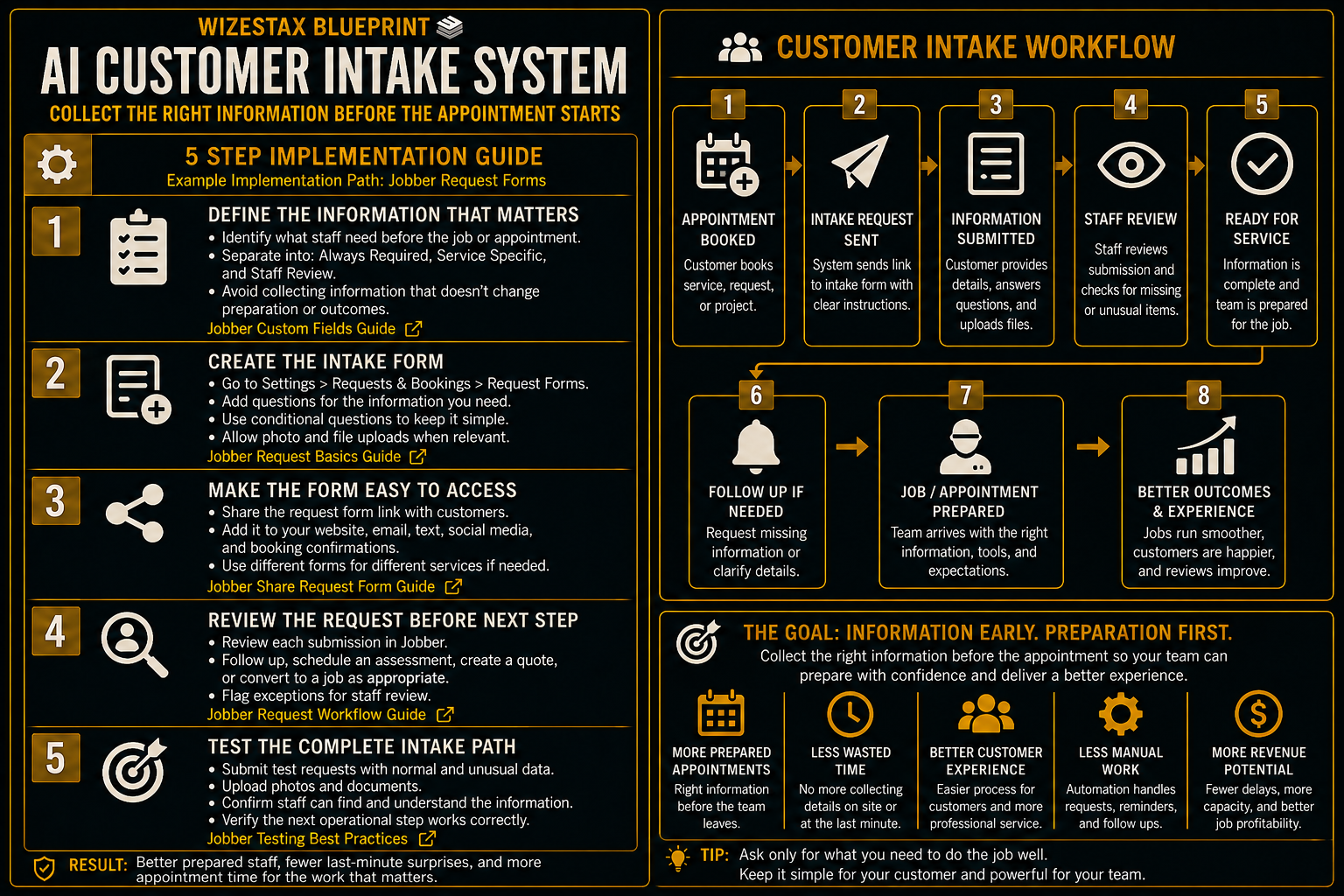
Step By Step Implementation Guide
The following setup demonstrates one implementation path using Jobber.
It is not a WIZESTAX recommendation or preferred Stax.
Jobber is used here because customer intake can feed directly into a field service workflow. Its current Request Forms can collect information about the customer and requested work, including job details, photos, and measurements, before staff decide whether to schedule an assessment, prepare a quote, or create a job. (Jobber Help Center)
Step 1: Define The Information That Changes The Job
Before building the form, identify what employees actually need to know before deciding how the work should proceed.
Separate information into categories such as:
Customer Information
Name, contact information and service location.
Service Information
The service requested and details required to understand the work.
Preparation Information
Photos, measurements, access details, property information, equipment information, or other details employees need before arrival.
Staff Review Information
Anything that could change the quote, appointment length, equipment requirements, employee assignment, or whether the business should accept the work.
Avoid adding questions simply because the information might be useful someday.
Every unnecessary field increases customer effort.
Step 2: Create The Request Form
In Jobber, open Settings and navigate to Requests And Bookings.
Create or customize the request form.
Add the questions needed to understand the customer’s requested work.
Jobber currently allows businesses to customize request forms for information such as contact details, job information, photos, and measurements. Each form can also have its own shareable link. (Jobber Help Center)
Jobber Requests And Bookings Settings
Step 3: Make The Intake Available To Customers
Once the request form is configured, make it visible to customers.
Jobber currently supports sharing request forms through Client Hub, direct links, websites, and other online channels. Businesses can also maintain multiple request forms when different services require different information. (Jobber Help Center)
Use the appropriate form link on the website, in customer communication, or wherever the intake process begins.
For businesses with different services, separate forms can prevent customers from answering questions unrelated to the work they need.
Jobber Request Form Sharing Guide
Step 4: Review The Request Before Creating The Work
When a customer submits the form, the information appears as a request in Jobber.
Review the request before deciding what happens next.
Jobber’s request workflow allows staff to follow up with the customer, schedule an assessment, create a quote, or convert the request into a job. (Jobber Help Center)
This is an important control point.
The intake system should not automatically assume that every submission is ready for scheduling.
A request containing unusual photos, missing measurements, unclear scope, difficult access conditions, or another exception may require staff review first.
Where useful, Jobber custom fields can also store additional information on clients, properties, quotes, jobs, invoices, and other records. (Jobber Help Center)
Step 5: Test The Complete Intake Path
Create a test request as though you were a real customer.
Complete the form with normal information.
Submit another request with an unusual service requirement.
Upload the types of supporting information the business expects customers to provide.
Confirm that the submission appears correctly for staff.
Confirm that employees can understand what the customer needs without searching through separate messages.
Test the next operational action, whether that means following up, scheduling an assessment, preparing a quote, or creating the job.
The test is successful when the employee receiving the request has enough organized information to make the next decision without rebuilding the customer’s story manually.
Operational Time Snapshot
The economic value of customer intake automation is primarily the staff and appointment capacity consumed by information gathering that could have happened earlier.
Consider a business where manual intake consumes approximately 10 minutes of employee time per appointment.
At an illustrative labor cost of $25 per hour:
| Monthly Appointments | Manual Intake Time | Staff Cost | Illustrative Labor Time Value |
|---|---|---|---|
| 25 | 10 Minutes | $25 Per Hour | About $104 |
| 50 | 10 Minutes | $25 Per Hour | About $208 |
| 100 | 10 Minutes | $25 Per Hour | About $417 |
Illustrative scenario only. Actual intake time, labor costs, software costs and savings will vary by business.
This calculation also does not capture the operational cost of poor preparation.
A missing photo, incorrect measurement, inaccessible job site, misunderstood service request, or incomplete project description can create consequences that are substantially more expensive than the administrative time required to collect the information.
WIZESTAX Diagnostic Scorecard
| Category | Assessment |
|---|---|
| Economic Problem | Paid staff and appointment time are consumed by late or incomplete information |
| Information Quality Required | Moderate To High |
| Automation Potential | High |
| Human Judgment Required | Low To Moderate |
| Customer Effort | Moderate |
| Data Dependency | Moderate |
| Scalability | High |
| Primary Value | Earlier job preparation and reduced manual intake |
| Primary Risk | Creating unnecessary customer friction by collecting too much information |
Common Mistakes
| Mistake | Result |
|---|---|
| Asking for unnecessary information | Customers face avoidable friction |
| Making every question mandatory | Customers may abandon the intake process |
| Using one intake form for every service | Irrelevant questions reduce usefulness |
| Treating every submission as ready for work | Important exceptions can be missed |
| Collecting information nobody reviews | Customer effort produces no operational value |
| Storing information in disconnected places | Staff still cannot prepare efficiently |
| Collecting sensitive information without a business need | Unnecessary privacy and security risk |
| Automatically changing service decisions from intake data | Staff judgment can be bypassed where it is needed |
Related WIZESTAX Categories
| Category | Related Business Problem |
|---|---|
| Operations | Appointment Preparation |
| Operations | Job Preparation |
| Customer Service | Missing Customer Information |
| Field Service | Site And Access Information |
| Sales | Estimate Qualification |
| Scheduling | Appointment Readiness |
These remain separate problems. The AI Customer Intake System solves the problem of collecting required customer and job information before work begins. Appointment Preparation concerns whether the overall appointment is operationally ready. Estimate Qualification determines whether a prospect or project should advance toward an estimate. Scheduling determines when the work should occur. Job Completion Follow Up begins after the work has already been completed. Each Blueprint therefore owns a different operational or economic leak.
Get New WIZESTAX Blueprints Every Monday
Subscribe to receive new WIZESTAX Blueprints covering Customer Retention, Marketing, Sales, Finance and Operations directly to your inbox.


