

AI Invoice Follow Up System
Keep Outstanding Invoices From Quietly Becoming Cash Flow Problems
Finishing the work does not finish the payment process. An invoice can be delivered correctly and still remain unpaid because the customer forgot, missed the email, needs the payment link again, has an administrative delay, or has a question that nobody knows exists. As invoice volume grows, outstanding balances become harder to manage manually. Someone has to check what is due, determine what is actually unpaid, send the appropriate reminder, monitor responses, and stop contacting the customer when payment arrives. The AI Invoice Follow Up System creates a structured process around outstanding invoices. It monitors invoice status, sends appropriate reminders according to defined rules, stops routine communication when payment is recorded, and sends exceptions to a person when the situation requires judgment.
This Blueprint does not assume that automated reminders will make every customer pay faster. Its purpose is to prevent legitimate receivables from remaining unattended simply because nobody consistently managed the follow up process.
Which Stax Fits Your Business
| Business Need | Stax | Software | Cost |
|---|---|---|---|
| Straightforward invoicing and payment reminders for smaller businesses | Starter Stax | Wave | Varies By Plan And Usage |
| Accounting centered receivables management with automated reminders | Growth Stax | QuickBooks Online | Varies By Plan And Features |
| Dedicated accounts receivable automation for growing finance operations | Pro Stax | BILL | Varies By Plan And Configuration |
Pricing and capabilities change over time and should be confirmed directly with each software provider before purchase.
Software Linx
Starter
Growth
Pro
Blueprint Overview
| Metric | Value |
|---|---|
| Category | Finance |
| Business Problem | Outstanding invoices receive inconsistent attention |
| Primary Objective | Keep legitimate receivables moving toward payment or resolution |
| Core Signal | Invoice remains unpaid according to current accounting records |
| Setup Time | Approximately 30 To 90 Minutes |
| Difficulty | Beginner To Intermediate |
| Maintenance | Periodic reminder and exception review |
| Best For | Businesses that regularly invoice customers after providing products or services |
| Primary Output | Outstanding invoice receives the appropriate reminder or human review |
The Hidden Revenue Leak
| Without This Blueprint | With This Blueprint |
|---|---|
| Outstanding invoices depend on someone noticing them | Receivables follow a defined process |
| Reminder timing changes between customers | Timing can follow established rules |
| Staff repeatedly check invoice status | Current payment status controls follow up |
| Paid customers can accidentally receive reminders | Payment can stop routine outreach |
| Billing questions remain hidden | Customer responses can surface exceptions |
| Owners spend time chasing routine balances | Staff can focus on invoices requiring judgment |
The economic problem is not simply the time required to send reminder emails.
The larger leak is cash already earned by the business remaining outside the business longer than necessary because routine receivables receive inconsistent attention.
An unpaid invoice is also different from a lost sale.
The work may already have been performed, labor paid, materials purchased, and operating expenses incurred. The business is waiting to convert an existing receivable into usable cash.
That makes invoice follow up fundamentally a cash flow process.
Business Impact Snapshot
| Area | Potential Impact |
|---|---|
| Receivable Visibility | Outstanding invoices remain easier to identify |
| Staff Work | Routine reminder activity can require less manual effort |
| Consistency | Similar invoices can follow defined reminder rules |
| Customer Experience | Professional reminders provide a clear path to payment or assistance |
| Cash Flow | Avoidable payment delays may be reduced |
| Management | Outstanding balances and exceptions become easier to monitor |
The goal is not to send more reminders.
The goal is to make sure every legitimate outstanding invoice reaches the appropriate next step.
Real World Example
A commercial cleaning company completes a $1,500 service and sends the customer an invoice due in 14 days.
The due date passes without payment.
The accounting record still shows the full balance outstanding.
The follow up process sends a polite reminder containing the invoice information and approved payment path.
Several days later, the customer replies that the payment link in the original email is no longer available.
Instead of continuing the standard reminder sequence, the issue is identified and the customer receives the correct payment information.
Payment is recorded the following day.
The routine follow up stops.
The system did not create the $1,500.
It helped move money the business had already earned from an outstanding receivable into a resolved payment.
WIZESTAX Stax Options
Starter Stax
Wave
Best For
Solo operators and smaller businesses that need invoicing, payment tracking, and straightforward customer reminders without a larger accounting infrastructure.
| Function | Software |
|---|---|
| Customer Records | Wave |
| Invoicing | Wave |
| Invoice Status | Wave |
| Online Payments | Wave |
| Customer Communication | Wave |
| Accounting Records | Wave |
Advantages
| Benefit |
|---|
| Invoicing and payment records remain connected |
| Relatively simple architecture |
| Suitable for smaller invoice volumes |
| Does not require a separate CRM for routine billing |
| Customer payment activity remains close to the invoice |
Limitations
| Limitation |
|---|
| Less appropriate for complex finance operations |
| Advanced automation is more limited |
| Capabilities vary by plan and service |
| Businesses may outgrow the workflow as receivable complexity increases |
Growth Stax
QuickBooks Online
Best For
Businesses that already use accounting software as the primary financial record and want invoice reminders tied directly to customer balances and payment status.
| Function | Software |
|---|---|
| Accounting | QuickBooks Online |
| Invoicing | QuickBooks Online |
| Accounts Receivable | QuickBooks Online |
| Payment Status | QuickBooks Online |
| Customer Records | QuickBooks Online |
| Invoice Reminders | QuickBooks Online |
Advantages
| Benefit |
|---|
| Invoice status remains connected to accounting records |
| Accounts receivable and customer balances remain centralized |
| Routine reminders can stay inside the financial system |
| Payment activity updates the same accounting environment |
| Suitable for businesses already operating in QuickBooks |
Limitations
| Limitation |
|---|
| Automation is centered primarily around accounting workflows |
| More specialized customer communication may require additional tools |
| Plan and payment costs can increase |
| Complex collections processes may need dedicated receivables software |
Pro Stax
BILL
Best For
Businesses with larger receivable operations that need a more dedicated system for invoice delivery, payment collection, customer payment workflows, and finance team visibility.
| Function | Software |
|---|---|
| Accounts Receivable | BILL |
| Invoice Management | BILL |
| Customer Payments | BILL |
| Payment Tracking | BILL |
| Finance Workflow | BILL |
| Accounting Connections | BILL Integrations |
Advantages
| Benefit |
|---|
| Designed specifically around financial workflows |
| Suitable for larger receivable volumes |
| Payment activity can connect to accounting operations |
| Finance teams gain a more structured receivables process |
| Reduces dependence on a general CRM for billing activity |
Limitations
| Limitation |
|---|
| More financial infrastructure than simple businesses require |
| Additional software cost |
| Integration and accounting configuration require attention |
| Customer relationship functions are narrower than a general CRM |
How The Three Stax Differ
| Stax | Primary Approach |
|---|---|
| Wave | Simple invoicing and payment management |
| QuickBooks Online | Receivables managed inside the accounting system |
| BILL | Dedicated financial workflow and receivables infrastructure |
These are different implementation architectures rather than rankings.
Wave fits smaller businesses where invoicing itself is relatively straightforward.
QuickBooks Online fits businesses where the accounting ledger should remain the central source of truth for invoice status.
BILL fits businesses where accounts receivable has become a larger operational function requiring dedicated financial workflow infrastructure.
The appropriate architecture depends on invoice volume, accounting complexity, payment methods, finance staffing, and where the authoritative payment record already lives.
Copy And Paste First Reminder
“Hi {{first_name}}, just a quick reminder that invoice {{invoice_number}} for {{amount}} is showing as due. If you have already submitted payment, please disregard this message. If you need the payment information resent, just let us know. Thank you.”
Copy And Paste Second Reminder
“Hi {{first_name}}, we are following up on invoice {{invoice_number}}, which is currently showing as outstanding. If you have any questions or need the payment link resent, please reply and we will be happy to help.”
Copy And Paste Final Automated Reminder
“Hi {{first_name}}, invoice {{invoice_number}} is still showing as outstanding in our system. If there is an issue we can help resolve, please reply so our team can assist. Otherwise, you can complete payment using the approved payment information provided with your invoice. Thank you.”
Copy And Paste AI Prompt
You are assisting a business with routine follow up on outstanding customer invoices.
Your purpose is to help customers complete legitimate outstanding payments and identify situations requiring human assistance.
Only discuss invoice information supplied by the business’s current financial records.
You may remind customers about outstanding invoices, provide approved payment instructions, resend an approved payment link, answer basic billing questions supported by business information, and identify customers who need staff assistance.
Keep communication short, polite and professional.
Never invent balances, due dates, fees, discounts, payment status, payment links, financing terms or billing policies.
Never claim that an invoice remains unpaid without checking the current invoice status.
Do not threaten customers or invent consequences for late payment.
Stop routine follow up when payment is recorded or the invoice is otherwise resolved.
Immediately route disputes, discrepancies, refund requests, partial payment issues, incorrect invoices, hardship requests and unusual billing situations to a staff member.
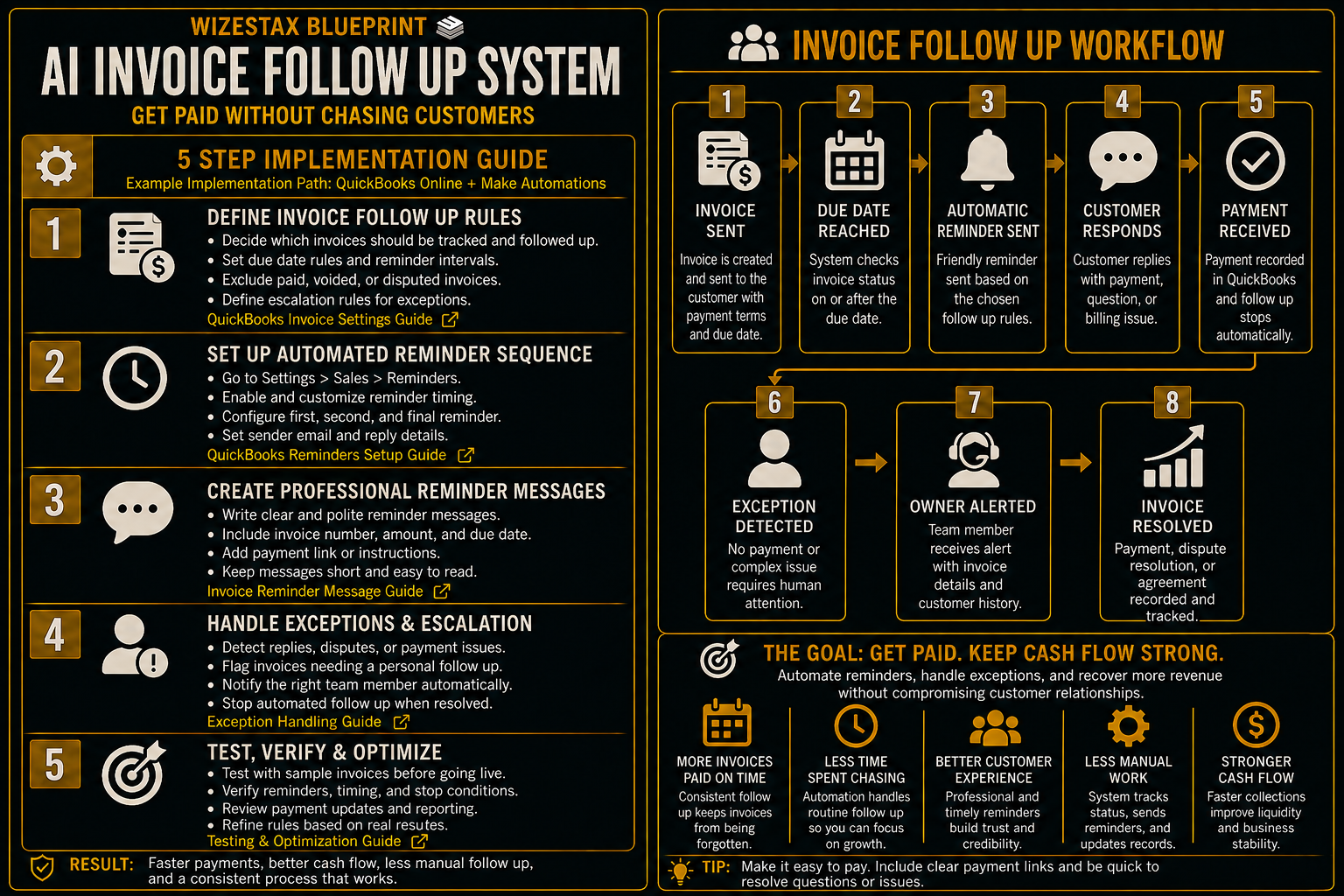
Step By Step Implementation Guide
The following setup demonstrates one implementation path using QuickBooks Online.
It is not a WIZESTAX recommendation or preferred Stax.
QuickBooks Online is used here because invoice creation, due dates, payment status, customer records, and reminder settings can remain close to the accounting record that determines whether money is actually outstanding.
Step 1: Define Which Invoices Enter Follow Up
Start by defining what qualifies as an outstanding invoice.
A useful process should distinguish between:
Open Invoice
Money is still legitimately owed.
Due Invoice
The invoice has reached its agreed payment date.
Overdue Invoice
The due date has passed and the accounting record still shows an outstanding balance.
Resolved Invoice
Payment has been received or the balance has otherwise been legitimately cleared.
Exception
The invoice should not continue through routine automation because a dispute, payment arrangement, credit, correction, or other issue requires review.
The accounting record should remain the source of truth.
Step 2: Configure Invoice Reminder Rules
Open the invoice or sales settings available in QuickBooks Online and review the reminder options for the business’s account.
Determine when customers should receive reminders relative to the invoice due date.
The appropriate timing depends on the business’s payment terms and customer relationships.
A business using payment on receipt should not necessarily use the same reminder schedule as a company operating on 30 day terms.
The reminder schedule should reflect the actual agreement with the customer.
Step 3: Write The Reminder Messages
Create professional messages for each stage of the process.
The first reminder can simply confirm that the invoice is showing as due.
A later reminder can make it easy for the customer to ask a question or request the payment information again.
Avoid language that assumes the customer is deliberately refusing to pay.
The system knows the invoice status.
It does not necessarily know why payment has not occurred.
Step 4: Define Payment And Exception Rules
Determine what should stop routine follow up.
Examples include:
Payment Recorded
The invoice no longer requires collection.
Invoice Voided Or Credited
The balance is no longer legitimately outstanding.
Billing Dispute
A person needs to review the issue.
Payment Arrangement
The customer is following an approved alternative process.
Incorrect Invoice
The financial record needs correction before further outreach.
Automation should handle routine receivables.
Judgment should remain with the business when the validity or terms of the balance are being questioned.
Step 5: Test The Complete Payment Path
Create or use appropriate test records before relying on the process.
Confirm how an unpaid invoice appears before its due date.
Confirm what happens when the due date passes.
Verify the wording and timing of each reminder.
Record a test payment or use a safe test workflow where available.
Confirm that resolved invoices no longer continue through routine follow up.
Test an exception that requires human review.
The system is ready when current payment status reliably determines whether the customer receives another reminder.
Outstanding Receivables Snapshot
The economic value of this system begins with money the business has already invoiced but has not yet collected.
Consider an illustrative business with an average outstanding invoice value of $750.
| Outstanding Invoices | Average Balance | Receivables Represented |
|---|---|---|
| 10 | $750 | $7,500 |
| 25 | $750 | $18,750 |
| 50 | $750 | $37,500 |
These figures represent outstanding receivables, not additional revenue created by automation.
The business already earned or invoiced this money.
The system’s job is to make routine collection activity more consistent and expose invoices that require personal attention.
The most useful measurements are:
Total Outstanding Receivables
How much legitimate invoiced value remains unpaid.
Invoices Requiring Follow Up
How many balances currently qualify for routine outreach.
Average Days Outstanding
How long receivables remain unresolved.
Payments After Reminder
How many invoices are resolved after follow up occurs.
Exceptions Requiring Staff
How many invoices involve disputes, corrections, arrangements, or other issues.
Resolved Receivables
How much outstanding invoice value ultimately moves to a completed financial outcome.
WIZESTAX Diagnostic Scorecard
| Category | Assessment |
|---|---|
| Economic Problem | Earned revenue remains tied up in unresolved receivables |
| Financial Data Accuracy Required | Very High |
| Automation Potential | High |
| Human Judgment Required | Moderate |
| Customer Effort | Low |
| Data Dependency | High |
| Scalability | High |
| Primary Value | Consistent management of legitimate outstanding invoices |
| Primary Risk | Contacting customers using inaccurate or outdated payment information |
Common Mistakes
| Mistake | Result |
|---|---|
| Sending reminders without checking payment status | Paid customers can receive incorrect messages |
| Sending reminders too frequently | Routine collection becomes customer frustration |
| Using aggressive language | Customer relationships can be damaged |
| Treating every unpaid invoice as identical | Genuine exceptions are ignored |
| Automating billing disputes | Problems requiring judgment can escalate |
| Using incorrect payment links | Payment becomes harder instead of easier |
| Continuing after payment | Customers receive irrelevant communication |
| Tracking reminder volume instead of receivables | Activity is measured instead of financial outcomes |
Related WIZESTAX Categories
| Category | Related Business Problem |
|---|---|
| Finance | Payment Failure Recovery |
| Finance | Accounts Receivable Aging |
| Finance | Recurring Payment Monitoring |
| Sales | Estimate Follow Up |
| Operations | Job Completion Follow Up |
| Customer Service | Billing Issue Routing |
These remain separate problems. The AI Invoice Follow Up System owns the period after a legitimate invoice has been issued and while the balance remains outstanding. Estimate Follow Up occurs before the customer has approved the work or sale. Job Completion Follow Up closes the operational loop after the service itself has been completed. Payment Failure Recovery addresses an attempted payment that failed rather than an invoice simply remaining unpaid. Accounts Receivable Aging identifies balances that have remained outstanding long enough to create a broader financial risk. Billing Issue Routing identifies questions and disputes requiring staff intervention. Each Blueprint therefore protects a different financial or operational leak.
Get New WIZESTAX Blueprints Every Monday
Subscribe to receive new WIZESTAX Blueprints covering Customer Retention, Marketing, Sales, Finance and Operations directly to your inbox.


