Purechase Request Routing Sysystem
Direct Internal Purchase Requests To The Correct Approvers, Reduce Approval Delays, And Maintain Visibility Before Orders Are Placed
A growing business may have several departments requesting supplies, replacement equipment and outside services throughout the week. Employees identify what they need, estimate the cost and contact a manager for approval. Some requests are submitted by email, while others arrive through text messages, spreadsheets or informal conversations.
As purchasing activity increases, the approval process becomes difficult to coordinate. A department manager may approve a request without realizing that finance must also review it. Another request may remain unanswered because the responsible manager is unavailable. Employees begin contacting several people to determine who has authority to approve their purchases.
These delays can interrupt ordinary operations. A maintenance team may wait for replacement parts, a warehouse may run short of packaging supplies, or an administrative department may purchase equipment without completing the required budget review. The underlying problem is not necessarily a shortage of money or a slow supplier. It is the absence of a consistent process for directing purchase requests to the appropriate decision makers.
The Purchase Request Routing System creates a structured path between the employee requesting a purchase and the people authorized to approve it. Requests can be directed according to department, purchase amount, expense category or other established business rules. The system also records decisions, identifies outstanding approvals and provides visibility into requests that require additional information.
Software Linx
Starter: ProcurementExpress
Growth: Precoro
Pro: Kissflow Procurement Cloud
Blueprint Overview
| Metric | Value |
|---|---|
| Category | Purchasing And Procurement Operations |
| Business Problem | Purchase requests are delayed or sent to incorrect approvers |
| Primary Objective | Route purchase requests according to established approval rules |
| Core Signals | Department, purchase amount, expense category, approval authority, request status |
| Setup Time | Approximately 4 to 8 hours for a basic workflow |
| Difficulty | Intermediate |
| Maintenance | Weekly exception review and periodic approval rule updates |
| Best For | Businesses with multiple purchasing responsibilities |
| Primary Output | Routed requests, approval notifications and decision records |
Setup time is illustrative and excludes extensive integrations, procurement policy development, data migration and complex organizational approval structures.
The Hidden Revenue Leak
| Without This Blueprint | With This Blueprint |
|---|---|
| Requests arrive through different communication channels | Requests enter a defined submission process |
| Employees are uncertain who can approve purchases | Approval responsibility follows established rules |
| Managers receive requests outside their authority | Requests are directed to appropriate approvers |
| Outstanding requests are difficult to locate | Pending approvals remain visible |
| Employees repeatedly contact managers for updates | Request status can be monitored |
| Purchase information is frequently incomplete | Required fields improve submission quality |
| Approval decisions are difficult to reconstruct | Decisions are recorded |
| Purchasing delays are discovered after operations are affected | Delayed requests can be identified earlier |
Purchase approval problems often develop gradually as a business expands. A small company may initially rely on its owner to authorize most purchases. When additional departments, locations and managers are introduced, that informal arrangement becomes increasingly difficult to maintain.
Employees may understand what supplies are needed without knowing the appropriate approval process. A department supervisor might have authority to approve routine purchases below a specified amount but require finance authorization for larger expenses. Specialized equipment may require technical review before a purchase is authorized, regardless of cost.
When those rules are not documented or consistently applied, requests can move between employees without reaching a decision. Some purchases receive unnecessary reviews, while others bypass the people responsible for controlling the budget.
The financial consequences extend beyond administrative time. Delayed purchasing can affect equipment availability, production schedules and the completion of customer orders. Conversely, purchases made without appropriate authorization can create duplicate orders, unexpected expenses and disputes over departmental budgets.
A Purchase Request Routing System addresses the movement of requests through the organization. It does not determine whether every proposed purchase is financially justified. That responsibility remains with the employees authorized to evaluate the business need, available funds and purchasing requirements.
Business Impact Snapshot
| Area | Potential Impact |
|---|---|
| Purchasing Administration | Less time identifying approvers |
| Operations | Earlier visibility into delayed requests |
| Financial Controls | More consistent authorization procedures |
| Employee Productivity | Reduced manual approval follow up |
| Management | Clearer responsibility for pending decisions |
| Documentation | Recorded approval history |
| Budget Planning | Better visibility into requested spending |
Real World Example
A regional commercial laundry company operates four facilities that process uniforms, restaurant linens and hospitality textiles. Each location purchases detergents, packaging supplies, maintenance components and replacement equipment. The company has separate operations managers, a maintenance supervisor and a central finance department.
Routine purchases below $500 can be approved by a location manager. Purchases between $500 and $2,500 require approval from the regional operations manager. Requests exceeding $2,500 must also receive finance authorization. Certain equipment purchases require maintenance review regardless of the requested amount.
These rules exist in a company policy document, but employees submit requests through email and messaging applications. A maintenance technician may send a replacement motor request to the location manager, who forwards it to operations. The operations manager may then discover that the maintenance supervisor needs to review the equipment specifications before finance can authorize the purchase.
The company processes approximately 80 internal purchase requests per month. Assume 25 percent of those requests require an additional 15 minutes of administrative coordination because they were initially directed to the wrong person or submitted without sufficient information.
That represents 20 requests requiring additional handling, or five administrative hours per month. At an illustrative loaded labor cost of $32 per hour, the unnecessary coordination represents $160 in monthly labor exposure.
The company may also experience operational delays when important maintenance requests remain unresolved. However, the cost of those delays cannot be estimated reliably without information about equipment availability, production schedules and the actual effect on customer orders.
With a Purchase Request Routing System, employees submit requests through a centralized form. Each submission includes the facility, expense category, requested item, estimated cost and business justification. The system uses the company’s established rules to direct the request to the appropriate approver.
A $350 detergent order may go directly to the location manager. A $1,800 replacement component may require regional operations approval and maintenance review. A $6,000 equipment purchase may require several authorized employees to evaluate the request before purchasing begins.
Employees can monitor the status of their requests without repeatedly contacting individual managers. Approvers receive the information needed to make decisions, and unresolved requests remain visible until the required action is completed.
The system does not guarantee immediate approval or prevent every purchasing delay. Its value comes from reducing avoidable confusion and ensuring that purchase requests follow the company’s established authorization process.
WIZESTAX Stax Options
Starter Stax
ProcurementExpress
Software: ProcurementExpress
Best For
Small and growing businesses that need organized purchase requests, configurable approval paths and visibility into purchasing decisions.
| Function | Software |
|---|---|
| Purchase Requests | ProcurementExpress Requests |
| Approval Routing | Approval Workflows |
| Spending Controls | Budget Management |
| Request Ownership | Assigned Approvers |
| Approval Notifications | Workflow Notifications |
| Purchasing Records | Purchase Orders |
| Status Monitoring | Request Dashboard |
| Reporting | Purchasing Reports |
ProcurementExpress provides a centralized purchasing environment where employees can submit purchase requests and obtain authorization before purchases proceed. The platform supports configurable approval workflows that can direct purchasing documents according to established business rules.
Approval routing can consider factors such as department, supplier, purchase amount and custom fields. Organizations can configure conditional approval paths and parallel approvals where the applicable process requires more than one reviewer.
For example, a small manufacturing company may allow production supervisors to approve routine supplies while directing larger equipment purchases to management. ProcurementExpress can help formalize those responsibilities and maintain visibility into requests awaiting action.
The platform also provides budget visibility and purchasing records. These capabilities can help approvers understand the financial context of a request before authorizing additional spending.
The company must still establish its approval policies and configure the software accordingly. Routing rules that do not reflect actual authority can create delays or allow requests to reach inappropriate approvers.
Advantages
| Benefit |
|---|
| Centralized purchase requests |
| Configurable approval routing |
| Budget visibility |
| Documented purchasing decisions |
| Clear request status |
Limitations
| Limitation |
|---|
| Requires approval policy configuration |
| Complex routing may require additional setup |
| Employees must adopt the submission process |
| Integration needs vary by accounting environment |
| Available features depend on the selected plan |
Growth Stax
Precoro
Software: Precoro
Best For
Growing businesses that need structured purchase requisitions, multiple approval levels and connected purchasing workflows.
| Function | Software |
|---|---|
| Purchase Intake | Purchase Requisitions |
| Request Forms | Custom Fields And Forms |
| Approval Routing | Configurable Approval Workflows |
| Spending Thresholds | Policy Based Approval Rules |
| Department Routing | Team And Location Rules |
| Collaboration | Comments And Attachments |
| Approval Visibility | Requisition Status |
| Purchasing Handoff | Purchase Order Generation |
| Reporting | Procurement Records |
Precoro provides purchasing workflows that connect purchase requests with approvals and subsequent purchasing activity. Employees can submit requisitions using structured forms, allowing the organization to collect information before a request reaches its approvers.
Approval workflows can be configured according to department, location, spending limits and other established conditions. Businesses can use multiple approval levels when a request requires review from more than one employee.
For example, a growing food production company may require production managers to review ingredient purchases while finance evaluates requests that exceed departmental spending limits. Precoro can direct those requests according to the configured approval process.
The platform also supports collaboration within purchase requisitions. Employees can attach supporting documents, add comments and monitor request status without relying entirely on separate email conversations.
Once a requisition receives the necessary authorization, the purchasing process can continue through purchase order creation. This connection helps preserve information between the initial request and the subsequent order.
Precoro requires accurate organizational rules and appropriate user permissions. Businesses should verify how approval thresholds, integrations and purchasing controls operate under their selected subscription.
Advantages
| Benefit |
|---|
| Structured purchase requisitions |
| Multiple approval levels |
| Configurable department routing |
| Connected purchasing records |
| Request status visibility |
Limitations
| Limitation |
|---|
| Requires initial workflow design |
| Multiple approval paths increase configuration complexity |
| Organizational changes require rule maintenance |
| Integration availability varies |
| Subscription costs depend on business requirements |
Pro Stax
Kissflow Procurement Cloud
Software: Kissflow Procurement Cloud
Best For
Organizations with more complex purchasing structures that need configurable procurement intake, approval authority rules and connections to existing financial systems.
| Function | Software |
|---|---|
| Purchase Intake | Procurement Request Forms |
| Requisition Routing | Approval Workflows |
| Approval Authority | Threshold And Role Rules |
| Department Controls | Configurable Routing Conditions |
| Budget Review | Budget Aware Approval Logic |
| Exceptions | Escalation Workflows |
| Purchase Orders | Connected Procurement Processes |
| Record History | Approval Audit Trails |
| Financial Integration | ERP Connections |
Kissflow Procurement Cloud provides configurable procurement processes that connect employee requests with purchasing authorization. Organizations can establish request forms and approval rules designed around their existing operational structure.
The platform supports routing based on approval thresholds, organizational authority and other procurement conditions. Requests can move through different review stages according to the information supplied and the applicable purchasing policy.
For example, a regional healthcare services organization may require department managers to review routine supplies, finance to authorize larger expenditures and specialized personnel to evaluate purchases involving regulated equipment. Kissflow can support workflows that reflect those different responsibilities.
The platform also supports connections between purchasing processes. An approved requisition can move into a purchase order workflow, reducing the need to recreate information as the transaction progresses.
Organizations using existing financial systems may also need to connect procurement approvals with their accounting or enterprise resource planning environment. Kissflow provides integration capabilities, although the specific configuration depends on the systems involved.
Greater flexibility introduces additional implementation responsibilities. Businesses must define their approval hierarchy, test exception handling and maintain routing rules as organizational responsibilities change.
Advantages
| Benefit |
|---|
| Configurable procurement workflows |
| Complex approval authority rules |
| Structured request intake |
| Connected purchasing processes |
| Financial system integration capabilities |
Limitations
| Limitation |
|---|
| Requires detailed workflow planning |
| Complex configurations may increase implementation effort |
| Integrations require compatibility review |
| Employee training may be substantial |
| Specialized capabilities may exceed smaller business needs |
How The Three Stax Differ
The three platforms address purchase request routing through different operational structures. Each can help businesses formalize approval responsibilities, but the appropriate implementation depends on organizational complexity and the purchasing processes already in place.
ProcurementExpress
Provides centralized purchasing requests and configurable approval workflows. This approach suits businesses seeking clearer purchasing authorization without necessarily rebuilding their entire procurement environment.
Precoro
Connects structured purchase requisitions with configurable approvals and purchase order workflows. This approach suits growing organizations that need to coordinate purchasing across departments or locations.
Kissflow Procurement Cloud
Provides configurable procurement intake, approval authority rules and connections between purchasing processes. This approach suits organizations with more complex authorization structures or substantial integration requirements.
These are different implementation architectures rather than product rankings.
Vendor Selection Boundary
Starter, Growth and Pro describe illustrative implementation approaches rather than product endorsements.
Businesses should verify current pricing, approval capabilities, user permissions, integrations and implementation requirements directly with each software vendor.
Copy And Paste Purchase Request Routing Alert
Purchase request awaiting review.
Request number: {{request_number}}
Requesting employee: {{employee_name}}
Department: {{department}}
Location: {{location}}
Purchase category: {{purchase_category}}
Requested item or service: {{purchase_description}}
Estimated purchase amount: {{estimated_amount}}
Business justification: {{business_justification}}
Required approver: {{assigned_approver}}
Current approval stage: {{approval_stage}}
Submission date: {{submission_date}}
Required decision date: {{required_date}}
Current status: {{request_status}}
Review the purchase request against the applicable approval policy and available budget. Confirm that the requested items, estimated cost and supporting information are sufficient to make an informed decision.
If additional authorization is required, direct the request to the appropriate reviewer. If information is incomplete, return the request to the submitting employee with a clear explanation of what is needed.
Record the approval decision and any relevant comments before the request proceeds to purchasing.
Copy And Paste Purchase Request Follow Up
Hello {{approver_name}},
Purchase request {{request_number}} is awaiting your review.
The request was submitted by {{employee_name}} for {{purchase_description}}, with an estimated cost of {{estimated_amount}}.
The requested decision date is {{required_date}}.
Please review the submitted information and record your decision through {{approval_system}}. If additional information is required, the request can be returned to the employee for clarification.
Thank you.
Copy And Paste AI Prompt
You are assisting a business with purchase request routing and approval administration.
Review the purchase requests, organizational approval hierarchy and purchasing policies provided. Identify the appropriate approver for each request based on department, location, purchase category, amount and any additional conditions established by the business.
Identify requests that have been directed to the wrong approver, requests awaiting action beyond their established review period and requests missing information required for approval.
Separate requests awaiting authorization from purchases that have already been approved. Identify any requests that require multiple approval stages or specialized review before proceeding.
Do not invent approval limits, spending policies, employee authority or budget availability. Do not automatically approve purchases or assume that a manager has authority beyond the limits provided.
Present the results in a table containing the request number, department, estimated amount, required approver, current status, routing issue and next action.
Where the available information is insufficient, identify the specific policy or request detail needed to determine the appropriate routing path.
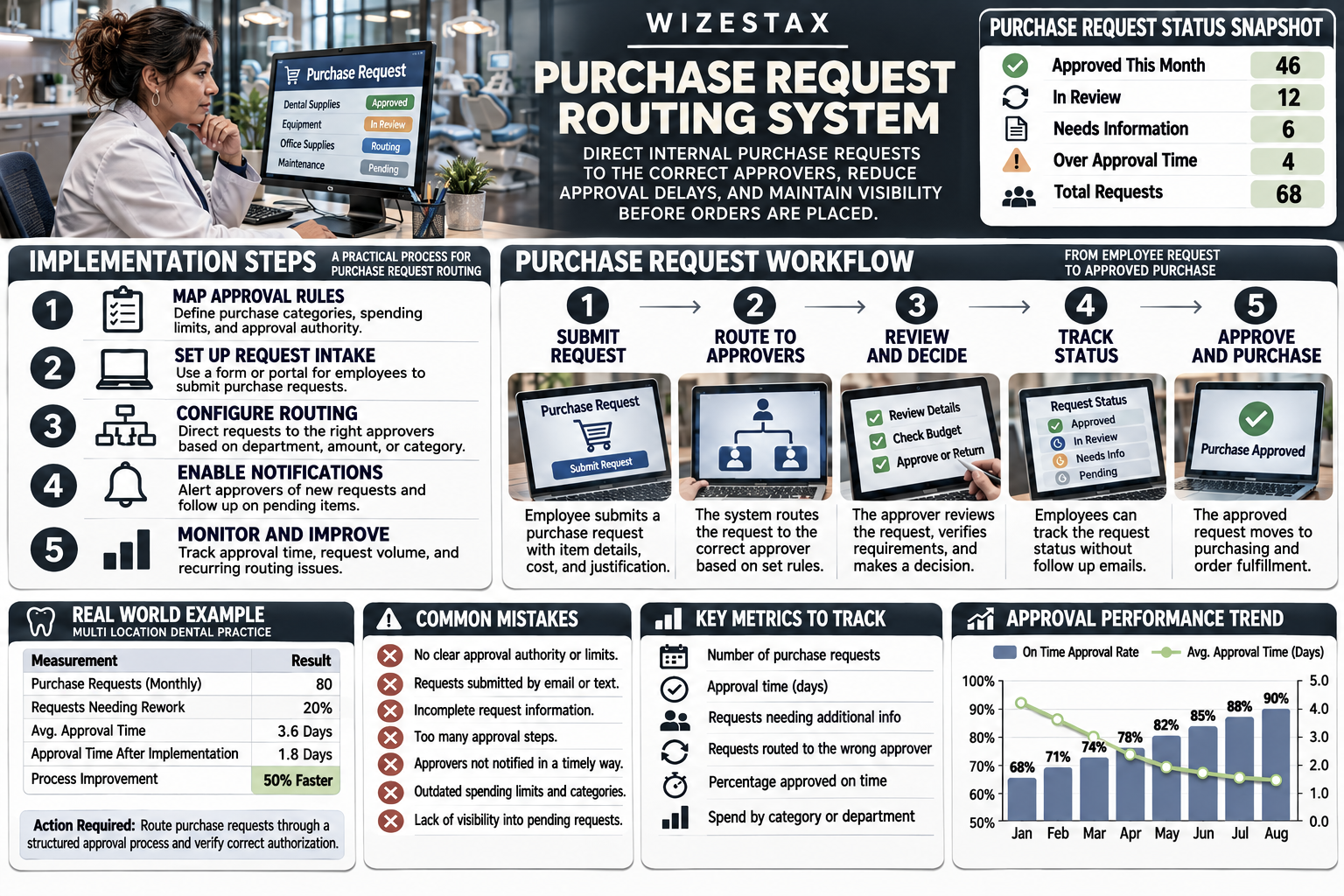
Step By Step Implementation Guide
The following implementation demonstrates one approach using ProcurementExpress. It is not a WIZESTAX recommendation or preferred Stax.
The platform is used because its purchase request and approval workflow capabilities provide a direct example of how businesses can formalize purchasing authorization.
Step 1: Document The Current Purchasing Process
Review how employees currently request purchases and identify the communication channels used. Determine whether requests arrive through email, messaging applications, spreadsheets or an existing purchasing system.
Record how requests move from the employee to the final approver. Identify situations where employees regularly contact multiple managers or where purchasing decisions remain unresolved because responsibility is unclear.
Step 2: Identify Purchasing Categories
Organize purchasing activity into categories that reflect the company’s actual operations. Examples may include maintenance supplies, office equipment, production materials, replacement parts and outside services.
Categories should support meaningful routing decisions rather than introduce unnecessary administrative complexity. If two categories follow identical approval rules, separate workflows may not be required.
Step 3: Establish Approval Authority
Document which employees have authority to approve different types of purchases. Include any spending thresholds, departmental responsibilities and requirements for specialized review.
Approval authority should be based on the company’s established policies. Employees should not be assigned additional purchasing authority merely because the software makes that configuration convenient.
Step 4: Create Employee Accounts
Set up the relevant users within ProcurementExpress and assign permissions appropriate to their responsibilities. Identify employees who submit requests, managers who approve spending and administrators who maintain the purchasing process.
Review access permissions before allowing employees to submit or authorize actual purchases. Ensure that individuals cannot approve requests outside their established authority.
Step 5: Configure Purchase Request Information
Establish the information employees must provide when submitting a request.
| Field | Purpose |
|---|---|
| Request Number | Identifies the purchase |
| Employee | Identifies the requester |
| Department | Supports approval routing |
| Location | Identifies the operating site |
| Purchase Category | Classifies the expense |
| Description | Explains the requested purchase |
| Estimated Amount | Supports spending threshold checks |
| Supplier | Identifies a proposed vendor |
| Justification | Explains the business need |
| Required Date | Establishes timing |
| Supporting Documents | Provides quotes or specifications |
| Approval Status | Records the current stage |
Step 6: Build The Approval Paths
Open the platform’s approval workflow configuration and establish routing rules based on the documented approval hierarchy.
For example, a business may direct routine department purchases to a department manager while requiring regional approval for larger requests. Specialized purchases may need an additional reviewer regardless of the requested amount.
Test each condition before using the workflow with live purchasing activity.
Step 7: Establish Multiple Approval Requirements
Determine which requests require more than one authorization. Some purchases may need sequential approvals, while others may require independent reviews from different departments.
Configure the approval process to reflect those requirements. Avoid adding unnecessary approval stages simply because the software supports them.
Step 8: Configure Notifications
Enable notifications that inform approvers when requests require attention. Where supported, establish reminders for requests that remain pending beyond the company’s expected review period.
Notifications should contain sufficient information for the recipient to identify the request and take action. Avoid creating repeated alerts that do not distinguish urgent issues from routine purchasing activity.
Step 9: Establish Request Statuses
| Status | Meaning |
|---|---|
| Draft | Request has not been submitted |
| Submitted | Request entered the approval process |
| Pending Approval | Assigned reviewer has not decided |
| Information Required | Additional details requested |
| Escalated | Request requires further review |
| Approved | Required authorization completed |
| Rejected | Purchase request was not authorized |
| Cancelled | Request withdrawn |
| Ready For Purchasing | Authorized request awaiting order processing |
Use the statuses supported by the selected platform and map them to the company’s internal terminology.
Step 10: Test Routing Scenarios
Create sample requests representing common purchasing situations. Include routine low value purchases, larger equipment requests, incomplete submissions and requests requiring multiple approvers.
Confirm that each request reaches the correct reviewer and that employees can identify its current status. Test what happens when a request is rejected, returned for clarification or assigned to an unavailable approver.
Step 11: Introduce The Submission Process
Train employees to submit purchase requests through the established system. Explain which information is required and how employees can monitor their requests after submission.
Provide approvers with instructions for reviewing supporting information, recording decisions and returning incomplete requests. Discourage informal approvals that bypass the company’s purchasing controls.
Step 12: Monitor Approval Performance
Review the number of requests submitted, the average approval time and the volume of requests requiring reassignment. Identify departments or purchase categories experiencing recurring delays.
Investigate requests that remain pending beyond the expected review period and determine whether the cause involves missing information, unclear authority or unavailable approvers.
Update the routing rules when organizational responsibilities change. The objective is to maintain an approval process that supports operational needs without weakening purchasing controls.
Purchase Request Routing Cost Exposure Snapshot
| Requests Per Month | Requests Requiring Extra Coordination | Additional Time Per Request | Monthly Labor Exposure |
|---|---|---|---|
| 40 | 10 | 15 Minutes | $80 |
| 80 | 20 | 15 Minutes | $160 |
| 120 | 30 | 15 Minutes | $240 |
| 200 | 50 | 15 Minutes | $400 |
These illustrative scenarios assume that 25 percent of purchase requests require 15 minutes of additional administrative coordination at a loaded labor cost of $32 per hour.
Actual costs depend on the number of requests, employee compensation, approval complexity and existing purchasing procedures. The figures represent potential administrative labor exposure rather than guaranteed software savings.
They do not include the possible operational costs of delayed equipment purchases, duplicate orders or unauthorized spending. Those effects require separate measurement using actual business records.
WIZESTAX Diagnostic Scorecard
| Category | Assessment |
|---|---|
| Economic Problem | Purchasing requests are delayed by unclear approval responsibility |
| Signal Quality Required | High |
| Automation Potential | High |
| Human Judgment Required | Moderate To High |
| Data Dependency | Moderate |
| Scalability | High |
| Primary Value | Consistent routing and approval visibility |
| Primary Risk | Incorrect approval rules directing requests to unauthorized employees |
Common Mistakes
| Mistake | Result |
|---|---|
| Failing to document approval authority | Requests reach incorrect employees |
| Creating too many approval stages | Purchasing becomes unnecessarily slow |
| Allowing incomplete submissions | Approvers repeatedly request clarification |
| Ignoring department differences | Requests follow inappropriate workflows |
| Failing to update approval limits | Routing rules become outdated |
| Assigning unavailable approvers | Requests remain pending |
| Allowing informal approvals | Purchasing controls are bypassed |
| Confusing requests with purchase orders | Authorization records become unclear |
| Ignoring rejected requests | Employees lack visibility into decisions |
| Failing to monitor approval delays | Recurring bottlenecks continue |
| Using automation to authorize purchases | Human spending judgment is bypassed |
| Neglecting employee training | Requests continue arriving outside the system |
WIZESTAX Perspective
Purchase request routing is an operational coordination problem that becomes more visible as businesses grow. Employees may know exactly what they need to purchase while remaining uncertain about who has the authority to approve it. When responsibility is unclear, requests move through unnecessary conversations and purchasing decisions take longer than the underlying business need requires.
Automation can direct requests according to established rules, notify the appropriate employees and maintain a record of approval decisions. It cannot independently determine whether a purchase is necessary, financially justified or consistent with the company’s broader priorities.
An effective routing system reduces uncertainty without eliminating responsible human review. The goal is to ensure that purchase requests reach the correct decision makers with sufficient information to support timely authorization.
Monday Action
Review ten recent purchase requests and identify how each one moved from submission to final approval. Record whether the request reached the correct employee, whether additional information was required and how long the approval process took.
Identify one recurring routing problem and document the approval rule that would prevent it. Use that information to evaluate whether a structured purchase request workflow could reduce unnecessary administrative coordination.
Get New WIZESTAX Blueprints Every Monday
Subscribe to receive new WIZESTAX Blueprints covering Customer Retention, Marketing, Sales, Finance and Operations directly to your inbox.